
1. 镜像相关命令
1.1 搜索镜像
1$ docker search whalesay
2INDEX       NAME                                      DESCRIPTION                                     STARS     OFFICIAL   AUTOMATED
3docker.io   docker.io/docker/whalesay                 An image for use in the Docker demo tutorial    637
4docker.io   docker.io/mendlik/docker-whalesay         Docker whalesay image from training materi...   7                    [OK]
5docker.io   docker.io/caibar/whalesay                 Builds automatizados.                           1                    [OK]
6docker.io   docker.io/milanfort/whalesay              Modified docker/whalesay image that output...   1
7docker.io   docker.io/nikovirtala/whalesay            Tiny Go web service to print Moby Dock ASC...   1                    [OK]
8docker.io   docker.io/ojenge/whalesay                 from docker/whalesay                            1
9docker.io   docker.io/sabs1117/whalesay               Whalesay with fortune phrases.                  1
10docker.io   docker.io/swinton/whalesay                whalesay, innit                                 1
11docker.io   docker.io/asakilan/pg-whalesay            My whalesay                                     0
12docker.io   docker.io/blaines/whalesay                                                                0
13docker.io   docker.io/claytonrogers/docker-whalesay   Whalesay automated build                        0                    [OK]
14docker.io   docker.io/dhalljohnston/whalesay          whalesay                                        0
15docker.io   docker.io/dockeramiller/whalesay          Modified version of the official docker/wh...   0                    [OK]
16docker.io   docker.io/firecyberice/whalesay           Docker **Cloud** automated build for **amd...   0
17docker.io   docker.io/forsingh/whalesay               whalesay                                        0                    [OK]
18docker.io   docker.io/hongxi/whalesay-fortunes        Demo, the whalesay-fortunes                     0
19docker.io   docker.io/jracionero/docker-whalesay      My smarter docker whalesay                      0
20docker.io   docker.io/liuzhishan/docker-whalesay      docker-whalesay                                 0
21docker.io   docker.io/ox0spy/whalesay-fortune         like docker/whalesay, just using fortunes ...   0
22docker.io   docker.io/phyominhtun/whalesay            First WhaleSay Test                             0
23docker.io   docker.io/puneethp/whalesay               Docker-Whalesay                                 0
24docker.io   docker.io/stealthizer/rpi-whalesay        https://github.com/stealthizer/rpi-whalesay     0
25docker.io   docker.io/tiagoferreira/whalesay          Whalesay image                                  0
26docker.io   docker.io/whalebrew/whalesay                                                              0
27docker.io   docker.io/yang225217/whalesay                                                             0
使用docker search 命令可以搜索远端仓库中的共享镜像,默认搜索官方仓库DockerHub中的镜像。
用法为docker search TERM,支持的参数主要包括:
-- automated = true|false:仅显示自动创建的镜像,默认为否;
-- no-trunc = true|false:输出信息不截断显示,默认为否;
-- s --stars=X:指定仅显示评价为指定星级以上的镜像,默认为0,即输出所有镜像。
可以看到返回了很多包含关键字的镜像,其中包括像名字、描述、星级(表示该镜像受欢迎程度)、是否官方创建、是否自动创建等。
默认的输出将按照星级评价进行排序。
现在我们搜索的一个鲸鱼说话的镜像。
1.2 拉取镜像
1$ docker pull docker/whalesay
2Using default tag: latest
docker pull NAME[:TAG]
docker pull 命令直接从DockerHub镜像源来下载镜像。其中NAME是镜像仓库的名称(用来区分镜像),TAG是镜像的标签(表示版本信息)。通常情况下,描述一个镜像需要包括“名称 + 标签”信息。
因为我们命令中并没有指定TAG标签,则默认会选择latest标签,这会下载仓库中最新的镜像。
1.3 查看镜像
1$ docker images
2REPOSITORY          TAG                 IMAGE ID            CREATED             SIZE
3docker/whalesay     latest              6b362a9f73eb        3 years ago         247MB
使用docker images命令可以列出本地主机上已有的镜像的基本信息。
在列出的信息种,可以看到以下几个字段信息
REPOSITORY:来自于哪个仓库。
TAG:镜像的标签信息。
IMAGE ID:镜像的ID(唯一标识镜像)
CREATED:创建时间。说明镜像的最后更新时间。
SIZE:镜像大小,优秀的镜像往往体积较小。
其中镜像的ID信息十分重要,它唯一标识了镜像。在使用镜像ID的时候,一般可以使用该ID的前若干字符组成的可区分串来代替完整的ID。镜像大小信息只是表示该镜像的逻辑体积大小,实际上由于相同的镜像层本地只会存储一份,物理上占用的存储空间会小于各镜像的逻辑体积之和。
如果需要查看docker images更多命令可以通过man docker-images来查看。
1.4 运行镜像
1$ docker run docker/whalesay cowsay hellow docker
2 _______________
3< hellow docker >
4 ---------------
5    \
6     \
7      \
8                    ##        .
9              ## ## ##       ==
10           ## ## ## ##      ===
11       /""""""""""""""""___/ ===
12  ~~~ {~~ ~~~~ ~~~ ~~~~ ~~ ~ /  ===- ~~~
13       \______ o          __/
14        \    \        __/
15          \____\______/
docker run 就是运行命令。
docker/whalesay 是要运行的镜像名称
cowsay 是要输出的话,例如我们输出了hellow docker
1.5 上传镜像
1$ docker tag docker/whalesay gzq2333/whalesay
2
3$ docker images
4REPOSITORY          TAG                 IMAGE ID            CREATED             SIZE
5gzq2333/whalesay    latest              6b362a9f73eb        3 years ago         247MB
6docker/whalesay     latest              6b362a9f73eb        3 years ago         247MB
7
8$ docker push gzq2333/whalesay
9The push refers to repository [docker.io/gzq2333/whalesay]
105f70bf18a086: Pushed
11d061ee1340ec: Pushed
12d511ed9e12e1: Pushed
13091abc5148e4: Pushed
14b26122d57afa: Pushed
1537ee47034d9b: Pushed
16528c8710fd95: Pushed
171154ba695078: Pushed
18latest: digest: sha256:df326a383b4a036fd5a33402248027d1c972954622924158a28744ed5f9fca1e size: 2402
使用docker push命令可以上传镜像到仓库,默认上传到DockerHub官方仓库(需要登录)
用户在DockerHub网站注册后可以上传自制镜像。例如用户gzq2333上传本地whalesay镜像,可以先添加新的标签:gzq2333/whalesay,然后用docker push 命令上镜像。
这里需要重点提示一下,在添加新标签 gzq2333/whalesay 的时候,gzq2333这个一定要是DockerHub存在的用户ID,否则会出现以下提示:denied: requested access to the resource is denied。
第一次上传时需要登录。
1$ docker login
2Username:
3Password:
4Login Succeeded
最好不要使用邮箱登录(因为邮箱和Docker ID是两个分离的东西,我们可以使用邮箱登录Docker Web,但是不能登录客户端,如果两者都使用Docker ID登录,那么就OK了)
1.6 删除镜像
$ docker rmi 6b362a9f73eb
当使用docker rmi命令,并且后面跟上镜像的ID,也可以根据镜像名称删除。
注意,当有该镜像创建容器存在时,镜像文件默认是无法被删除的。如果需要强行删除镜像,可以使用-f参数
1$ docker rmi -f 6b362a9f73eb
2Untagged: docker/whalesay:latest
3Untagged: docker/whalesay@sha256:178598e51a26abbc958b8a2e48825c90bc22e641de3d31e18aaf55f3258ba93b
4Deleted: sha256:6b362a9f73eb8c33b48c95f4fcce1b6637fc25646728cf7fb0679b2da273c3f4
注意,通常并不推荐使用-f参数来强制删除一个存在容器依赖的镜像。正确的做法是先删除依赖的镜像的所有容器,再来删除镜像。
2. 容器相关命令
这里我就重新在DockerHub官网下载一个tomcat的镜像来做演示。
2.1 创建容器
1$ docker pull tomcat
2Using default tag: latest
3latest: Pulling from library/tomcat
405d1a5232b46: Downloading [=========================>                         ]     23MB/45.31MB
55cee356eda6b: Download complete
605d1a5232b46: Pull complete
75cee356eda6b: Pull complete
889d3385f0fd3: Pull complete
965dd87f6620b: Pull complete
1078a183a01190: Pull complete
111a4499c85f97: Pull complete
122c9d39b4bfc1: Pull complete
131b1cec2222c9: Pull complete
14fc95b85a81f3: Pull complete
150f3868647539: Pull complete
169b6a6eddb2d9: Pull complete
178787183cb077: Pull complete
18Digest: sha256:8d120de5102cc12310de741299e9bf6f39d2d674663f2ce4e6f0f181ccfeebe7
19Status: Downloaded newer image for tomcat:latest
20
21
22$ docker images
23REPOSITORY          TAG                 IMAGE ID            CREATED             SIZE
24tomcat              latest              41a54fe1f79d        11 days ago         463MB
25
26$ docker run -d -p 8081:8080 tomcat
27eb0fdb6960ce362f4ec20de40f73d6c64c0c6dd0c5dc1c1818444f7239f54a02
首先我用docker pull 从DockerHub官网下载了一个Tomcat镜像。然后docker images查看镜像信息。在通过这个docker run运行镜像命令生成了一个容器。
docker run:运行镜像命令
-d:后台运行
-p 8081:8080:端口映射,把宿主机上的8081端口映射到了容器内Tomcat的8080端口上面了。
tomcat:镜像名称
然后输入这个网址:http://127.0.0.1:8081/
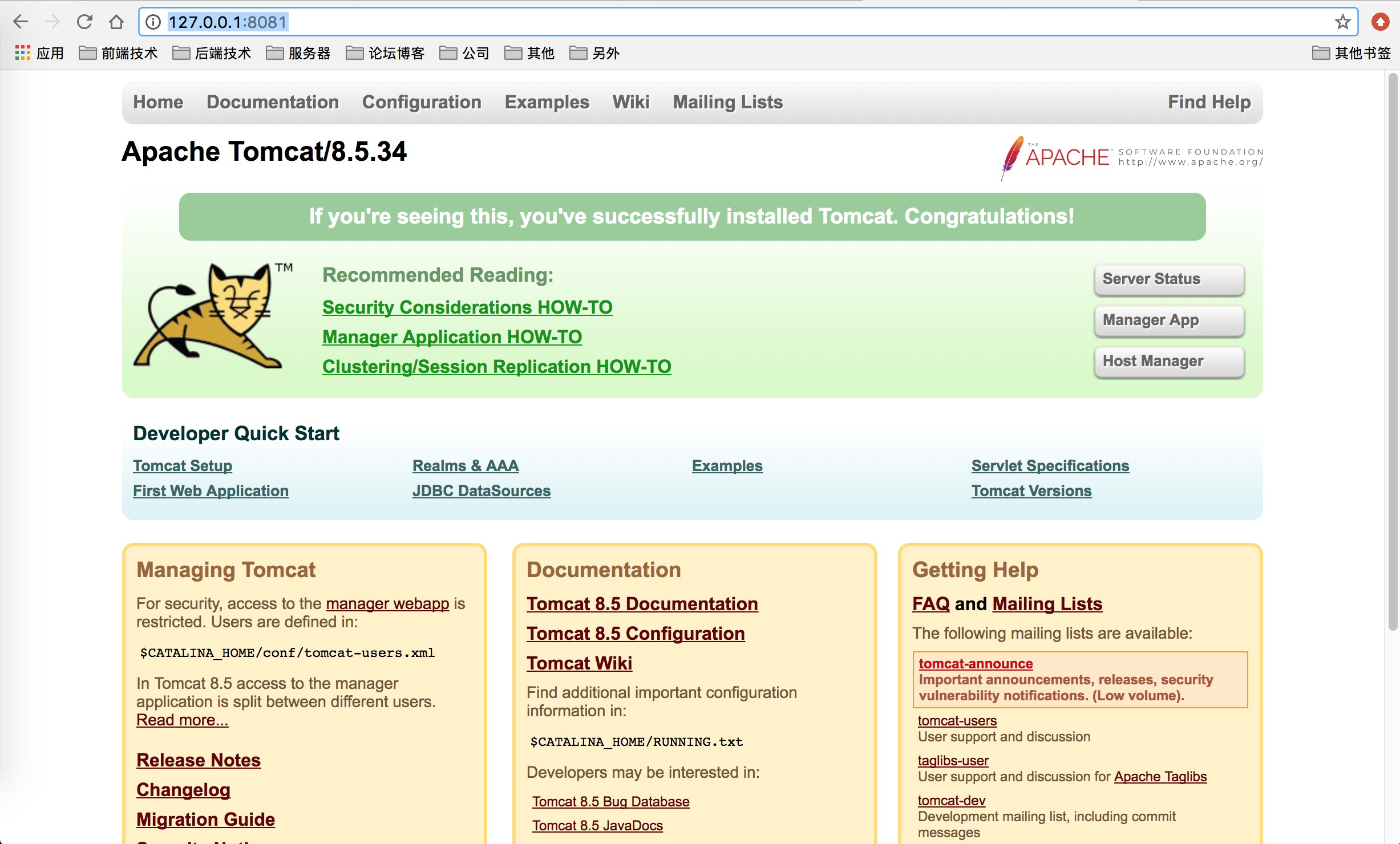
那么意味着这个tomcat的容器启动成功。
2.2 查看容器
1$ docker ps
2CONTAINER ID        IMAGE               COMMAND             CREATED             STATUS              PORTS                    NAMES
3eb0fdb6960ce        tomcat              "catalina.sh run"   5 seconds ago       Up 4 seconds        0.0.0.0:8081->8080/tcp   focused_newton
这里就是容器的基本信息。
CONTAINER ID:容器ID,唯一标识。
IMAGE:生成容器的镜像名称。
COMMAND:命令。
CREATED:创建时间,最后更新时间。
STATUS:状态。
PORTS:请求端口信息。
NAMES:容器名称。
2.3 进入容器
在使用-d参数时,容器启动后会在后台运行,用户无法看到容器中的信息,也无法进行操作。这个时候如果需要进入容器操作,有很多种方法,包括使用官方的attach或者exec命令。以及第三方nsenter工具等。
1.attach命令
docker attach focused_newton
当docker容器在 “-d”守护态运行的时候,比如通过supervisord控制两个程序非守护态运行:ssh -d tomcat
那么这个时候,用户就无法直接进入到容器中去,docker attach容器ID就会一直卡着。
因为此时容器运行的进程是ssh,而不是/bin/bash 也没有虚拟终端(-it)参数,所以是进入不到的。
2.exec命令
Docker从1.3版本提供了一个exec命令,可以在容器内直接执行任意命令。
1$ docker exec -it eb0fdb6960ce /bin/bash
2root@eb0fdb6960ce:/usr/local/tomcat#
-i, --interactive = true|false:打开标准输入接受用户输入命令,默认false;
--privileged = true|false: 是否给执行命令以最高权限,默认为false;
-t --tty = true|false: 分配伪终端,默认false;
-u --user="": 执行命令的用户或ID
可以看到,一个bash终端打开了,在不影响容器内其他应用的前提下,用户可以很容易与容器进行交互。
2.4 容器终止,启动,重启命令
1. docker stop命令用于终止一个运行中的容器,容器终止,里面的应用也就结束了:
1$ docker stop eb0fdb6960ce
2eb0fdb6960ce
2. 我们可以通过docker ps -qa 来查看终止的容器:
1$ docker ps -qa
2eb0fdb6960ce
3. 处于终止的容器,可以通过docker start 命令来重新启动:
1$ docker start eb0fdb6960ce
2eb0fdb6960ce
4. docker restart 命令会将一个运行状态的容器先终止,然后再重新启动它:
1$ docker restart eb0fdb6960ce
2eb0fdb6960ce
2.5 删除容器
$ docker rm eb0fdb6960ce
docker rm命令来删除处于终止或退出状态的容器,并不能删除正在运行状态的容器。
如果直接删除一个运行中的容器,可以添加-f参数。docker会先发送sigkill信号给容器,终止其中的应用,之后强行删除。
1$ docker rm -f eb0fdb6960ce
2eb0fdb6960ce
注意,删除容器的话,容器里面应用的产生的数据和日志信息等全都会被删除销毁,所以建议把应用里面的日子和产生的数据挂载到宿主机上。