
本文主要内容:
(1)商品修改功能开发
(2)@RequestMapping
(3)Controller类中方法的返回值
(4)参数绑定
(5)post中文乱码
(6)SpringMVC和Struts2的区别
1.商品修改功能开发
1.1需求
操作流程:
(1)进入商品查询列表页面;
(2)点击修改,进入商品修改页面,页面中显示了要修改的商品(从数据库查询),
要修改的商品从数据库查询,根据商品id(主键)查询商品信息;
(3)在商品修改页面,修改商品信息,修改后,点击提交。
1.2开发mapper
mapper:
根据id查询商品信息
根据id更新Items表的数据
不用开发了,使用逆向工程生成的代码,Spring+SpringMVC+MyBatis深入学习及搭建(十)——MyBatis逆向工程
1.3开发service
接口功能:
根据id查询商品信息
修改商品信息
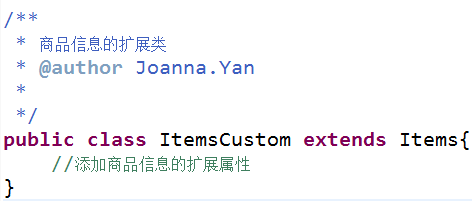
public interface ItemsService { //商品查询列表 public List<ItemsCustom> findItemsList(ItemsQueryVo itemsQueryVo) throws Exception;
1//根据id查询商品信息
2public ItemsCustom findItemsById(Integer id) throws Exception;
3
4//修改商品信息
5public void updateItems(Integer id,ItemsCustom itemsCustom) throws Exception;
}
public class ItemsServiceImpl implements ItemsService{
1@Autowired
2private ItemsMapperCustom itemsMapperCustom;
3@Autowired
4private ItemsMapper itemsMapper;
5
6@Override
7public List<ItemsCustom> findItemsList(ItemsQueryVo itemsQueryVo)
8        throws Exception {
9    //通过ItemsMapperCustom查询数据库
10    return itemsMapperCustom.findItemsList(itemsQueryVo);
11}
12
13@Override
14public ItemsCustom findItemsById(Integer id) throws Exception {
15    Items items=itemsMapper.selectByPrimaryKey(id);
16    //中间对商品信息进行业务处理
17    //....
18    //返回Items的扩展类ItemsCustom
19    ItemsCustom itemsCustom=new ItemsCustom();
20    //将items的属性值拷贝到itemsCustom
21    BeanUtils.copyProperties(items, itemsCustom);
22    return itemsCustom;
23}
24
25@Override
26public void updateItems(Integer id, ItemsCustom itemsCustom)
27        throws Exception {
28    //添加业务校验,通常在service接口对关键参数进行校验
29    //校验id是否为空,如果为空抛出异常
30
31    //更新商品信息使用updateByPrimaryKeyWithBLOBs根据id更新items表中所有字段,包括大文本类型字段
32    //updateByPrimaryKeyWithBLOBs要求必须传入id
33    itemsCustom.setId(id);
34    itemsMapper.updateByPrimaryKeyWithBLOBs(itemsCustom);
35}
}
1.4开发controller
方法:
商品信息修改页面显示
商品信息修改提交
@Controller public class ItemsController {
1@Autowired
2private ItemsService itemsService;
3
4//商品查询http://localhost:8080/SpringMVC\_MyBatis/queryItems.action
5@RequestMapping("/queryItems")
6public ModelAndView queryItems() throws Exception{
7    //调用service查找数据库,查询商品列表
8    List<ItemsCustom> itemsList=itemsService.findItemsList(null);
9
10    //返回ModelAndView
11    ModelAndView modelAndView=new ModelAndView();
12    modelAndView.addObject("itemsList", itemsList);
13    //指定视图
// modelAndView.setViewName("/WEB-INF/jsp/items/itemsList.jsp"); //下边的路径,如果在视图解析器中配置jsp路径的前缀和jsp路径的后缀,修改为 modelAndView.setViewName("items/itemsList"); return modelAndView; }
1//商品信息修改页面显示
2@RequestMapping("/editItems")
3public ModelAndView editItems() throws Exception{
4    //调用service根据商品id查询商品信息
5    ItemsCustom itemsCustom=itemsService.findItemsById(1);
6    //返回ModelAndView
7    ModelAndView modelAndView=new ModelAndView();
8    //将商品信息放到model
9    modelAndView.addObject("itemsCustom",itemsCustom);
10    //商品修改页面
11    modelAndView.setViewName("items/editItems");
12    return modelAndView;
13}
14
15//商品信息修改提交
16@RequestMapping("/editItemsSubmit")
17public ModelAndView editItemsSubmit() throws Exception{
18    //调用service更新商品信息,页面需要将商品信息传到此方法
19    //......
20
21
22    //返回ModelAndView
23    ModelAndView modelAndView=new ModelAndView();
24    //返回一个成功页面
25    modelAndView.setViewName("success");
26    return modelAndView;
27}
}
1.5 编写jsp
itemsList.jsp
<%@ page language="java" contentType="text/html; charset=UTF-8" pageEncoding="UTF-8"%> <%@ taglib uri="http://java.sun.com/jsp/jstl/core" prefix="c" %> <%@ taglib uri="http://java.sun.com/jsp/jstl/fmt" prefix="fmt"%>
<!DOCTYPE html PUBLIC "-//W3C//DTD HTML 4.01 Transitional//EN" "http://www.w3.org/TR/html4/loose.dtd"> <html> <head> <meta http-equiv="Content-Type" content="text/html; charset=UTF-8"> <title>查询商品列表</title> </head> <body> <form action="${pageContext.request.contextPath }/queryItem.action" method="post"> 查询条件: <table width="100%" border=1> <tr> <td><input type="submit" value="查询"/></td> </tr> </table> 商品列表: <table width="100%" border=1> <tr> <td>商品名称</td> <td>商品价格</td> <td>生产日期</td> <td>商品描述</td> <td>操作</td> </tr> <c:forEach items="${itemsList }" var="item"> <tr> <td>${item.name }</td> <td>${item.price }</td> <td><fmt:formatDate value="${item.createtime}" pattern="yyyy-MM-dd HH:mm:ss"/></td> <td>${item.detail }</td><td><a href="${pageContext.request.contextPath }/editItems.action?id=${item.id}">修改</a></td>
editItems.jsp
<%@ page language="java" contentType="text/html; charset=UTF-8" pageEncoding="UTF-8"%> <%@ taglib uri="http://java.sun.com/jsp/jstl/core" prefix="c" %> <%@ taglib uri="http://java.sun.com/jsp/jstl/fmt" prefix="fmt"%>
<!DOCTYPE html PUBLIC "-//W3C//DTD HTML 4.01 Transitional//EN" "http://www.w3.org/TR/html4/loose.dtd"> <html> <head> <meta http-equiv="Content-Type" content="text/html; charset=UTF-8"> <title>修改商品信息</title> </head> <body> <form id="itemForm" action="" method="post" enctype="multipart/form-data"> <input type="hidden" name="id" value="${itemsCustom.id }"/> 修改商品信息: <table width="100%" border=1> <tr> <td>商品名称</td> <td><input type="text" name="name" value="${itemsCustom.name }"/></td> </tr> <tr> <td>商品价格</td> <td><input type="text" name="price" value="${itemsCustom.price }"/></td> </tr> <%-- <tr> <td>商品生产日期</td> <td><input type="text" name="createtime" value="<fmt:formatDate value="${item.createtime}" pattern="yyyy-MM-dd HH:mm:ss"/>"/></td> </tr> <tr> <td>商品图片</td> <td> <c:if test="${item.pic !=null}"> <img src="https://my.oschina.net/pic/${item.pic}" width=100 height=100/> <br/> </c:if> <input type="file" name="pictureFile"/> </td> </tr> --%> <tr> <td>商品简介</td> <td> <textarea rows="3" cols="30" name="detail">${itemsCustom.detail }</textarea> </td> </tr> <tr> <td colspan="2" align="center"><input type="submit" value="提交"/> </td> </tr> </table> </form> </body> </html>1.6 商品修改调试
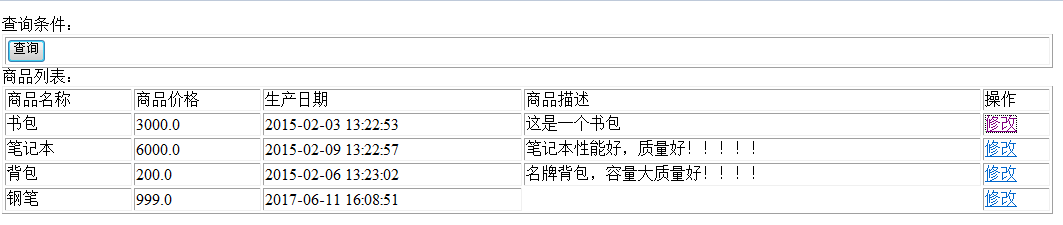
访问地址:http://localhost:8080/SpringMVC\_MyBatis/queryItems.action 点击修改

接下来,学习一些特性:
2. @RequestMapping
通过RequestMapping注解可以定义不同的处理器映射规则。
2.1URL路径映射
@RequestMapping(value="/item")或@RequestMapping("/item")
value的值是数组,可以将多个url映射到同一个方法.
2.2窄化请求映射
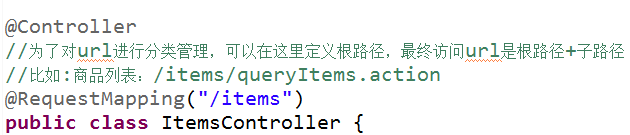
在Controller Class上添加@RequestMapping(url)指定通用请求前缀, 限制此类下的所有方法请求url必须以请求前缀开头,通过此方法对url进行分类管理。
那么前面jsp中的请求的地址要相应改变
itemsList.jsp中:


editItems.jsp中:

2.3请求方法限定
出于安全性考虑,对http的链接进行方法限制。
如果限制请求为post,进行get请求时,则报错:


3.Controller类中方法的返回值
3.1返回ModelAndView
Controller方法中定义ModelAndView对象并返回,对象中可添加model数据、指定view。
3.2返回字符串
3.2.1逻辑视图名
controller方法返回字符串可以指定逻辑视图名,通过视图解析器解析为物理视图地址。
真正视图(jsp路径)=前缀+逻辑+逻辑视图名+后缀
@RequestMapping(value="/editItems",method={RequestMethod.POST,RequestMethod.GET}) public String editItems(Model model) throws Exception{ //调用service根据商品id查询商品信息 ItemsCustom itemsCustom=itemsService.findItemsById(1);
1    //通过形参中的model将model数据传到页面
2    //相当于modelAndView.addObject方法
3    model.addAttribute("itemsCustom", itemsCustom);
4    return "items/editItems";
5}
3.2.2Redirect重定向
需求:商品修改提交后,重定向到商品查询列表。
redirect重定向特点:浏览器地址栏中的url会变化。修改提交的request数据无法传到重定向的地址。因为重定向后重新进行request(request无法共享)
@RequestMapping("/editItemsSubmit") public String editItemsSubmit(HttpServletRequest request) throws Exception{ //调用service更新商品信息,页面需要将商品信息传到此方法 //......
1    //重定向到商品的查询列表
2    return "redirect:queryItems.action";
3}
}
3.2.3forward页面转发
通过forward进行页面转发,浏览器地址栏url不变,request可以共享。
@RequestMapping("/editItemsSubmit") public String editItemsSubmit(HttpServletRequest request) throws Exception{ //调用service更新商品信息,页面需要将商品信息传到此方法 //......
//重定向到商品的查询列表
// return "redirect:queryItems.action"; //页面转发 return "forward:queryItems.action"; }
验证request是否可以共享:
在editItems.jsp中提交了一个id,在queryItems.action获取id。
//商品查询http://localhost:8080/SpringMVC\_MyBatis/items/queryItems.action @RequestMapping("/queryItems") public ModelAndView queryItems(HttpServletRequest request) throws Exception{ //测试forward后request是否可以共享 System.out.println(request.getParameter("id"));
1    //调用service查找数据库,查询商品列表
2    List<ItemsCustom> itemsList=itemsService.findItemsList(null);
3
4    //返回ModelAndView
5    ModelAndView modelAndView=new ModelAndView();
6    modelAndView.addObject("itemsList", itemsList);
7    //指定视图
// modelAndView.setViewName("/WEB-INF/jsp/items/itemsList.jsp"); //下边的路径,如果在视图解析器中配置jsp路径的前缀和jsp路径的后缀,修改为 modelAndView.setViewName("items/itemsList"); return modelAndView; }
3.3返回void
在controller方法形参上可以定义request和response,使用request或response指定响应结果:
(1)使用request转发页面,如下:
request.getRequestDispatcher("页面路径").forward(request, response);
(2)也可以通过response页面重定向:
response.sendRedirect("url");
(3)也可以通过response指定响应结果,例如响应json数据如下:
response.setCharacterEncoding("utf-8"); response.setContentType("application/json;charset=utf-8"); response.getWriter().write("json串");
4.参数绑定
struts接收数据时,是在action类的成员变量中定义你需要接收的参数。
4.1spring参数绑定过程
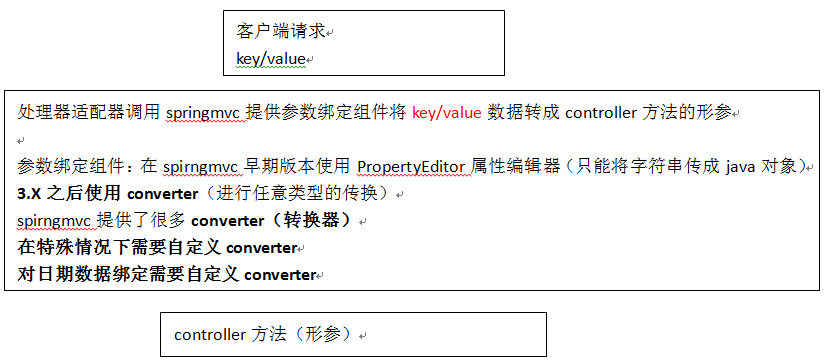
从客户端请求key/value数据,经过参数绑定,将key/value数据绑定到controller方法的形参上。
springmvc中,接收页面提交的数据是通过方法形参来接收。而不是在controller类定义成员变量接收!
4.2默认支持的类型
直接在controller方法形参上定义下边类型的对象,就可以使用这些对象。在参数绑定过程中,如果遇到下边类型直接进行绑定。
4.2.1HttpServletRequest
通过request对象获取请求信息。
4.2.2HttpServletResponse
通过response处理响应信息
4.2.3HttpSession
通过session对象得到session中存放的对象。
4.2.4Model/ModelMap
作用:将model数据填充到request域。
ModelMap是Model接口的实现类,通过Model或ModelMap向页面传递数据,如下:
//调用service查询商品信息 Items item = itemService.findItemById(id); model.addAttribute("item", item);
页面通过${item.XXXX}获取item对象的属性值。
使用Model和ModelMap的效果一样,如果直接使用Model,springmvc会实例化ModelMap。
4.3简单类型
通过@RequestParam对简单类型的参数进行绑定。
如果不使用@RequestParam,要求request传入参数名称和controller方法的形参名称一致,方可绑定成功。


如果使用@RequestParam,不用限制request传入参数名称和controller方法的形参名称一致。

通过required属性指定参数是否必须要传入,如果设置为true,没有传入参数,报下边错误:

4.4 pojo绑定
@RequestMapping("/editItemsSubmit") public String editItemsSubmit(HttpServletRequest request,Integer id,ItemsCustom itemsCustom) throws Exception{ //调用service更新商品信息,页面需要将商品信息传到此方法 itemsService.updateItems(id, itemsCustom);
//重定向到商品的查询列表
// return "redirect:queryItems.action"; //页面转发 return "forward:queryItems.action"; }
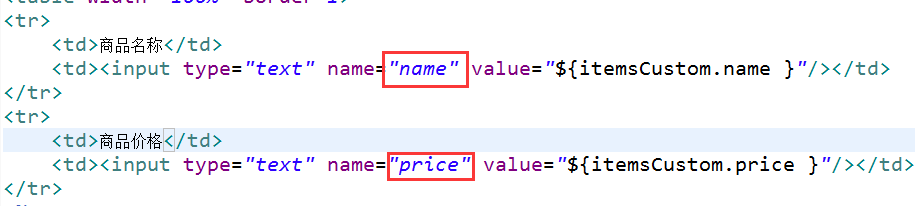
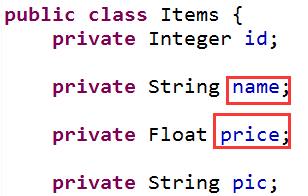
页面中<input/>的name和controller的pojo形参中的属性名称一致,会自动将页面中的数据绑定到pojo。
页面定义:
controller的pojo形参的定义:
4.4.1简单pojo
将pojo对象中的属性名与传递进来的属性名对应,如果传进来的参数名称和对象中的属性名称一致则将参数值设置在pojo对象中。
页面定义如下:
<input type="text" name="**name**"/> <input type="text" name="**price**"/>Controller方法定义如下:
@RequestMapping("/editItemSubmit") public String editItemSubmit(Items items)throws Exception{ System.out.println(items);
请求参数名称和pojo的属性名称一致,会自动将请求参数赋值给pojo的属性。
4.4.2包装pojo
如果采用类似struts中对象.属性的方式命名,需要将pojo对象作为一个包装对象的属性,Controller方法中以该包装对象最为形参。
包装对象定义如下:
public class QueryVo { private Items items; }
页面定义:
<input type="text" name="**items.**name" /> <input type="text" name="**items.**price" />Controller方法定义如下:
public String useraddsubmit(Model model,QueryVo queryVo)throws Exception{ System.out.println(queryVo.getItems());
4.5自定义参数绑定
需求:
对于controller形参中pojo对象,如果属性中有日期类型,需要自定义参数绑定。将请求日期参数串转成日期类型,要转换的日期类型和pojo中日期属性的类型保持一致。
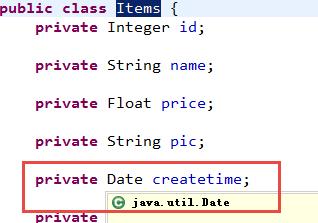
所有自定义参数绑定将日期串转成java.util.Date类型。
需要向处理器适配器中注入自定义的参数绑定组件。
4.5.1自定义日期类型绑定
package joanna.yan.ssm.controller.converter;
import java.text.ParseException; import java.text.SimpleDateFormat; import java.util.Date; import org.springframework.core.convert.converter.Converter; /** * 日期转换器 * @author Joanna.Yan * */ public class CustomDateConverter implements Converter<String, Date>{
1@Override
2public Date convert(String source) {
3    System.out.println("source="+source);
4    SimpleDateFormat sdf=new SimpleDateFormat("yyyy-MM-dd HH:mm:ss");
5    try {
6        return sdf.parse(source);
7    } catch (ParseException e) {
8        e.printStackTrace();
9    }
10    return null;
11}
}
4.5.2配置方式
4.5.2.1配置方式1
classpath下springmvc.xml中加:
<mvc:annotation-driven conversion-service="conversionService"></mvc:annotation-driven>
<!-- 自定义参数绑定 -->1<bean id="conversionService" class="org.springframework.format.support.FormattingConversionServiceFactoryBean"> 2 <!-- 转换器 --> 3 <property name="converters"> 4 <list> 5 <!-- 日期类型转换 --> 6 <bean class="joanna.yan.ssm.controller.converter.CustomDateConverter"/> 7 </list> 8 </property> 9</bean>
4.5.2.2配置方式2
<!--注解适配器 -->1<bean 2 class="org.springframework.web.servlet.mvc.method.annotation.RequestMappingHandlerAdapter"> 3 <property name="webBindingInitializer" ref="customBinder"></property> 4</bean> 5 6<!-- 自定义webBinder --> 7<bean id="customBinder" 8 class="org.springframework.web.bind.support.ConfigurableWebBindingInitializer"> 9 <property name="conversionService" ref="conversionService" /> 10</bean> 11<!-- conversionService --> 12<bean id="conversionService" 13 class="org.springframework.format.support.FormattingConversionServiceFactoryBean"> 14 <!-- 转换器 --> 15 <property name="converters"> 16 <list> 17 <bean class="joanna.yan.ssm.controller.converter.CustomDateConverter"/> 18 </list> 19 </property> 20</bean>
4.6集合类
4.6.1字符串数组
页面定义如下:
页面选中多个checkbox向controller方法传递:
<input type="checkbox" name="item\_id" value="001"/> <input type="checkbox" name="item\_id" value="002"/> <input type="checkbox" name="item\_id" value="003"/>传递到controller方法中的格式是:001,002,003
Controller方法中可以用String[]接收,定义如下:
public String deleteitem(String[] item_id)throws Exception{ System.out.println(item_id); }
4.6.2List
List中存放对象,并将定义的List放在包装类中,controller使用包装对象接收。
包装类中定义List对象,并添加get/set方法如下:
Public class QueryVo { Private List<Items> itemList;//商品列表
//get/set方法.. }
页面定义如下:
<tr> <td><input type="text" name=" itemsList\[0\].id" value="${item.id}"/></td> <td><input type="text" name=" itemsList\[0\].name" value="${item.name }"/></td> <td><input type="text" name=" itemsList\[0\].price" value="${item.price}"/></td> </tr> <tr> <td><input type="text" name=" itemsList\[1\].id" value="${item.id}"/></td> <td><input type="text" name=" itemsList\[1\].name" value="${item.name }"/></td> <td><input type="text" name=" itemsList\[1\].price" value="${item.price}"/></td> </tr>上边的静态代码改为动态jsp代码如下:
<c:forEach items="${itemsList }" var="item" varStatus="s">
<tr> <td><input type="text" name="itemsList\[${s.index }\].name" value="${item.name }"/></td> <td><input type="text" name="itemsList\[${s.index }\].price" value="${item.price }"/></td> ..... ..... </tr> </c:forEach>Contrller方法定义如下:
public String useraddsubmit(Model model,QueryVo queryVo)throws Exception{ System.out.println(queryVo.getItemList()); }
4.6.3Map
在包装类中定义Map对象,并添加get/set方法,controller使用包装对象接收。
包装类中定义Map对象如下:
Public class QueryVo { private Map<String, Object> itemInfo = new HashMap<String, Object>(); //get/set方法.. }
页面定义如下:
<tr> <td>学生信息:</td> <td> 姓名:<inputtype="text"name="itemInfo\['name'\]"/> 年龄:<inputtype="text"name="itemInfo\['price'\]"/> .. .. .. </td> </tr>Contrller方法定义如下:
public String useraddsubmit(Model model,QueryVo queryVo)throws Exception{ System.out.println(queryVo.getStudentinfo()); }
5.post中文乱码
在web.xml中加入:
<!-- 解决post乱码 --> <filter> <filter-name>CharacterEncodingFilter</filter-name> <filter-class>org.springframework.web.filter.CharacterEncodingFilter</filter-class> <init-param> <param-name>encoding</param-name> <param-value>utf-8</param-value> </init-param> </filter> <filter-mapping> <filter-name>CharacterEncodingFilter</filter-name> <url-pattern>/\*</url-pattern> </filter-mapping>以上可以解决post请求乱码问题。
对于get请求中文参数出现乱码解决方法有两个:
修改Tomcat配置文件添加编码与工程编码一致,如下:
<Connector URIEncoding="utf-8" connectionTimeout="20000" port="8080" protocol="HTTP/1.1" redirectPort="8443"/>
另外一种方法对参数进行重新编码:
String userName=new String(request.getParamter("userName").getBytes("ISO8859-1"),"utf-8");
ISO8859-1是Tomcat默认编码,需要将Tomcat编码后的内容按utf-8编码。
6.SpringMVC和Struts2的区别
(1)SpringMVC的入口是一个Servlet即前端控制器,而Struts2的入口是一个filter过滤器。
(2)SpringMVC是基于方法开发(一个url对应一个方法),请求参数传递到方法的形参,可以设计为单例或多例(建议单例),struts2是基于类开发,传递参数是通过类的成员变量,只能设计为多例。
SpringMVC将url和Controller方法映射,映射成功后SpringMVC生成一个Handler对象,对象中止包括了一个method。方法执行结束后,形参数据销毁。
SpringMVC的Controller开发类似service开发。
(3)Strut采用值栈存储请求和响应的数据,通过OGNL存取数据,SpringMVC通过参数解析器将request请求内容解析,并给方法形参赋值,将数据和视图封装成ModelAndView对象,最后又将ModelAndView中的模型数据通过request域传输到页面。jsp视图解析器默认使用jstl。
(4)经过实际测试,Struts2速度慢在于使用Struts标签,如果使用Struts建议使用jstl。