
方式一、通过hibernate.cfg.xml文件配置
1. hibernate.cfg.xml
1<?xml version="1.0" encoding="UTF-8"?>
2<!DOCTYPE hibernate-configuration PUBLIC
3          "-//Hibernate/Hibernate Configuration DTD 3.0//EN"
4          "http://hibernate.sourceforge.net/hibernate-configuration-3.0.dtd">
5<hibernate-configuration>
6	<session-factory>
7		<!-- 数据库链接配置 -->
8		<property name="connection.username">test</property>
9		<property name="connection.password">123</property>
10		<property name="connection.driver_class">oracle.jdbc.driver.OracleDriver</property>
11		<property name="connection.url">jdbc:oracle:thin:@127.0.0.1:1521:tran</property>
12		<!-- 显示实际操作数据库时的SQL -->
13              <property name="show_sql">true</property>
14              <property name="format_sql">true</property>
15              <property name="use_sql_comments">true</property>
16		<!-- SQL方言 -->
17		<property name="dialect">org.hibernate.dialect.OracleDialect</property>
18		<!-- 编码方式 -->
19		<property name="connection.characterEncoding">GBK</property>
20		<!-- C3P0数据源设置 -->
21		<property name="c3p0.min_size">5</property>
22		<property name="c3p0.max_size">20</property>
23		<property name="c3p0.timeout">1800</property>
24		<property name="c3p0.max_statements">50</property>
25		<!-- 自动创建数据表 -->
26		<property name="hbm2ddl.auto">update</property>
27		<!-- 事务相关 -->
28		<property name="connection.release_mode">auto</property>
29		<property name="transaction.auto_close_session">false</property>
30		<property name="connection.autocommit">false</property>
31		<!-- 对象与数据库表格映像文件 -->
32		<mapping resource="com/lxh/transaction3/BankAccount.hbm.xml" />
33	</session-factory>
34</hibernate-configuration>
2. 应用代码
1package com.lxh.transaction3;
2
3import java.io.File;
4import org.hibernate.cfg.Configuration;
5
6public class HibernateTransactionTest {
7	// path
8	private static String path = HibernateTransactionTest.class.getResource("")
9			.getPath().toString();
10
11	// hibernate.cfg.xml文件方式获取
12	public static Configuration getConfigurationByXML() {
13		// 加载配置文件
14		Configuration config = new Configuration();
15		Configuration cfg = config.configure(new File(path
16				+ "hibernate.cfg.xml"));
17		return cfg;
18	}
19
20	public static void main(String[] args) {
21		// Configuration
22		Configuration cfg = HibernateTransactionTest.getConfigurationByXML();
23		System.out.println("****cfg="+cfg+"****\n****SessionFactory="+cfg.buildSessionFactory()+"****");
24	}
25
26}
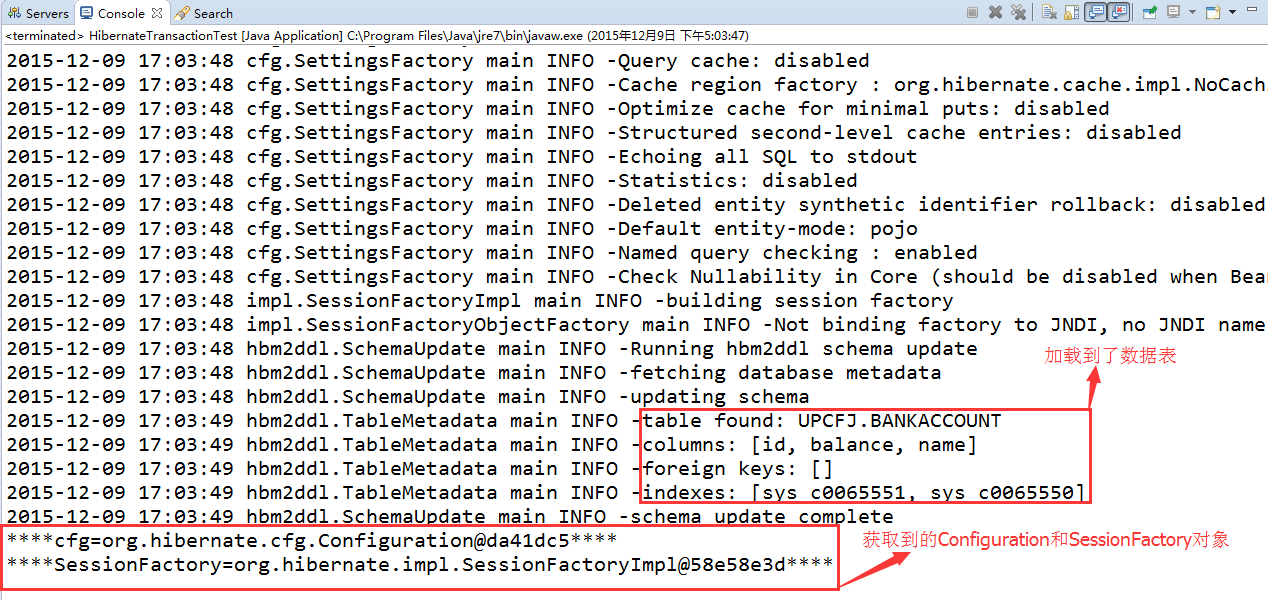
3. 测试结果
方式二、通过hibernate.properties文件配置
1. hibernate.properties
1hibernate.connection.username=test
2hibernate.connection.password=123
3hibernate.connection.url=jdbc:oracle:thin:@127.0.0.1:1521:tran
4hibernate.connection.driver_class=oracle.jdbc.driver.OracleDriver
5hibernate.dialect=org.hibernate.dialect.OracleDialect
6hibernate.hbm2ddl.auto=update
7hibernate.show_sql=true
8hibernate.format_sql=true
9hibernate.connection.characterEncodin=GBK
10hibernate.connection.release_mode=auto
11hibernate.transaction.auto_close_session=false
12hibernate.connection.autocommit=false
13c3p0.min_size=5
14c3p0.max_size=20
15c3p0.timeout=1800
16c3p0.max_statements=50
2. 应用代码
1package com.lxh.transaction3;
2
3import java.io.File;
4import java.io.FileReader;
5import java.io.IOException;
6import java.util.Properties;
7import org.hibernate.cfg.Configuration;
8
9public class HibernateTransactionTest {
10	// path
11	private static String path = HibernateTransactionTest.class.getResource("")
12			.getPath().toString();
13
14	// properties文件方式获取
15	public static Configuration getConfigurationByProp() {
16		// hibernate.properties
17		Properties prop = new Properties();
18		try {
19			prop.load(new FileReader(new File(path + "hibernate.properties")));
20		} catch (IOException e) {
21			System.out.println("加载hibernate配置文件失败:\t" + e.getMessage());
22		}
23		// 加载配置文件
24		Configuration config = new Configuration();
25		Configuration cfg = config.setProperties(prop);
26		cfg.addClass(BankAccount.class);// 非常重要----自动搜索BankAccount.hbm.xml
27		return cfg;
28	}
29
30	public static void main(String[] args) {
31		// Configuration
32		Configuration cfg = HibernateTransactionTest.getConfigurationByProp();
33		System.out.println("****cfg="+cfg+"****\n****SessionFactory="+cfg.buildSessionFactory()+"****");
34	}
35
36}
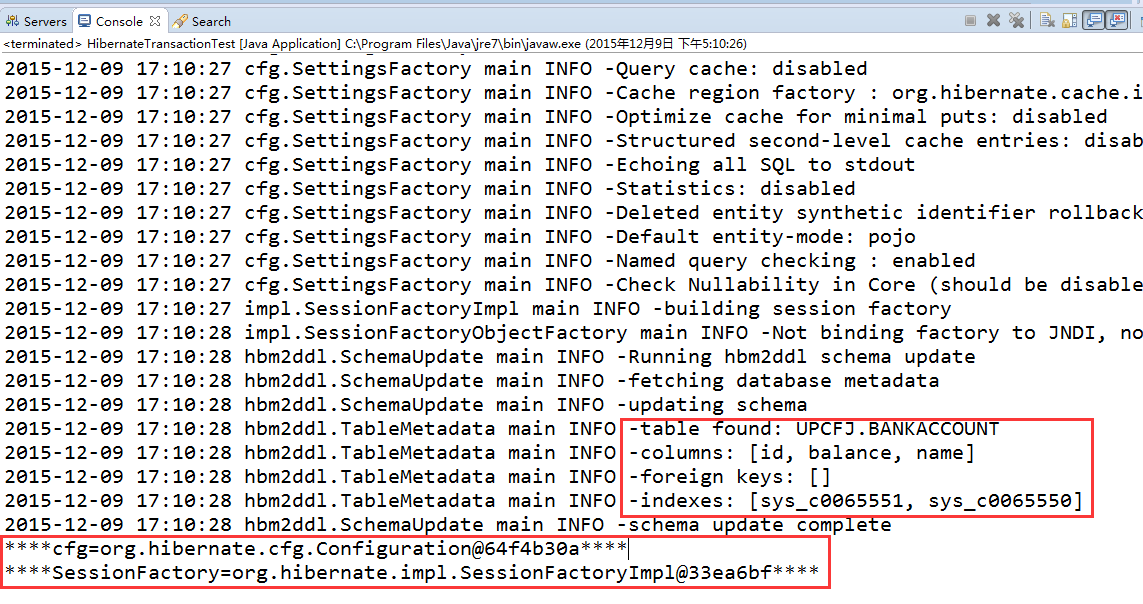
3. 测试结果
补充:BankAccount.hbm.xml
1<?xml version="1.0" encoding="utf-8"?>
2<!DOCTYPE hibernate-mapping PUBLIC "-//Hibernate/Hibernate Mapping DTD 3.0//EN"
3"http://hibernate.sourceforge.net/hibernate-mapping-3.0.dtd">
4<hibernate-mapping>
5	<class name="com.lxh.transaction3.BankAccount" table="BankAccount">
6		<id name="id" type="string">
7			<column name="id" />
8		</id>
9		<!-- name字段设置唯一约束 -->
10		<property name="name" type="string" unique-key="true">
11			<column name="name" not-null="true" />
12		</property>
13		<property name="balance" type="java.lang.Integer">
14			<column name="balance" />
15		</property>
16	</class>
17</hibernate-mapping>
说明;
1. 需要引入数据库驱动包以及hibernate相关jar;
2. 使用properties文件配置hibernate时,应该采用cfg.addClass(BankAccount.class);自动加载XXX.hbm.xm文件;
3. XXX.hbm.xml文件配置时特别注意正确书写表名和对应POJO的路径。
参考:
1. hibernate使用Properties文件方式配置 http://blog.csdn.net/xiazdong/article/details/7562765
2. hibernate.cfg.xml配置 http://www.blogjava.net/baoyaer/articles/172642.html
3. hibernate.cfg.xml在hibernate与spring中配置的区别 http://kewen1989.iteye.com/blog/1747156
4. hibernate配置文件中有关事务的配置说明 http://www.blogjava.net/freeman1984/archive/2011/08/04/355808.html
5. hibernate配置参数解释 http://www.cnblogs.com/elleniou/archive/2012/12/01/2797546.html
6. hibernate展示SQL语句 http://www.mkyong.com/hibernate/hibernate-display-generated-sql-to-console-show\_sql-format\_sql-and-use\_sql\_comments/
遇到的问题:
hibernate能显示执行的SQL语句,但是不能执行格式化。原先配置如下图所示:

解决方法:去掉空格即可。