
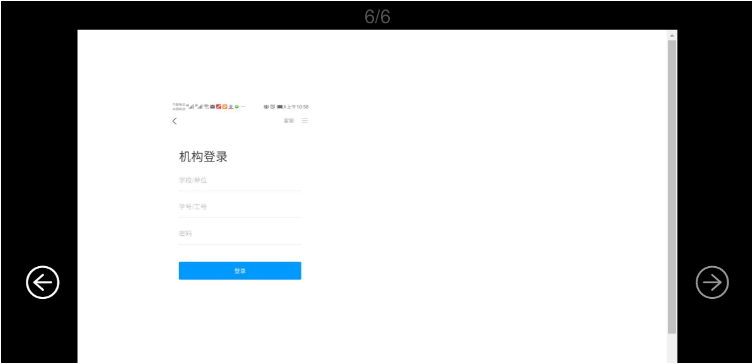
样式如图:
 1:npm install --save vue-pdf
2:在需要使用的页面中
1:npm install --save vue-pdf
2:在需要使用的页面中
1<div class="page">{{currentPage}}/{{pageCount}}</div>
2<div class="pdf">
3    <span @click="changePdfPage(0)" class="arrow" :class="{grey:currentPage===1}"><i class="iconfont icon-changyongicon-1"></i></span>
4    <div class="main">
5        <pdf src="/demo.pdf" ref='ref' class="pdf" :page="currentPage" @num-pages="pageCount=$event" @page-loaded="currentPage=$event" @loaded="loadPdfHandler"></pdf>
6    </div>
7    <span @click="changePdfPage(1)" class="arrow" :class="{grey:currentPage===pageCount}"><i class="iconfont icon-changyongicon-"></i></span>
8</div>
1<script>
2    import pdf from 'vue-pdf'
3    export default {
4        components: {
5            pdf
6        },
7        data() {
8            return {
9                currentPage: 0, // pdf文件页码
10                pageCount: 0, // pdf文件总页数
11                fileType: 'pdf',
12            }
13        },
14        // created() {
15        //     this.src = pdf.createLoadingTask(this.src)
16        // },//如果不是本地文件
17        methods: {
18            changePdfPage(val) {
19                if (val === 0 & this.currentPage > 1) {
20                    this.currentPage--
21                }
22                if (val === 1 & this.currentPage < this.pageCount) {
23                    this.currentPage++
24                }
25            },
26            loadPdfHandler(e) {
27                this.currentPage = 1
28            }
29        }
30    }
31</script>
1<style>
2	.page {
3		text-align: center;
4		font-size: 30px;
5		line-height: 40px;
6	}
7
8	.pdf {
9		display: flex;
10		justify-content: center;
11		align-items: center;
12
13		.arrow {
14			color: #999;
15		}
16
17		.arrow:hover {
18			color: white;
19		}
20
21		.grey:hover {
22			color: #999;
23		}
24
25		i {
26			font-size: 70px;
27			padding: 20px;
28			cursor: pointer;
29		}
30
31		.main {
32			width: 50%;
33			overflow: auto;
34			height: calc(100vh - 120px);
35		}
36	}
37</style>
::: warning 若要浏览本地pdf文件,文件必须放在public文件夹下 :::