<font size='9' face='黑体'>目录</font>
[TOC]
1、安装Maven并配置环境变量
下载maven(windows下载zip包,linux下载tar.gz包),然后配置环境变量
在项目中使用maven,可以从java中央仓库中获取到项目所依赖的jar包,才能完成项目的部署。
1.1 Linux配置环境变量内容
1export MAVEN_HOME=/usr/local/apache-maven-3.5.3  -- 选择自己正确的版本号
2export PATH=${PATH}:${MAVEN_HOME}/bin
配置完成后,输入source profile使环境变量生效
在终端输入mvn -v查看maven是否安装成功
1.2 Windows配置环境变量内容
1添加环境变量
2MAVEN_HOME=C:\Program Files\Maven\apache-maven-3.5.3
3在path后追加环境变量:%MAVEN_HOME%\bin
输出mvn -v检查是否安装成功 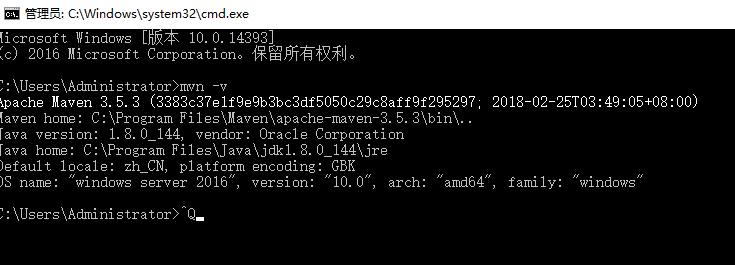
2、配置Jenkins中的jdk和maven环境变量
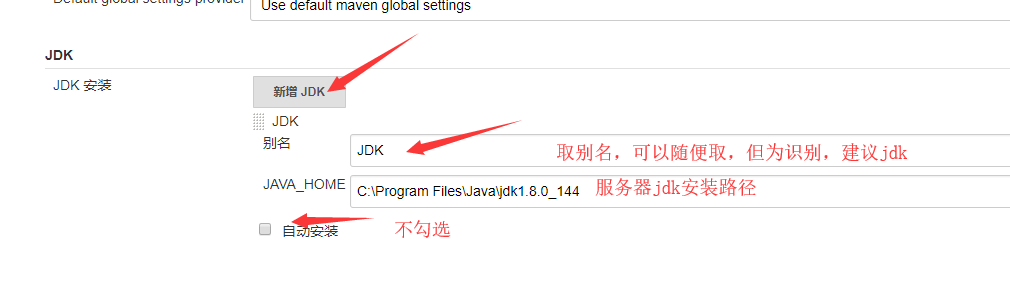
2.1 在Jenkins中点击系统管理->全局工具配置分别配置jdk和maven
2.1.1 配置jdk
2.1.2 配置maven
- 安装插件Maven Integration plugin
- 在全局配置工具中配置maven
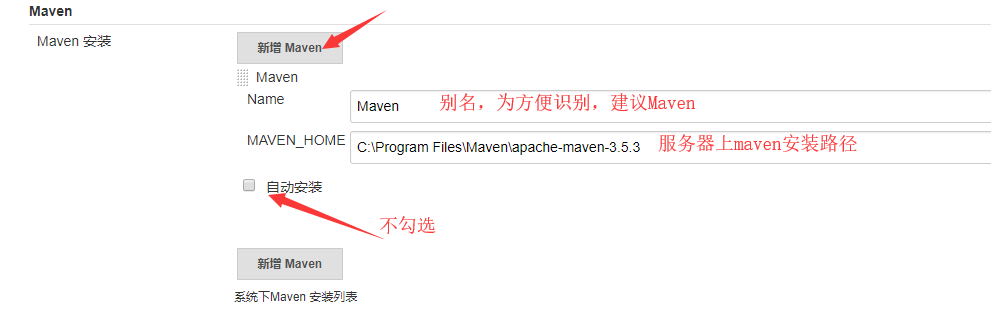
3 安装搭建svn
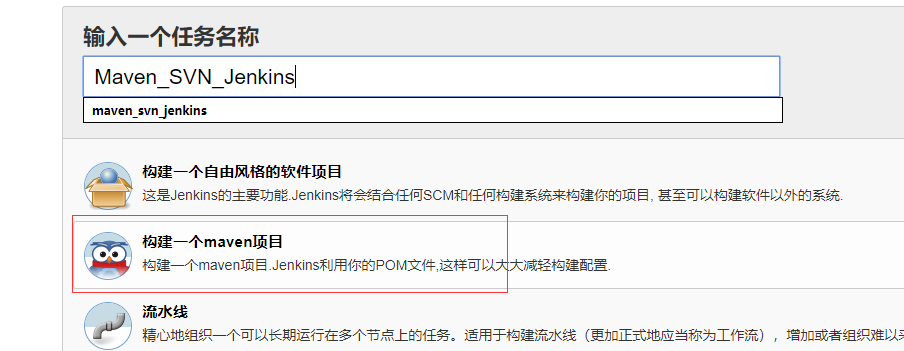
4 构建Jenkins集成项目
- 构建一个maven项目(需要先安装Maven Integration plugin插件)
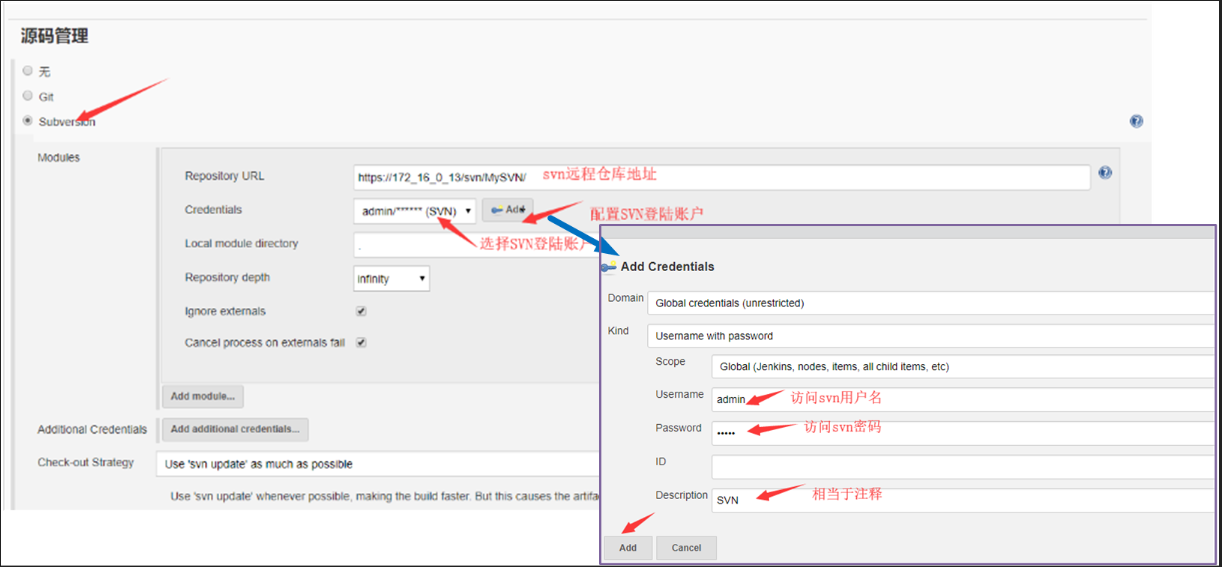
- 配置源码管理(svn)
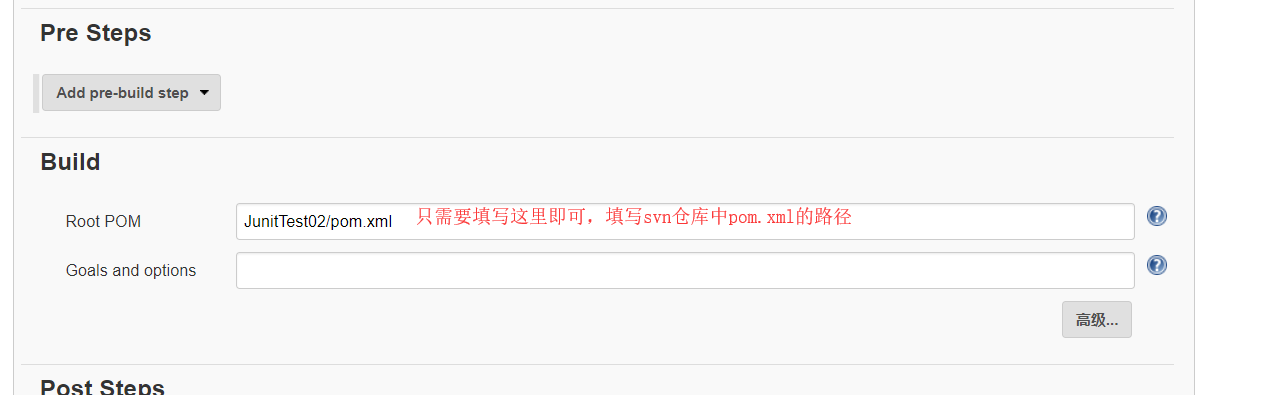
- 在Pre Steps下找到Build进行配置
5. 项目执行日志输出及解释
5.1 日志关键点展示
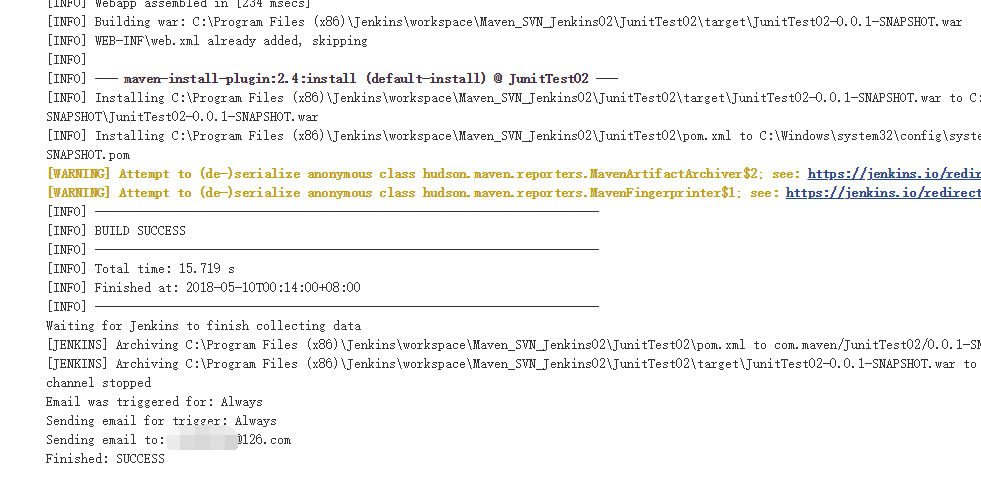
5.1.1 项目构建完成控制台输出
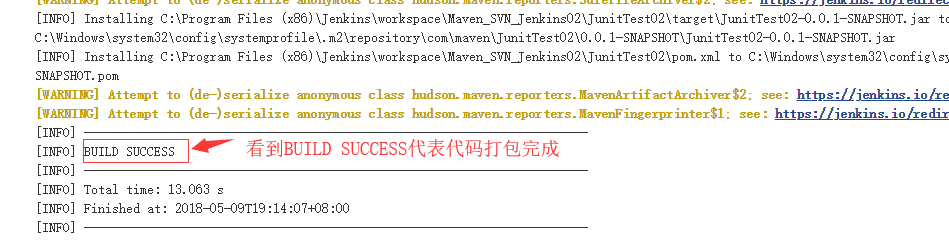
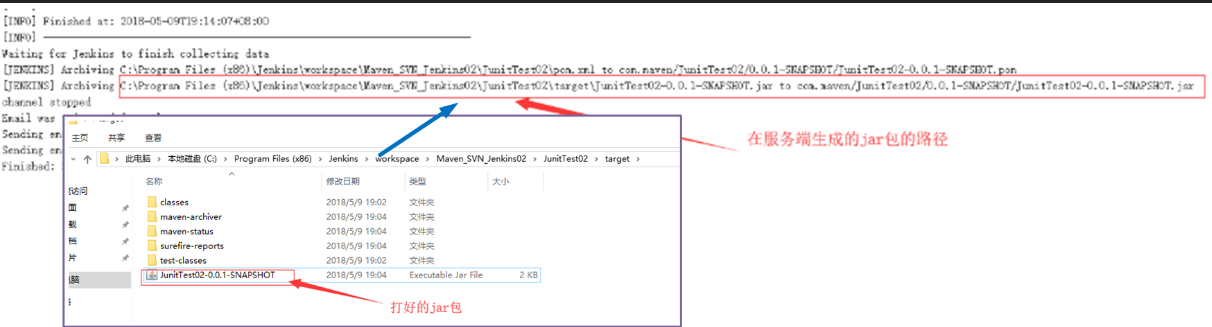
5.1.2 生成的jar包的路径
5.1.3 如果控制台报错找不到对应的jar包的解决办法
说明在maven的中央仓库无法下载到这个jar包,那么就需要找开发要对应的jar包然后放到控制台报错指示路径即可
5.2 日志输出完整展示
1由用户 admin 启动
2构建中 在工作空间 C:\Program Files (x86)\Jenkins\workspace\Maven_SVN_Jenkins02 中
3Updating https://172_16_0_13/svn/MySVN at revision '2018-05-09T19:13:45.498 +0800' --quiet
4Using sole credentials admin/****** (SVN) in realm ‘<https://172_16_0_13:443> VisualSVN Server’
5At revision 1
6
7No changes for https://172_16_0_13/svn/MySVN since the previous build
8No emails were triggered.
9Parsing POMs
10Established TCP socket on 52378
11[JunitTest02] $ "C:\Program Files\Java\jdk1.8.0_144/bin/java" -cp "C:\Program Files (x86)\Jenkins\plugins\maven-plugin\WEB-INF\lib\maven35-agent-1.12-alpha-1.jar;C:\Program Files\Maven\apache-maven-3.5.3\boot\plexus-classworlds-2.5.2.jar;C:\Program Files\Maven\apache-maven-3.5.3/conf/logging" jenkins.maven3.agent.Maven35Main "C:\Program Files\Maven\apache-maven-3.5.3" "C:\Program Files (x86)\Jenkins\war\WEB-INF\lib\remoting-3.20.jar" "C:\Program Files (x86)\Jenkins\plugins\maven-plugin\WEB-INF\lib\maven35-interceptor-1.12-alpha-1.jar" "C:\Program Files (x86)\Jenkins\plugins\maven-plugin\WEB-INF\lib\maven3-interceptor-commons-1.12-alpha-1.jar" 52378
12<===[JENKINS REMOTING CAPACITY]===>channel started
13Executing Maven:  -B -f C:\Program Files (x86)\Jenkins\workspace\Maven_SVN_Jenkins02\JunitTest02\pom.xml install
14[INFO] Scanning for projects...
15[INFO]
16[INFO] -----------------------< com.maven:JunitTest02 >------------------------
17[INFO] Building JunitTest02 0.0.1-SNAPSHOT
18[INFO] --------------------------------[ jar ]---------------------------------
19[INFO]
20[INFO] --- maven-resources-plugin:2.6:resources (default-resources) @ JunitTest02 ---
21[WARNING] Using platform encoding (GBK actually) to copy filtered resources, i.e. build is platform dependent!
22[INFO] Copying 0 resource
23[INFO]
24[INFO] --- maven-compiler-plugin:3.1:compile (default-compile) @ JunitTest02 ---
25[INFO] Nothing to compile - all classes are up to date
26[INFO]
27[INFO] --- maven-resources-plugin:2.6:testResources (default-testResources) @ JunitTest02 ---
28[WARNING] Using platform encoding (GBK actually) to copy filtered resources, i.e. build is platform dependent!
29[INFO] Copying 0 resource
30[INFO]
31[INFO] --- maven-compiler-plugin:3.1:testCompile (default-testCompile) @ JunitTest02 ---
32[INFO] Nothing to compile - all classes are up to date
33[INFO]
34[INFO] --- maven-surefire-plugin:2.12.4:test (default-test) @ JunitTest02 ---
35[INFO] Surefire report directory: C:\Program Files (x86)\Jenkins\workspace\Maven_SVN_Jenkins02\JunitTest02\target\surefire-reports
36-------------------------------------------------------
37 T E S T S
38-------------------------------------------------------
39Running com.junit.exam01.DecoExamTest
40This is test A
41This is test B
42Tests run: 2, Failures: 0, Errors: 0, Skipped: 0, Time elapsed: 0.094 sec
43
44Results :
45
46Tests run: 2, Failures: 0, Errors: 0, Skipped: 0
47
48[JENKINS] Recording test results
49[INFO]
50[INFO] --- maven-jar-plugin:2.4:jar (default-jar) @ JunitTest02 ---
51[WARNING] Attempt to (de-)serialize anonymous class hudson.maven.reporters.BuildInfoRecorder$1; see: https://jenkins.io/redirect/serialization-of-anonymous-classes/
52[INFO]
53[INFO] --- maven-install-plugin:2.4:install (default-install) @ JunitTest02 ---
54[WARNING] Attempt to (de-)serialize anonymous class hudson.maven.reporters.SurefireArchiver$2; see: https://jenkins.io/redirect/serialization-of-anonymous-classes/
55[INFO] Installing C:\Program Files (x86)\Jenkins\workspace\Maven_SVN_Jenkins02\JunitTest02\target\JunitTest02-0.0.1-SNAPSHOT.jar to C:\Windows\system32\config\systemprofile\.m2\repository\com\maven\JunitTest02\0.0.1-SNAPSHOT\JunitTest02-0.0.1-SNAPSHOT.jar
56[INFO] Installing C:\Program Files (x86)\Jenkins\workspace\Maven_SVN_Jenkins02\JunitTest02\pom.xml to C:\Windows\system32\config\systemprofile\.m2\repository\com\maven\JunitTest02\0.0.1-SNAPSHOT\JunitTest02-0.0.1-SNAPSHOT.pom
57[WARNING] Attempt to (de-)serialize anonymous class hudson.maven.reporters.MavenArtifactArchiver$2; see: https://jenkins.io/redirect/serialization-of-anonymous-classes/
58[WARNING] Attempt to (de-)serialize anonymous class hudson.maven.reporters.MavenFingerprinter$1; see: https://jenkins.io/redirect/serialization-of-anonymous-classes/
59[INFO] ------------------------------------------------------------------------
60[INFO] BUILD SUCCESS
61[INFO] ------------------------------------------------------------------------
62[INFO] Total time: 13.063 s
63[INFO] Finished at: 2018-05-09T19:14:07+08:00
64[INFO] ------------------------------------------------------------------------
65Waiting for Jenkins to finish collecting data
66[JENKINS] Archiving C:\Program Files (x86)\Jenkins\workspace\Maven_SVN_Jenkins02\JunitTest02\pom.xml to com.maven/JunitTest02/0.0.1-SNAPSHOT/JunitTest02-0.0.1-SNAPSHOT.pom
67[JENKINS] Archiving C:\Program Files (x86)\Jenkins\workspace\Maven_SVN_Jenkins02\JunitTest02\target\JunitTest02-0.0.1-SNAPSHOT.jar to com.maven/JunitTest02/0.0.1-SNAPSHOT/JunitTest02-0.0.1-SNAPSHOT.jar
68channel stopped
69Email was triggered for: Always
70Sending email for trigger: Always
71Sending email to: Gupan0923@126.com
72Finished: SUCCESS
6. 打war包配置及出错指导
6.1 修改pom.xml文件
使用maven默认打包时打的jar包,如果要打war包需要修改pom.xml文件,修改方式如下:
1<project xmlns="http://maven.apache.org/POM/4.0.0" xmlns:xsi="http://www.w3.org/2001/XMLSchema-instance" xsi:schemaLocation="http://maven.apache.org/POM/4.0.0 http://maven.apache.org/xsd/maven-4.0.0.xsd">
2  <modelVersion>4.0.0</modelVersion>
3  <groupId>com.maven</groupId>
4  <artifactId>JunitTest02</artifactId>
5  <version>0.0.1-SNAPSHOT</version>
6
7  <!--  以下是添加的代码-->
8  <dependencies>
9	  <dependency>
10	  	<groupId>junit</groupId>
11	  	<artifactId>junit</artifactId>
12	  	<version>4.11</version>
13	  </dependency>
14  </dependencies>
15  <!--  添加代码结束-->
16
17  <!-- 将这里修改为war打包的时候就可以打war包 -->
18  <packaging>war</packaging>
19</project>
6.2 jenkins打包报错解决指导
6.2.1 错误展示
修改后,jenkins打包时,发现报错如下:

6.2.2 出错原因
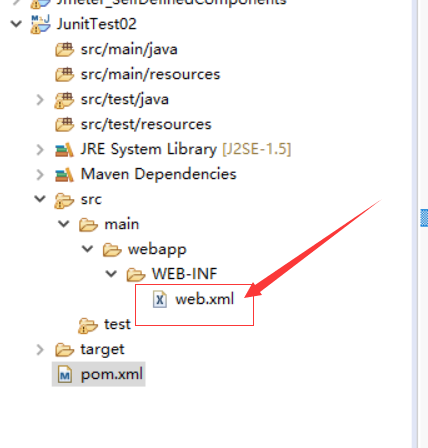
maven的web项目默认的webroot是在src\main\webapp\WEB-INF。如果在此目录下找不到web.xml就抛出以上的异常。
6.2.3 问题解决
在src\main\webapp\WEB-INF下建立web.xml文件