
先放效果截图 项目中需要有个Dialog全选对话框,点击全选全部选中,取消全选全部取消。下午查了些资料,重写了一下Dialog对话框。把代码放出来。 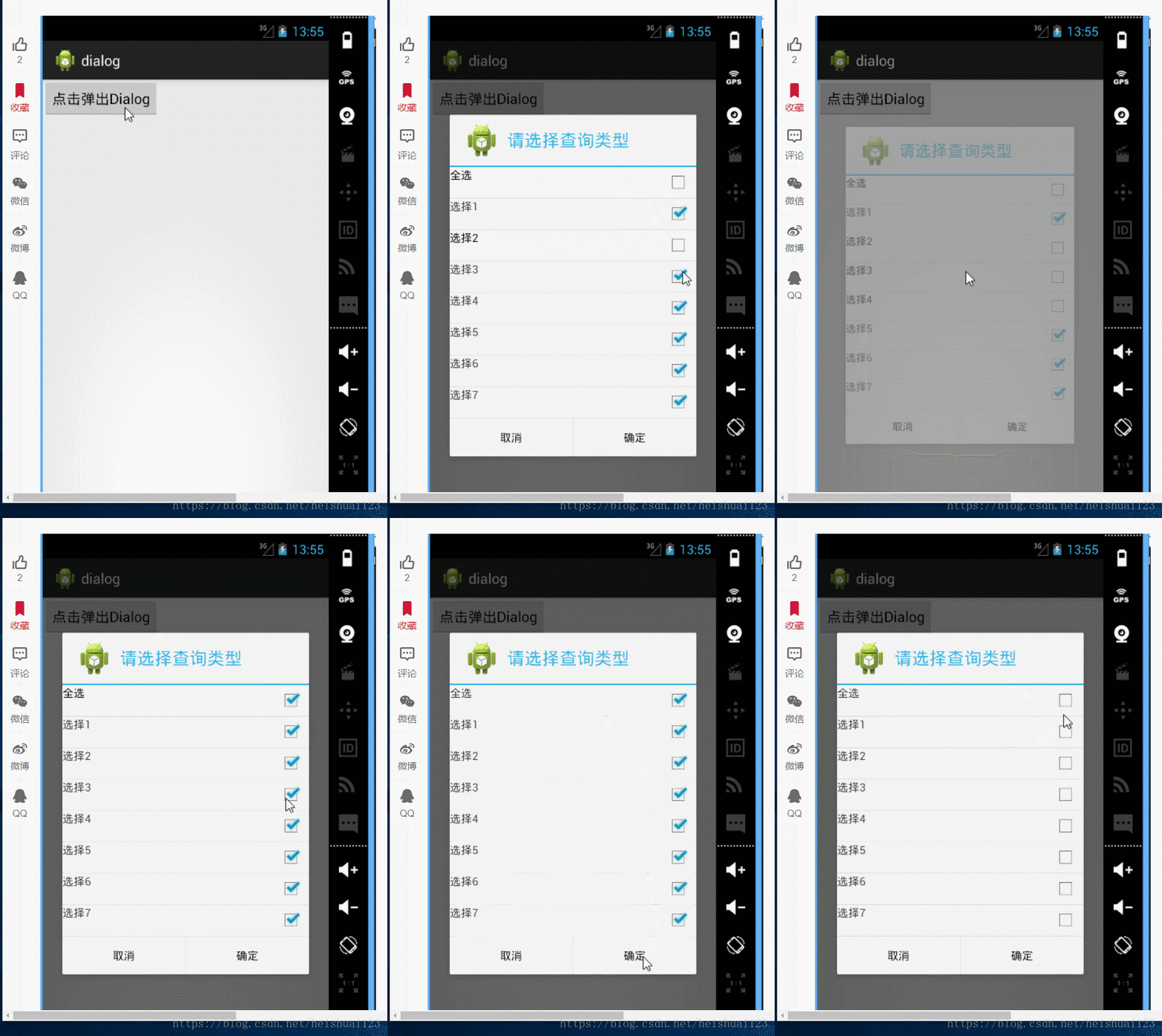
1public class MainActivity extends Activity {
2    View getlistview;
3    String[] mlistText = { "全选", "选择1", "选择2", "选择3", "选择4", "选择5", "选择6", "选择7" };
4    ArrayList<Map<String, Object>> mData = new ArrayList<Map<String, Object>>();
5    AlertDialog.Builder builder;
6    AlertDialog builder2;
7    SimpleAdapter adapter;
8    Boolean[] bl = { false, false, false, false, false, false, false, false };
9
10    @Override
11    protected void onCreate(Bundle savedInstanceState) {
12        super.onCreate(savedInstanceState);
13        setContentView(R.layout.activity_main);
14        Button button = (Button) findViewById(R.id.btn);
15        int lengh = mlistText.length;
16        for (int i = 0; i < lengh; i++) {
17            Map<String, Object> item = new HashMap<String, Object>();
18            item.put("text", mlistText[i]);
19            mData.add(item);
20        }
21        button.setOnClickListener(new OnClickListener() {
22            @Override
23            public void onClick(View v) {
24                CreateDialog();// 点击创建Dialog
25            }
26        });
27
28    }
29
30    class ItemOnClick implements OnItemClickListener {
31
32        @Override
33        public void onItemClick(AdapterView<?> arg0, View view, int position, long id) {
34            CheckBox cBox = (CheckBox) view.findViewById(R.id.X_checkbox);
35            if (cBox.isChecked()) {
36                cBox.setChecked(false);
37            } else {
38                Log.i("TAG", "取消该选项");
39                cBox.setChecked(true);
40            }
41
42            if (position == 0 && (cBox.isChecked())) {
43                //如果是选中 全选  就把所有的都选上 然后更新
44                for (int i = 0; i < bl.length; i++) {
45                    bl[i] = true;
46                }
47                adapter.notifyDataSetChanged();
48            } else if (position == 0 && (!cBox.isChecked())) {
49                //如果是取消全选 就把所有的都取消 然后更新
50                for (int i = 0; i < bl.length; i++) {
51                    bl[i] = false;
52                }
53                adapter.notifyDataSetChanged();
54            }
55            if (position != 0 && (!cBox.isChecked())) {
56                // 如果把其它的选项取消   把全选取消
57                bl[0] = false;
58                bl[position]=false;
59                adapter.notifyDataSetChanged();
60            } else if (position != 0 && (cBox.isChecked())) {
61                //如果选择其它的选项,看是否全部选择
62                //先把该选项选中 设置为true
63                bl[position]=true;
64                int a = 0;
65                for (int i = 1; i < bl.length; i++) {
66                    if (bl[i] == false) {
67                        //如果有一个没选中  就不是全选 直接跳出循环
68                        break;
69                    } else {
70                        //计算有多少个选中的
71                        a++;
72                        if (a == bl.length - 1) {
73                            //如果选项都选中,就把全选 选中,然后更新
74                            bl[0] = true;
75                            adapter.notifyDataSetChanged();
76                        }
77                    }
78                }
79            }
80        }
81
82    }
83
84    public void CreateDialog() {
85
86        // 动态加载一个listview的布局文件进来
87        LayoutInflater inflater = LayoutInflater.from(MainActivity.this);
88        getlistview = inflater.inflate(R.layout.listview, null);
89
90        // 给ListView绑定内容
91        ListView listview = (ListView) getlistview.findViewById(R.id.X_listview);
92        adapter = new SetSimpleAdapter(MainActivity.this, mData, R.layout.listitem, new String[] { "text" },
93                new int[] { R.id.X_item_text });
94        // 给listview加入适配器
95        listview.setAdapter(adapter);
96        listview.setItemsCanFocus(false);
97        listview.setChoiceMode(ListView.CHOICE_MODE_MULTIPLE);
98        listview.setOnItemClickListener(new ItemOnClick());
99
100        builder = new AlertDialog.Builder(this);
101        builder.setTitle("请选择查询类型");
102        builder.setIcon(R.drawable.ic_launcher);
103        //设置加载的listview
104        builder.setView(getlistview);
105        builder.setPositiveButton("确定", new DialogOnClick());
106        builder.setNegativeButton("取消", new DialogOnClick());
107        builder.create().show();
108    }
109
110    class DialogOnClick implements DialogInterface.OnClickListener {
111
112        @Override
113        public void onClick(DialogInterface dialog, int which) {
114            switch (which) {
115            case Dialog.BUTTON_POSITIVE:
116                //确定按钮的事件
117                break;
118            case Dialog.BUTTON_NEGATIVE:
119                //取消按钮的事件
120                break;
121            default:
122                break;
123            }
124        }
125    }
126
127    //重写simpleadapterd的getview方法
128    class SetSimpleAdapter extends SimpleAdapter {
129
130        public SetSimpleAdapter(Context context, List<? extends Map<String, ?>> data, int resource, String[] from,
131                int[] to) {
132            super(context, data, resource, from, to);
133        }
134
135        @Override
136        public View getView(int position, View convertView, ViewGroup parent) {
137            if (convertView == null) {
138                convertView = LinearLayout.inflate(getBaseContext(), R.layout.listitem, null);
139            }
140            CheckBox ckBox = (CheckBox) convertView.findViewById(R.id.X_checkbox);
141            //每次都根据 bl[]来更新checkbox
142            if (bl[position] == true) {
143                ckBox.setChecked(true);
144            } else if (bl[position] == false) {
145                ckBox.setChecked(false);
146            }
147            return super.getView(position, convertView, parent);
148        }
149    }
150}
布局文件
1<RelativeLayout xmlns:android="http://schemas.android.com/apk/res/android"
2    xmlns:tools="http://schemas.android.com/tools"
3    android:layout_width="match_parent"
4    android:layout_height="match_parent"
5    tools:context="${relativePackage}.${activityClass}" >
6
7    <Button
8        android:id="@+id/btn"
9        android:layout_width="wrap_content"
10        android:layout_height="wrap_content"
11        android:text="点击弹出Dialog" />
12
13</RelativeLayout>
14
15
16<RelativeLayout xmlns:android="http://schemas.android.com/apk/res/android"
17    xmlns:tools="http://schemas.android.com/tools"
18    android:layout_width="match_parent"
19    android:layout_height="match_parent"
20    tools:context="${relativePackage}.${activityClass}" >
21
22    <ListView
23        android:id="@+id/X_listview"
24        android:layout_width="match_parent"
25        android:layout_height="wrap_content" >
26    </ListView>
27
28</RelativeLayout>
29
30
31<LinearLayout xmlns:android="http://schemas.android.com/apk/res/android"
32    xmlns:tools="http://schemas.android.com/tools"
33    android:layout_width="match_parent"
34    android:layout_height="match_parent"
35    tools:context="${relativePackage}.${activityClass}" >
36
37    <RelativeLayout
38        android:layout_width="wrap_content"
39        android:layout_height="wrap_content"
40        android:descendantFocusability="blocksDescendants" >
41
42        <TextView
43            android:id="@+id/X_item_text"
44            android:layout_width="wrap_content"
45            android:layout_height="wrap_content"
46            android:text="选项" />
47
48        <CheckBox
49            android:id="@+id/X_checkbox"
50            android:layout_width="wrap_content"
51            android:layout_height="wrap_content"
52            android:layout_alignParentRight="true"
53            android:clickable="false"
54            android:focusable="false" />
55    </RelativeLayout>
56
57</LinearLayout>