
Spark是2015年最受热捧大数据开源平台,我们花一点时间来快速体验一下Spark。
Spark 技术栈
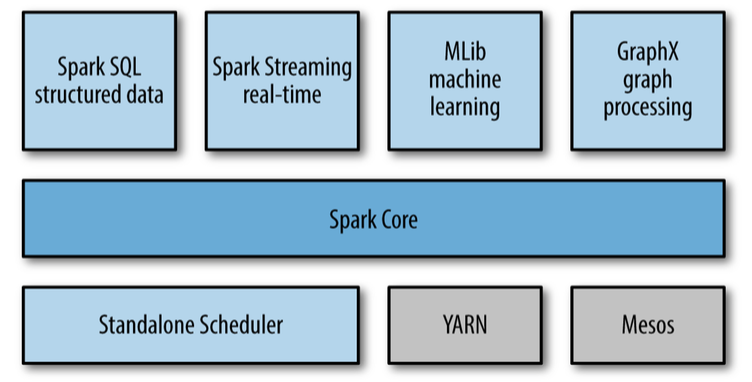
如上图所示,Spark的技术栈包括了这些模块:
-
核心模块 :Spark Core
-
集群管理
-
Standalone Scheduler
-
YARN
-
Mesos
-
Spark SQL
-
Spark 流 Streaming
-
Spark 机器学习 MLLib
-
GraphX 图处理模块
安装和启动Spark
Spark Python Shell
> bin/pyspark
Spark Ipython Shell
1> IPYTHON=1 ./bin/pyspark
2> IPYTHON_OPTS="notebook" ./bin/pyspark
Spark 架构
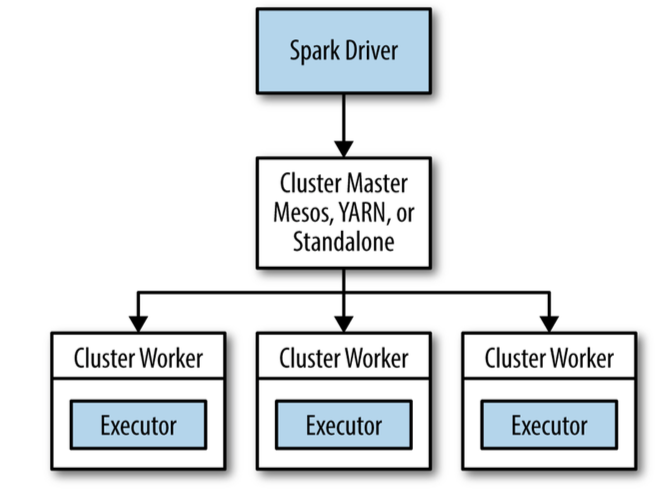
初始化 Spark Context
在使用Spark的功能之前首先要初始化Spark的context,Context包含了Spark的连接和配置信息。
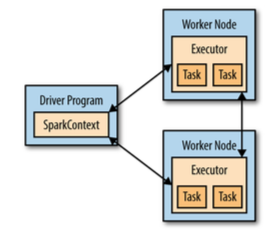
Spark Context,Driver和Worker节点之间的关系如下图:
1from pyspark import SparkConf, SparkContext
2conf = SparkConf().setMaster("local").setAppName("My App")
3sc = SparkContext(conf = conf)
创建 RDD
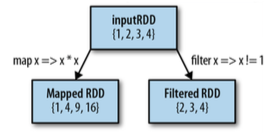
RDD是Spark的基本数据模型,所有的操作都是基于RDD。RDD是inmutable(不可改变)的。
1lines = sc.textFile("README.md")
2pythonLines = lines.filter(lambda line: "Python" in line)
3pythonLines.first()
4pythonLines.count()
RDD 操作:
下面是一些对RDD的变形操作
RDD Transformation on {1,2,3,4}

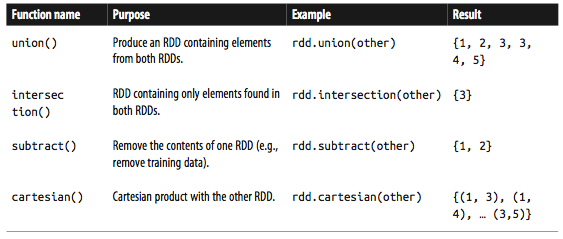
两个RDD之间的操作, Transformation on {1,2,3} and {3,4,5}
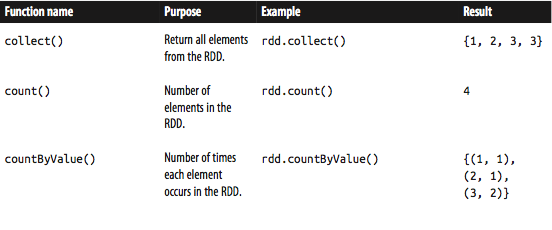
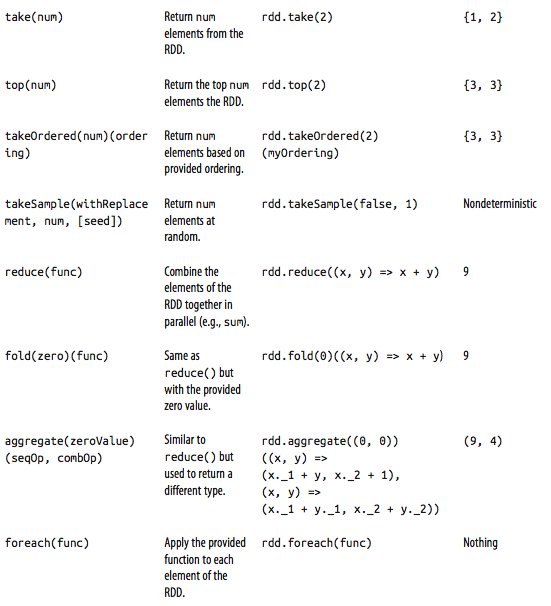
RDD actions on {1,2,3,3}
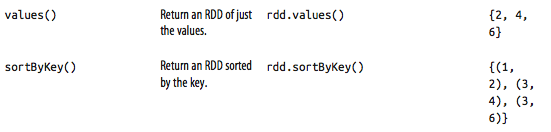
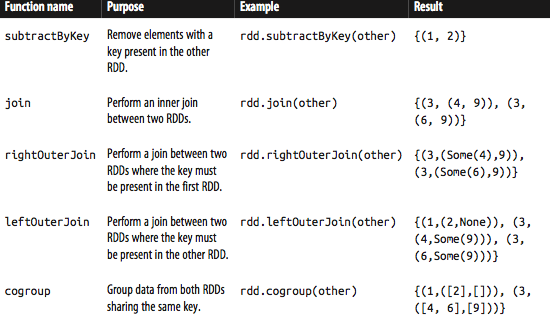
Transformation on pair RDD {(1,2),(3,4),(3,6)}

Transform on two pair RDDs {(1,2),(3,4),(3,6)}, {(3,9)}
Spark 流 stream
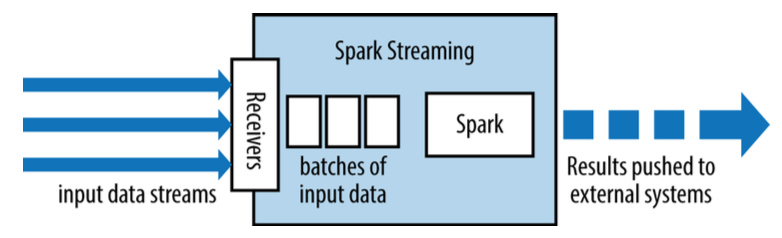
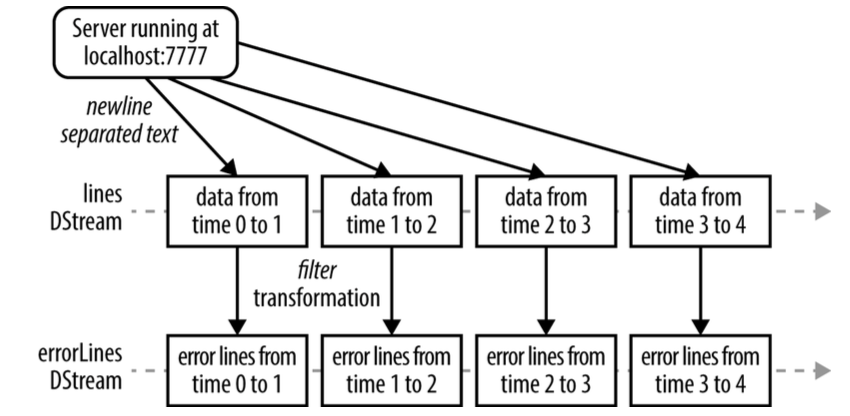
Spark流基于RDD,可以理解对小的时间片段上的RDD操作。

SparkSQL
Spark SQL可以用于操作和查询结构化和半结构化的数据。包括Hive,JSON, CSV等。
1# Import Spark SQL
2from pyspark.sql import HiveContext, Row
3# Or if you can't include the hive requirements
4from pyspark.sql import SQLContext, Row
5
6input = hiveCtx.jsonFile(inputFile)
7# Register the input schema RDDinput.registerTempTable("tweets")
8# Select tweets based on the retweetCount
9topTweets = hiveCtx.sql("SELECT text, retweetCount FROM tweets ORDER BY retweetCount LIMIT 10")
Spark SQL支持JDBC
SparkML
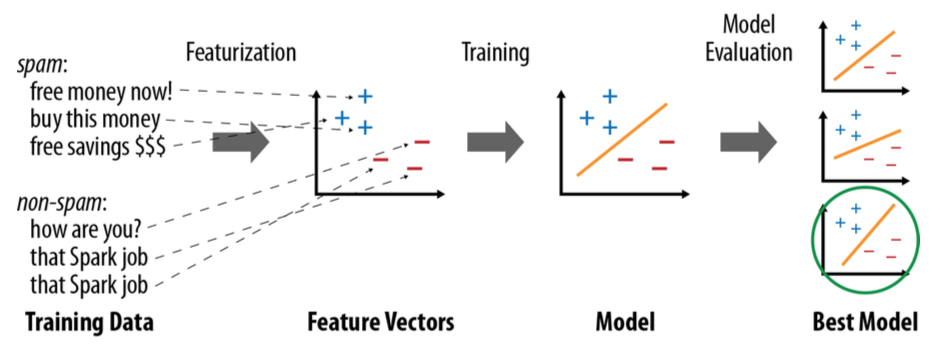
机器学习的基本流程如下:
-
获得数据
-
从数据中提取特征
-
对数据进行有监督的或者无监督的学习,训练机器学习的模型
-
对模型进行评估,找出最佳模型
由于Spark的架构特点,Spark支持的机器学习算法是哪些可以并行的算法。
1from pyspark.mllib.regression import LabeledPoint
2from pyspark.mllib.feature import HashingTF
3from pyspark.mllib.classification import LogisticRegressionWithSGD
4
5spam = sc.textFile("spam.txt")normal = sc.textFile("normal.txt")
6
7# Create a HashingTF instance to map email text to vectors of 10,000 features.
8
9tf = HashingTF(numFeatures = 10000)
10# Each email is split into words, and each word is mapped to one feature.
11spamFeatures = spam.map(lambda email: tf.transform(email.split(" ")))
12normalFeatures = normal.map(lambda email: tf.transform(email.split(" ")))
13
14# Create LabeledPoint datasets for positive (spam) and negative (normal) examples.
15
16positiveExamples = spamFeatures.map(lambda features: LabeledPoint(1, features))
17negativeExamples = normalFeatures.map(lambda features: LabeledPoint(0, features))
18trainingData = positiveExamples.union(negativeExamples)
19trainingData.cache() # Cache since Logistic Regression is an iterative algorithm.
20
21# Run Logistic Regression using the SGD algorithm.
22
23model = LogisticRegressionWithSGD.train(trainingData)
24
25# Test on a positive example (spam) and a negative one (normal). We first apply
26# the same HashingTF feature transformation to get vectors, then apply the model.
27posTest = tf.transform("O M G GET cheap stuff by sending money to ...".split(" "))
28negTest = tf.transform("Hi Dad, I started studying Spark the other ...".split(" "))
29print "Prediction for positive test example: %g" % model.predict(posTest)
30print "Prediction for negative test example: %g" % model.predict(negTest)