
1.引用需要的组件
这里用到_AppRegistry,StyleSheet,Text,View_
1import React, { Component } from 'react';
2import {
3  AppRegistry,//JS运行所有React Native应用的入口,必须引用
4  StyleSheet,//样式
5  Text,//文本框
6  View,//视图
7} from 'react-native';
2.所有的标签都必须包含在<View></View>内部。
3.<Text></Text>标签为文本标签。可选属性有以下:
- numberOfLines 文本行数限制,添加后超过限制行数文本会在末尾默认以...的形式省略。
- ellipsizeMode 设置文本缩略格式,配合numberOfLines使用.
- onPress 点击事件
- style 样式
4.style样式的创建。
-
可以直接在Text标签内写样式 style={{}}
<Text numberOfLines={1} style={{color:'blue'}}> 121212121212121212121212
</Text> -
也可以类似网页里写样式文件一样,用StyleSheet.create({ })创建自定义的style样式.
例:创建mystyle1和mystyle2样式
1const styles = StyleSheet.create({
2   mystyle1: {
3  	color:'red',//颜色
4    fontSize: 10,//字号
5    textAlign: 'center',//居中
6
7  },
8  mystyle2:{
9  	fontSize:35,//字号
10  	fontWeight:'bold',//粗细
11  	textAlign:'center',//居中
12  	fontStyle:'italic',//斜体
13  	color:'blue',//颜色
14  	textDecorationLine:'underline'//下划线
15  }
16});
5.自定义样式的引用。
属性的引用方式为 属性name={属性值}。
例
1 <View style={styles.container}>
2        <Text numberOfLines={1}    style={styles.mystyle2}>
3	        121212121212121212121212
4        </Text>
5</View>
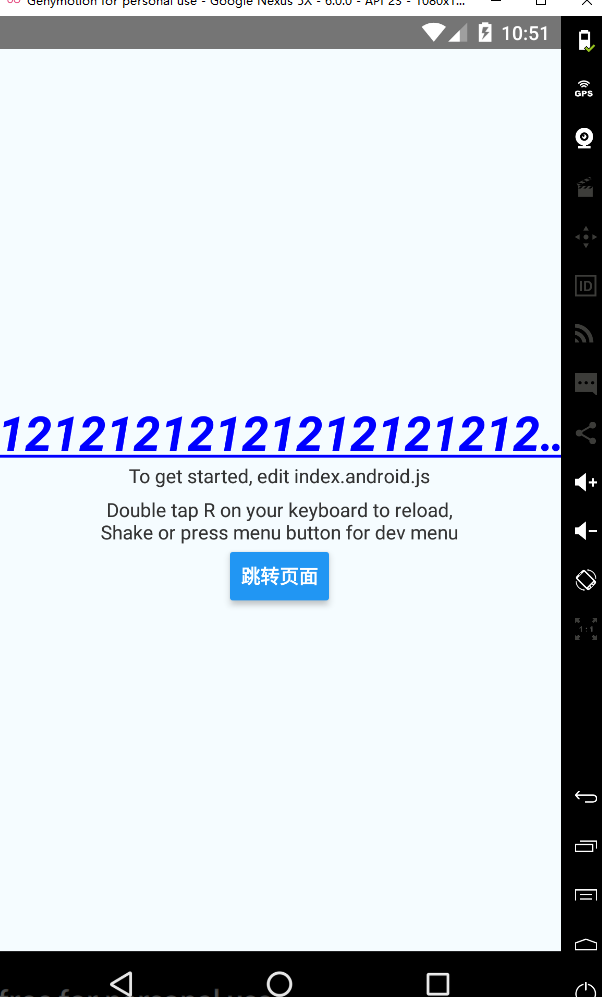
运行结果:(可以看到行数限制和mystyle2样式都已经生效)
6.关于样式的继承。
解释:字体样式的继承,即将Text嵌套于其他Text时,内部的 Text 组件可以继承外部 Text 组件的样式。
先上总体结论:
1Text标签互相嵌套时:
21.自身无样式,则可继承外部Text样式。
32.自身样式和外部Text样式冲突,自身样式优先级最高,覆盖其他冲突样式。
43.自身样式和外部Text样式存在部分冲突,则冲突的样式自身优先级最高覆盖外部Text样式,其他不冲突的样式可实现继承样式。
实例1:
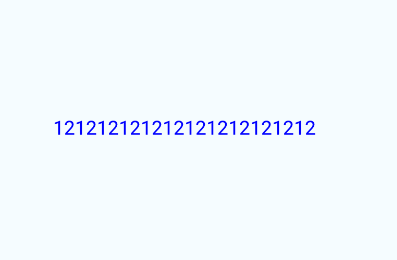
《1》内部的<Text>不设置样式,外部的<Text>设置样式
1  //外部的样式设置为蓝色,内部的Text不写样式
2 <Text numberOfLines={1}    style={{color:'blue'}}>
3        <Text>
4	         121212121212121212121212
5        </Text>
6  </Text>
运行结果(外部的蓝色设置生效。):
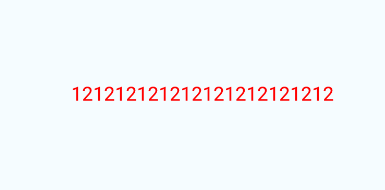
《2》内部的<Text>设置样式,外部的<Text>设置不同的样式,样式冲突的情况。
1//内部设置样式颜色为红色,和外部Text样式冲突
2 <Text numberOfLines={1}    style={{color:'blue'}}>
3        <Text style={{color:'red'}}>
4	         121212121212121212121212
5        </Text>
6  </Text>
运行结果(冲突时,内部的红色生效):
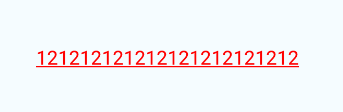
《3》内部的<Text>设置样式,外部的<Text>设置不同的样式,样式不冲突的情况。
1//内部设置样式颜色为红色,和外部Text样式蓝色冲突,但是外部样式多了一个下划线
2 <Text numberOfLines={1}    style={{color:'blue',textDecorationLine:'underline'}}>
3        <Text style={{color:'red'}}>
4	         121212121212121212121212
5        </Text>
6  </Text>
运行结果(冲突的部分内部样式覆盖外部样式,即自身样式覆盖其他样式,自身样式权重最大优先级最高。内部不存在的样式,会继承外部的样式,如示例中的下划线):
7.样式先后顺序的影响。
在同一个Text内写两个(多个)样式对象,或者引用两个(多个)样式时,后引用的覆盖先引用的。
示例:
同时引用两个样式style={{样式1},{样式2}}先设置样式蓝色,后设置红色:
1     <View style={styles.container}>
2        <Text numberOfLines={1}
3         style={{color:'blue',textDecorationLine:'underline'},{color:'red'}}>
4	         测试引用两个不同的样式
5        </Text>
6      </View>
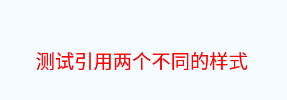
后写的红色生效,并且没有样式1中的下划线。反过来把红色放前边,则蓝色生效。
结论:当两个(多个)样式引用时,后边的会覆盖前边的,而且是直接覆盖,跟样式继承的区别是即使不冲突的属性也会被覆盖。
附上源码
1/**
2 * Sample React Native App
3 * https://github.com/facebook/react-native
4 * @flow
5 */
6
7import React, { Component } from 'react';
8import {
9  AppRegistry,
10  StyleSheet,
11  Text,
12  View,
13  Button,
14  Alert
15} from 'react-native';
16//引入navbar
17
18export default class MyFirstDemo extends Component {
19  render() {
20
21    return (
22      <View style={styles.container}>
23        <Text numberOfLines={1}    style={styles.mystyle2}>
24	         121212121212121212121212
25	        <Text  style={styles.style1}>
26	         1231231111
27	        </Text>
28	        <Text >
29	         123123aaaa
30	        </Text>
31        </Text>
32        <Text style={styles.instructions}>
33          To get started, edit index.android.js
34        </Text>
35        <Text style={styles.instructions}>
36          Double tap R on your keyboard to reload,{'\n'}
37          Shake or press menu button for dev menu
38        </Text>
39        <Button title="跳转页面" onPress={onButtonPress} >
40
41        </Button>
42      </View>
43    );
44  }
45}
46
47const styles = StyleSheet.create({
48  container: {
49    flex: 1,
50    justifyContent: 'center',
51    alignItems: 'center',
52    backgroundColor: '#F5FCFF',
53  },
54  mystyle1: {
55  	color:'red',
56    fontSize: 10,
57    textAlign: 'center',
58    margin: 10,
59  },
60  mystyle2:{
61  	fontSize:35,
62  	fontWeight:'bold',
63  	textAlign:'center',
64  	fontStyle:'italic',
65  	color:'blue',
66  	textDecorationLine:'underline'
67  },
68  instructions: {
69    textAlign: 'center',
70    color: '#333333',
71    marginBottom: 5,
72  }
73
74});
75const onButtonPress=()=>{
76  Alert.alert('Button has been pressed!');
77}
78AppRegistry.registerComponent('MyFirstDemo', () => MyFirstDemo);