
效果图:
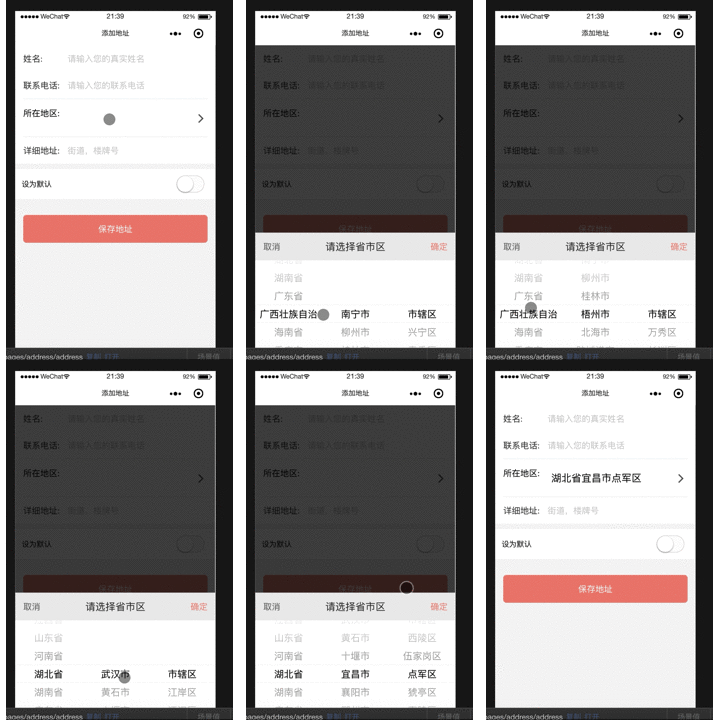
address_picker.tsx:
1import Taro, { Component } from '@tarojs/taro'
2import { View, PickerView, PickerViewColumn } from '@tarojs/components'
3import PropTypes from 'prop-types'
4import address from '../../utils/city.js'
5import './address_picker.scss'
6
7class AddressPicker extends Component {
8
9    state = {
10        value: [18, 11, 0],
11        provinces: address.provinces,
12        citys: address.citys[440000],
13        areas: address.areas[441400],
14        areaInfo: '',
15    }
16
17    cityChange (e) {
18        const pickerValue = e.detail.value
19        const { provinces, citys, value } = this.state
20        const provinceNum = pickerValue[0]
21        const cityNum = pickerValue[1]
22        const countyNum = pickerValue[2]
23        // 如果省份选择项和之前不一样,表示滑动了省份,此时市默认是省的第一组数据,
24        if (value[0] != provinceNum) {
25            const id = provinces[provinceNum].id
26            this.setState({
27                value: [provinceNum, 0, 0],
28                citys: address.citys[id],
29                areas: address.areas[address.citys[id][0].id]
30            })
31        } else if (value[1] != cityNum) {
32            // 滑动选择了第二项数据,即市,此时区显示省市对应的第一组数据
33            const id = citys[cityNum].id
34            console.log(id)
35            this.setState({
36                value: [provinceNum, cityNum, 0],
37                areas: address.areas[citys[cityNum].id]
38            })
39        } else {
40            // 滑动选择了区
41            this.setState({
42                value: [provinceNum, cityNum, countyNum]
43            })
44        }
45    }
46
47    //  params true代表传递地址,false不传递
48    handlePickerShow (params: boolean) {
49
50        if (params) {
51            console.log(this.props)
52            const { provinces, citys, areas, value, areaInfo } = this.state
53            // 将选择的城市信息显示到输入框
54            const tempAreaInfo = provinces[value[0]].name + '' + citys[value[1]].name + areas[value[2]].name
55            this.setState({
56                areaInfo: tempAreaInfo
57            }, () => {
58                this.props.onHandleToggleShow(this.state.areaInfo)
59            })
60        }
61    }
62
63    render () {
64        const { provinces, citys, areas, value } = this.state
65        const { pickerShow } = this.props
66        return (
67            <View className={pickerShow? 'address-picker-container show': 'address-picker-container'} onClick={this.handlePickerShow.bind(this,true)}>
68                <View className="picker-content">
69                    <View className="dialog-header">
70                        <View className="dialog-button cancel" onClick={this.handlePickerShow.bind(this,false)}>取消</View>
71                        <View className="dialog-title">请选择省市区</View>
72                        <View className="dialog-button" onClick={this.handlePickerShow.bind(this, true)}>确定</View>
73                    </View>
74                    <PickerView onChange={this.cityChange} value={value} className='picker-view-wrap'>
75                        <PickerViewColumn>
76                            {
77                                provinces.map((province, index) => {
78                                    return <View className="picker-item" key={index}>{province.name}</View>
79                                })
80                            }
81                        </PickerViewColumn>
82                        <PickerViewColumn>
83                            {
84                                citys.map((city, index) => {
85                                    return <View className="picker-item" key={index}>{city.name}</View>
86                                })
87                            }
88                        </PickerViewColumn>
89                        <PickerViewColumn>
90                            {
91                                areas.map((area, index) => {
92                                    return <View className="picker-item" key={index}>{area.name}</View>
93                                })
94                            }
95                        </PickerViewColumn>
96                    </PickerView>
97                </View>
98            </View>
99        )
100    }
101}
102
103AddressPicker.propTypes = {
104    pickerShow: PropTypes.bool.isRequired,
105    onHandleToggleShow: PropTypes.func.isRequired,
106}
107
108export default AddressPicker
样式文件:
1.address-picker-container {
2    width: 100%;
3    height: 100vh;
4    display: flex;
5    z-index: 12;
6    background: rgba(0, 0, 0, 0.7);
7    flex-direction: column;
8    justify-content: center;
9    align-items: center;
10    position: fixed;
11    bottom: 0px;
12    left: 0px;
13    visibility: hidden;
14    &.show {
15        visibility: visible;
16        .picker-content {
17            transform: translateY(0);
18            transition: all 0.4s ease;
19        }
20    }
21}
22
23.picker-content {
24    position: absolute;
25    width: 100%;
26    bottom: 0;
27    background-color: #fff;
28    transform: translateY(150%);
29    transition: all 0.4s ease;
30
31    .picker-view-wrap {
32        width: 100%;
33        height: 400px;
34    }
35}
36
37.picker-item {
38    line-height: 70px;
39    font-size: 36px;
40    text-align: center;
41}
42
43.dialog-header {
44    width: 100%;
45    background: #ededed;
46    display: flex;
47    justify-content: space-between;
48    align-items: center;
49
50    .dialog-title {
51        color: #333;
52    }
53
54    .dialog-button {
55        display: inline-block;
56        text-align: center;
57        font-size: 32px;
58        color: #E28E81;
59        padding: 30px;
60        &.cancel {
61            color: #666;
62        }
63    }
64}
地址信息存放在city.js,传送门:https://pan.baidu.com/s/1G2gCoiJ7ujt2x8sEXKuLQg
注意:
父组件调用子组件,传递函数时,函数名需要以on开头命名,否则子组件无法识别该函数,比如:
<AddressPicker pickerShow={pickerShow} onHandleToggleShow={this.toggleAddressPicker.bind(this)}/>