Springboot整合elasticsearch以及接口开发
搭建elasticsearch集群
搭建过程略(我这里用的是elasticsearch5.5.2版本)
写入测试数据
新建索引book(非结构化索引)
PUT http://192.168.100.102:9200/book
修改mapping(结构化索引)
1POST http://192.168.100.102:9200/book/novle/_mappings
2
3{
4
5  "novel": {
6
7    "properties": {
8
9      "word_count": {"type": "integer"},
10
11      "author": {"type": "keyword"},
12
13      "title": {"type": "text"},
14
15      "publish_date": {"type": "date","format": "yyyy-MM-dd HH:mm:ss||yyyy-MM-dd||epoch_millis"}
16
17    }
18
19  }
20
21}
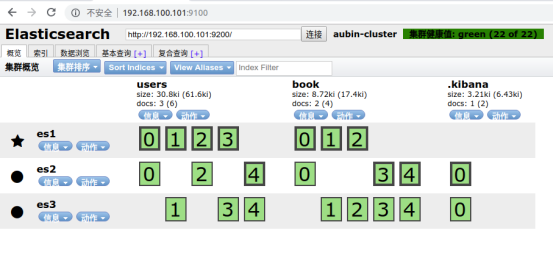
查看新建索引结果(我这里使用的是elasticsearch-head插件)
测试数据写入
1PUT http://192.168.100.102:9200/book/novel/1
2
3{
4
5"word_count": 1000000,
6
7"author": "金庸",
8
9"title": "神雕侠侣",
10
11"publish_date": "1997-10-1"
12
13}
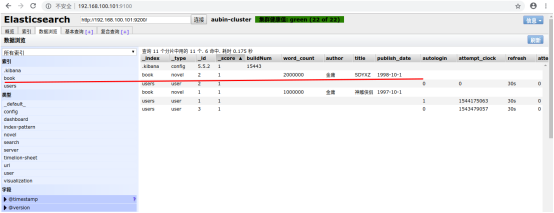
查看数据写入结果:
Springboot整合elasticsearch
新建springboot项目
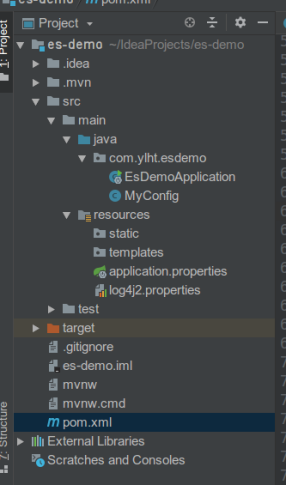
目录结构
Pom文件
1<?xml version="1.0" encoding="UTF-8"?>
2<project xmlns="http://maven.apache.org/POM/4.0.0" xmlns:xsi="http://www.w3.org/2001/XMLSchema-instance"
3         xsi:schemaLocation="http://maven.apache.org/POM/4.0.0 http://maven.apache.org/xsd/maven-4.0.0.xsd">
4    <modelVersion>4.0.0</modelVersion>
5    <parent>
6        <groupId>org.springframework.boot</groupId>
7        <artifactId>spring-boot-starter-parent</artifactId>
8        <!--<version>2.1.1.RELEASE</version>-->
9        <version>1.5.6.RELEASE</version>
10        <relativePath/> <!-- lookup parent from repository -->
11    </parent>
12    <groupId>com.ylht</groupId>
13    <artifactId>es-demo</artifactId>
14    <version>0.0.1-SNAPSHOT</version>
15    <name>es-demo</name>
16    <description>Demo project for Spring Boot</description>
17
18    <properties>
19        <java.version>1.8</java.version>
20        <es.version>5.5.2</es.version>
21    </properties>
22
23    <dependencies>
24        <dependency>
25            <groupId>org.springframework.boot</groupId>
26            <artifactId>spring-boot-starter-web</artifactId>
27        </dependency>
28        <!-- https://mvnrepository.com/artifact/org.elasticsearch.client/transport -->
29        <dependency>
30            <groupId>org.elasticsearch.client</groupId>
31            <artifactId>transport</artifactId>
32            <version>${es.version}</version>
33        </dependency>
34
35        <dependency>
36            <groupId>org.elasticsearch</groupId>
37            <artifactId>elasticsearch</artifactId>
38            <version>${es.version}</version>
39        </dependency>
40
41        <dependency>
42            <groupId>org.apache.logging.log4j</groupId>
43            <artifactId>log4j-api</artifactId>
44            <version>2.7</version>
45        </dependency>
46
47        <!-- https://mvnrepository.com/artifact/org.apache.logging.log4j/log4j-core -->
48        <dependency>
49            <groupId>org.apache.logging.log4j</groupId>
50            <artifactId>log4j-core</artifactId>
51            <version>2.7</version>
52        </dependency>
53
54        <dependency>
55            <groupId>org.springframework.boot</groupId>
56            <artifactId>spring-boot-devtools</artifactId>
57            <scope>runtime</scope>
58        </dependency>
59
60        <dependency>
61            <groupId>org.springframework.boot</groupId>
62            <artifactId>spring-boot-starter-test</artifactId>
63            <scope>test</scope>
64        </dependency>
65    </dependencies>
66
67    <build>
68        <plugins>
69            <plugin>
70                <groupId>org.springframework.boot</groupId>
71                <artifactId>spring-boot-maven-plugin</artifactId>
72            </plugin>
73        </plugins>
74    </build>
75</project>
log4j2.properties
1appender.console.type=Console
2appender.console.name=console
3appender.console.layout.type=PatternLayout
4appender.console.layout.pattern=[%t] %-5p %c %m%n
5
6rootLogger.level=info
7rootLogger.appenderRef.console.ref=console
MyConfig类
1package com.ylht.esdemo;
2
3import org.elasticsearch.client.transport.TransportClient;
4import org.elasticsearch.common.settings.Settings;
5import org.elasticsearch.common.transport.InetSocketTransportAddress;
6import org.elasticsearch.transport.client.PreBuiltTransportClient;
7import org.springframework.context.annotation.Bean;
8import org.springframework.context.annotation.Configuration;
9
10import java.net.InetAddress;
11import java.net.UnknownHostException;
12
13@Configuration
14public class MyConfig {
15
16    @Bean
17    public TransportClient client() throws UnknownHostException {
18        InetSocketTransportAddress es1 = new InetSocketTransportAddress(
19                InetAddress.getByName("192.168.100.101"), 9300
20        );
21        InetSocketTransportAddress es2 = new InetSocketTransportAddress(
22                InetAddress.getByName("192.168.100.102"), 9300
23        );
24        InetSocketTransportAddress es3 = new InetSocketTransportAddress(
25                InetAddress.getByName("192.168.100.103"), 9300
26        );
27
28        Settings settings = Settings.builder()
29                .put("cluster.name", "aubin-cluster")
30                .build();
31
32        TransportClient client = new PreBuiltTransportClient(settings);
33        client.addTransportAddresses(es1, es2, es3);
34        return client;
35    }
36}
EsDemoApplication****类文件
1package com.ylht.esdemo;
2
3import org.elasticsearch.action.get.GetResponse;
4import org.elasticsearch.client.transport.TransportClient;
5import org.springframework.beans.factory.annotation.Autowired;
6import org.springframework.boot.SpringApplication;
7import org.springframework.boot.autoconfigure.SpringBootApplication;
8import org.springframework.boot.autoconfigure.jdbc.DataSourceAutoConfiguration;
9import org.springframework.boot.autoconfigure.orm.jpa.HibernateJpaAutoConfiguration;
10import org.springframework.http.HttpStatus;
11import org.springframework.http.ResponseEntity;
12import org.springframework.web.bind.annotation.GetMapping;
13import org.springframework.web.bind.annotation.RequestParam;
14import org.springframework.web.bind.annotation.RestController;
15
16import javax.xml.ws.Response;
17
18@SpringBootApplication(exclude = {DataSourceAutoConfiguration.class, HibernateJpaAutoConfiguration.class})
19@RestController
20public class EsDemoApplication {
21
22    @Autowired
23    private TransportClient client;
24
25    @GetMapping("/")
26    public String index() {
27        return "index";
28    }
29
30    @GetMapping(value = "/get/book/novel")
31    public ResponseEntity get(@RequestParam(name = "id", defaultValue = "") String id) {
32        try {
33
34            if (id.isEmpty()) {
35                return new ResponseEntity(HttpStatus.NOT_FOUND);
36            }
37            GetResponse response = this.client.prepareGet("book", "novel", id)
38                    .get();
39            if (!response.isExists()) {
40                return new ResponseEntity(HttpStatus.NOT_FOUND);
41            }
42            return new ResponseEntity(response.getSource(), HttpStatus.OK);
43        } catch (Exception e) {
44            e.printStackTrace();
45            return new ResponseEntity(HttpStatus.INTERNAL_SERVER_ERROR);
46        }
47    }
48
49    public static void main(String[] args) {
50        SpringApplication.run(EsDemoApplication.class, args);
51    }
52}
启动项目
(启动项目之前最好先 mvn clean,mvn package,mvn install)
启动方式有多种
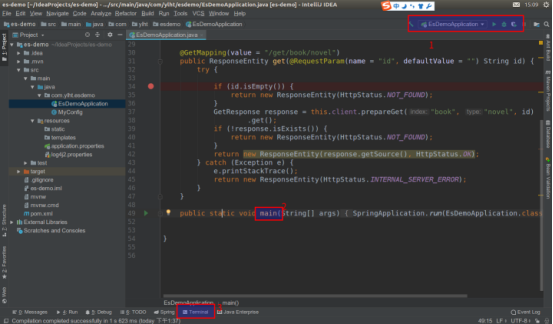
- 直接点击绿色三角按钮运行(它右边一个是debug运行)
- 直接运行main方法
- 点击Teminal,输入mvn spring-boo:run
运行出错可以看看我的博客https://i.cnblogs.com/posts?categoryid=1373086
项目正常启动后

接口测试
我这里使用的ponstman
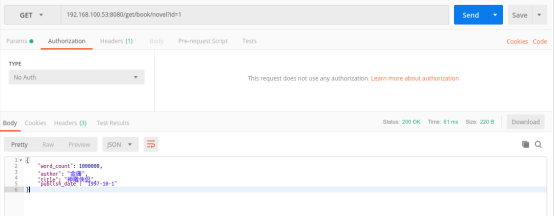
GET 192.168.100.53:8080/get/book/novel?id=1
结果图