
有些情况就是需要查找某个字符串并高亮,但有些需求就是需要全局模糊查找,找到符合的字符串并高亮。造了个小轮子
###效果图 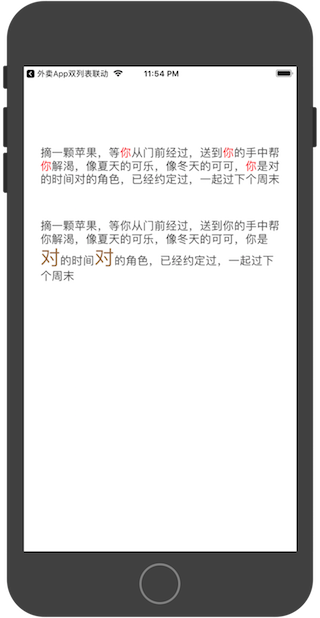
1#pragma mark -- 设置在一个文本中所有特殊字符的特殊颜色
2+ (NSMutableAttributedString *)setAllText:(NSString *)allStr andSpcifiStr:(NSString *)keyWords withColor:(UIColor *)color specifiStrFont:(UIFont *)font{
3    NSMutableAttributedString *mutableAttributedStr = [[NSMutableAttributedString alloc] initWithString:allStr];
4    if (color == nil) {
5        color = [UIColor redColor];
6    }
7    if (font == nil) {
8        font = [UIFont systemFontOfSize:17];
9    }
10
11
12    for (NSInteger j=0; j<=keyWords.length-1; j++) {
13
14        NSRange searchRange = NSMakeRange(0, [allStr length]);
15        NSRange range;
16        NSString *singleStr = [keyWords substringWithRange:NSMakeRange(j, 1)];
17        while
18            ((range = [allStr rangeOfString:singleStr options:NSLiteralSearch range:searchRange]).location != NSNotFound) {
19                //改变多次搜索时searchRange的位置
20                searchRange = NSMakeRange(NSMaxRange(range), [allStr length] - NSMaxRange(range));
21                //设置富文本
22                [mutableAttributedStr addAttribute:NSForegroundColorAttributeName value:color range:range];
23                [mutableAttributedStr addAttribute:NSFontAttributeName value:font range:range];
24            }
25    }
26    return mutableAttributedStr;
27}