
Here is a more complete answer with regard to InnoDB. It is a bit of a lengthy process, but can be worth the effort.
Keep in mind that /var/lib/mysql/ibdata1 is the busiest file in the InnoDB infrastructure. It normally houses six types of information:
-
Table Data
-
Table Indexes
-
Rollback Segments
-
Undo Space
-
Table Metadata (Data Dictionary)
-
Double Write Buffer (background writing to prevent reliance on OS caching)
-
Insert Buffer (managing changes to non-unique secondary indexes)
InnoDB Architecture
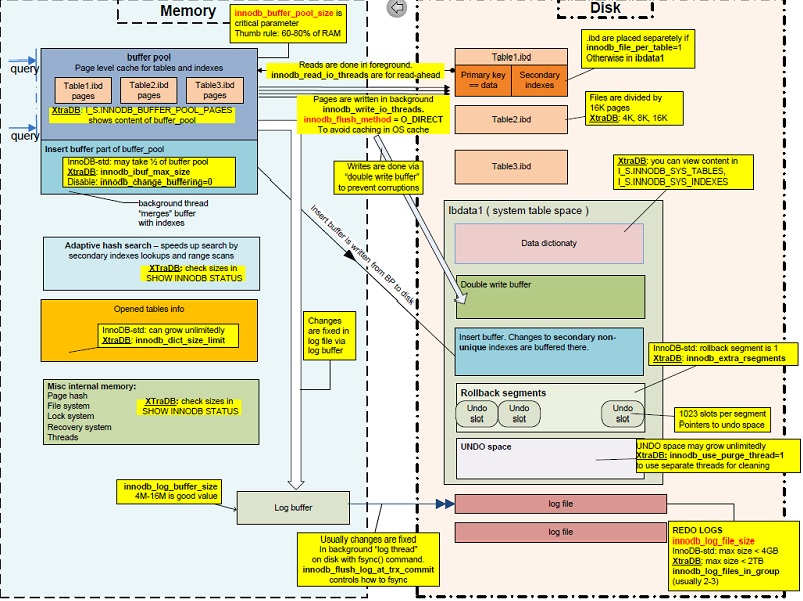
Many people create multiple ibdata files hoping for better disk-space management and performance, however that belief is mistaken.
Can I run OPTIMIZE TABLE ?
Unfortunately, running OPTIMIZE TABLE against an InnoDB table stored in the shared table-space file ibdata1 does two things:
-
Makes the table’s data and indexes contiguous inside
ibdata1 -
Makes
ibdata1grow because the contiguous data and index pages are appended toibdata1
You can however, segregate Table Data and Table Indexes from ibdata1 and manage them independently.
Can I run OPTIMIZE TABLE with innodb_file_per_table ?
Suppose you were to add innodb_file_per_table to /etc/my.cnf (my.ini). Can you then just run OPTIMIZE TABLE on all the InnoDB Tables?
Good News : When you run OPTIMIZE TABLE with innodb_file_per_table enabled, this will produce a .ibd file for that table. For example, if you have table mydb.mytable witha datadir of /var/lib/mysql, it will produce the following:
-
/var/lib/mysql/mydb/mytable.frm -
/var/lib/mysql/mydb/mytable.ibd
The .ibd will contain the Data Pages and Index Pages for that table. Great.
Bad News : All you have done is extract the Data Pages and Index Pages of mydb.mytable from living in ibdata. The data dictionary entry for every table, including mydb.mytable, still remains in the data dictionary (See the Pictorial Representation of ibdata1). YOU CANNOT JUST SIMPLY DELETE ibdata1 AT THIS POINT !!! Please note that ibdata1 has not shrunk at all.
InnoDB Infrastructure Cleanup
To shrink ibdata1 once and for all you must do the following:
-
Dump (e.g., with
mysqldump) all databases into a.sqltext file (SQLData.sqlis used below) -
Drop all databases (except for
mysqlandinformation_schema) CAVEAT : As a precaution, please run this script to make absolutely sure you have all user grants in place:1mkdir /var/lib/mysql_grants 2cp /var/lib/mysql/mysql/* /var/lib/mysql_grants/. 3chown -R mysql:mysql /var/lib/mysql_grants -
Login to mysql and run
SET GLOBAL innodb_fast_shutdown = 0;(This will completely flush all remaining transactional changes fromib_logfile0andib_logfile1) -
Shutdown MySQL
-
Add the following lines to
/etc/my.cnf(ormy.inion Windows)1[mysqld]innodb_file_per_table 2innodb_flush_method=O_DIRECT 3innodb_log_file_size=1G 4innodb_buffer_pool_size=4G(Sidenote: Whatever your set for
innodb_buffer_pool_size, make sureinnodb_log_file_sizeis 25% ofinnodb_buffer_pool_size.Also: innodb_flush_method=O_DIRECT is not available on Windows)
-
Delete
ibdata*andib_logfile*, Optionally, you can remove all folders in/var/lib/mysql, except/var/lib/mysql/mysql. -
Start MySQL (This will recreate
ibdata1[10MB by default] andib_logfile0andib_logfile1at 1G each). -
Import
SQLData.sql
Now, ibdata1 will still grow but only contain table metadata because each InnoDB table will exist outside of ibdata1. ibdata1 will no longer contain InnoDB data and indexes for other tables.
For example, suppose you have an InnoDB table named mydb.mytable. If you look in /var/lib/mysql/mydb, you will see two files representing the table:
-
mytable.frm(Storage Engine Header) -
mytable.ibd(Table Data and Indexes)
With the innodb_file_per_table option in /etc/my.cnf, you can run OPTIMIZE TABLE mydb.mytable and the file /var/lib/mysql/mydb/mytable.ibd will actually shrink.
I have done this many times in my career as a MySQL DBA. In fact, the first time I did this, I shrank a 50GB ibdata1 file down to only 500MB!
Give it a try. If you have further questions on this, just ask. Trust me; this will work in the short term as well as over the long haul.
CAVEAT
At Step 6, if mysql cannot restart because of the mysql schema begin dropped, look back at Step 2. You made the physical copy of the mysql schema. You can restore it as follows:
1mkdir /var/lib/mysql/mysql
2cp /var/lib/mysql_grants/* /var/lib/mysql/mysql
3chown -R mysql:mysql /var/lib/mysql/mysql
Go back to Step 6 and continue