
Element Transfer组件默认支持单个list的穿梭
现业务需要支持两个list,效果如下
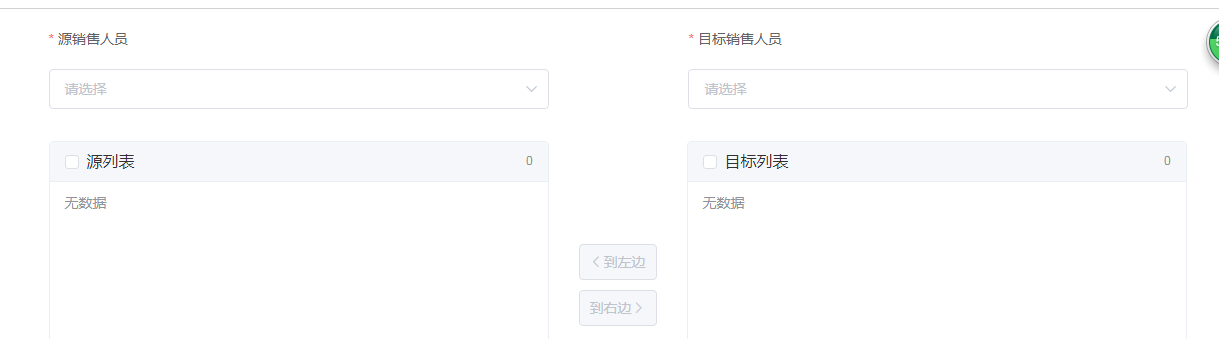
实现思路:
1、有选中才可穿梭
2、已穿梭源数据减少、目标增加(双向)
边界条件:
存储旧List((用于已穿梭后切换下拉框重置list等)
切下拉框时重置另一个list为旧list
左边下拉框选项同右边时 清空右边下拉的选项
代码
1<template>
2  <div class="page custom-MS custom-MS-ED">
3    <el-button class="right-top" type="primary" @click="updateBdCompany('qryForm')">保存</el-button>
4    <v-pageSection title="企业分配">
5      <el-row>
6        <el-form :inline="true" :model="qryInput" :rules="newRules" ref="qryForm" label-position="top">
7          <el-col :span="8" :offset="2">
8            <el-form-item label="源销售人员" prop="sourceAccount">
9              <el-select v-model="qryInput.sourceAccount" filterable placeholder="请选择" clearable @change="handleSourceChange">
10                <el-option v-for="item in bdList" :key="item.account" :label="item.name" :value="item.account">
11                  <span style="float: left">{{ item.name }}</span>
12                  <span style="float: right; color: #8492a6; font-size: 13px">{{ item.account }}</span>
13                </el-option>
14              </el-select>
15            </el-form-item>
16          </el-col>
17          <el-col :span="8" :offset="4">
18            <el-form-item label="目标销售人员" prop="targetAccount">
19              <el-select v-model="qryInput.targetAccount" filterable placeholder="请选择" clearable @change="handleTargetChange">
20                <el-option v-for="item in otherBdList" :key="item.account" :label="item.name" :value="item.account">
21                  <span style="float: left">{{ item.name }}</span>
22                  <span style="float: right; color: #8492a6; font-size: 13px">{{ item.account }}</span>
23                </el-option>
24              </el-select>
25            </el-form-item>
26          </el-col>
27        </el-form>
28      </el-row>
29      <el-row>
30        <el-col :span="8" :offset="2">
31          <el-table border height="450"
32            ref="multipleSourceTable"
33            :data="sourceCL"
34            tooltip-effect="dark"
35            style="width: 100%"
36            @selection-change="handleSourceSelectionChange">       <!-- 使用Element表格的单选多选功能 -->
37            <el-table-column
38              type="selection"
39              width="55">
40            </el-table-column>
41            <el-table-column label="操作">
42              <template slot-scope="scope">{{scope.row.shortName}} -- {{scope.row.poi}}</template>
43            </el-table-column>
44          </el-table>
45        </el-col>
46        <el-col :span="2" :offset="1">
47          <div style="height: 260px">
48            <el-button type="primary" style="margin-top: 150px" :disabled="multipleSourceSelection.length == 0" @click="addToTarget">到右边<i class="el-icon-arrow-right el-icon--right"></i></el-button>
49          </div>
50          <div>
51            <el-button type="primary" icon="el-icon-arrow-left" :disabled="multipleTargetSelection.length == 0" @click="addToSource">到左边</el-button>
52          </div>
53        </el-col>
54        <el-col :span="8" :offset="1">
55          <el-table border height="450"
56            ref="multipleTargetTable"
57            :data="targetCL"
58            tooltip-effect="dark"
59            style="width: 100%"
60            @selection-change="handleTargetSelectionChange">
61            <el-table-column
62              type="selection"
63              width="55">
64            </el-table-column>
65            <el-table-column label="操作">
66              <template slot-scope="scope">{{scope.row.shortName}}-{{scope.row.poi}}</template>
67            </el-table-column>
68          </el-table>
69        </el-col>
70      </el-row>
71    </v-pageSection>
72  </div>
73</template>
74<script>  //发ajax请求的服务
75  import CMService from '@/services/companyManagement-service'
76  export default {
77    data() {
78      return {
79        qryInput: {
80          sourceAccount: ''
81        },
82        updateParams: {},
83        companyIds: [],
84        bdList: [],
85        sourceCL: [],
86        targetCL: [],
87        oldSourceCL: [],
88        oldTargetCL: [],
89        multipleSourceSelection: [],
90        multipleTargetSelection: [],     //Element 数据校验
91        newRules: {
92          sourceAccount: {
93            required: true,
94            message: '请选择源销售人员'
95          },
96          targetAccount: {
97            required: true,
98            message: '请选择目标销售人员'
99          }
100        },
101      }
102    },
103    methods: {
104      qry() {
105        let vm = this
106        CMService.qryUnderlingUser(this.qryInput, function(response) {
107          vm.bdList = response.data.bdList
108        })
109      },
110      // 封装的方法 start
111      // 是否穿梭过
112      isTransfer(curList, oldList) {
113        if(curList.length != oldList.length){
114          return true
115        }else{
116          return curList.every(function(item){
117            return oldList.includes(item)
118          })
119        }
120      },
121      // 删除已选
122      deleteSelected(curList, multipleSelection) {
123        let resultList = []
124        curList.forEach(function(itemC, indexC){
125          let resultFlag =  multipleSelection.every(function(itemM, indexM){
126            return itemM.id != itemC.id
127          })
128          if(resultFlag) resultList.push(itemC)
129        })
130        return resultList
131      },
132      // 获取id组成的数组
133      getIdList(curList) {
134        let idList = []
135        curList.forEach(function(item, index){
136          idList.push(item.id)
137        })
138        return idList
139      },
140      // 封装的方法 end
141
142      qrySourceCL(account) {
143        if(!account){
144          this.sourceCL = []
145          return
146        }
147        let vm = this
148        if(this.isTransfer){
149          this.targetCL = this.oldTargetCL
150        }
151        CMService.getBdCompanyList({account: account}, function(response) {
152          debugger
153          vm.sourceCL = response.data.companyList
154          vm.oldSourceCL = vm._.clone(response.data.companyList)
155
156        })
157      },
158      qryTargetCL(account) {
159        if(!account){
160          this.targetCL = []
161          return
162        }
163        let vm = this
164        if(this.isTransfer){
165          this.sourceCL = this.oldSourceCL
166        }
167        CMService.getBdCompanyList({account: account}, function(response) {
168          vm.targetCL = response.data.companyList
169          vm.oldTargetCL = vm._.clone(response.data.companyList)
170        })
171      },
172      addToTarget() {
173        if(!this.qryInput.targetAccount){
174          this.$alert('请先选择目标销售人员')
175          return
176        }
177        this.sourceCL = this.deleteSelected(this.sourceCL, this.multipleSourceSelection)
178        this.targetCL = this.targetCL.concat(this.multipleSourceSelection)
179      },
180      addToSource() {
181        if(!this.qryInput.sourceAccount){
182          this.$alert('请先选择目标销售人员')
183          return
184        }
185        this.targetCL = this.deleteSelected(this.targetCL, this.multipleTargetSelection)
186        this.sourceCL = this.sourceCL.concat(this.multipleTargetSelection)
187      },
188      updateBdCompany(formName) {
189        let vm = this
190        this.$refs[formName].validate((valid) => {
191          if (valid) {
192            this.updateParams.companyIds = this.getIdList(this.targetCL)
193            CMService.updateBdCompany(this.updateParams, function(response) {
194              vm.$alert('修改成功').then(() => {
195                vm.dialogModifyFormVisible = false
196                vm.qry()
197              })
198            })
199          } else {
200            console.log('error submit!!')
201            return false
202          }
203        })
204      },
205      handleSourceChange(account) {
206        this.qrySourceCL(account)
207      },
208      handleTargetChange(account) {
209        this.qryTargetCL(account)
210        this.updateParams.account = account
211      },
212      toggleSelection(rows) {
213        if (rows) {
214          rows.forEach(row => {
215            this.$refs.multipleTable.toggleRowSelection(row);
216          });
217        } else {
218          this.$refs.multipleTable.clearSelection();
219        }
220      },
221      handleSourceSelectionChange(val) {
222        this.multipleSourceSelection = val;
223      },
224      handleTargetSelectionChange(val) {
225        this.multipleTargetSelection = val;
226      }
227    },
228    mounted() {
229      this.qry()
230    },
231    computed: {    //目标销售人员由源销售人员过滤得到
232      otherBdList: function(){
233        let vm = this
234        return this.bdList.filter(function(item, index){
235          return item.account !== vm.qryInput.sourceAccount
236        })
237      }
238    },
239  }
240</script>