
原理主要是通过鼠标点击UI的位置,将当前图片的alpha(透明通道)改为0,然后通过Shader叠加渲染
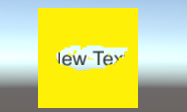
大致效果就是这样:
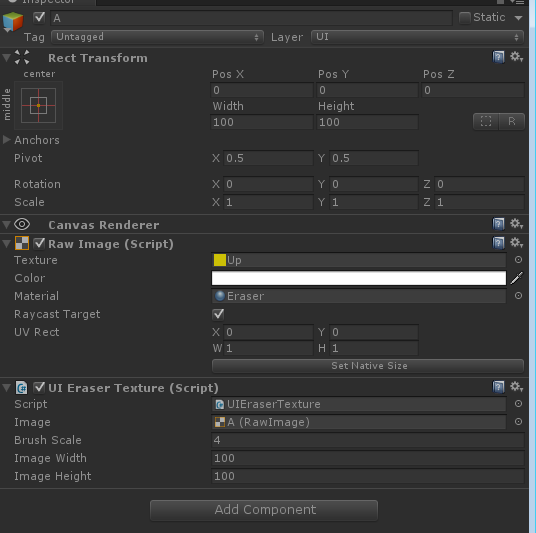
属性编辑窗口需要填写图片的大小和橡皮檫的大小
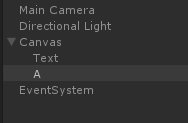
界面布局如下:
以下为C#脚本,主要负责计算当前需要镂空的像素位置,并将当前像素点上的颜色值Color.a=0
1using UnityEngine;
2using UnityEngine.UI;
3using UnityEngine.EventSystems;
4using System.Collections;
5
6public class UIEraserTexture : MonoBehaviour ,IPointerDownHandler,IPointerUpHandler{
7
8    public  RawImage image;
9    public  int brushScale = 4;
10    public int imageWidth;
11    public int imageHeight;
12    Texture2D texRender;
13    RectTransform mRectTransform;
14    Canvas canvas;
15
16    void Awake(){
17        mRectTransform = GetComponent<RectTransform> ();
18        canvas = GameObject.Find("Canvas").GetComponent<Canvas>();
19    }
20
21    void Start ()
22    {
23        //texRender = new Texture2D(image.mainTexture.width, image.mainTexture.height,TextureFormat.ARGB32,true);
24        texRender = new Texture2D(imageWidth, imageWidth,TextureFormat.ARGB32,true);
25        Reset ();
26
27    }
28
29    bool isMove = false;
30
31    public void OnPointerDown(PointerEventData data)
32    {
33        start = ConvertSceneToUI (data.position);
34        isMove = true;
35    }
36
37    public void OnPointerUp(PointerEventData data)
38    {
39        isMove = false;
40        OnMouseMove (data.position);
41        start = Vector2.zero;
42    }
43
44    void Update(){
45        if (isMove) {
46            OnMouseMove (Input.mousePosition);
47        }
48    }
49
50    Vector2 start = Vector2.zero;
51    Vector2 end = Vector2.zero;
52
53    Vector2 ConvertSceneToUI(Vector3 posi){
54        Vector2 postion;
55        if(RectTransformUtility.ScreenPointToLocalPointInRectangle(mRectTransform , posi, canvas.worldCamera, out postion)){
56            return postion;
57        }
58        return Vector2.zero;
59    }
60
61    void OnMouseMove(Vector2 position)
62    {
63        end = ConvertSceneToUI (position);
64        Draw (new Rect (end.x+texRender.width/2, end.y+texRender.height/2, brushScale, brushScale));
65
66        if (start.Equals (Vector2.zero)) {
67            return;
68        }
69
70        Rect disract = new Rect ((start+end).x/2+texRender.width/2, (start+end).y/2+texRender.height/2, Mathf.Abs (end.x-start.x), Mathf.Abs (end.y-start.y));
71
72        for (int x = (int)disract.xMin; x < (int)disract.xMax; x++) {
73            for (int y = (int)disract.yMin; y < (int)disract.yMax; y++) {
74                Draw (new Rect (x, y, brushScale, brushScale));
75            }
76        }
77
78        start = end;
79    }
80
81    void Reset(){
82
83        for (int i = 0; i < texRender.width; i++) {
84
85            for (int j = 0; j < texRender.height; j++) {
86
87                Color color = texRender.GetPixel (i,j);
88                color.a = 1;
89                texRender.SetPixel (i,j,color);
90            }
91        }
92
93        texRender.Apply ();
94        image.material.SetTexture ("_RendTex",texRender);
95
96    }
97
98    void Draw(Rect rect){
99        for (int x = (int)rect.xMin; x < (int)rect.xMax; x++) {
100            for (int y = (int)rect.yMin; y < (int)rect.yMax; y++) {
101                if (x < 0 || x > texRender.width || y < 0 || y > texRender.height) {
102                    return;
103                }
104                Color color = texRender.GetPixel (x,y);
105                color.a = 0;
106                texRender.SetPixel (x,y,color);
107            }
108        }
109
110        texRender.Apply();
111        image.material.SetTexture ("_RendTex",texRender);
112    }
113
114}
接下来就是shader了
1Shader "Unlit/Transparent Colored Eraser"
2{
3    Properties
4    {
5        _MainTex ("Base (RGB), Alpha (A)", 2D) = "white" {}
6        _RendTex ("Base (RGB), Alpha (A)", 2D) = "white" {}
7    }
8
9    SubShader
10    {
11        LOD 200
12
13        Tags
14        {
15            "Queue" = "Transparent"
16            "IgnoreProjector" = "True"
17            "RenderType" = "Transparent"
18        }
19
20        Pass
21        {
22            Cull Off
23            Lighting Off
24            ZWrite Off
25            Fog { Mode Off }
26            Offset -1, -1
27            ColorMask RGB
28            AlphaTest Greater .01
29            Blend SrcAlpha OneMinusSrcAlpha
30            ColorMaterial AmbientAndDiffuse
31
32            CGPROGRAM
33            #pragma vertex vert
34            #pragma fragment frag
35            #include "UnityCG.cginc"
36
37            sampler2D _MainTex;
38            float4 _MainTex_ST;
39            sampler2D _RendTex;
40
41            struct appdata_t
42            {
43                float4 vertex : POSITION;
44                half4 color : COLOR;
45                float2 texcoord : TEXCOORD0;
46            };
47
48            struct v2f
49            {
50                float4 vertex : POSITION;
51                half4 color : COLOR;
52                float2 texcoord : TEXCOORD0;
53            };
54
55            v2f vert (appdata_t v)
56            {
57                v2f o;
58                o.vertex = mul(UNITY_MATRIX_MVP, v.vertex);
59                o.color = v.color;
60                o.texcoord = v.texcoord;
61                return o;
62            }
63
64            half4 frag (v2f IN) : COLOR
65            {
66                // Sample the texture
67                half4 col = tex2D(_MainTex, IN.texcoord) * IN.color;
68                half4 rnd = tex2D(_RendTex, IN.texcoord) * IN.color;
69                col.a =  rnd.a;
70                return col;
71                }
72            ENDCG
73        }
74    }
75}