
1. 如何对事件进行管理,可以查看这个 http://my.oschina.net/abian/blog/497296
截图:
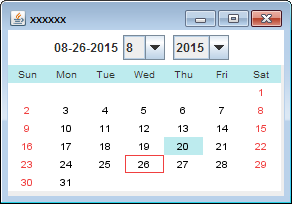
1package unit;
2
3import java.awt.BorderLayout;
4import java.awt.Color;
5import java.awt.Dimension;
6import java.awt.Font;
7import java.awt.GridLayout;
8import java.awt.event.ActionEvent;
9import java.awt.event.ActionListener;
10import java.text.SimpleDateFormat;
11import java.util.Calendar;
12import java.util.EventListener;
13import java.util.GregorianCalendar;
14import javax.swing.BorderFactory;
15import javax.swing.Box;
16import javax.swing.JButton;
17import javax.swing.JComboBox;
18import javax.swing.JFrame;
19import javax.swing.JLabel;
20import javax.swing.JPanel;
21import javax.swing.SwingConstants;
22import javax.swing.event.EventListenerList;
23
24/**
25 * 日期选择器 采用触发事件的方式,这样的话,就可以将DateChooser添加到任何组件之上,
26 * 任何组件都可以捕获日期选择的事件,然后进行相应处理
27 *
28 * @author changwen
29 * @date Aug 26, 2015
30 */
31
32@SuppressWarnings("all")
33public class DateChooser extends JPanel {
34
35	protected Color weekBackgroundColor = new Color(189, 235, 238);
36	protected Color weekendBtnFontColor = new Color(240, 64, 64); // color
37	protected Color selectedColor = weekBackgroundColor;
38	protected Font labelFont = new Font("Arial", Font.PLAIN, 10);
39	protected Color defaultBtnFontColor = Color.BLACK;
40	protected Color defaultBtnBackgroundColor = Color.WHITE;
41	private Calendar cal = null;
42	private Calendar todayCal = null;
43	private int year;
44	private int month;
45	private int day;
46	private JPanel controllPanel = null;
47	private JPanel dateContainerPanel = null;
48	private JLabel todayLabel = null;
49	protected DateButton[][] buttonDays = null;
50	public JComboBox monthChoice;
51	public JComboBox yearChoice;
52	protected String[] weekTitle = { "Sun", "Mon", "Tue", "Wed", "Thu", "Fri", "Sat" };
53	protected int[] months = new int[] { 1, 2, 3, 4, 5, 6, 7, 8, 9, 10, 11, 12 };
54	private EventListenerList actionListenerList = new EventListenerList();
55
56	public DateChooser() {
57		buttonDays = new DateButton[6][7];
58		cal = Calendar.getInstance();
59		todayCal = Calendar.getInstance();
60		this.year = cal.get(Calendar.YEAR);
61		this.month = cal.get(Calendar.MONTH);
62		this.day = cal.get(Calendar.DATE);
63		JPanel oprPanel = createControlPanel();
64		this.setLayout(new BorderLayout(0, 0));
65		dateContainerPanel = new JPanel();
66		createDayPanel(cal);
67		setActiveDay(day);
68		this.add(oprPanel, BorderLayout.NORTH);
69		this.add(dateContainerPanel, BorderLayout.CENTER);
70
71	}
72
73	@SuppressWarnings("all")
74	public JPanel createControlPanel() {
75		controllPanel = new JPanel();
76		controllPanel.setBackground(Color.WHITE);
77		Box hBox = Box.createHorizontalBox();
78		String strToday = formatDate(todayCal);
79		todayLabel = new JLabel(strToday);
80		monthChoice = new JComboBox();
81		for (int i = 0; i < months.length; i++) {
82			monthChoice.addItem(months[i]);
83		}
84
85		monthChoice.setSelectedItem(months[month]);
86		monthChoice.setPreferredSize(new Dimension(monthChoice.getPreferredSize().width,
87				monthChoice.getPreferredSize().height));
88
89		monthChoice.addActionListener(new ActionListener() {
90			public void actionPerformed(ActionEvent ae) {
91				int i = monthChoice.getSelectedIndex();
92				if (i >= 0) {
93					month = i;
94					Calendar cal = new GregorianCalendar(year, month, 1);
95					year = cal.get(Calendar.YEAR);
96					month = cal.get(Calendar.MONTH);
97					createDayPanel(cal);
98				}
99			}
100		});
101		int currentYear = todayCal.get(Calendar.YEAR);
102		final int gapYears = 10;
103		yearChoice = new JComboBox();
104		for (int i = currentYear - gapYears; i < currentYear + gapYears; i++) {
105			yearChoice.addItem(i);
106		}
107
108		yearChoice.setSelectedIndex(gapYears);
109		yearChoice.setPreferredSize(new Dimension(yearChoice.getPreferredSize().width,
110				yearChoice.getPreferredSize().height));
111
112		yearChoice.addActionListener(new ActionListener() {
113			public void actionPerformed(ActionEvent ae) {
114				System.out.println(yearChoice.getSelectedIndex());
115				if (yearChoice.getSelectedIndex() != gapYears) {
116					Integer selYear = (Integer) yearChoice.getSelectedItem();
117					Calendar cal = new GregorianCalendar(year, month, 1);
118					cal.set(Calendar.YEAR, selYear);
119					year = cal.get(Calendar.YEAR);
120					month = cal.get(Calendar.MONTH);
121					createDayPanel(cal);
122				}
123			}
124		});
125
126		hBox.add(todayLabel);
127		hBox.add(Box.createHorizontalStrut(5));
128		hBox.add(monthChoice);
129		hBox.add(Box.createHorizontalStrut(8));
130		hBox.add(yearChoice);
131		hBox.add(Box.createHorizontalStrut(8));
132
133		controllPanel.add(hBox, BorderLayout.NORTH);
134		return controllPanel;
135
136	}
137
138	/**
139	 * 创建日期组件
140	 *
141	 * @param cal
142	 *            void
143	 */
144	public void createDayPanel(Calendar cal) {
145		dateContainerPanel.removeAll();
146		dateContainerPanel.revalidate();
147		cal.set(Calendar.DAY_OF_MONTH, 1);
148		cal.add(Calendar.MONTH, 1);
149		cal.add(Calendar.DAY_OF_MONTH, -1);
150		int weeks = cal.get(Calendar.WEEK_OF_MONTH);
151
152		GridLayout grid = new GridLayout(7, 7, 0, 0);
153		dateContainerPanel.setLayout(grid);
154		cal.set(Calendar.DAY_OF_MONTH, 1);
155		int weekday = cal.get(Calendar.DAY_OF_WEEK);
156		System.out.println("weekday+" + weekday);
157		cal.add(Calendar.DAY_OF_MONTH, 1 - weekday);
158		System.out.println("Calendar.DAY_OF_MONTH=" + cal.get(Calendar.DAY_OF_MONTH));
159
160		for (int i = 0; i < 7; i++) {
161			JLabel weekLabel = new JLabel(weekTitle[i], SwingConstants.CENTER);
162			weekLabel.setFont(labelFont);
163			weekLabel.setOpaque(true);
164			weekLabel.setBackground(weekBackgroundColor);
165			dateContainerPanel.add(weekLabel);
166		}
167		DayButtonActionListener dayButtonActionListener = new DayButtonActionListener();
168
169		for (int i = 0; i < 6; i++) {
170			for (int j = 0; j < 7; j++) {
171				int curMonth = cal.get(Calendar.MONTH);
172				DateButton button = null;
173				if (curMonth != month) {
174					button = new DateButton(" ");
175					button.setEnabled(false);
176					button.setBackground(defaultBtnBackgroundColor);
177				} else {
178					int currentDay = cal.get(Calendar.DAY_OF_MONTH);
179					button = new DateButton(currentDay + "");
180					button.setHorizontalTextPosition(SwingConstants.RIGHT);
181					button.setFont(labelFont);
182					button.setBackground(defaultBtnBackgroundColor);
183					button.setSelectedBackground(weekBackgroundColor);
184					if (currentDay == todayCal.get(Calendar.DAY_OF_MONTH) && month == todayCal.get(Calendar.MONTH)
185							&& year == todayCal.get(Calendar.YEAR)) {
186						button.setBorder(BorderFactory.createLineBorder(weekendBtnFontColor));
187					}
188					if (cal.get(Calendar.MONTH) != month) {
189						button.setForeground(Color.BLUE);
190					}
191					if (j == 0 || j == 6) {
192						button.setForeground(weekendBtnFontColor);
193					} else {
194						button.setForeground(defaultBtnFontColor);
195					}
196
197				}
198				button.addActionListener(dayButtonActionListener);
199				buttonDays[i][j] = button;
200				dateContainerPanel.add(buttonDays[i][j]);
201				cal.add(Calendar.DAY_OF_MONTH, 1);
202			}
203		}
204
205	}
206
207	/**
208	 * 选中莫一天
209	 *
210	 * @param selectedDay
211	 *            void
212	 */
213	public void setActiveDay(int selectedDay) {
214		clearAllActiveDay();
215		if (selectedDay <= 0) {
216			day = new GregorianCalendar().get(Calendar.DAY_OF_MONTH);
217		} else {
218			day = selectedDay;
219		}
220		int leadGap = new GregorianCalendar(year, month, 1).get(Calendar.DAY_OF_WEEK) - 1;
221		JButton selectedButton = buttonDays[(leadGap + selectedDay - 1) / 7][(leadGap + selectedDay - 1) % 7];
222		selectedButton.setBackground(weekBackgroundColor);
223	}
224
225	/**
226	 * 清除所有选择的日期
227	 *
228	 */
229	public void clearAllActiveDay() {
230		for (int i = 0; i < 6; i++) {
231			for (int j = 0; j < 7; j++) {
232				JButton button = buttonDays[i][j];
233				if (button.getText() != null && button.getText().trim().length() > 0) {
234					button.setBackground(defaultBtnBackgroundColor);
235					button.revalidate();
236				}
237			}
238
239		}
240	}
241
242	/**
243	 * 获取选中的日期
244	 *
245	 * @return String
246	 */
247	public String getSelectedDate() {
248		Calendar cal = new GregorianCalendar(year, month, day);
249		return formatDate(cal);
250	}
251
252	private String formatDate(Calendar cal) {
253		String pattern = "MM-dd-yyyy";
254		SimpleDateFormat dateFormat = new SimpleDateFormat(pattern);
255		return dateFormat.format(cal.getTime());
256	}
257
258	class DayButtonActionListener implements ActionListener {
259		public void actionPerformed(ActionEvent e) {
260			JButton button = (JButton) e.getSource();
261			if (button.getText() != null && button.getText().trim().length() > 0) {
262				day = Integer.parseInt(button.getText());
263				setActiveDay(day);
264				fireActionPerformed(e);// fire button click event
265				/**
266				 * 采用触发事件的方式,这样的话,就可以将DateChooser添加到任何组件之上,
267				 * 任何组件都可以捕获日期选择的事件,然后进行相应处理
268				 */
269			}
270		}
271	}
272
273	public void addActionListener(ActionListener actionListener) {
274		actionListenerList.add(ActionListener.class, actionListener);
275	}
276
277	public void removeActionListener(ActionListener actionListener) {
278		actionListenerList.remove(ActionListener.class, actionListener);
279	}
280
281	/**
282	 * 事件管理,触发事件
283	 *
284	 * @param actionEvent
285	 *            void
286	 */
287	protected void fireActionPerformed(ActionEvent actionEvent) {
288		EventListener listenerList[] = actionListenerList.getListeners(ActionListener.class);
289		for (int i = 0, n = listenerList.length; i < n; i++) {
290			((ActionListener) listenerList[i]).actionPerformed(actionEvent);
291		}
292	}
293
294	public static void main(String[] args) {
295
296		JFrame frame = new JFrame("xxxxxx");
297		frame.setSize(400, 300);
298
299		final DateChooser datePicker = new DateChooser();
300		datePicker.addActionListener(new ActionListener() {// 事件捕获
301
302					public void actionPerformed(ActionEvent e) {
303						System.out.println(datePicker.getSelectedDate());
304
305					}
306				});
307		frame.getContentPane().add(datePicker);
308
309		frame.setDefaultCloseOperation(JFrame.EXIT_ON_CLOSE);
310		frame.setLocationRelativeTo(null);
311		frame.setVisible(true);
312
313	}
314
315}
316
317//-------自定义按钮--------------
318package unit;
319
320import java.awt.Color;
321import java.awt.Cursor;
322import java.awt.Graphics;
323import java.awt.Graphics2D;
324import java.awt.Paint;
325import java.awt.RenderingHints;
326
327import javax.swing.Action;
328import javax.swing.BorderFactory;
329import javax.swing.Icon;
330import javax.swing.JButton;
331
332public class DateButton extends JButton {
333	private static final long serialVersionUID = 1L;
334	protected Color normalBackground;
335	protected Color selectedBackground;
336	public DateButton() {
337		initAttributes();
338	}
339
340	public DateButton(Icon icon) {
341		super(icon);
342		initAttributes();
343	}
344
345	public DateButton(String text, Icon icon) {
346		super(text, icon);
347		initAttributes();
348	}
349
350	public DateButton(String text) {
351		super(text);
352		initAttributes();
353	}
354
355	public DateButton(Action a) {
356		super(a);
357		initAttributes();
358	}
359
360	public void initAttributes() {
361		setRolloverEnabled(true);
362		setBorder(BorderFactory.createEmptyBorder());
363		setContentAreaFilled(false);
364		setFocusPainted(false);
365		setNormalBackground(new Color(216, 216, 216));
366		setCursor(Cursor.getPredefinedCursor(Cursor.HAND_CURSOR));
367	}
368
369	@Override
370	public void paint(Graphics g) {
371
372		Graphics2D g2d = (Graphics2D) g;
373		g2d.setRenderingHint(RenderingHints.KEY_ANTIALIASING, RenderingHints.VALUE_ANTIALIAS_ON);
374
375		Paint oldPaint = g2d.getPaint();
376
377		if ((getModel().isSelected() || getModel().isPressed()) && selectedBackground != null) {
378			g2d.setPaint(selectedBackground);
379			g2d.fillRect(0, 0, getWidth(), getHeight());
380		} else if (getNormalBackground() != null) {
381			g2d.setPaint(getNormalBackground());
382			g2d.fillRect(0, 0, getWidth(), getHeight());
383		}
384		g2d.setPaint(oldPaint);
385		super.paint(g2d);
386
387	}
388
389	public void clearDefaultAttribute() {
390		setNormalBackground(null);
391	}
392
393	@Override
394	public void setBackground(Color bg) {
395		super.setBackground(bg);
396		normalBackground = bg;
397	}
398
399	public Color getNormalBackground() {
400		return normalBackground;
401	}
402
403	public void setNormalBackground(Color normalBackground) {
404		super.setBackground(normalBackground);
405		this.normalBackground = normalBackground;
406	}
407
408
409
410	public void setSelectedBackground(Color selectedBackground) {
411		this.selectedBackground = selectedBackground;
412	}
413
414}