
搭建项目以及初始化配置
1vue create ts_vue_btn
2
这里使用了vue CLI3自定义选择的服务,我选择了ts、stylus等工具。然后创建完项目之后,进入项目。使用快捷命令code .进入Vs code编辑器(如果没有code .,需要将编辑器的**「bin文件目录地址」**放到环境变量的path中)。然后,我进入编辑器之后,进入设置工作区,随便设置一个参数,这里比如推荐设置字号,点下。这里是为了生成.vscode文件夹,里面有个json文件。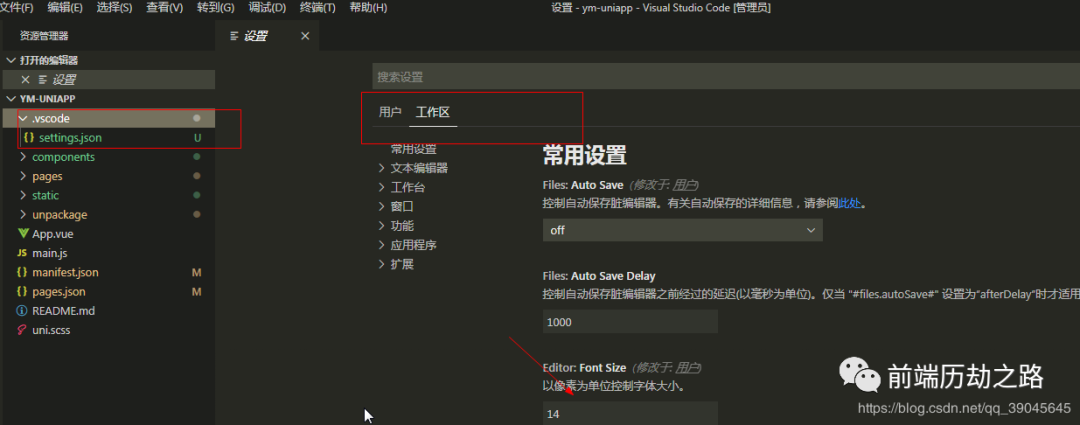
我们在开发项目的时候,项目文件夹内的文件很多,会有时影响视觉。那么这个文件就是设置什么文件隐藏,注意只是隐藏,而不是删除!下面是我自己写的,在**「Vue cli3」**生成的项目需要隐藏的文件参数。
1{
2    "files.exclude": {
3        "**/.git": true,
4        "**/.svn": true,
5        "**/.hg": true,
6        "**/CVS": true,
7        "**/.DS_Store": true,
8        "**/README.md": true,
9        "**/node_modules":true,
10        "**/shims-tsx.d.ts": true,
11        "**/shims-vue.d.ts": true,
12        "**/.browserslistrc": true,
13        ".eslintrc.js": true,
14        "babel.config.js": true,
15        "package-lock.json": true,
16        ".gitignore": true,
17        "tsconfig.json": true
18    }
19}
20
以下就是所看到的文件目录,我把一些无关紧要的文件跟文件夹隐藏或者删除后所看到的。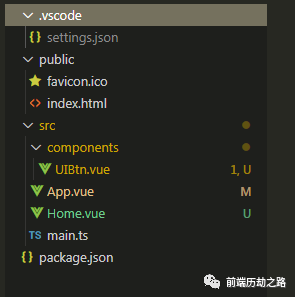 文件解读(从上往下):
| 文件夹或文件 | 包含子文件夹或文件 | 含义 |
|---|---|---|
| .vscode | settings.json | 隐藏文件设置 |
| public | index.html、favicon.ico | 静态文件存放处 |
| src | components文件夹(存放组件)、App.vue、Home.vue、main.js | 项目主要文件夹 |
| package.json | 无 | 项目依赖参数等 |
开发实践
下图为所需要创建的项目文件目录,这里我们开发一个Vue按钮组件。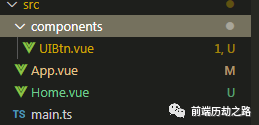 如下图所示,这就是我们要用
Typescript开发的组件。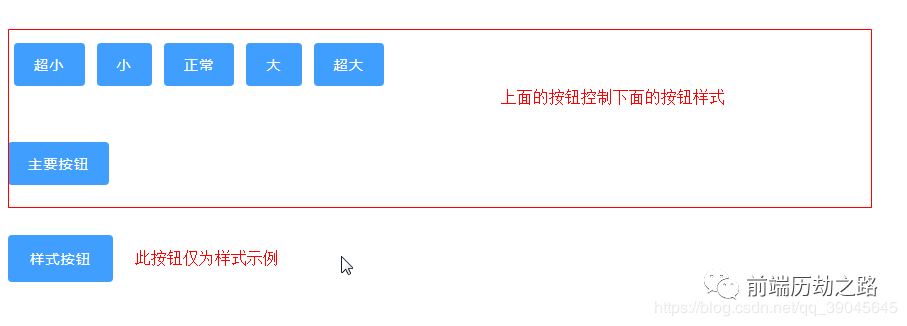
开始编辑:
1、App.vue
1<template>
2  <div id="app">
3   <Home></Home>
4  </div>
5</template>
6
7<script lang="ts">
8import { Component, Vue } from 'vue-property-decorator';// 编写类样式组件所需要的一些类或者是装饰器
9import Home from "@/Home.vue"; // 引入页面组件
10
11// 这里我们需要使用Component装饰器,这个装饰器是注册组件用的,里面的参数是一个对象,内有一个components属性,值为引入的组件名
12@Component({
13  components:{
14    Home
15  }
16})
17export default class App extends Vue {}
18</script>
19
20<style lang="stylus">
21
22</style>
23
24
2、UIBtn.vue
1<template>
2  <!-- v-on="$listeners" 可以使用,在本类不再监听,在其他地方监听,可以不用$emit(),但是我们这里不用它 -->
3  <button
4    class="ui-btn"
5    @click="onBtnclick('success!')"
6    :class="{
7    'ui-btn-xsmall':xsmall,
8    'ui-btn-small':small,
9    'ui-btn-large':large,
10    'ui-btn-xlarge':xlarge
11  }"
12  >
13    <slot>Button</slot>
14  </button>
15</template>
16
17<script lang="ts">
18import { Component, Vue, Emit, Prop } from "vue-property-decorator"; // 编写类样式组件所需要的一些类或者是装饰器
19@Component
20export default class UIBtn extends Vue {
21  @Prop(Boolean) private xsmall: boolean | undefined;
22  @Prop(Boolean) private small: boolean | undefined;
23  @Prop(Boolean) private large: boolean | undefined;
24  @Prop(Boolean) private xlarge: boolean | undefined;
25  // eslint-disable-next-line @typescript-eslint/no-empty-function
26  @Emit("click") private emitclick(x: string) {}
27  private mounted() {
28    console.log(this.large);
29  }
30  private onBtnclick(x: string) {
31    this.emitclick(x);
32  }
33}
34</script>
35
36<style scoped lang="stylus" >
37resize(a, b, c)
38  padding a b
39  font-size  c
40.ui-btn
41  resize(12px, 20px, 14px)
42  border 0 solid #000
43  border-radius 4px
44  outline none
45  font-weight 500;
46  letter-spacing 0.09em
47  background-color #409eff
48  color #fff
49  cursor pointer
50  user-select none
51  &:hover
52    filter brightness(120%)
53  &:active
54    filter brightness(80%)
55  &.ui-btn-xsmall
56    resize(5px, 15px, 14px)
57  &.ui-btn-small
58    resize(8px, 18px, 14px)
59  &.ui-btn-large
60    resize(14px, 22px, 14px)
61  &.ui-btn-xlarge
62    resize(16px, 24px, 14px)
63</style>
64
3、Home.vue
1<template>
2  <div class="home-con">
3      <div class="btn-group">
4           <UIBtn class="btn" @click="resize('xsmall')">超小</UIBtn>
5           <UIBtn class="btn" @click="resize('small')">小</UIBtn>
6           <UIBtn class="btn" @click="resize('normal')">正常</UIBtn>
7           <UIBtn class="btn" @click="resize('large')">大</UIBtn>
8           <UIBtn class="btn" @click="resize('xlarge')">超大</UIBtn>
9      </div>
10      <div class="btn-con">
11           <UIBtn @click='onClick'
12           :xlarge="xlarge"
13           :large="large"
14           :small="small"
15           :xsmall="xsmall"
16           >主要按钮</UIBtn>
17      </div>
18      <div class="btn-pro">
19            <UIBtn large >样式按钮</UIBtn>
20      </div>
21  </div>
22</template>
23
24<script lang="ts">
25import { Component, Vue } from 'vue-property-decorator'; // 编写类样式组件所需要的一些类或者是装饰器
26import UIBtn from '@/components/UIBtn.vue';
27@Component({
28    components:{
29      UIBtn
30    }
31})
32export default class Home extends Vue {
33   // eslint-disable-next-line @typescript-eslint/no-inferrable-types
34   private xlarge: boolean = false;
35    // eslint-disable-next-line @typescript-eslint/no-inferrable-types
36   private large: boolean = false;
37    // eslint-disable-next-line @typescript-eslint/no-inferrable-types
38   private xsmall: boolean = false;
39    // eslint-disable-next-line @typescript-eslint/no-inferrable-types
40   private small: boolean = false;
41   private resize (name: string){
42       console.log(name)
43       switch (name) {
44           case 'xsmall':
45               this.xsmall=true;
46               this.small=false;
47               this.large=false;
48               this.xlarge=false;
49               break;
50           case 'small':
51               this.xsmall=false;
52               this.small=true;
53               this.large=false;
54               this.xlarge=false;
55               break;
56           case 'normal':
57               this.xsmall=false;
58               this.small=false;
59               this.large=false;
60               this.xlarge=false;
61               break;
62           case 'large':
63               this.xsmall=false;
64               this.small=false;
65               this.large=true;
66               this.xlarge=false;
67               break;
68           case 'xlarge':
69               this.xsmall=false;
70               this.small=false;
71               this.large=false;
72               this.xlarge=true;
73               break;
74       }
75   }
76   private onClick(x: string) {
77       console.log(x)
78    }
79}
80</script>
81
82<style lang="stylus" scoped>.btn-group
83    margin 50px 0
84.btn
85    margin 6px
86.btn-pro
87    margin-top 50px </style>
88
结语
❝
作者:「Vam的金豆之路」
主要领域:「前端开发」
我的微信:「maomin9761」
微信公众号:「前端历劫之路」
❞
本文转转自微信公众号前端历劫之路原创https://mp.weixin.qq.com/s/7yVMIx2t4ErXdZTizY-TPw,如有侵权,请联系删除。