
背景:
作为一个DBA,大表的DDL的变更大部分都是使用Percona的pt-online-schema-change,本文说明下另一种工具gh-ost的使用:不依赖于触发器,是因为他是通过模拟从库,在row binlog中获取增量变更,再异步应用到ghost表的。在使用gh-ost之前,可以先看GitHub 开源的 MySQL 在线更改 Schema 工具【转】文章或则官网了解其特性和原理。本文只对使用进行说明。
说明:
1)下载安装:https://github.com/github/gh-ost/tags
2) 参数说明:gh-ost --help


1Usage of gh-ost:
2  --aliyun-rds:是否在阿里云数据库上执行。true
3  --allow-master-master:是否允许gh-ost运行在双主复制架构中,一般与-assume-master-host参数一起使用
4  --allow-nullable-unique-key:允许gh-ost在数据迁移依赖的唯一键可以为NULL,默认为不允许为NULL的唯一键。如果数据迁移(migrate)依赖的唯一键允许NULL值,则可能造成数据不正确,请谨慎使用。
5  --allow-on-master:允许gh-ost直接运行在主库上。默认gh-ost连接的从库。
6  --alter string:DDL语句
7  --approve-renamed-columns ALTER:如果你修改一个列的名字,gh-ost将会识别到并且需要提供重命名列名的原因,默认情况下gh-ost是不继续执行的,除非提供-approve-renamed-columns ALTER。
8  --ask-pass:MySQL密码
9  --assume-master-host string:为gh-ost指定一个主库,格式为”ip:port”或者”hostname:port”。在这主主架构里比较有用,或则在gh-ost发现不到主的时候有用。
10  --assume-rbr:确认gh-ost连接的数据库实例的binlog_format=ROW的情况下,可以指定-assume-rbr,这样可以禁止从库上运行stop slave,start slave,执行gh-ost用户也不需要SUPER权限。
11  --check-flag
12  --chunk-size int:在每次迭代中处理的行数量(允许范围:100-100000),默认值为1000。
13  --concurrent-rowcount:该参数如果为True(默认值),则进行row-copy之后,估算统计行数(使用explain select count(*)方式),并调整ETA时间,否则,gh-ost首先预估统计行数,然后开始row-copy。
14  --conf string:gh-ost的配置文件路径。
15  --critical-load string:一系列逗号分隔的status-name=values组成,当MySQL中status超过对应的values,gh-ost将会退出。-critical-load Threads_connected=20,Connections=1500,指的是当MySQL中的状态值Threads_connected>20,Connections>1500的时候,gh-ost将会由于该数据库严重负载而停止并退出。
16        Comma delimited status-name=threshold, same format as --max-load. When status exceeds threshold, app panics and quits
17  --critical-load-hibernate-seconds int :负载达到critical-load时,gh-ost在指定的时间内进入休眠状态。 它不会读/写任何来自任何服务器的任何内容。
18  --critical-load-interval-millis int:当值为0时,当达到-critical-load,gh-ost立即退出。当值不为0时,当达到-critical-load,gh-ost会在-critical-load-interval-millis秒数后,再次进行检查,再次检查依旧达到-critical-load,gh-ost将会退出。
19  --cut-over string:选择cut-over类型:atomic/two-step,atomic(默认)类型的cut-over是github的算法,two-step采用的是facebook-OSC的算法。
20  --cut-over-exponential-backoff
21  --cut-over-lock-timeout-seconds int:gh-ost在cut-over阶段最大的锁等待时间,当锁超时时,gh-ost的cut-over将重试。(默认值:3)
22  --database string:数据库名称。
23  --debug:debug模式。
24  --default-retries int:各种操作在panick前重试次数。(默认为60)
25  --discard-foreign-keys:该参数针对一个有外键的表,在gh-ost创建ghost表时,并不会为ghost表创建外键。该参数很适合用于删除外键,除此之外,请谨慎使用。
26  --dml-batch-size int:在单个事务中应用DML事件的批量大小(范围1-100)(默认值为10)
27  --exact-rowcount:准确统计表行数(使用select count(*)的方式),得到更准确的预估时间。
28  --execute:实际执行alter&migrate表,默认为noop,不执行,仅仅做测试并退出,如果想要ALTER TABLE语句真正落实到数据库中去,需要明确指定-execute
29  --exponential-backoff-max-interval int
30  --force-named-cut-over:如果为true,则'unpostpone | cut-over'交互式命令必须命名迁移的表
31  --force-table-names string:在临时表上使用的表名前缀
32  --heartbeat-interval-millis int:gh-ost心跳频率值,默认为500
33  --help
34  --hooks-hint string:任意消息通过GH_OST_HOOKS_HINT注入到钩子
35  --hooks-path string:hook文件存放目录(默认为empty,即禁用hook)。hook会在这个目录下寻找符合约定命名的hook文件来执行。
36  --host string :MySQL IP/hostname
37  --initially-drop-ghost-table:gh-ost操作之前,检查并删除已经存在的ghost表。该参数不建议使用,请手动处理原来存在的ghost表。默认不启用该参数,gh-ost直接退出操作。
38  --initially-drop-old-table:gh-ost操作之前,检查并删除已经存在的旧表。该参数不建议使用,请手动处理原来存在的ghost表。默认不启用该参数,gh-ost直接退出操作。
39  --initially-drop-socket-file:gh-ost强制删除已经存在的socket文件。该参数不建议使用,可能会删除一个正在运行的gh-ost程序,导致DDL失败。
40  --master-password string :MySQL 主密码
41  --master-user string:MysQL主账号
42  --max-lag-millis int:主从复制最大延迟时间,当主从复制延迟时间超过该值后,gh-ost将采取节流(throttle)措施,默认值:1500s。
43  --max-load string:逗号分隔状态名称=阈值,如:'Threads_running=100,Threads_connected=500'. When status exceeds threshold, app throttles writes
44  --migrate-on-replica:gh-ost的数据迁移(migrate)运行在从库上,而不是主库上。
45  --nice-ratio float:每次chunk时间段的休眠时间,范围[0.0…100.0]。0:每个chunk时间段不休眠,即一个chunk接着一个chunk执行;1:每row-copy 1毫秒,则另外休眠1毫秒;0.7:每row-copy 10毫秒,则另外休眠7毫秒。
46  --ok-to-drop-table:gh-ost操作结束后,删除旧表,默认状态是不删除旧表,会存在_tablename_del表。
47  --panic-flag-file string:当这个文件被创建,gh-ost将会立即退出。
48  --password string :MySQL密码
49 --port int :MySQL端口,最好用从库
50  --postpone-cut-over-flag-file string:当这个文件存在的时候,gh-ost的cut-over阶段将会被推迟,数据仍然在复制,直到该文件被删除。
51  --quiet:静默模式。
52  --replica-server-id uint : gh-ost的server_id
53  --replication-lag-query string:弃用
54  --serve-socket-file string:gh-ost的socket文件绝对路径。
55  --serve-tcp-port int:gh-ost使用端口,默认为关闭端口。
56  --skip-foreign-key-checks:确定你的表上没有外键时,设置为'true',并且希望跳过gh-ost验证的时间-skip-renamed-columns ALTER
57  --skip-renamed-columns ALTER:如果你修改一个列的名字(如change column),gh-ost将会识别到并且需要提供重命名列名的原因,默认情况下gh-ost是不继续执行的。该参数告诉gh-ost跳该列的数据迁移,让gh-ost把重命名列作为无关紧要的列。该操作很危险,你会损失该列的所有值。
58  --stack:添加错误堆栈追踪。
59  --switch-to-rbr:让gh-ost自动将从库的binlog_format转换为ROW格式。
60  --table string:表名
61  --test-on-replica:在从库上测试gh-ost,包括在从库上数据迁移(migration),数据迁移完成后stop slave,原表和ghost表立刻交换而后立刻交换回来。继续保持stop slave,使你可以对比两张表。
62  --test-on-replica-skip-replica-stop:当-test-on-replica执行时,该参数表示该过程中不用stop slave。
63  --throttle-additional-flag-file string:当该文件被创建后,gh-ost操作立即停止。该参数可以用在多个gh-ost同时操作的时候,创建一个文件,让所有的gh-ost操作停止,或者删除这个文件,让所有的gh-ost操作恢复。
64  --throttle-control-replicas string:列出所有需要被检查主从复制延迟的从库。
65  --throttle-flag-file string:当该文件被创建后,gh-ost操作立即停止。该参数适合控制单个gh-ost操作。-throttle-additional-flag-file string适合控制多个gh-ost操作。
66  --throttle-http string
67  --throttle-query string:节流查询。每秒钟执行一次。当返回值=0时不需要节流,当返回值>0时,需要执行节流操作。该查询会在数据迁移(migrated)服务器上操作,所以请确保该查询是轻量级的。
68  --timestamp-old-table:在旧表名中使用时间戳。 这会使旧表名称具有唯一且无冲突的交叉迁移
69  --tungsten:告诉gh-ost你正在运行的是一个tungsten-replication拓扑结构。
70  --user string :MYSQL用户
71  --verbose
72  --version

3)使用说明:条件是操作的MySQL上需要的binlog模式是ROW。如果在一个从上测试也必须是ROW模式,还要开启log_slave_updates。根据上面的参数说明按照需求进行调整。
环境:主库:192.168.163.131;从库:192.168.163.130

1① 检查有没有外键和触发器。
2② 检查表的主键信息。
3③ 检查是否主库或从库,是否开启log_slave_updates,以及binlog信息
4④ 检查gho和del结尾的临时表是否存在
5⑤ 创建ghc结尾的表,存数据迁移的信息,以及binlog信息等
6---以上校验阶段
7⑥ 初始化stream的连接,添加binlog的监听
8---以下迁移阶段
9⑥ 创建gho结尾的临时表,执行DDL在gho结尾的临时表上
10⑦ 开启事务,按照主键id把源表数据写入到gho结尾的表上,再提交,以及binlog apply。
11---以下cut-over阶段
12⑧ lock源表,rename 表:rename 源表 to 源_del表,gho表 to 源表。
13⑨ 清理ghc表。

1. 单实例上DDL: 单个实例相当于主库,需要开启--allow-on-master参数和ROW模式。
gh-ost --user="root" --password="root" --host=192.168.163.131 --database="test" --table="t1" --alter="ADD COLUMN cc2 varchar(10),add column cc3 int not null default 0 comment 'test' " --allow-on-master --execute
2. 主从上DDL:
有2个选择,一是按照1直接在主上执行同步到从上,另一个连接到从库,在主库做迁移(只要保证从库的binlog为ROW即可,主库不需要保证):
gh-ost --user="root" --password="root" --host=192.168.163.130 --database="test" --table="t" --initially-drop-old-table --alter="ADD COLUMN y1 varchar(10),add column y2 int not null default 0 comment 'test' " --execute
此时的操作大致是:
-
行数据在主库上读写
-
读取从库的二进制日志,将变更应用到主库
-
在从库收集表格式,字段&索引,行数等信息
-
在从库上读取内部的变更事件(如心跳事件)
-
在主库切换表
在执行DDL中,从库会执行一次stop/start slave,要是确定从的binlog是ROW的话可以添加参数:--assume-rbr。如果从库的binlog不是ROW,可以用参数--switch-to-rbr来转换成ROW,此时需要注意的是执行完毕之后,binlog模式不会被转换成原来的值。--assume-rbr和--switch-to-rbr参数不能一起使用。
3. 在从上进行DDL测试:
gh-ost --user="root" --password="root" --host=192.168.163.130 --database="test" --table="t" --alter="ADD COLUMN abc1 varchar(10),add column abc2 int not null default 0 comment 'test' " --test-on-replica --switch-to-rbr --execute
参数--test-on-replica:在从库上测试gh-ost,包括在从库上数据迁移(migration),数据迁移完成后stop slave,原表和ghost表立刻交换而后立刻交换回来。继续保持stop slave,使你可以对比两张表。如果不想stop slave,则可以再添加参数:--test-on-replica-skip-replica-stop
上面三种是gh-ost操作模式,上面的操作中,到最后不会清理临时表,需要手动清理,再下次执行之前果然临时表还存在,则会执行失败,可以通过参数进行删除:

1--initially-drop-ghost-table:gh-ost操作之前,检查并删除已经存在的ghost表。该参数不建议使用,请手动处理原来存在的ghost表。默认不启用该参数,gh-ost直接退出操作。
2
3--initially-drop-old-table:gh-ost操作之前,检查并删除已经存在的旧表。该参数不建议使用,请手动处理原来存在的ghost表。默认不启用该参数,gh-ost直接退出操作。
4
5--initially-drop-socket-file:gh-ost强制删除已经存在的socket文件。该参数不建议使用,可能会删除一个正在运行的gh-ost程序,导致DDL失败。
6
7--ok-to-drop-table:gh-ost操作结束后,删除旧表,默认状态是不删除旧表,会存在_tablename_del表。

还有其他的一些参数,比如:--exact-rowcount、--max-lag-millis、--max-load等等,可以看上面的说明,具体大部分常用的参数命令如下:
gh-osc --user= --password= --host= --database= --table= --max-load=Threads_running=30, --chunk-size=1000 --serve-socket-file=/tmp/gh-ost.test.sock --exact-rowcount --allow-on-master/--test-on-replica --initially-drop-ghost-table/--initially-drop-old-table/--initially-drop-socket-file --max-lag-millis= --max-load='Threads_running=100,Threads_connected=500' --ok-to-drop-table
4)额外说明:终止、暂停、限速
gh-ost --user="root" --password="root" --host=192.168.163.131 --database="test" --table="t1" --alter="ADD COLUMN o2 varchar(10),add column o1 int not null default 0 comment 'test' " --exact-rowcount --serve-socket-file=/tmp/gh-ost.t1.sock --panic-flag-file=/tmp/gh-ost.panic.t1.flag --postpone-cut-over-flag-file=/tmp/ghost.postpone.t1.flag --allow-on-master --execute
① 标示文件终止运行:--panic-flag-file
创建文件终止运行,例子中创建**/tmp/gh-ost.panic.t1.flag**文件,终止正在运行的gh-ost,临时文件清理需要手动进行。
② 表示文件禁止cut-over进行,即禁止表名切换,数据复制正常进行。--postpone-cut-over-flag-file
创建文件延迟cut-over进行,即推迟切换操作。例子中创建**/tmp/ghost.postpone.t1.flag**文件,gh-ost 会完成行复制,但并不会切换表,它会持续的将原表的数据更新操作同步到临时表中。
③ 使用socket监听请求,操作者可以在命令运行后更改相应的参数。--serve-socket-file,--serve-tcp-port(默认关闭)
创建socket文件进行监听,通过接口进行参数调整,当执行操作的过程中发现负载、延迟上升了,不得不终止操作,重新配置参数,如 chunk-size,然后重新执行操作命令,可以通过scoket接口进行动态调整。如:
暂停操作:
1#暂停
2echo throttle | socat - /tmp/gh-ost.test.t1.sock
3#恢复
4echo no-throttle | socat - /tmp/gh-ost.test.t1.sock
修改限速参数:
1echo chunk-size=100 | socat - /tmp/gh-ost.t1.sock
2
3echo max-lag-millis=200 | socat - /tmp/gh-ost.t1.sock
4
5echo max-load=Thread_running=3 | socat - /tmp/gh-ost.t1.sock
4)和pt-online-schema-change对比测试
1. 表没有写入并且参数为默认的情况下,二者DDL操作时间差不多,毕竟都是copy row操作。
2. 表有大量写入(sysbench)的情况下,因为pt-osc是多线程处理的,很快就能执行完成,而gh-ost是模拟“从”单线程应用的,极端的情况下,DDL操作非常困难的执行完毕。
**结论:**虽然pt-osc不需要触发器,对于主库的压力和性能影响也小很多,但是针对高并发的场景进行DDL效率还是比pt-osc低,所以还是需要在业务低峰的时候处理。相关的测试可以看gh-ost和pt-osc性能对比。
5**)封装脚本:**
环境:M:192.168.163.131(ROW),S:192.168.163.130/132
封装脚本:gh-ost.py
1#!/bin/env python
2# -*- encoding: utf-8 -*-
3#----------------------------------------------
4# Purpose:     gh-ost
5# Created:     2018-06-16
6#----------------------------------------------
7
8import MySQLdb
9import re
10import sys
11import time
12import subprocess
13import os
14from optparse import OptionParser
15
16def calc_time(func):
17    def _deco(*args, **kwargs):
18        begin_time = time.time()
19        func(*args, **kwargs)
20        cost_time = time.time() - begin_time
21        print 'cost time: %ss' % round(cost_time,2)
22    return _deco
23
24def get_table_count(conn,dbname,tbname):
25    query  = ''' SELECT count(*) FROM %s.%s ''' %(dbname,tbname)
26    cursor = conn.cursor()
27    cursor.execute(query)
28    row_nums = cursor.fetchone()
29    cursor.close()
30    conn.close()
31    return row_nums
32
33def online_ddl(conn,ddl_cmd):
34    cursor = conn.cursor()
35    cursor.execute(ddl_cmd)
36    conn.commit()
37    cursor.close()
38    conn.close()
39
40#@calc_time
41def run_cmd(cmd):
42    p = subprocess.Popen(cmd, shell=True)
43    return p,p.pid
44
45def drop_ghost_table(conn,ghost_name_list):
46    try:
47        cursor = conn.cursor()
48        query  = ''' DROP TABLE IF EXISTS %s; ''' %(ghost_name_list)
49        cursor.execute(query)
50        conn.commit()
51        cursor.close()
52        conn.close()
53    except Exception,e:
54        print e
55
56if __name__ == "__main__":
57    parser = OptionParser()
58    parser.add_option("-P", "--Port", help="Port for search", dest="port")
59    parser.add_option("-D", "--Dbname", help="the Dbname to use", dest="dbname")
60    parser.add_option("-T", "--Table", help="the Table to use", dest="tablename")
61
62    (options, args) = parser.parse_args()
63
64    if not options.port:
65        print 'params port need to apply'
66        exit()
67
68    if not options.dbname:
69        print 'params dbname need to apply'
70        exit()
71
72    if not options.tablename:
73        print 'params tablename need to apply'
74        exit()
75
76    gh_ost_socket   = '/tmp/gh-ost.%s.%s.sock' %(options.dbname,options.tablename)
77    #终止标志
78    panic_flag      = '/tmp/gh-ost.panic.%s.%s.flag' %(options.dbname,options.tablename)
79    # postpone_flag   =  '/tmp/gh-ost.postpone.%s.%s.flag' %(options.dbname,options.tablename)
80    #暂停标志
81    throttle_flag   = '/tmp/gh-ost.throttle.%s.%s' %(options.dbname,options.tablename)
82#    socket = '/data/%s/tmp/mysql.sock' %(options.port)
83    socket = '/var/run/mysqld/mysqld.sock'
84
85
86
87    get_conn = MySQLdb.connect(host='192.168.163.131', port=int(options.port), user='root', passwd='root', db=options.dbname, unix_socket=socket,charset='utf8')
88    conn     = MySQLdb.connect(host='192.168.163.131', port=int(options.port), user='root', passwd='root', db=options.dbname, unix_socket=socket,charset='utf8')
89
90    (table_count,) = get_table_count(get_conn,options.dbname,options.tablename)
91    print ("\033[0;32m%s\033[0m" % "表的数量:%s" %table_count)
92
93    DDL_CMD    = raw_input('Enter DDL CMD   : ').replace('`','')
94
95    gh_command_list = re.split('[ ]+',DDL_CMD)
96    if gh_command_list[0].upper() == 'CHANGE' and gh_command_list[1] != gh_command_list[2]:
97        print ("\033[0;31m%s\033[0m" % "renamed columns' data will be lost,pt-osc exit...")
98        exit()
99
100    if table_count <= 10000:
101        ddl = ''' ALTER TABLE %s %s ''' %(options.tablename,DDL_CMD)
102        print ("\033[0;36m%s\033[0m" %ddl)
103        print ("\033[0;32m%s\033[0m" % "online ddl ...")
104        online_ddl(conn,ddl)
105        print ("\033[0;32m%s\033[0m" % "执行完成 ...")
106        exit()
107
108    else:
109        MAX_LOAD   = raw_input('Enter Max Threads_running【25】 : ')
110        if not MAX_LOAD:
111            Threads_running = 25
112        else:
113            try:
114                Threads_running = int(MAX_LOAD)
115            except ValueError:
116                print ("\033[0;31m%s\033[0m" % "输入类型错误,退出...")
117                exit()
118
119        CHUNK_SIZE = raw_input('Enter Max chunk-size【1000】    : ')
120        if not CHUNK_SIZE:
121            chunk_size = 1000
122        else:
123            try:
124                chunk_size = int(CHUNK_SIZE)
125            except ValueError:
126                print ("\033[0;31m%s\033[0m" % "输入类型错误,退出...")
127                exit()
128
129        print ("\033[0;32m%s\033[0m" % "gh-ost ddl ...")
130        #--postpone-cut-over-flag-file=%s
131        gh_command = '''/usr/bin/gh-ost --user="root" --password="root" --host=192.168.163.131 --port=%s --database="%s" --table="%s" --allow-on-master  --max-load='Threads_running=%d' --chunk-size=%d --serve-socket-file=%s --panic-flag-file=%s --throttle-additional-flag-file=%s --alter="%s"  --execute ''' %(options.port,options.dbname,options.tablename,Threads_running,chunk_size,gh_ost_socket,panic_flag,throttle_flag,DDL_CMD)
132        print ("\033[0;36m%s\033[0m" %gh_command)
133
134
135        child,pid = run_cmd(gh_command)
136        print ("\033[0;31mgh-ost's PID:%s\033[0m" %pid)
137        print ("\033[0;33m创建:【touch %s】文件,暂停DDL ...\033[0m" %throttle_flag)
138        try:
139            child.wait()
140        except:
141            child.terminate()
142            #clean
143            ghost_name_list = '_%s_ghc,_%s_gho'  %(options.tablename,options.tablename)
144            drop_ghost_table(conn,ghost_name_list)
145            if os.path.exists(gh_ost_socket):
146                os.system('rm -r %s' %gh_ost_socket)
147                print ("\033[0;32m%s\033[0m" % "清理完成 ...")
148                exit()
149            print ("\033[0;32m%s\033[0m" % "清理完成 ...")
150            exit()
151        finally :
152            pass
运行:
1root@test2:~# python gh-ost.py -P3306 -Dtest -Tzjy
2表的数量:1310720
3Enter DDL CMD   : ADD COLUMN q1 varchar(10),ADD COLUMN q2 varchar(10)
4Enter Max Threads_running【25】 : 10
5Enter Max chunk-size【1000】    : 200
6gh-ost ddl ...
7/usr/bin/gh-ost --user="root" --password="root" --host=192.168.163.131 --port=3306 --database="test" --table="zjy" --allow-on-master  --max-load='Threads_running=10' --chunk-size=200 --serve-socket-file=/tmp/gh-ost.test.zjy.sock --panic-flag-file=/tmp/gh-ost.panic.test.zjy.flag --throttle-additional-flag-file=/tmp/gh-ost.throttle.test.zjy --alter="ADD COLUMN q1 varchar(10),ADD COLUMN q2 varchar(10)"  --execute
8gh-ost's PID:2105
9创建:【touch /tmp/gh-ost.throttle.test.zjy】文件,暂停DDL ...
102018/06/17 14:37:37 binlogsyncer.go:79: [info] create BinlogSyncer with config {99999 mysql 192.168.163.131 3306 root   false false <nil>}
112018/06/17 14:37:37 binlogsyncer.go:246: [info] begin to sync binlog from position (mysql-bin.000013, 31197930)
122018/06/17 14:37:37 binlogsyncer.go:139: [info] register slave for master server 192.168.163.131:3306
132018/06/17 14:37:37 binlogsyncer.go:573: [info] rotate to (mysql-bin.000013, 31197930)
14# Migrating `test`.`zjy`; Ghost table is `test`.`_zjy_gho`
15# Migrating test2:3306; inspecting test2:3306; executing on test2
16# Migration started at Sun Jun 17 14:37:37 +0800 2018
17# chunk-size: 200; max-lag-millis: 1500ms; dml-batch-size: 10; max-load: Threads_running=10; critical-load: ; nice-ratio: 0.000000
18# throttle-additional-flag-file: /tmp/gh-ost.throttle.test.zjy
19# panic-flag-file: /tmp/gh-ost.panic.test.zjy.flag
20# Serving on unix socket: /tmp/gh-ost.test.zjy.sock
21Copy: 0/1305600 0.0%; Applied: 0; Backlog: 0/1000; Time: 0s(total), 0s(copy); streamer: mysql-bin.000013:31199542; State: migrating; ETA: N/A
22Copy: 0/1305600 0.0%; Applied: 0; Backlog: 0/1000; Time: 1s(total), 1s(copy); streamer: mysql-bin.000013:31202866; State: migrating; ETA: N/A
23Copy: 44400/1305600 3.4%; Applied: 0; Backlog: 0/1000; Time: 2s(total), 2s(copy); streamer: mysql-bin.000013:33352548; State: migrating; ETA: 56s
24Copy: 91200/1305600 7.0%; Applied: 0; Backlog: 0/1000; Time: 3s(total), 3s(copy); streamer: mysql-bin.000013:35598132; State: migrating; ETA: 39s
25Copy: 135200/1305600 10.4%; Applied: 0; Backlog: 0/1000; Time: 4s(total), 4s(copy); streamer: mysql-bin.000013:37727925; State: migrating; ETA: 34s
26Copy: 174000/1305600 13.3%; Applied: 0; Backlog: 0/1000; Time: 5s(total), 5s(copy); streamer: mysql-bin.000013:39588956; State: migrating; ETA: 32s
27Copy: 212200/1305600 16.3%; Applied: 0; Backlog: 0/1000; Time: 6s(total), 6s(copy); streamer: mysql-bin.000013:41430090; State: migrating; ETA: 30s
28Copy: 254800/1305600 19.5%; Applied: 0; Backlog: 0/1000; Time: 7s(total), 7s(copy); streamer: mysql-bin.000013:43483555; State: migrating; ETA: 28s
29Copy: 303600/1305600 23.3%; Applied: 0; Backlog: 0/1000; Time: 8s(total), 8s(copy); streamer: mysql-bin.000013:45834978; State: migrating; ETA: 26s
30Copy: 351200/1305600 26.9%; Applied: 0; Backlog: 0/1000; Time: 9s(total), 9s(copy); streamer: mysql-bin.000013:48128675; State: migrating; ETA: 24s
31Copy: 401400/1305600 30.7%; Applied: 0; Backlog: 0/1000; Time: 10s(total), 10s(copy); streamer: mysql-bin.000013:50547454; State: migrating; ETA: 22s
32Copy: 451200/1305600 34.6%; Applied: 0; Backlog: 0/1000; Time: 11s(total), 11s(copy); streamer: mysql-bin.000013:52946991; State: migrating; ETA: 20s
33Copy: 490000/1305600 37.5%; Applied: 0; Backlog: 0/1000; Time: 12s(total), 12s(copy); streamer: mysql-bin.000013:54817320; State: migrating; ETA: 19s
34Copy: 529600/1305600 40.6%; Applied: 0; Backlog: 0/1000; Time: 13s(total), 13s(copy); streamer: mysql-bin.000013:56735431; State: migrating; ETA: 19s
35Copy: 589200/1305600 45.1%; Applied: 0; Backlog: 0/1000; Time: 14s(total), 14s(copy); streamer: mysql-bin.000013:59606450; State: migrating; ETA: 17s
36Copy: 639400/1305600 49.0%; Applied: 0; Backlog: 0/1000; Time: 15s(total), 15s(copy); streamer: mysql-bin.000013:62025561; State: migrating; ETA: 15s
37Copy: 695200/1305600 53.2%; Applied: 0; Backlog: 0/1000; Time: 16s(total), 16s(copy); streamer: mysql-bin.000013:64704138; State: migrating; ETA: 14s
38Copy: 751200/1305600 57.5%; Applied: 0; Backlog: 0/1000; Time: 17s(total), 17s(copy); streamer: mysql-bin.000013:67401961; State: migrating; ETA: 12s
39Copy: 803800/1305600 61.6%; Applied: 0; Backlog: 0/1000; Time: 18s(total), 18s(copy); streamer: mysql-bin.000013:69935884; State: migrating; ETA: 11s
40Copy: 856400/1305600 65.6%; Applied: 0; Backlog: 0/1000; Time: 19s(total), 19s(copy); streamer: mysql-bin.000013:72470455; State: migrating; ETA: 9s
41Copy: 907400/1305600 69.5%; Applied: 0; Backlog: 0/1000; Time: 20s(total), 20s(copy); streamer: mysql-bin.000013:74927401; State: migrating; ETA: 8s
42Copy: 958800/1305600 73.4%; Applied: 0; Backlog: 0/1000; Time: 21s(total), 21s(copy); streamer: mysql-bin.000013:77404243; State: migrating; ETA: 7s
43Copy: 999200/1305600 76.5%; Applied: 0; Backlog: 0/1000; Time: 22s(total), 22s(copy); streamer: mysql-bin.000013:79351223; State: migrating; ETA: 6s
44Copy: 1009600/1305600 77.3%; Applied: 0; Backlog: 0/1000; Time: 23s(total), 23s(copy); streamer: mysql-bin.000013:79855229; State: migrating; ETA: 6s
45Copy: 1059600/1305600 81.2%; Applied: 0; Backlog: 0/1000; Time: 24s(total), 24s(copy); streamer: mysql-bin.000013:82264712; State: migrating; ETA: 5s
46Copy: 1107200/1305600 84.8%; Applied: 0; Backlog: 0/1000; Time: 25s(total), 25s(copy); streamer: mysql-bin.000013:84558411; State: migrating; ETA: 4s
47Copy: 1147000/1305600 87.9%; Applied: 0; Backlog: 0/1000; Time: 26s(total), 26s(copy); streamer: mysql-bin.000013:86486148; State: migrating; ETA: 3s
48Copy: 1198000/1305600 91.8%; Applied: 0; Backlog: 0/1000; Time: 27s(total), 27s(copy); streamer: mysql-bin.000013:88943747; State: migrating; ETA: 2s
49Copy: 1245400/1305600 95.4%; Applied: 0; Backlog: 0/1000; Time: 28s(total), 28s(copy); streamer: mysql-bin.000013:91218202; State: migrating; ETA: 1s
50Copy: 1286600/1305600 98.5%; Applied: 0; Backlog: 0/1000; Time: 29s(total), 29s(copy); streamer: mysql-bin.000013:93203991; State: migrating; ETA: 0s
51Copy: 1310720/1310720 100.0%; Applied: 0; Backlog: 0/1000; Time: 29s(total), 29s(copy); streamer: mysql-bin.000013:94366846; State: migrating; ETA: due
52Copy: 1310720/1310720 100.0%; Applied: 0; Backlog: 1/1000; Time: 30s(total), 29s(copy); streamer: mysql-bin.000013:94369042; State: migrating; ETA: due
53# Migrating `test`.`zjy`; Ghost table is `test`.`_zjy_gho`
54# Migrating test2:3306; inspecting test2:3306; executing on test2
55# Migration started at Sun Jun 17 14:37:37 +0800 2018
56# chunk-size: 200; max-lag-millis: 1500ms; dml-batch-size: 10; max-load: Threads_running=10; critical-load: ; nice-ratio: 0.000000
57# throttle-additional-flag-file: /tmp/gh-ost.throttle.test.zjy
58# panic-flag-file: /tmp/gh-ost.panic.test.zjy.flag
59# Serving on unix socket: /tmp/gh-ost.test.zjy.sock
60Copy: 1310720/1310720 100.0%; Applied: 0; Backlog: 0/1000; Time: 30s(total), 29s(copy); streamer: mysql-bin.000013:94371928; State: migrating; ETA: due
612018/06/17 14:38:08 binlogsyncer.go:107: [info] syncer is closing...
622018/06/17 14:38:08 binlogstreamer.go:47: [error] close sync with err: sync is been closing... (这里的error不影响使用,重复关闭了sync,等作者修复)
632018/06/17 14:38:08 binlogsyncer.go:122: [info] syncer is closed
64# Done
总结:
gh-ost 放弃了触发器,使用 binlog 来同步。gh-ost 作为一个伪装的备库,可以从主库/备库上拉取 binlog,过滤之后重新应用到主库上去,相当于主库上的增量操作通过 binlog 又应用回主库本身,不过是应用在幽灵表上。
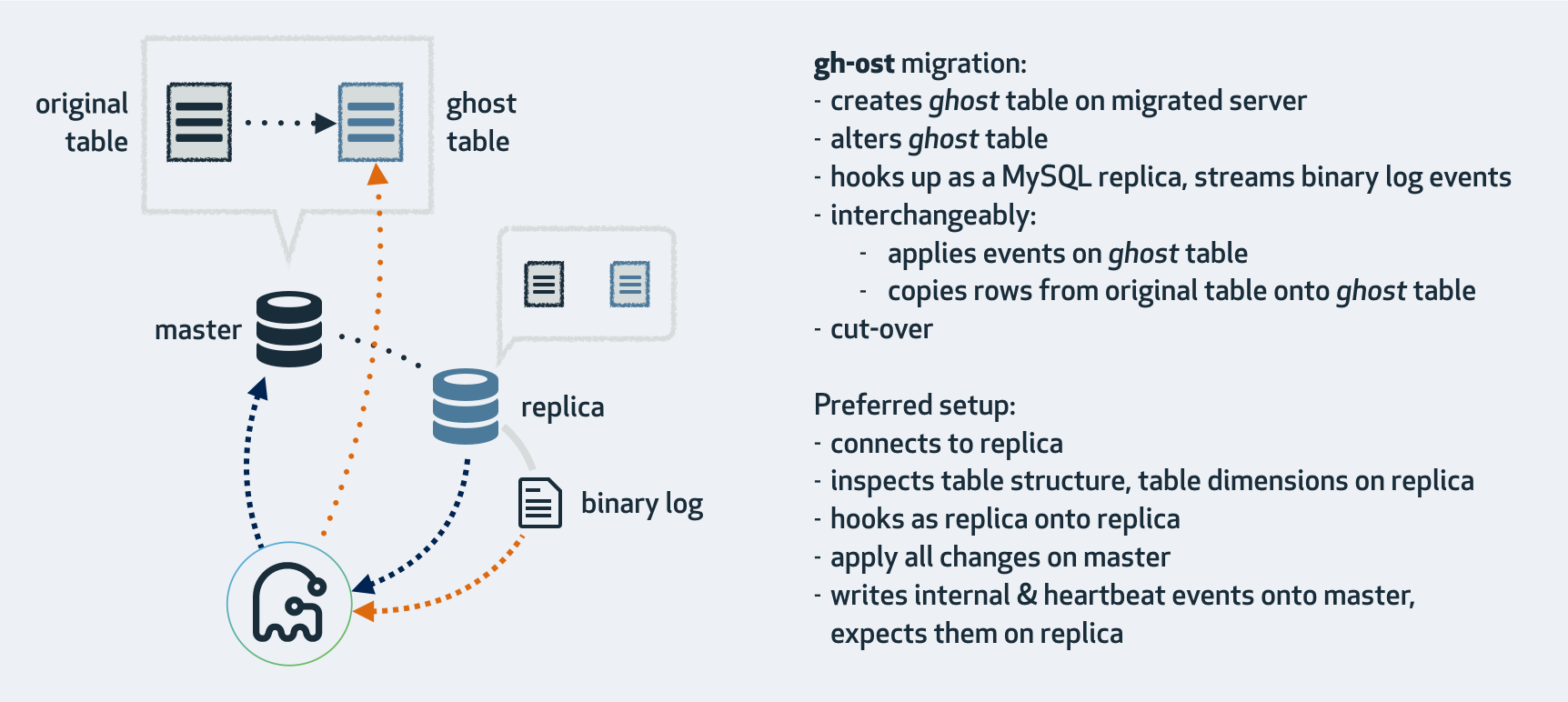
**gh-ost 首先连接到主库上,根据 alter 语句创建幽灵表,然后作为一个”备库“连接到其中一个真正的备库上,一边在主库上拷贝已有的数据到幽灵表,一边从备库上拉取增量数据的 binlog,然后不断的把 binlog 应用回主库。**图中 cut-over 是最后一步,锁住主库的源表,等待 binlog 应用完毕,然后替换 gh-ost 表为源表。gh-ost 在执行中,会在原本的 binlog event 里面增加以下 hint 和心跳包,用来控制整个流程的进度,检测状态等。这种架构带来诸多好处,例如:
- 整个流程异步执行,对于源表的增量数据操作没有额外的开销,高峰期变更业务对性能影响小。
- 降低写压力,触发器操作都在一个事务内,gh-ost 应用 binlog 是另外一个连接在做。
- 可停止,binlog 有位点记录,如果变更过程发现主库性能受影响,可以立刻停止拉binlog,停止应用 binlog,稳定之后继续应用。
- 可测试,gh-ost 提供了测试功能,可以连接到一个备库上直接做 Online DDL,在备库上观察变更结果是否正确,再对主库操作,心里更有底。
参考文档:
https://github.com/github/gh-ost
GitHub 开源的 MySQL 在线更改 Schema 工具