项目系统中打印功能,导出 word 文档功能是挺常用的,本文介绍自定文档模板,程序实现模板内容中值替代的功能。
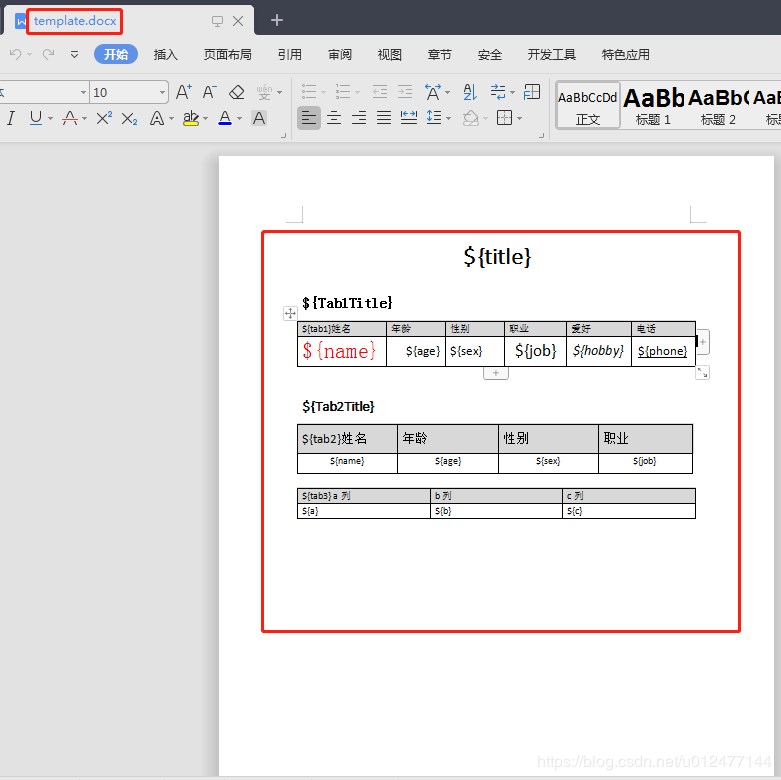
模板文件 template.docx
执行 main
1public static void main(String[] args) {
2        //模板文档路径
3        String filePath = "D:/DOC/template.docx";
4        String res = String.valueOf(new Date().getTime());
5        //生成文档路径
6        String outFile = "D:/DOC/插入值后文档" + res + ".docx";
7        try {
8            GeneralTemplateTool gtt = new GeneralTemplateTool();
9
10            Map<String, Object> params = new HashMap<String, Object>();
11            //创建替代模板里段落中如${title}值开始
12            params.put("title","标题文字 by Stephen" );
13            params.put("Tab1Title","表一");
14            params.put("Tab2Title","表二");
15            //......对应模板扩展
16            //创建替代模板里段落中如${title}值结束
17
18            //创建替代&生成模板里tab1标识的表格中的值开始
19            List<Map<String,String>> tab1list = new ArrayList<Map<String,String>>();
20            for (int i = 1; i <= 3; i++) {
21                Map<String, String> map = new HashMap<String, String>();
22                map.put("name", "张" + i);
23                map.put("age", "1" + i);
24                map.put("sex", "男");
25                map.put("job", "职业"+i);
26                map.put("hobby", "爱好"+i);
27                map.put("phone", "1312365322"+i);
28                tab1list.add(map);
29            }
30            params.put("tab1", tab1list);
31            //创建替代&生成模板里tab1标识的表格中的值结束
32
33             //创建替代&生成模板里tab2标识的表格中的值开始
34            List<Map<String,String>> tab2list = new ArrayList<Map<String,String>>();
35            for (int i = 1; i <= 3; i++) {
36                Map<String, String> map = new HashMap<String, String>();
37                map.put("name", "王" + i);
38                map.put("age", "1" + i);
39                map.put("sex", "女");
40                map.put("job", "职业"+i);
41                tab2list.add(map);
42            }
43            params.put("tab2", tab2list);
44            //创建替代&生成模板里tab2标识的表格中的值结束
45
46            //创建替代&生成模板里tab3标识的表格中的值开始
47            List<Map<String,String>> tab3list = new ArrayList<Map<String,String>>();
48            for (int i = 1; i <= 4; i++) {
49                Map<String, String> map = new HashMap<String, String>();
50                map.put("a", "a列值" + i);
51                map.put("b", "b列值" + i);
52                map.put("c", "c列值" + i);
53                tab3list.add(map);
54            }
55            params.put("tab3", tab3list);
56            //创建替代&生成模板里tab3标识的表格中的值结束
57            //......对应模板扩展
58
59            gtt.templateWrite(filePath, outFile, params);
60            System.out.println("生成模板成功");
61            System.out.println(outFile);
62        } catch (Exception e) {
63            System.out.println("生成模板失败");
64            e.printStackTrace();
65        }
66    }
后台打印日志
1-------解析出第 1 个表------开始处理
2###表标识值:tab1
3----${tab1}
4----姓名
5第1列:${name}
6第2列:${age}
7第3列:${sex}
8第4列:${job}
9第5列:${hobby}
10第6列:${phone}
11开始复制第0行
12${name}
13第1列:张1
14${age}
15第2列:11
16${sex}
17第3列:男
18${job}
19第4列:职业1
20${hobby}
21第5列:爱好1
22${phone}
23第6列:13123653221
24开始复制第1行
25${name}
26第1列:张2
27${age}
28第2列:12
29${sex}
30第3列:男
31${job}
32第4列:职业2
33${hobby}
34第5列:爱好2
35${phone}
36第6列:13123653222
37开始复制第2行
38${name}
39第1列:张3
40${age}
41第2列:13
42${sex}
43第3列:男
44${job}
45第4列:职业3
46${hobby}
47第5列:爱好3
48${phone}
49第6列:13123653223
50-------解析出第 1 个表------结束处理
51-------解析出第 2 个表------开始处理
52###表标识值:tab2
53----${tab2}
54----姓名
55第1列:${name}
56第2列:${age}
57第3列:${sex}
58第4列:${job}
59开始复制第0行
60${name}
61第1列:王1
62${age}
63第2列:11
64${sex}
65第3列:女
66${job}
67第4列:职业1
68开始复制第1行
69${name}
70第1列:王2
71${age}
72第2列:12
73${sex}
74第3列:女
75${job}
76第4列:职业2
77开始复制第2行
78${name}
79第1列:王3
80${age}
81第2列:13
82${sex}
83第3列:女
84${job}
85第4列:职业3
86-------解析出第 2 个表------结束处理
87-------解析出第 3 个表------开始处理
88###表标识值:tab3
89----${tab3}
90----a
91----列
92第1列:${a}
93第2列:${b}
94第3列:${c}
95开始复制第0行
96${a}
97第1列:a列值1
98${b}
99第2列:b列值1
100${c}
101第3列:c列值1
102开始复制第1行
103${a}
104第1列:a列值2
105${b}
106第2列:b列值2
107${c}
108第3列:c列值2
109开始复制第2行
110${a}
111第1列:a列值3
112${b}
113第2列:b列值3
114${c}
115第3列:c列值3
116开始复制第3行
117${a}
118第1列:a列值4
119${b}
120第2列:b列值4
121${c}
122第3列:c列值4
123-------解析出第 3 个表------结束处理
124生成模板成功
125D:/DOC/插入值后文档1558313967002.docx
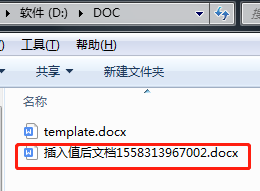
程序执行完生成新的文档
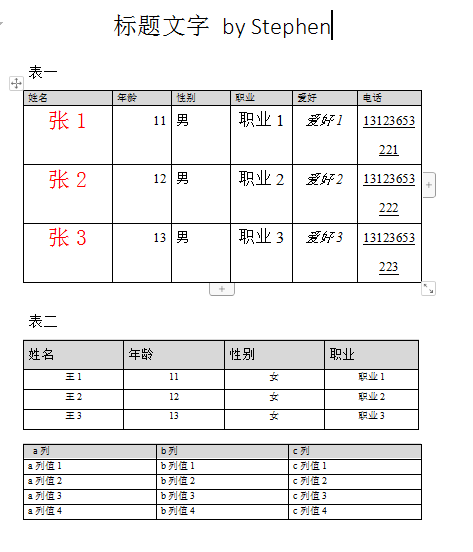
查看效果:值被动态加入,格式保留。
具体实现代码:
1/** 2 * 用一个docx文档作为模板,程序替换其中的内容,再写入目标文档中。 3 * @param filePath 4 * @param outFile 5 * @param params 6 * @throws Exception 7 */ 8public void templateWrite(String filePath, String outFile, 9 Map<String, Object> params) throws Exception { 10 InputStream is = new FileInputStream(filePath); 11 //System.out.println(filePath); 12 XWPFDocument doc = new XWPFDocument(is); 13 // 替换段落里面的变量 14 this.replaceInPara(doc, params); 15 // 替换多个表格里面的变量并插入数据 16 this.insertValueToTables(doc, params); 17 OutputStream os = new FileOutputStream(outFile); 18 doc.write(os); 19 this.close(os); 20 this.close(is); 21} 22 23/** 24 * 替换段落里面的变量 25 * 26 * @param doc 27 * 要替换的文档 28 * @param params 29 * 参数 30 */ 31private void replaceInPara(XWPFDocument doc, Map<String, Object> params) { 32 Iterator<XWPFParagraph> iterator = doc.getParagraphsIterator(); 33 XWPFParagraph para; 34 while (iterator.hasNext()) { 35 para = iterator.next(); 36 this.replaceInPara(para, params); 37 } 38} 39 40/** 41 * 替换段落里面的变量 42 * 43 * @param para 44 * 要替换的段落 45 * @param params 46 * 参数 47 */ 48private boolean replaceInPara(XWPFParagraph para, Map<String, Object> params) { 49 boolean data = false; 50 List<XWPFRun> runs; 51 Matcher matcher; 52 if (this.matcher(para.getParagraphText()).find()) { 53 runs = para.getRuns(); 54 for (int i = 0; i < runs.size(); i++) { 55 XWPFRun run = runs.get(i); 56 String runText = run.toString(); 57 matcher = this.matcher(runText); 58 if (matcher.find()) { 59 while ((matcher = this.matcher(runText)).find()) { 60 String str=String.valueOf(params.get(matcher.group(1))); 61 //System.out.println("----"+runText); 62 //System.out.println("----"+str); 63 runText = matcher.replaceFirst(str); 64 } 65 Boolean isBold = run.isBold(); 66 Boolean isItalic = run.isItalic(); 67 Boolean isStrike = run.isStrike(); 68 UnderlinePatterns Underline = run.getUnderline(); 69 String Color = run.getColor(); 70 int TextPosition = run.getTextPosition(); 71 int FontSize = run.getFontSize(); 72 String FontFamily = run.getFontFamily(); 73 CTR ctr =run.getCTR(); 74 para.removeRun(i); 75 //para.insertNewRun(i).setText(runText); 76 XWPFRun newrun = para.insertNewRun(i); 77 newrun.setText(runText); 78 try { 79 // 复制格式 80 newrun.setBold(isBold); 81 newrun.setItalic(isItalic); 82 newrun.setStrike(isStrike); 83 newrun.setUnderline(Underline); 84 newrun.setColor(Color); 85 newrun.setTextPosition(TextPosition); 86 if (FontSize != -1) { 87 newrun.setFontSize(FontSize); 88 CTRPr rpr = newrun.getCTR().isSetRPr() ? newrun.getCTR().getRPr() : newrun.getCTR().addNewRPr(); 89 CTFonts fonts = rpr.isSetRFonts() ? rpr.getRFonts() : rpr.addNewRFonts(); 90 fonts.setAscii(FontFamily); 91 fonts.setEastAsia(FontFamily); 92 fonts.setHAnsi(FontFamily); 93 } 94 if (FontFamily != null) { 95 newrun.setFontFamily(FontFamily); 96 } 97 if (ctr != null) { 98 Boolean flat = false; 99 try { 100 flat = ctr.isSetRPr(); 101 } catch (Exception e) { 102 } 103 if (flat) { 104 CTRPr tmpRPr = ctr.getRPr(); 105 if (tmpRPr.isSetRFonts()) { 106 CTFonts tmpFonts = tmpRPr.getRFonts(); 107 CTRPr cellRPr = newrun.getCTR().isSetRPr() ? newrun 108 .getCTR().getRPr() : newrun 109 .getCTR().addNewRPr(); 110 CTFonts cellFonts = cellRPr.isSetRFonts() ? cellRPr 111 .getRFonts() : cellRPr 112 .addNewRFonts(); 113 cellFonts.setAscii(tmpFonts.getAscii()); 114 cellFonts.setAsciiTheme(tmpFonts 115 .getAsciiTheme()); 116 cellFonts.setCs(tmpFonts.getCs()); 117 cellFonts.setCstheme(tmpFonts.getCstheme()); 118 cellFonts.setEastAsia(tmpFonts 119 .getEastAsia()); 120 cellFonts.setEastAsiaTheme(tmpFonts 121 .getEastAsiaTheme()); 122 cellFonts.setHAnsi(tmpFonts.getHAnsi()); 123 cellFonts.setHAnsiTheme(tmpFonts 124 .getHAnsiTheme()); 125 } 126 } 127 } 128 } catch (Exception e) { 129 e.printStackTrace(); 130 } 131 132 } 133 } 134 data = true; 135 } else if (this.matcherRow(para.getParagraphText())) { 136 runs = para.getRuns(); 137 // System.out.println("run " + runs); 138 data = true; 139 } 140 return data; 141} 142 143/** 144 * 按模版行样式填充数据,暂未实现特殊样式填充(如列合并),只能用于普通样式(如段落间距 缩进 字体 对齐) 145 * @param doc 146 * 要替换的文档 147 * @param params 148 * 参数 149 * @throws Exception 150 */ 151private void insertValueToTables(XWPFDocument doc, Map<String, Object> params) 152 throws Exception { 153 Iterator<XWPFTable> iterator = doc.getTablesIterator(); 154 XWPFTable table = null; 155 int z =1; 156 while (iterator.hasNext()) { 157 //行 158 List<XWPFTableRow> rows = null; 159 //列 160 List<XWPFTableCell> cells = null; 161 List<XWPFParagraph> paras; 162 table = iterator.next(); 163 System.out.println("-------解析出第 "+z+" 个表------开始处理"); 164 //获取表格行数据list 165 rows = table.getRows(); 166 XWPFTableRow tmpRow = null; 167 //第二行为模板行 168 tmpRow = rows.get(1); 169 //模版列 170 List<XWPFTableCell> tmpCells = null; 171 XWPFTableCell tmpCell = null; 172 tmpCells = tmpRow.getTableCells(); 173 List<Map> tablist =null; 174 List<String> listkey = new ArrayList<String>(); 175 for (int i = 1; i <= rows.size(); i++) { 176 cells = rows.get(i - 1).getTableCells(); 177 //获取当前行所有列 178 if(i==1){ 179 int intcell = 1; 180 //遍历列 181 for (XWPFTableCell cell : cells) { 182 if (intcell == 1) { 183 //取第一行第一列表标识并替代${ tab1} 姓名 值 为姓名 map里取对应表list数据 184 String flagtemp = cell.getText(); 185 flagtemp = flagtemp.substring(flagtemp.indexOf("{")+1, flagtemp.lastIndexOf("}")); 186 System.out.println("###表标识值:" +flagtemp); 187 tablist = (List<Map>) params.get(flagtemp); 188 paras = cell.getParagraphs(); 189 for (XWPFParagraph para : paras) { 190 List<XWPFRun> runs; 191 runs = para.getRuns(); 192 for (int m = 0; m < runs.size(); m++) { 193 XWPFRun run = runs.get(m); 194 String runText = run.toString(); 195 System.out.println("----"+runText); 196 Matcher matcher; 197 matcher = this.matcher(runText); 198 if (matcher.find()) { 199 while ((matcher = this.matcher(runText)).find()) { 200 runText = matcher.replaceFirst(""); 201 } 202 para.removeRun(m); 203 para.insertNewRun(m).setText(runText); 204 } 205 } 206 } 207 } 208 intcell++; 209 break; 210 } 211 }else if(i==2){ 212 //第二行替代值并创建list key用 213 int intcell = 1; 214 for (XWPFTableCell cell : cells) { 215 System.out.println("第"+intcell + "列:" + cell.getText()); 216 //Map mapth = tablist.get(0); 217 paras = cell.getParagraphs(); 218 for (XWPFParagraph para : paras) { 219 //读取的值去掉${} 220 String keystr = para.getParagraphText(); 221 keystr = keystr.substring(keystr.indexOf("{")+1, keystr.lastIndexOf("}")); 222 listkey.add(keystr); 223 } 224 intcell++; 225 } 226 } 227 } 228 //开始动态创建表 229 for (int i = 0; i < tablist.size(); i++) { 230 System.out.println("开始复制第" + i + "行"); 231 XWPFTableRow row = table.createRow(); 232 row.setHeight(tmpRow.getHeight()); 233 Map<String,String> tempmap = tablist.get(i); 234 cells = row.getTableCells(); 235 // 插入的行会填充与表格第一行相同的列数 236 for (int k = 0 ; k < cells.size(); k++) { 237 tmpCell = tmpCells.get(k); 238 XWPFTableCell cell = cells.get(k); 239 setCellText(tmpCell, cell, tablist.get(i).get(listkey.get(k)).toString()); 240 System.out.println("第"+(k+1)+"列:" +tablist.get(i).get(listkey.get(k)).toString()); 241 } 242 // 继续写剩余的列 243 for (int j = cells.size(); j < listkey.size(); j++) { 244 tmpCell = tmpCells.get(j); 245 XWPFTableCell cell = row.addNewTableCell(); 246 setCellText(tmpCell, cell, tablist.get(i).get(listkey.get(j)).toString()); 247 System.out.println("第"+(j+1)+"列:" +tablist.get(i).get(listkey.get(j)).toString()); 248 } 249 } 250 // 删除表标识行 251 table.removeRow(1); 252 System.out.println("-------解析出第 "+z+" 个表------结束处理"); 253 z++; 254 } 255} 256 257public void setCellText(XWPFTableCell tmpCell, XWPFTableCell cell, 258 String text) throws Exception { 259 CTTc cttc2 = tmpCell.getCTTc(); 260 CTTcPr ctPr2 = cttc2.getTcPr(); 261 262 CTTc cttc = cell.getCTTc(); 263 CTTcPr ctPr = cttc.addNewTcPr(); 264 cell.setColor(tmpCell.getColor()); 265 // cell.setVerticalAlignment(tmpCell.getVerticalAlignment()); 266 if (ctPr2.getTcW() != null) { 267 ctPr.addNewTcW().setW(ctPr2.getTcW().getW()); 268 } 269 if (ctPr2.getVAlign() != null) { 270 ctPr.addNewVAlign().setVal(ctPr2.getVAlign().getVal()); 271 } 272 if (cttc2.getPList().size() > 0) { 273 CTP ctp = cttc2.getPList().get(0); 274 if (ctp.getPPr() != null) { 275 if (ctp.getPPr().getJc() != null) { 276 cttc.getPList().get(0).addNewPPr().addNewJc() 277 .setVal(ctp.getPPr().getJc().getVal()); 278 } 279 } 280 } 281 if (ctPr2.getTcBorders() != null) { 282 ctPr.setTcBorders(ctPr2.getTcBorders()); 283 } 284 XWPFParagraph tmpP = tmpCell.getParagraphs().get(0); 285 XWPFParagraph cellP = cell.getParagraphs().get(0); 286 XWPFRun tmpR = null; 287 if (tmpP.getRuns() != null && tmpP.getRuns().size() > 0) { 288 tmpR = tmpP.getRuns().get(0); 289 String runText = tmpR.toString(); 290 System.out.println(runText); 291 } 292 XWPFRun cellR = cellP.createRun(); 293 cellR.setText(text); 294 // 复制字体信息 295 if (tmpR != null) { 296 cellR.setBold(tmpR.isBold()); 297 cellR.setItalic(tmpR.isItalic()); 298 cellR.setStrike(tmpR.isStrike()); 299 cellR.setUnderline(tmpR.getUnderline()); 300 cellR.setColor(tmpR.getColor()); 301 cellR.setTextPosition(tmpR.getTextPosition()); 302 if (tmpR.getFontSize() != -1) { 303 cellR.setFontSize(tmpR.getFontSize()); 304 } 305 if (tmpR.getFontFamily() != null) { 306 cellR.setFontFamily(tmpR.getFontFamily()); 307 } 308 if (tmpR.getCTR() != null) { 309 if (tmpR.getCTR().isSetRPr()) { 310 CTRPr tmpRPr = tmpR.getCTR().getRPr(); 311 if (tmpRPr.isSetRFonts()) { 312 CTFonts tmpFonts = tmpRPr.getRFonts(); 313 CTRPr cellRPr = cellR.getCTR().isSetRPr() ? cellR 314 .getCTR().getRPr() : cellR.getCTR().addNewRPr(); 315 CTFonts cellFonts = cellRPr.isSetRFonts() ? cellRPr 316 .getRFonts() : cellRPr.addNewRFonts(); 317 cellFonts.setAscii(tmpFonts.getAscii()); 318 cellFonts.setAsciiTheme(tmpFonts.getAsciiTheme()); 319 cellFonts.setCs(tmpFonts.getCs()); 320 cellFonts.setCstheme(tmpFonts.getCstheme()); 321 cellFonts.setEastAsia(tmpFonts.getEastAsia()); 322 cellFonts.setEastAsiaTheme(tmpFonts.getEastAsiaTheme()); 323 cellFonts.setHAnsi(tmpFonts.getHAnsi()); 324 cellFonts.setHAnsiTheme(tmpFonts.getHAnsiTheme()); 325 } 326 } 327 } 328 } 329 // 复制段落信息 330 cellP.setAlignment(tmpP.getAlignment()); 331 cellP.setVerticalAlignment(tmpP.getVerticalAlignment()); 332 cellP.setBorderBetween(tmpP.getBorderBetween()); 333 cellP.setBorderBottom(tmpP.getBorderBottom()); 334 cellP.setBorderLeft(tmpP.getBorderLeft()); 335 cellP.setBorderRight(tmpP.getBorderRight()); 336 cellP.setBorderTop(tmpP.getBorderTop()); 337 cellP.setPageBreak(tmpP.isPageBreak()); 338 if (tmpP.getCTP() != null) { 339 if (tmpP.getCTP().getPPr() != null) { 340 CTPPr tmpPPr = tmpP.getCTP().getPPr(); 341 CTPPr cellPPr = cellP.getCTP().getPPr() != null ? cellP 342 .getCTP().getPPr() : cellP.getCTP().addNewPPr(); 343 // 复制段落间距信息 344 CTSpacing tmpSpacing = tmpPPr.getSpacing(); 345 if (tmpSpacing != null) { 346 CTSpacing cellSpacing = cellPPr.getSpacing() != null ? cellPPr 347 .getSpacing() : cellPPr.addNewSpacing(); 348 if (tmpSpacing.getAfter() != null) { 349 cellSpacing.setAfter(tmpSpacing.getAfter()); 350 } 351 if (tmpSpacing.getAfterAutospacing() != null) { 352 cellSpacing.setAfterAutospacing(tmpSpacing 353 .getAfterAutospacing()); 354 } 355 if (tmpSpacing.getAfterLines() != null) { 356 cellSpacing.setAfterLines(tmpSpacing.getAfterLines()); 357 } 358 if (tmpSpacing.getBefore() != null) { 359 cellSpacing.setBefore(tmpSpacing.getBefore()); 360 } 361 if (tmpSpacing.getBeforeAutospacing() != null) { 362 cellSpacing.setBeforeAutospacing(tmpSpacing 363 .getBeforeAutospacing()); 364 } 365 if (tmpSpacing.getBeforeLines() != null) { 366 cellSpacing.setBeforeLines(tmpSpacing.getBeforeLines()); 367 } 368 if (tmpSpacing.getLine() != null) { 369 cellSpacing.setLine(tmpSpacing.getLine()); 370 } 371 if (tmpSpacing.getLineRule() != null) { 372 cellSpacing.setLineRule(tmpSpacing.getLineRule()); 373 } 374 } 375 // 复制段落缩进信息 376 CTInd tmpInd = tmpPPr.getInd(); 377 if (tmpInd != null) { 378 CTInd cellInd = cellPPr.getInd() != null ? cellPPr.getInd() 379 : cellPPr.addNewInd(); 380 if (tmpInd.getFirstLine() != null) { 381 cellInd.setFirstLine(tmpInd.getFirstLine()); 382 } 383 if (tmpInd.getFirstLineChars() != null) { 384 cellInd.setFirstLineChars(tmpInd.getFirstLineChars()); 385 } 386 if (tmpInd.getHanging() != null) { 387 cellInd.setHanging(tmpInd.getHanging()); 388 } 389 if (tmpInd.getHangingChars() != null) { 390 cellInd.setHangingChars(tmpInd.getHangingChars()); 391 } 392 if (tmpInd.getLeft() != null) { 393 cellInd.setLeft(tmpInd.getLeft()); 394 } 395 if (tmpInd.getLeftChars() != null) { 396 cellInd.setLeftChars(tmpInd.getLeftChars()); 397 } 398 if (tmpInd.getRight() != null) { 399 cellInd.setRight(tmpInd.getRight()); 400 } 401 if (tmpInd.getRightChars() != null) { 402 cellInd.setRightChars(tmpInd.getRightChars()); 403 } 404 } 405 } 406 } 407} 408 409/** 410 * 正则匹配字符串 411 * 412 * @param str 413 * @return 414 */ 415private Matcher matcher(String str) { 416 Pattern pattern = Pattern.compile("\\$\\{(.+?)\\}", 417 Pattern.CASE_INSENSITIVE); 418 Matcher matcher = pattern.matcher(str); 419 return matcher; 420} 421 422/** 423 * 正则匹配字符串 424 * 425 * @param str 426 * @return 427 */ 428private boolean matcherRow(String str) { 429 Pattern pattern = Pattern.compile("\\$\\[(.+?)\\]", 430 Pattern.CASE_INSENSITIVE); 431 Matcher matcher = pattern.matcher(str); 432 return matcher.find(); 433} 434 435/** 436 * 关闭输入流 437 * 438 * @param is 439 */ 440private void close(InputStream is) { 441 if (is != null) { 442 try { 443 is.close(); 444 } catch (IOException e) { 445 e.printStackTrace(); 446 } 447 } 448} 449 450/** 451* 关闭输出流 452* 453* @param os 454*/ 455private void close(OutputStream os) { 456 if (os != null) { 457 try { 458 os.close(); 459 } catch (IOException e) { 460 e.printStackTrace(); 461 } 462 } 463 }
相关 jar 的引入
1import java.io.File;
2import java.io.FileInputStream;
3import java.io.FileNotFoundException;
4import java.io.FileOutputStream;
5import java.io.IOException;
6import java.io.InputStream;
7import java.io.OutputStream;
8import java.util.ArrayList;
9import java.util.Date;
10import java.util.HashMap;
11import java.util.Iterator;
12import java.util.List;
13import java.util.Map;
14import java.util.regex.Matcher;
15import java.util.regex.Pattern;
16
17import org.apache.poi.openxml4j.exceptions.InvalidFormatException;
18import org.apache.poi.xwpf.usermodel.Document;
19import org.apache.poi.xwpf.usermodel.UnderlinePatterns;
20import org.apache.poi.xwpf.usermodel.XWPFDocument;
21import org.apache.poi.xwpf.usermodel.XWPFParagraph;
22import org.apache.poi.xwpf.usermodel.XWPFRun;
23import org.apache.poi.xwpf.usermodel.XWPFTable;
24import org.apache.poi.xwpf.usermodel.XWPFTableCell;
25import org.apache.poi.xwpf.usermodel.XWPFTableRow;
26import org.openxmlformats.schemas.wordprocessingml.x2006.main.CTFonts;
27import org.openxmlformats.schemas.wordprocessingml.x2006.main.CTInd;
28import org.openxmlformats.schemas.wordprocessingml.x2006.main.CTP;
29import org.openxmlformats.schemas.wordprocessingml.x2006.main.CTPPr;
30import org.openxmlformats.schemas.wordprocessingml.x2006.main.CTR;
31import org.openxmlformats.schemas.wordprocessingml.x2006.main.CTRPr;
32import org.openxmlformats.schemas.wordprocessingml.x2006.main.CTSpacing;
33import org.openxmlformats.schemas.wordprocessingml.x2006.main.CTTc;
34import org.openxmlformats.schemas.wordprocessingml.x2006.main.CTTcPr;
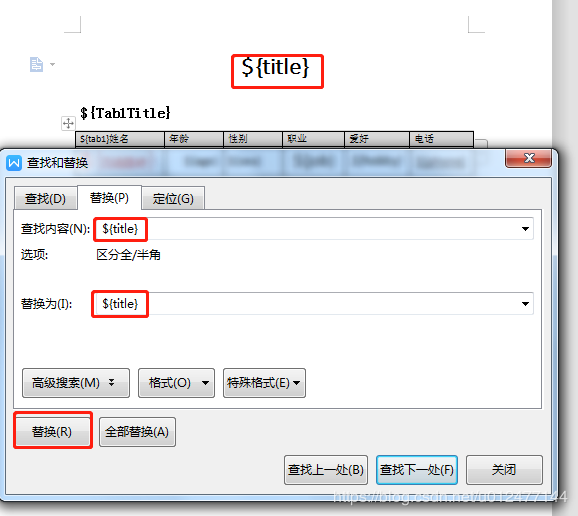
注意:
有个细节,模板文档中所有诸如:${title} 元素都得替换自身一次,才能被程序识别为一个整体元素被动态替换掉值!
操作如下图:
欢迎订阅 Stephen 公众号