
现象:用eclipse的导出工具,生成一个产品目录,点击里面的执行文件,报错:
The xx executable launcher was unable to locate its companion shared library
国内网上搜了一下,都是eclipse自己启动时报这个错,基本上的解决方案如下:
修改Myeclipse.ini文件
1-startup
2../Common/plugins/org.eclipse.equinox.launcher_1.0.201.R35x_v20090715.jar
3--launcher.library
4../Common/plugins/org.eclipse.equinox.launcher.win32.win32.x86_1.0.200.v20090519
5-install
6D:/Program Files/Genuitec/MyEclipse-8.6
7-vm
8D:/ProgramFiles/Genuitec/Common/binary/com.sun.java.jdk.win32.x86_1.6.0.013/jre/bin/client/jvm.dll
9-configuration
10configuration
11-vmargs
12-Xmx512m
13-XX:MaxPermSize=256m
14-XX:ReservedCodeCacheSize=64m
不能解决独立osgi产品的运行问题,但是eclipse也是osgi框架,对比ini后发现,产品ini里没有“startup”的描述,判断是自动产生的配置里缺少一块儿,最后在一个老外的网页上看到一些解释,网址如下:
转帖文字如下:
Sometimes in your Eclipse RCP/Equinox based development you may encounter this error. In this short tip I will explain the reason of this error and it can be fixed.
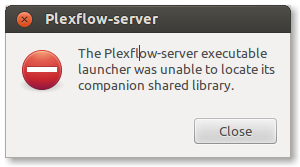
Replace name of “plexflow-server” with “your-app”.
Small recap
Launcher is platform-specific part of Eclipse Equinox that eases launching OSGi Framework and provides more native feeling from starting Eclipse RCP or OSGi based applications to the end users.
Launching in native way is composed of three parts: native exacutable itself, platform specific library and Java launcher JAR.
You can read more about Equinox launcher in my previous post.
Why?
Native launcher cannot locate shared library. It is missing inplugins/folder or is not in folder (exploded) form so native launcher cannot load load it.
Make sure that your build app has this layout:
1+ your-app/
2+--- your-app.exe
3+--+ plugins/
4   +---- prg.eclipse.equinox.launcher_<os>.<ws>.<arch>_<version>/
5       +--- eclipse_1502.so (Linux) OR
6       +--- eclipse_1503.dll (Win) OR
7       +--- eclipse_1503.so (Mac)
==========最终解决方案=======
把eclipse的plugins目录下的
org.eclipse.equinox.launcher.win32.win32.x86_64_1.1.200.v20130807-1835目录
和org.eclipse.equinox.launcher_1.3.0.v20130327-1440.jar包
copy到产品plugins目录下,
在产品ini文件中添加-startup这段配置,
再次执行启动脚本,成功通过。