
为了不想到处去下载jar包,我使用maven为我管理,在开始编码这些东西之前,我们先在pom.xml文件中<dependencies>标签内加入以下内容:
1<!-- Following jars are involved by MailSender.java -->
2<dependency>
3    <groupId>com.sun.mail</groupId>
4    <artifactId>javax.mail</artifactId>
5    <version>1.5.2</version>
6</dependency>
7<dependency>
8    <groupId>javax.activation</groupId>
9    <artifactId>activation</artifactId>
10    <version>1.1.1</version>
11</dependency>
为了方便,我抽象了一个MailMessage对象,此对象代表了邮件对象,内封装了收信人、发信人、邮件内容、抄送人、密件抄送等等诸多代表邮件的属性,如下:
1package com.abc.common.mail;
2
3/**
4 * Represents a Mail message object which contains all the massages needed
5 * by an email.
6 */
7class MailMessage {
8    private String subject;
9    private String from;
10    private String[] tos;
11    private String[] ccs;
12    private String[] bccs;
13    private String content;
14    private String[] fileNames;
15
16    /**
17     * No parameter constructor.
18     */
19    public MailMessage(){}
20
21    /**
22     * Construct a MailMessage object.
23     */
24    public MailMessage(String subject, String from, String[] tos,
25            String[] ccs, String[] bccs, String content, String[] fileNames) {
26        this.subject = subject;
27        this.from = from;
28        this.tos = tos;
29        this.ccs = ccs;
30        this.bccs = bccs;
31        this.content = content;
32        this.fileNames = fileNames;
33    }
34    /**
35     * Construct a simple MailMessage object.
36     */
37    public MailMessage(String subject, String from, String to, String content) {
38        this.subject = subject;
39        this.from = from;
40        this.tos = new String[]{to};
41        this.content = content;
42    }
43    public String getSubject() {
44        return subject;
45    }
46    public void setSubject(String subject) {
47        this.subject = subject;
48    }
49    public String getFrom() {
50        return from;
51    }
52    public void setFrom(String from) {
53        this.from = from;
54    }
55    public String[] getTos() {
56        return tos;
57    }
58    public void setTos(String[] tos) {
59        this.tos = tos;
60    }
61    public String[] getCcs() {
62        return ccs;
63    }
64    public void setCcs(String[] ccs) {
65        this.ccs = ccs;
66    }
67    public String[] getBccs() {
68        return bccs;
69    }
70    public void setBccs(String[] bccs) {
71        this.bccs = bccs;
72    }
73    public String getContent() {
74        return content;
75    }
76    public void setContent(String content) {
77        this.content = content;
78    }
79    public String[] getFileNames() {
80        return fileNames;
81    }
82    public void setFileNames(String[] fileNames) {
83        this.fileNames = fileNames;
84    }
85}
另外,我们还需要一个对象来描述发送者的授权问题。即,发送者在发送邮件直线需要获取SMTP服务器的授权,只有经过授权的账户才能发送邮件,这个对象如下:
1package com.abc.common.mail;
2
3import javax.mail.Authenticator;
4import javax.mail.PasswordAuthentication;
5
6public class MailAuthenticator extends Authenticator {
7
8    /**
9     * Represents the username of sending SMTP server.
10     * <p>For example: If you use smtp.163.com as your smtp server, then the related
11     * username should be: <br>'<b>testname@163.com</b>', or just '<b>testname</b>' is OK.
12     */
13    private String username = null;
14    /**
15     * Represents the password of sending SMTP sever.
16     * More explicitly, the password is the password of username.
17     */
18    private String password = null;
19
20    public MailAuthenticator(String user, String pass) {
21        username = user;
22	password = pass;
23    }
24
25    protected PasswordAuthentication getPasswordAuthentication() {
26	return new PasswordAuthentication(username, password);
27    }
28}
最后,是最重要的主类了。调用此类的sendEmail(MailMessage mail)方法可以发送邮件,这封邮件中可以包含一个或多个附件。
但是在发送附件之前,我们需要了解附件名和内容乱码的问题:MIME要解决的一个问题就是将SMTP协议不支持的字节流转换成为SMTP 协议支持的字节流。比如我们要通过邮件传输一个附件文档,该附件文档就是一个8bit 字节流,如果简单的直接通过SMTP 发送,其最高位信息将被丢失。MIME规定可以用两种编码方式将8bit 的字节流编码成为低于8bit 的字节流,它们分别是BASE64 编码(BASE64 将8bit 字节流编码成6bit 字节流)和QP 编码。这两种编码方式同样应用在对中文的编码上。例如如果邮件中文题目叫做“CVS 介绍”,那么其编码后的形式可能为:
Subject: =?gb2312?B?Q1ZTLS3QpMX0LnBwdA==?=
其中,标题字符串以”=?”开始,以”?=”结束。”gb2312”表示字符串的字符集,而以”?”分隔的”B”就表示此字符串的编码方式为BASE64。那么,此编码从何而来的呢?查阅相关资料后,发现MimeUtility.encodeWord()和MimeUtility.encodeText()等方法就是用来编码中文等特殊字符的:
1//solve encoding problem of attachments file name.
2try {
3    fileName = MimeUtility.encodeText(fileName);
4} catch (UnsupportedEncodingException e) {
5    LOGGER.error("Cannot convert the encoding of attachments file name.", e);
6}
同样的, 我们处理此标题时就要先将BASE64编码的6bit 字节流转换为原来的8bit 字节流,再根据字符集”gb2312”转换为Java 中的String 类型。这里可以简单的使用JavaMail 提供的MimeUtility.decodeWord()或者MimeUtility.decodeText()静态方法将编码后的字符串解码。当然,不是每个情况都会出现乱码的,所以,不要对所有的乱码都执行这个操作,因此,我们需要判断其内容是不是符合某些规则,满足这些规则的字符串,我们可以视其为乱码,并执行相应的解码操作。于是,我封装了一个方法,方法内部进行了内容的判断,如果满足规则,则进行解码,否则不进行:
1/**
2 * For receiving an email, the sender, receiver, reply-to and subject may
3 * be messy code. The default encoding of HTTP is ISO8859-1, In this situation,
4 * use MimeUtility.decodeTex() to convert these information to GBK encoding.
5 * @param res The String to be decoded.
6 * @return A decoded String.
7 */
8private static String mimeDecodeString(String res) {
9    if(res != null) {
10        String s = res.trim();
11        try {
12            if (s.startsWith("=?GB") || s.startsWith("=?gb")
13                    || from.startsWith("=?UTF") || s.startsWith("=?utf")) {
14                s = MimeUtility.decodeText(from);
15            }
16        } catch (Exception e) {
17            LOGGER.error("Decode string error. Origin string is: " + res, e);
18        }
19        return from;
20    }
21    return null;
22}
另外,这个类中还有一个发送匿名邮件的API叫sendAnonymousEmail(MailMessage mail)(仅供交流学习研究使用,不要拿去做坏事哦)。注意,此处的匿名,并不是不写发送者的邮箱,这里的匿名是指我们可以输入任何有效的邮箱地址,这个地址不一定存在,只需要满足邮箱格式的地址即可。比如noreply@sina.cc,又比如111111@111.com,通过这类地址实现隐藏发送者地址的目的。事实上,我们也无需输入真实的发送者地址,因为这封邮件将跳过发送者的SMTP服务器而直接发送到接收者的服务器上。要想明白这个道理,我们得先说说MX。
MX(Mail Exchanger)记录是邮件交换记录,它指向一个邮件服务器,用于电子邮件系统发邮件时根据收信人的地址后缀来定位邮件服务器。例如,当Internet上的某用户要发一封信给 user@mydomain.com 时,该用户的邮件系统通过本机DNS查找mydomain.com这个域名的MX记录,如果MX记录存在,用户计算机就将邮件发送到MX记录所指定的邮件服务器上。
简单的说,MX记录就是用于为发送的邮件指路的记录,它直接指向收件人邮箱所在的域的邮件接收服务器。有了这个邮件接收服务器地址,我们的机器就可以直接向该服务器传送邮件了。
话不多说,看看这个发送匿名邮件的API吧:
1/**
2 * Send anonymous email. Note that although we could give any address as from address,
3 * (for example: <b>'a@a.a' is valid</b>), the from of MailMessage should always be the
4 * correct format of email address(for example the <b>'aaaa' is invalid</b>). Otherwise
5 * an exception would be thrown say that username is invalid.
6 * @param mail The MailMessage object which contains at least all the required
7 *        attributes to be sent.
8 */
9public static void sendAnonymousEmail(MailMessage mail) {
10    String dns = "dns://";
11    Hashtable<String, String> env = new Hashtable<String, String>();
12    env.put(Context.INITIAL_CONTEXT_FACTORY, "com.sun.jndi.dns.DnsContextFactory");
13    env.put(Context.PROVIDER_URL, dns);
14    String[] tos = mail.getTos();
15    try {
16        DirContext ctx = new InitialDirContext(env);
17        for(String to:tos) {
18            String domain = to.substring(to.indexOf('@') + 1);
19            //Get MX(Mail eXchange) records from DNS
20            Attributes attrs = ctx.getAttributes(domain, new String[] { "MX" });
21            if (attrs == null || attrs.size() <= 0) {
22                throw new java.lang.IllegalStateException(
23                    "Error: Your DNS server has no Mail eXchange records!");
24            }
25            @SuppressWarnings("rawtypes")
26            NamingEnumeration servers = attrs.getAll();
27            String smtpHost = null;
28            boolean isSend = false;
29            StringBuffer buf = new StringBuffer();
30            //try all the mail exchange server to send the email.
31            while (servers.hasMore()) {
32                Attribute hosts = (Attribute) servers.next();
33                for (int i = 0; i < hosts.size(); ++i) {
34                    //sample: 20 mx2.qq.com
35                    smtpHost = (String) hosts.get(i);
36                    //parse the string to get smtpHost. sample: mx2.qq.com
37                    smtpHost = smtpHost.substring(smtpHost.lastIndexOf(' ') + 1);
38                    try {
39                        sendEmail(smtpHost, mail, true);
40                        isSend = true;
41                        return;
42                    } catch (Exception e) {
43                        LOGGER.error("", e);
44                        buf.append(e.toString()).append("\r\n");
45                        continue;
46                    }
47                }
48            }
49            if (!isSend) {
50                throw new java.lang.IllegalStateException("Error: Send email error."
51                        + buf.toString());
52            }
53        }
54    } catch (NamingException e) {
55        LOGGER.error("", e);
56    }
57}
这个API中,先从邮件中封装的收件人地址里取出收件人所在发服务器地址,然后通过该地址查找本地DNS记录,如果未找到,则抛出IllegalStateException,因为没法知道收件人的邮件服务器地址就没法发送匿名邮件了。如果找到,则尝试依次向每个邮件服务器发送该邮件,如果发送成功,则立即返回,不再尝试下一个邮件服务器地址。如果发送失败,则会抛出异常,提醒失败。注意到这个API中间的
sendEmail(smtpHost, mail, true);
此方法是我封装的用于发送邮件的基础方法。话不多说,先上代码:
1/**
2 * Send Email. Use string array to represents attachments file names.
3 * @see #sendEmail(String, String, String[], String[], String[], String, File[])
4 */
5private static void sendEmail(String smtpHost, MailMessage mail,
6        boolean isAnonymousEmail) {
7    if(mail == null) {
8        throw new IllegalArgumentException("Param mail can not be null.");
9    }
10    String[] fileNames = mail.getFileNames();
11    //only needs to check the param: fileNames, other params would be checked through
12    //the override method.
13    File[] files = null;
14    if(fileNames != null && fileNames.length > 0) {
15        files = new File[fileNames.length];
16        for(int i = 0; i < files.length; i++) {
17            File file = new File(fileNames[i]);
18            files[i] = file;
19        }
20    }
21    sendEmail(smtpHost, mail.getSubject(), mail.getFrom(), mail.getTos(),
22            mail.getCcs(), mail.getBccs(), mail.getContent(), files, isAnonymousEmail);
23}
为了重用有些代码,我特意提取了一部分公共的部分,因此此方法是一个重载方法,也是最核心的方法了。需要注意的是,发送匿名邮件时,需要将mail.smtp.auth属性设置为false,并且在获取邮件session时,不需要提供邮件验证器Authenticator:
1if(isAnonymousEmail) {
2    //only anonymous email needs param smtpHost
3    props.put("mail.smtp.host", smtpHost);
4    props.put("mail.smtp.auth", "false");
5    session = Session.getInstance(props, null);
6}
下面再看看这个被调用的sendEmail方法吧:
1/**
2 * Send Email. Note that content and attachments cannot be empty at the same time.
3 * @param smtpHost The SMTPHost. This param is needed when sending an anonymous email.
4 *        When sending normal email, the param is ignored and the default SMTPServer
5 *        configured is used.
6 * @param subject The email subject.
7 * @param from The sender address. This address must be available in SMTPServer.
8 * @param tos The receiver addresses. At least 1 address is valid.
9 * @param ccs The 'copy' receiver. Can be empty.
10 * @param bccs The 'encrypt copy' receiver. Can be empty.
11 * @param content The email content.
12 * @param attachments The file array represent attachments to be send.
13 * @param isAnonymousEmail If this mail is send in anonymous mode. When set to true, the
14 *        param smtpHost is needed and sender's email address from should be in correct
15 *        pattern.
16 */
17private static void sendEmail(String smtpHost, String subject, String from,
18        String[] tos, String[] ccs, String[] bccs, String content,
19        File[] attachments, boolean isAnonymousEmail) {
20    //parameter check
21    if(isAnonymousEmail && smtpHost == null) {
22        throw new IllegalStateException(
23            "When sending anonymous email, param smtpHost cannot be null");
24    }
25    if(subject == null || subject.length() == 0) {
26        subject = "Auto-generated subject";
27    }
28    if(from == null) {
29        throw new IllegalArgumentException("Sender's address is required.");
30    }
31    if(tos == null || tos.length == 0) {
32        throw new IllegalArgumentException(
33            "At lease 1 receive address is required.");
34    }
35    if(content == null && (attachments == null || attachments.length == 0)) {
36        throw new IllegalArgumentException(
37            "Content and attachments cannot be empty at the same time");
38    }
39    if(attachments != null && attachments.length > 0) {
40        List<File> invalidAttachments = new ArrayList<>();
41        for(File attachment:attachments) {
42            if(!attachment.exists() || attachment.isDirectory()
43                || !attachment.canRead()) {
44                invalidAttachments.add(attachment);
45            }
46        }
47        if(invalidAttachments.size() > 0) {
48            String msg = "";
49            for(File attachment:invalidAttachments) {
50                msg += "\n\t" + attachment.getAbsolutePath();
51            }
52            throw new IllegalArgumentException(
53                "The following attachments are invalid:" + msg);
54        }
55    }
56    Session session;
57    Properties props = new Properties();
58    props.put("mail.transport.protocol", "smtp");
59
60    if(isAnonymousEmail) {
61        //only anonymous email needs param smtpHost
62        props.put("mail.smtp.host", smtpHost);
63        props.put("mail.smtp.auth", "false");
64        session = Session.getInstance(props, null);
65    } else {
66        //normal email does not need param smtpHost and
67        //uses the default host SMTPServer
68        props.put("mail.smtp.host", SMTPServer);
69        props.put("mail.smtp.auth", "true");
70        session = Session.getInstance(
71            props, new MailAuthenticator(SMTPUsername, SMTPPassword));
72    }
73    //create message
74    MimeMessage msg = new MimeMessage(session);
75    try {
76        //Multipart is used to store many BodyPart objects.
77        Multipart multipart=new MimeMultipart();
78
79        BodyPart part = new MimeBodyPart();
80        part.setContent(content,"text/html;charset=gb2312");
81        //add email content part.
82        multipart.addBodyPart(part);
83
84        //add attachment parts.
85        if(attachments != null && attachments.length > 0) {
86            for(File attachment: attachments) {
87                String fileName = attachment.getName();
88                DataSource dataSource = new FileDataSource(attachment);
89                DataHandler dataHandler = new DataHandler(dataSource);
90                part = new MimeBodyPart();
91                part.setDataHandler(dataHandler);
92                //solve encoding problem of attachments file name.
93                try {
94                    fileName = MimeUtility.encodeText(fileName);
95                } catch (UnsupportedEncodingException e) {
96                    LOGGER.error(
97                        "Cannot convert the encoding of attachments file name.", e);
98                }
99                //set attachments the original file name. if not set,
100                //an auto-generated name would be used.
101                part.setFileName(fileName);
102                multipart.addBodyPart(part);
103            }
104        }
105        msg.setSubject(subject);
106        msg.setSentDate(new Date());
107        //set sender
108        msg.setFrom(new InternetAddress(from));
109        //set receiver,
110        for(String to: tos) {
111            msg.addRecipient(RecipientType.TO, new InternetAddress(to));
112        }
113        if(ccs != null && ccs.length > 0) {
114            for(String cc: ccs) {
115                msg.addRecipient(RecipientType.CC, new InternetAddress(cc));
116            }
117        }
118        if(bccs != null && bccs.length > 0) {
119            for(String bcc: bccs) {
120                msg.addRecipient(RecipientType.BCC, new InternetAddress(bcc));
121            }
122        }
123        msg.setContent(multipart);
124        //save the changes of email first.
125        msg.saveChanges();
126        //to see what commands are used when sending a email,
127        //use session.setDebug(true)
128        //session.setDebug(true);
129        //send email
130        Transport.send(msg);
131        LOGGER.info("Send email success.");
132        System.out.println("Send html email success.");
133    } catch (NoSuchProviderException e) {
134        LOGGER.error("Email provider config error.", e);
135    } catch (MessagingException e) {
136        LOGGER.error("Send email error.", e);
137    }
138}
有了《JavaMail发送和接收邮件API(详解)》一文的基础和前文的叙述,我想里面的逻辑应该不用多解释了吧。下面主要讲讲里面的几个变量。
正如你所见,里面的几个变量SMTPServer、SMTPUsername和SMTPPassword是需要配置的。如果是发送匿名邮件,那么SMTPUsername和SMTPPassword两个变量可以不用配置。这里,我是将这些内容搬到了项目的一个配置文件里,并在初始化这个对象时就去读取指定的配置文件获得这些值:
1private static String SMTPServer;
2private static String SMTPUsername;
3private static String SMTPPassword;
4static {
5    loadConfigProperties();
6}
7/**
8 * Load configuration properties to initialize attributes.
9 */
10private static void loadConfigProperties() {
11    //get current path
12    File f = new File("");
13    String absolutePath = f.getAbsolutePath();
14    String propertiesPath = "";
15    String OSName = System.getProperty("os.name");
16    if(OSName.contains("Windows")) {
17        propertiesPath = absolutePath + "\\..\\src\\main\\resources\\project.properties";
18    } else if(OSName.contains("unix")) {
19        propertiesPath = absolutePath + "/../src/main/resources/project.properties";
20    }
21    f = new File(propertiesPath);
22    if(!f.exists()) {
23        throw new RuntimeException(
24            "Porperties file not found at: " + f.getAbsolutePath());
25    }
26    Properties props = new Properties();
27    try {
28        props.load(new FileInputStream(f));
29        SMTPServer = props.getProperty("AbcCommon.mail.SMTPServer");
30        SMTPUsername = props.getProperty("AbcCommon.mail.SMTPUsername");
31        SMTPPassword = props.getProperty("AbcCommon.mail.SMTPPassword");
32        POP3Server = props.getProperty("AbcCommon.mail.POP3Server");
33        POP3Username = props.getProperty("AbcCommon.mail.POP3Username");
34        POP3Password = props.getProperty("AbcCommon.mail.POP3Password");
35    } catch (FileNotFoundException e) {
36        LOGGER.error("File not found at " + f.getAbsolutePath(), e);
37    } catch (IOException e) {
38        LOGGER.error("Error reading config file " + f.getName(), e);
39    }
40}
说了这么多发送邮件,下面再说说接收邮件。
首先,接收邮件,是肯定需要用户名和密码的,因此此方法至少含有两个参数。由于各大邮件服务公司的邮件服务器命名不统一,因此还需要一个参数来指定接收邮件的服务器,于是,此方法将含有三个参数。接收邮件的思路是:用username和password创建一个邮件验证器Authenticator,通过这个Authenticator来获得一个邮件Session。拿到Session后,通过
1Store store = session.getStore("pop3");
2Folder inbox = store.getFolder("INBOX");
一句,可以获得该账户的收件箱。《JavaMail发送和接收邮件API(详解)》一文中有提到,Store即是用来接收邮件的对象。然后可以通过
Message[] messages = inbox.getMessages();
来获得收件箱中的所有信息。接下来就可以迭代这个数组获取需要的内容了。整个方法如下:
1/**
2 * Receive Email from POPServer. Use POP3 protocal by default. Thus,
3 * call this method, you need to provide a pop3 mail server address.
4 * @param emailAddress The email account in the POPServer.
5 * @param password The password of email address.
6 */
7public static void receiveEmail(String host, String username, String password) {
8    //param check. If param is null, use the default configured value.
9    if(host == null) {
10        host = POP3Server;
11    }
12    if(username == null) {
13        username = POP3Username;
14    }
15    if(password == null) {
16        password = POP3Password;
17    }
18    Properties props = System.getProperties();
19    //MailAuthenticator authenticator = new MailAuthenticator(username, password);
20    try {
21        Session session = Session.getDefaultInstance(props, null);
22        // Store store = session.getStore("imap");
23        Store store = session.getStore("pop3");
24        // Connect POPServer
25        store.connect(host, username, password);
26        Folder inbox = store.getFolder("INBOX");
27        if (inbox == null) {
28            throw new RuntimeException("No inbox existed.");
29        }
30        // Open the INBOX with READ_ONLY mode and start to read all emails.
31        inbox.open(Folder.READ_ONLY);
32        System.out.println("TOTAL EMAIL:" + inbox.getMessageCount());
33        Message[] messages = inbox.getMessages();
34        SimpleDateFormat sdf = new SimpleDateFormat("yyyy-MM-dd HH:mm:ss");
35        for (int i = 0; i < messages.length; i++) {
36            Message msg = messages[i];
37            String from = InternetAddress.toString(msg.getFrom());
38            String replyTo = InternetAddress.toString(msg.getReplyTo());
39            String to = InternetAddress.toString(
40                msg.getRecipients(Message.RecipientType.TO));
41            String subject = msg.getSubject();
42            Date sent = msg.getSentDate();
43            Date ress = msg.getReceivedDate();
44            String type = msg.getContentType();
45            System.out.println(
46                (i + 1) + ".---------------------------------------------");
47            System.out.println("From:" + mimeDecodeString(from));
48            System.out.println("Reply To:" + mimeDecodeString(replyTo));
49            System.out.println("To:" + mimeDecodeString(to));
50            System.out.println("Subject:" + mimeDecodeString(subject));
51            System.out.println("Content-type:" + type);
52            if (sent != null) {
53                System.out.println("Sent Date:" + sdf.format(sent));
54            }
55            if (ress != null) {
56                System.out.println("Receive Date:" + sdf.format(ress));
57            }
58//                //Get message headers.
59//                @SuppressWarnings("rawtypes")
60//                Enumeration headers = msg.getAllHeaders();
61//                while (headers.hasMoreElements()) {
62//                    Header h = (Header) headers.nextElement();
63//                    String name = h.getName();
64//                    String val = h.getValue();
65//                    System.out.println(name + ": " + val);
66//                }
67
68//                //get the email content.
69//                Object content = msg.getContent();
70//                System.out.println(content);
71//                //print content
72//                Reader reader = new InputStreamReader(
73//                        messages[i].getInputStream());
74//                int a = 0;
75//                while ((a = reader.read()) != -1) {
76//                    System.out.print((char) a);
77//                }
78        }
79        // close connection. param false represents do not delete messaegs on server.
80        inbox.close(false);
81        store.close();
82//        } catch(IOException e) {
83//            LOGGER.error("IOException caught while printing the email content", e);
84    } catch (MessagingException e) {
85        LOGGER.error("MessagingException caught when use message object", e);
86    }
87}
注意到我们在处理邮件中可能出现乱码的内容时,调用了前文提到的自定义的**mimeDecodeString()**方法:
System.out.println("Subject:" + mimeDecodeString(subject));
还有,这里面的几个变量:POP3Server、POP3Username和POP3Password也是需要配置的,并会在初始化这个工具类的时候读取。
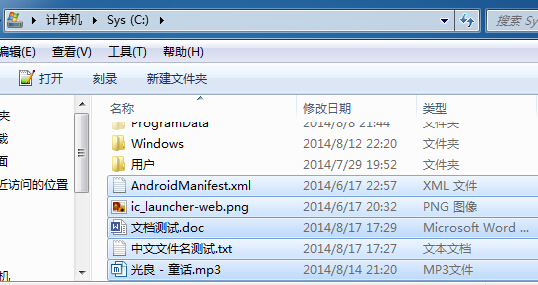
话不多说,让我们先发送一封试试。为了方便,随便找几个文件放入C:\\根目录下:
直接在MailUtil类中加入main方法:
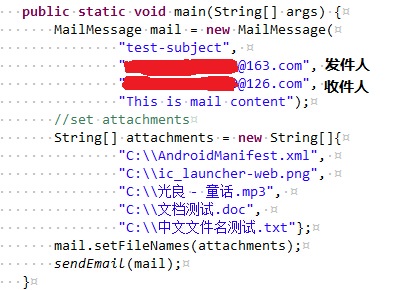
Ctrl+F11执行这个程序,首先可以在控制台看见以下内容(注意执行的程序和发送邮件的时间):

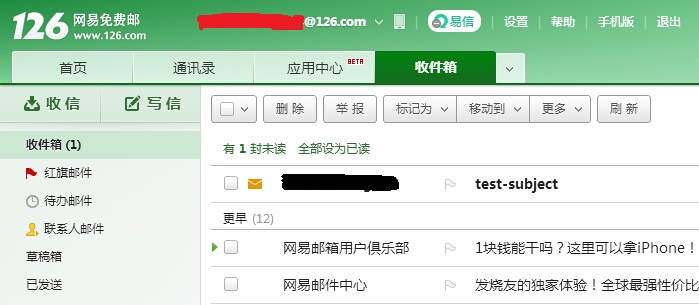
然后再进入邮箱,看到收到的邮件:
打开邮件后,会看到以下内容(注意标题,发件人,收件人和邮件内容,发送时间):
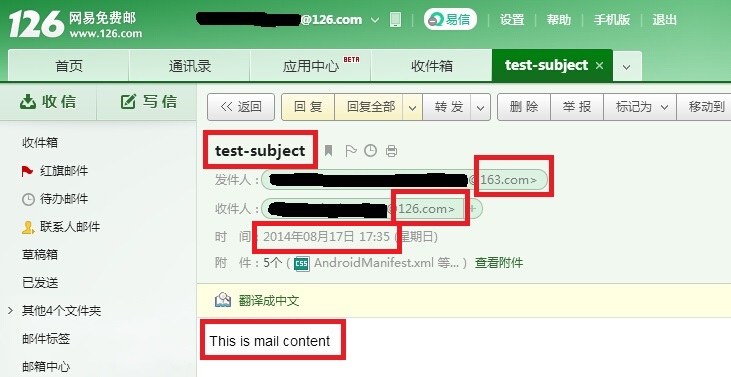
在看看附件的内容(注意附件名字):
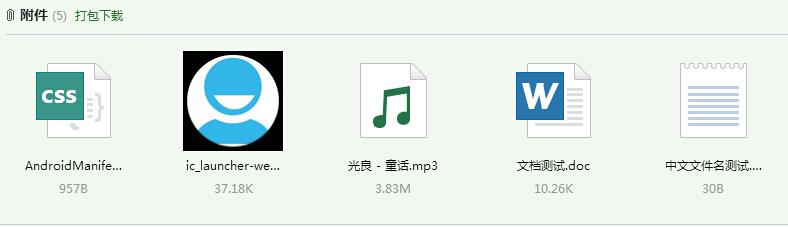
匿名邮件的发送也类似,我已经测试过了,这里不再贴出。好了,最后再贴出工具类的完整代码:
1package com.abc.common.mail;
2
3import java.io.File;
4import java.io.FileInputStream;
5import java.io.FileNotFoundException;
6import java.io.IOException;
7import java.io.UnsupportedEncodingException;
8import java.text.SimpleDateFormat;
9import java.util.ArrayList;
10import java.util.Date;
11import java.util.Hashtable;
12import java.util.List;
13import java.util.Properties;
14
15import javax.activation.DataHandler;
16import javax.activation.DataSource;
17import javax.activation.FileDataSource;
18import javax.mail.BodyPart;
19import javax.mail.Folder;
20import javax.mail.Message;
21import javax.mail.Message.RecipientType;
22import javax.mail.MessagingException;
23import javax.mail.Multipart;
24import javax.mail.NoSuchProviderException;
25import javax.mail.Session;
26import javax.mail.Store;
27import javax.mail.Transport;
28import javax.mail.internet.InternetAddress;
29import javax.mail.internet.MimeBodyPart;
30import javax.mail.internet.MimeMessage;
31import javax.mail.internet.MimeMultipart;
32import javax.mail.internet.MimeUtility;
33import javax.naming.Context;
34import javax.naming.NamingEnumeration;
35import javax.naming.NamingException;
36import javax.naming.directory.Attribute;
37import javax.naming.directory.Attributes;
38import javax.naming.directory.DirContext;
39import javax.naming.directory.InitialDirContext;
40
41import org.apache.log4j.Logger;
42
43public class MailUtil {
44
45    private static final Logger LOGGER = Logger.getLogger(MailUtil.class);
46
47    private static String SMTPServer;
48    private static String SMTPUsername;
49    private static String SMTPPassword;
50    private static String POP3Server;
51    private static String POP3Username;
52    private static String POP3Password;
53
54    static {
55        loadConfigProperties();
56    }
57
58    public static void main(String[] args) {
59        //发送邮件
60        MailMessage mail = new MailMessage(
61                "test-subject",
62                "xxxx@163.com",
63                "yyyy@126.com",
64                "This is mail content");
65        //set attachments
66        String[] attachments = new String[]{
67                "C:\\AndroidManifest.xml",
68                "C:\\ic_launcher-web.png",
69                "C:\\光良 - 童话.mp3",
70                "C:\\文档测试.doc",
71                "C:\\中文文件名测试.txt"};
72        mail.setFileNames(attachments);
73        sendEmail(mail);
74
75        //接收邮件
76        receiveEmail(POP3Server, POP3Username, POP3Password);
77
78        //发送匿名邮件
79        MailMessage anonymousMail = new MailMessage("subject",
80            "a@a.a", "zzzz@qq.com", "content");
81        anonymousMail.setFileNames(attachments);
82        sendAnonymousEmail(anonymousMail);
83    }
84
85    /**
86     * Load configuration properties to initialize attributes.
87     */
88    private static void loadConfigProperties() {
89        File f = new File("");
90        //this path would point to AbcCommon
91        String absolutePath = f.getAbsolutePath();
92        String propertiesPath = "";
93        String OSName = System.getProperty("os.name");
94        if(OSName.contains("Windows")) {
95            propertiesPath = absolutePath + "\\..\\src\\main\\resources\\project.properties";
96        } else if(OSName.contains("unix")) {
97            propertiesPath = absolutePath + "/../src/main/resources/project.properties";
98        }
99        f = new File(propertiesPath);
100        if(!f.exists()) {
101            throw new RuntimeException("Porperties file not found at: " + f.getAbsolutePath());
102        }
103        Properties props = new Properties();
104        try {
105            props.load(new FileInputStream(f));
106            SMTPServer = props.getProperty("AbcCommon.mail.SMTPServer");
107            SMTPUsername = props.getProperty("AbcCommon.mail.SMTPUsername");
108            SMTPPassword = props.getProperty("AbcCommon.mail.SMTPPassword");
109            POP3Server = props.getProperty("AbcCommon.mail.POP3Server");
110            POP3Username = props.getProperty("AbcCommon.mail.POP3Username");
111            POP3Password = props.getProperty("AbcCommon.mail.POP3Password");
112        } catch (FileNotFoundException e) {
113            LOGGER.error("File not found at " + f.getAbsolutePath(), e);
114        } catch (IOException e) {
115            LOGGER.error("Error reading config file " + f.getName(), e);
116        }
117    }
118
119    /**
120     * Send email. Note that the fileNames of MailMessage are the absolute path of file.
121     * @param mail The MailMessage object which contains at least all the required
122     *        attributes to be sent.
123     */
124    public static void sendEmail(MailMessage mail) {
125        sendEmail(null, mail, false);
126    }
127
128    /**
129     * Send anonymous email. Note that although we could give any address as from address,
130     * (for example: <b>'a@a.a' is valid</b>), the from of MailMessage should always be the
131     * correct format of email address(for example the <b>'aaaa' is invalid</b>). Otherwise
132     * an exception would be thrown say that username is invalid.
133     * @param mail The MailMessage object which contains at least all the required
134     *        attributes to be sent.
135     */
136    public static void sendAnonymousEmail(MailMessage mail) {
137        String dns = "dns://";
138        Hashtable<String, String> env = new Hashtable<String, String>();
139        env.put(Context.INITIAL_CONTEXT_FACTORY, "com.sun.jndi.dns.DnsContextFactory");
140        env.put(Context.PROVIDER_URL, dns);
141        String[] tos = mail.getTos();
142        try {
143            DirContext ctx = new InitialDirContext(env);
144            for(String to:tos) {
145                String domain = to.substring(to.indexOf('@') + 1);
146                //Get MX(Mail eXchange) records from DNS
147                Attributes attrs = ctx.getAttributes(domain, new String[] { "MX" });
148                if (attrs == null || attrs.size() <= 0) {
149                    throw new java.lang.IllegalStateException(
150                        "Error: Your DNS server has no Mail eXchange records!");
151                }
152                @SuppressWarnings("rawtypes")
153                NamingEnumeration servers = attrs.getAll();
154                String smtpHost = null;
155                boolean isSend = false;
156                StringBuffer buf = new StringBuffer();
157                //try all the mail exchange server to send the email.
158                while (servers.hasMore()) {
159                    Attribute hosts = (Attribute) servers.next();
160                    for (int i = 0; i < hosts.size(); ++i) {
161                        //sample: 20 mx2.qq.com
162                        smtpHost = (String) hosts.get(i);
163                        //parse the string to get smtpHost. sample: mx2.qq.com
164                        smtpHost = smtpHost.substring(smtpHost.lastIndexOf(' ') + 1);
165                        try {
166                            sendEmail(smtpHost, mail, true);
167                            isSend = true;
168                            return;
169                        } catch (Exception e) {
170                            LOGGER.error("", e);
171                            buf.append(e.toString()).append("\r\n");
172                            continue;
173                        }
174                    }
175                }
176                if (!isSend) {
177                    throw new java.lang.IllegalStateException("Error: Send email error."
178                            + buf.toString());
179                }
180            }
181        } catch (NamingException e) {
182            LOGGER.error("", e);
183        }
184    }
185
186    /**
187     * Send Email. Use string array to represents attachments file names.
188     * @see #sendEmail(String, String, String[], String[], String[], String, File[])
189     */
190    private static void sendEmail(String smtpHost,
191        MailMessage mail, boolean isAnonymousEmail) {
192        if(mail == null) {
193            throw new IllegalArgumentException("Param mail can not be null.");
194        }
195        String[] fileNames = mail.getFileNames();
196        //only needs to check the param: fileNames, other params would be checked through
197        //the override method.
198        File[] files = null;
199        if(fileNames != null && fileNames.length > 0) {
200            files = new File[fileNames.length];
201            for(int i = 0; i < files.length; i++) {
202                File file = new File(fileNames[i]);
203                files[i] = file;
204            }
205        }
206        sendEmail(smtpHost, mail.getSubject(), mail.getFrom(), mail.getTos(),
207                mail.getCcs(), mail.getBccs(), mail.getContent(), files, isAnonymousEmail);
208    }
209
210    /**
211     * Send Email. Note that content and attachments cannot be empty at the same time.
212     * @param smtpHost The SMTPHost. This param is needed when sending an anonymous email.
213     *        When sending normal email, the param is ignored and the default SMTPServer
214     *        configured is used.
215     * @param subject The email subject.
216     * @param from The sender address. This address must be available in SMTPServer.
217     * @param tos The receiver addresses. At least 1 address is valid.
218     * @param ccs The 'copy' receiver. Can be empty.
219     * @param bccs The 'encrypt copy' receiver. Can be empty.
220     * @param content The email content.
221     * @param attachments The file array represent attachments to be send.
222     * @param isAnonymousEmail If this mail is send in anonymous mode. When set to true, the
223     *        param smtpHost is needed and sender's email address from should be in correct
224     *        pattern.
225     */
226    private static void sendEmail(String smtpHost, String subject,
227            String from, String[] tos, String[] ccs, String[] bccs,
228            String content, File[] attachments, boolean isAnonymousEmail) {
229        //parameter check
230        if(isAnonymousEmail && smtpHost == null) {
231            throw new IllegalStateException(
232                "When sending anonymous email, param smtpHost cannot be null");
233        }
234        if(subject == null || subject.length() == 0) {
235            subject = "Auto-generated subject";
236        }
237        if(from == null) {
238            throw new IllegalArgumentException("Sender's address is required.");
239        }
240        if(tos == null || tos.length == 0) {
241            throw new IllegalArgumentException(
242                "At lease 1 receive address is required.");
243        }
244        if(content == null && (attachments == null || attachments.length == 0)) {
245            throw new IllegalArgumentException(
246                "Content and attachments cannot be empty at the same time");
247        }
248        if(attachments != null && attachments.length > 0) {
249            List<File> invalidAttachments = new ArrayList<>();
250            for(File attachment:attachments) {
251                if(!attachment.exists() || attachment.isDirectory()
252                    || !attachment.canRead()) {
253                    invalidAttachments.add(attachment);
254                }
255            }
256            if(invalidAttachments.size() > 0) {
257                String msg = "";
258                for(File attachment:invalidAttachments) {
259                    msg += "\n\t" + attachment.getAbsolutePath();
260                }
261                throw new IllegalArgumentException(
262                    "The following attachments are invalid:" + msg);
263            }
264        }
265        Session session;
266        Properties props = new Properties();
267        props.put("mail.transport.protocol", "smtp");
268
269        if(isAnonymousEmail) {
270            //only anonymous email needs param smtpHost
271            props.put("mail.smtp.host", smtpHost);
272            props.put("mail.smtp.auth", "false");
273            session = Session.getInstance(props, null);
274        } else {
275            //normal email does not need param smtpHost and uses the default host SMTPServer
276            props.put("mail.smtp.host", SMTPServer);
277            props.put("mail.smtp.auth", "true");
278            session = Session.getInstance(props,
279                new MailAuthenticator(SMTPUsername, SMTPPassword));
280        }
281        //create message
282        MimeMessage msg = new MimeMessage(session);
283        try {
284            //Multipart is used to store many BodyPart objects.
285            Multipart multipart=new MimeMultipart();
286
287            BodyPart part = new MimeBodyPart();
288            part.setContent(content,"text/html;charset=gb2312");
289            //add email content part.
290            multipart.addBodyPart(part);
291
292            //add attachment parts.
293            if(attachments != null && attachments.length > 0) {
294                for(File attachment: attachments) {
295                    String fileName = attachment.getName();
296                    DataSource dataSource = new FileDataSource(attachment);
297                    DataHandler dataHandler = new DataHandler(dataSource);
298                    part = new MimeBodyPart();
299                    part.setDataHandler(dataHandler);
300                    //solve encoding problem of attachments file name.
301                    try {
302                        fileName = MimeUtility.encodeText(fileName);
303                    } catch (UnsupportedEncodingException e) {
304                        LOGGER.error(
305                            "Cannot convert the encoding of attachments file name.", e);
306                    }
307                    //set attachments the original file name. if not set,
308                    //an auto-generated name would be used.
309                    part.setFileName(fileName);
310                    multipart.addBodyPart(part);
311                }
312            }
313            msg.setSubject(subject);
314            msg.setSentDate(new Date());
315            //set sender
316            msg.setFrom(new InternetAddress(from));
317            //set receiver,
318            for(String to: tos) {
319                msg.addRecipient(RecipientType.TO, new InternetAddress(to));
320            }
321            if(ccs != null && ccs.length > 0) {
322                for(String cc: ccs) {
323                    msg.addRecipient(RecipientType.CC, new InternetAddress(cc));
324                }
325            }
326            if(bccs != null && bccs.length > 0) {
327                for(String bcc: bccs) {
328                    msg.addRecipient(RecipientType.BCC, new InternetAddress(bcc));
329                }
330            }
331            msg.setContent(multipart);
332            //save the changes of email first.
333            msg.saveChanges();
334            //to see what commands are used when sending a email, use session.setDebug(true)
335            //session.setDebug(true);
336            //send email
337            Transport.send(msg);
338            LOGGER.info("Send email success.");
339            System.out.println("Send html email success.");
340        } catch (NoSuchProviderException e) {
341            LOGGER.error("Email provider config error.", e);
342        } catch (MessagingException e) {
343            LOGGER.error("Send email error.", e);
344        }
345    }
346
347
348    /**
349     * Receive Email from POPServer. Use POP3 protocal by default. Thus,
350     * call this method, you need to provide a pop3 mail server address.
351     * @param emailAddress The email account in the POPServer.
352     * @param password The password of email address.
353     */
354    public static void receiveEmail(String host, String username, String password) {
355        //param check. If param is null, use the default configured value.
356        if(host == null) {
357            host = POP3Server;
358        }
359        if(username == null) {
360            username = POP3Username;
361        }
362        if(password == null) {
363            password = POP3Password;
364        }
365        Properties props = System.getProperties();
366        //MailAuthenticator authenticator = new MailAuthenticator(username, password);
367        try {
368            Session session = Session.getDefaultInstance(props, null);
369            // Store store = session.getStore("imap");
370            Store store = session.getStore("pop3");
371            // Connect POPServer
372            store.connect(host, username, password);
373            Folder inbox = store.getFolder("INBOX");
374            if (inbox == null) {
375                throw new RuntimeException("No inbox existed.");
376            }
377            // Open the INBOX with READ_ONLY mode and start to read all emails.
378            inbox.open(Folder.READ_ONLY);
379            System.out.println("TOTAL EMAIL:" + inbox.getMessageCount());
380            Message[] messages = inbox.getMessages();
381            SimpleDateFormat sdf = new SimpleDateFormat("yyyy-MM-dd HH:mm:ss");
382            for (int i = 0; i < messages.length; i++) {
383                Message msg = messages[i];
384                String from = InternetAddress.toString(msg.getFrom());
385                String replyTo = InternetAddress.toString(msg.getReplyTo());
386                String to = InternetAddress.toString(
387                    msg.getRecipients(Message.RecipientType.TO));
388                String subject = msg.getSubject();
389                Date sent = msg.getSentDate();
390                Date ress = msg.getReceivedDate();
391                String type = msg.getContentType();
392                System.out.println((i + 1) + ".---------------------------------------------");
393                System.out.println("From:" + mimeDecodeString(from));
394                System.out.println("Reply To:" + mimeDecodeString(replyTo));
395                System.out.println("To:" + mimeDecodeString(to));
396                System.out.println("Subject:" + mimeDecodeString(subject));
397                System.out.println("Content-type:" + type);
398                if (sent != null) {
399                    System.out.println("Sent Date:" + sdf.format(sent));
400                }
401                if (ress != null) {
402                    System.out.println("Receive Date:" + sdf.format(ress));
403                }
404//                //Get message headers.
405//                @SuppressWarnings("rawtypes")
406//                Enumeration headers = msg.getAllHeaders();
407//                while (headers.hasMoreElements()) {
408//                    Header h = (Header) headers.nextElement();
409//                    String name = h.getName();
410//                    String val = h.getValue();
411//                    System.out.println(name + ": " + val);
412//                }
413
414//                //get the email content.
415//                Object content = msg.getContent();
416//                System.out.println(content);
417//                //print content
418//                Reader reader = new InputStreamReader(
419//                        messages[i].getInputStream());
420//                int a = 0;
421//                while ((a = reader.read()) != -1) {
422//                    System.out.print((char) a);
423//                }
424            }
425            // close connection. param false represents do not delete messaegs on server.
426            inbox.close(false);
427            store.close();
428//        } catch(IOException e) {
429//            LOGGER.error("IOException caught while printing the email content", e);
430        } catch (MessagingException e) {
431            LOGGER.error("MessagingException caught when use message object", e);
432        }
433    }
434
435    /**
436     * For receiving an email, the sender, receiver, reply-to and subject may
437     * be messy code. The default encoding of HTTP is ISO8859-1, In this situation,
438     * use MimeUtility.decodeTex() to convert these information to GBK encoding.
439     * @param res The String to be decoded.
440     * @return A decoded String.
441     */
442    private static String mimeDecodeString(String res) {
443        if(res != null) {
444            String from = res.trim();
445            try {
446                if (from.startsWith("=?GB") || from.startsWith("=?gb")
447                        || from.startsWith("=?UTF") || from.startsWith("=?utf")) {
448                    from = MimeUtility.decodeText(from);
449                }
450            } catch (Exception e) {
451                LOGGER.error("Decode string error. Origin string is: " + res, e);
452            }
453            return from;
454        }
455        return null;
456    }
457}