Ribbon是客户端的负载均衡机制,它有几种负载均衡机制。默认是轮询,我们也可以自定义规则。通过合理的分配网络请求来减小服务器的压力。项目都是注册到eureka服务器上。通过ribbon去调用其他服务。
项目搭建:
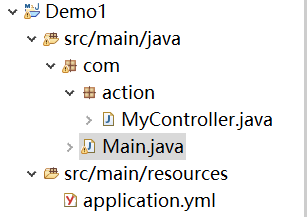
1. 导入依赖
1<parent>
2        <groupId>org.springframework.boot</groupId>
3        <artifactId>spring-boot-starter-parent</artifactId>
4        <version>1.5.8.RELEASE</version>
5        <relativePath/>
6    </parent>
7    <!-- springcloud依赖 -->
8    <dependencyManagement>
9        <dependencies>
10            <dependency>
11                <groupId>org.springframework.cloud</groupId>
12                <artifactId>spring-cloud-dependencies</artifactId>
13                <version>Dalston.SR3</version>
14                <type>pom</type>
15                <scope>import</scope>
16            </dependency>
17        </dependencies>
18    </dependencyManagement>
19
20    <dependencies>
21        <dependency>
22            <groupId>org.springframework.boot</groupId>
23            <artifactId>spring-boot-starter-web</artifactId>
24        </dependency>
25        <!-- eureka客户端依赖 -->
26        <dependency>
27            <groupId>org.springframework.cloud</groupId>
28            <artifactId>spring-cloud-starter-eureka</artifactId>
29        </dependency>
30    </dependencies>
2. 写配置文件
1# 项目访问路径前缀
2server:
3  context-path: /demo
4
5# 设置服务名称,服务会以这个名字注册到eureka服务器上
6spring:
7  application:
8    name: demo
9
10# 设置eureka服务器的注册地址
11eureka:
12  client:
13    serviceUrl:
14      defaultZone: http://localhost:8761/eureka/
3. 开发服务接口
1import javax.servlet.http.HttpServletRequest;
2import org.springframework.web.bind.annotation.RequestMapping;
3import org.springframework.web.bind.annotation.RestController;
4@RestController
5public class MyController {
6
7    @RequestMapping("/data")
8    public String testData(HttpServletRequest req){
9        String url = req.getRequestURL().toString();
10        return "提供服务的是: "+url;
11    }
12}
4. 启动主函数,测试。
1import java.util.Scanner;
2import org.springframework.boot.autoconfigure.SpringBootApplication;
3import org.springframework.boot.builder.SpringApplicationBuilder;
4import org.springframework.cloud.netflix.eureka.EnableEurekaClient;
5@SpringBootApplication
6//申明eureka客户端
7@EnableEurekaClient
8public class Main {
9
10    public static void main(String[] args) {
11        //1. 启动main方法,在控制台输入端口号
12        Scanner scan = new Scanner(System.in);
13        String port = scan.nextLine();
14        //项目以输入的端口号启动
15        new SpringApplicationBuilder(Main.class).properties("server.port="+port).run(args);
16        //2. 启动两次main方法,分别以8080  8081启动,模拟集群的环境    浏览器访问接口测试下。
17    }
18}

二:搭建Ribbon项目
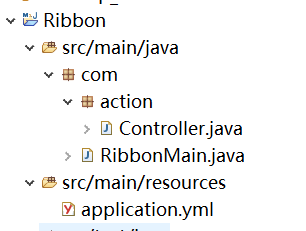
1. 导入依赖
1<parent>
2        <groupId>org.springframework.boot</groupId>
3        <artifactId>spring-boot-starter-parent</artifactId>
4        <version>1.5.8.RELEASE</version>
5        <relativePath/>
6    </parent>
7  <!-- springcloud依赖 -->
8  <dependencyManagement>
9        <dependencies>
10            <dependency>
11                <groupId>org.springframework.cloud</groupId>
12                <artifactId>spring-cloud-dependencies</artifactId>
13                <version>Dalston.SR3</version>
14                <type>pom</type>
15                <scope>import</scope>
16            </dependency>
17        </dependencies>
18    </dependencyManagement>
19
20    <dependencies>
21        <dependency>
22            <groupId>org.springframework.boot</groupId>
23            <artifactId>spring-boot-starter-web</artifactId>
24        </dependency>
25        <!-- eureka客户端依赖 -->
26        <dependency>
27            <groupId>org.springframework.cloud</groupId>
28            <artifactId>spring-cloud-starter-eureka</artifactId>
29        </dependency>
30        <!-- ribbon依赖 -->
31        <dependency>
32            <groupId>org.springframework.cloud</groupId>
33            <artifactId>spring-cloud-starter-ribbon</artifactId>
34        </dependency>
35    </dependencies>
2. 配置application.yml文件
1# 指定默认端口
2server:
3  port: 8083
4
5# 设置服务名称,服务会以这个名字注册到eureka服务器上
6spring:
7  application:
8    name: ribbon
9
10# 设置eureka服务器的注册地址
11eureka:
12  client:
13    serviceUrl:
14      defaultZone: http://localhost:8761/eureka/
3. 编写controller
1import org.springframework.beans.factory.annotation.Autowired;
2import org.springframework.web.bind.annotation.RequestMapping;
3import org.springframework.web.bind.annotation.RestController;
4import org.springframework.web.client.RestTemplate;
5@RestController
6public class Controller {
7
8     @Autowired
9     private RestTemplate restTpl;
10
11     @RequestMapping("/testRibbon")
12     public String testRibbon() {
13         String data = restTpl.getForObject("http://demo/demo/data", String.class);
14      //String data = restTpl.getForObject("http://127.0.0.1:8081/demo/data", String.class);
15      //User user = restTpl.getForObject("http://demo/demo/user/{id}", User.class,id); return data;
16   }
17}
4. 编写主函数入口, 配置RestTemplate
1import org.springframework.boot.SpringApplication;
2import org.springframework.boot.autoconfigure.SpringBootApplication;
3import org.springframework.cloud.client.loadbalancer.LoadBalanced;
4import org.springframework.cloud.netflix.eureka.EnableEurekaClient;
5import org.springframework.context.annotation.Bean;
6import org.springframework.web.client.RestTemplate;
7@SpringBootApplication
8//申明eureka客户端
9@EnableEurekaClient
10public class RibbonMain {
11
12    @Bean
13    @LoadBalanced
14    public RestTemplate getRestTemplate() {
15        return new RestTemplate();
16    }
17
18    public static void main(String[] args) {
19        SpringApplication.run(RibbonMain.class, args);
20    }
21}
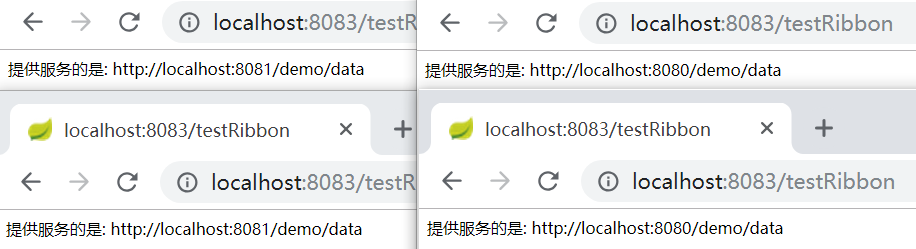
**测试:**我们通过 ribbon来调用其他服务数据,可以看到它默认是走轮询策略。