
JS与iOS之间的通信,主要运用两个方法:(PhoneGap框架也是基于此原理)
1、UIWebView的 stringByEvaluatingJavaScriptFromString方法
2、UIWebViewDelegate的
- (BOOL)webView:(UIWebView *)webView shouldStartLoadWithRequest:(NSURLRequest *)request navigationType:(UIWebViewNavigationType)navigationType方法
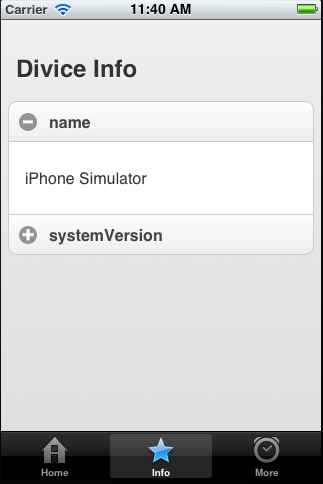
示例:
上部分是一个UIWebView,实现UIWebViewDelegate
[plain] view plain copy print ?
-
- (void)viewDidLoad
-
{
-
[super viewDidLoad];
-
NSString *path = [[NSBundle mainBundle] pathForResource:@"jm/info" ofType:@"html"];
-
NSURLRequest *request = [NSURLRequest requestWithURL:[NSURL fileURLWithPath:path]];
-
[self.webView loadRequest:request];
-
}
- (void)viewDidLoad { [super viewDidLoad]; NSString *path = [[NSBundle mainBundle] pathForResource:@"jm/info" ofType:@"html"]; NSURLRequest *request = [NSURLRequest requestWithURL:[NSURL fileURLWithPath:path]]; [self.webView loadRequest:request]; }
[plain] view plain copy print ?
-
#pragma mark - UIWebViewDelegate
-
- (BOOL)webView:(UIWebView *)webView shouldStartLoadWithRequest:(NSURLRequest *)request navigationType:(UIWebViewNavigationType)navigationType
-
{
-
if([request.mainDocumentURL.relativePath isEqualToString:@"/getInfo/name"])
-
{
-
NSString *info = [[UIDevice currentDevice] name];
-
NSString *js = [NSString stringWithFormat:@"showInfo(\"name\",\"%@\")",info];
-
[self.webView stringByEvaluatingJavaScriptFromString:js];
-
return false;
-
}
-
if([request.mainDocumentURL.relativePath isEqualToString:@"/getInfo/systemVersion"])
-
{
-
NSString *info = [[UIDevice currentDevice] systemVersion];
-
NSString *js = [NSString stringWithFormat:@"showInfo(\"systemVersion\",\"%@\")",info];
-
[self.webView stringByEvaluatingJavaScriptFromString:js];
-
return false;
-
}
-
return true;
-
}
#pragma mark - UIWebViewDelegate
1- (BOOL)webView:(UIWebView *)webView shouldStartLoadWithRequest:(NSURLRequest *)request navigationType:(UIWebViewNavigationType)navigationType
2{
3    if([request.mainDocumentURL.relativePath isEqualToString:@"/getInfo/name"])
4    {
5        NSString *info = [[UIDevice currentDevice] name];
6        NSString *js = [NSString stringWithFormat:@"showInfo(\"name\",\"%@\")",info];
7        [self.webView stringByEvaluatingJavaScriptFromString:js];
8        return false;
9    }
10    if([request.mainDocumentURL.relativePath isEqualToString:@"/getInfo/systemVersion"])
11    {
12        NSString *info = [[UIDevice currentDevice] systemVersion];
13        NSString *js = [NSString stringWithFormat:@"showInfo(\"systemVersion\",\"%@\")",info];
14        [self.webView stringByEvaluatingJavaScriptFromString:js];
15        return false;
16    }
17    return true;
18}
JS代码:
[html] view plain copy print ?
- <!DOCTYPE html\>
-
<html>
-
<head>
-
<title>city</title>
-
<meta charset="utf-8">
-
<meta name="viewport" content="width=device-width, initial-scale=1">
- <link rel\="stylesheet" href\="jquery.mobile-1.0.css"/>
- <script type\="text/javascript" src\="jquery.js"\></script\>
- <script type\="text/javascript" src\="jquery.mobile-1.0.js"\></script\>
-
<script>
-
function getInfo(name)
-
{
-
window.location = "/getInfo/"+name;
-
}
-
function showInfo(id,info)
-
{
-
$("p#"+id).html(info);
-
}
-
</script>
-
</head>
-
<body>
- <div data-role\="page"\>
- <div data-role\="content"\>
-
<h2>Divice Info</h2>
- <div data-role\="collapsible-set" data-theme\="c" data-content-theme\="d"\>
- <div data-role\="collapsible"\>
- <h3 onclick\="getInfo('name')"\>name</h3\>
- <p id\="name"\></p\>
-
</div>
- <div data-role\="collapsible"\>
- <h3 onclick\="getInfo('systemVersion')"\>systemVersion</h3\>
- <p id\="systemVersion"\></p\>
-
</div>
-
</div>
-
</div>
-
</div>
-
</body>
-
</html>