
引子:
开始的时候我想先要解决一个问题,怎么设置一个div盒子撑满整个屏幕?
看下面的html代码:
XHTML
1
2
3
4
5
<body> <div id \= "father-body" \> <div class \= "item1" \> </div> </div> </body>实现方法一:
JavaScript
1
2
3
4
5
html , body , # father - body {
height : 100 % ;
width : 100 % ;
background - color : # 123456 ;
}
这里主要解释下%(百分号)在CSS中使用的问题。% 主要是在父级元素或者是祖先元素定义了固定的width 和height 的时候才可以使用(或者说使用的时候才会有效果)。
实现方法二:
JavaScript
1
2
3
4
5
6
father - body {
position : fixed ;
width : 100 % ;
height : 100 % ;
background - color : # 123456 ;
}
这里为#father-body 设置position属性,触发自身的BFC。当对自身使用width 和 height的时候才可以生效。
position的fixed值的含义:
对象脱离常规流,使用 top,right,bottom,left等属性以窗口为参考点进行定位,当出现滚动条时,对象不会随着滚动。
position属性的几个值的概念:
1.相对定位
有了以上的定义,来看一段代码:
XHTML
1
2
3
4
5
6
7
8
9
10
11
12
13
14
15
16
17
18
19
20
21
22
23
24
25
26
27
28
<!DOCTYPE html> <html lang \= "en" \> <head><meta charset = "UTF-8" >
<title> Document </title> <style type\="text/css"> .item1, .item2, .item3 { width : 300px ; height : 100px ; background-color : #123456 ; margin : 20px ; } .item2 { position : relative ; /\*top:40px; left:40px;\*/ margin : 40px 0 0 40px ; } </style> </head> <body> <div> <div class \= "item1" \> </div> <div class \= "item2" \> </div> <div class \= "item3" \> </div> </div> </body> </html>效果如下图:

当我们使用top right bottom left 这样的属性的时候,CSS代码如下:
CSS
1
2
3
4
5
6
7
8
9
10
11
12
13
14
<style type \="text/css"> .item1, .item2, .item3 { width : 300px ; height : 100px ; background-color : #123456 ; margin : 20px ; } .item2 { position : relative ; top : 40px ; left : 40px ; /\*margin:40px 0 0 40px;\*/ } </style>可以看到的效果图如下图:
到这里可以验证当使用top right bottom left (这四个属性可以设置具体的像素数也可以设置百分比)这样属性改变元素的位置的时候,不会影响其他元素的位置。而使用margin 这样的属性改变元素的位置会影响其他元素的位置。
示意图如下(图片来自W3CSchool):

2.绝对定位
看下面的一段代码:
XHTML
1
2
3
4
5
6
7
8
9
10
11
12
13
14
15
16
17
18
19
20
21
22
23
24
25
26
27
28
<!DOCTYPE html> <html lang \= "en" \> <head><meta charset = "UTF-8" >
<title> Document </title> <style type\="text/css"> body { margin : 20px ; } #body-div { padding : 15px ; background-color : #a0c8ff ; border : 1px solid #000000 ; } #body-div div { padding : 10px ; background-color : #fff0ac ; border : 1px solid #000000 ; } </style> </head> <body> <div id \= "body-div" \> <div class \= "item1" \> Box-1 </div> <div class \= "item2" \> Box-2 </div> <div class \= "item3" \> Box-3 </div> </div> </body> </html>效果图如下:
我们为Box-2设置绝对定位属性
CSS
1
2
3
.item2 {
position : absolute ;
}
此时Box-2脱离文档流,效果如下:
这个时候Box-3的位置会占据之前Box-2的位置。且Box-2和Box-3的左边框会重合。且盒子的宽度会根据盒子内部的元素自适应。
当盒子设置了绝对定位但是没有使用top right bottom left设置盒子的偏移量的时候,它仍会占据原先的位置。
那么当设置top right bottom left这些属性的时候会是什么效果呢?
设置下面的代码:
CSS
1
2
3
4
5
.item2 {
position : absolute ;
top : 0 ;
right : 0 ;
}
效果如下图:
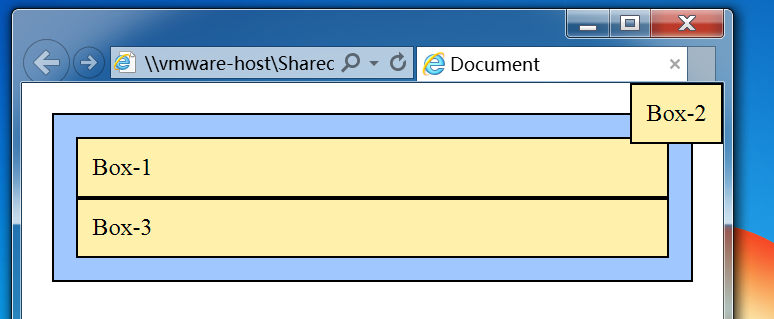
那么当我们把直接父级元素设置为已定位的元素会怎么样呢?
由上可以得出两个结论:
1.使用绝对定位的盒子以它的“最近”的一个“已经定位”的“祖先元素”为基准进行偏移(定位)。如果没有已经定位的祖先元素,那么就会以浏览器窗口为基准进行定位。
2.决对定位的框从标准流中脱离,这意味着它们对其后的兄弟盒子的定位没有影响。其它的盒子好像就当这个盒子(绝对定位的盒子)不存在一样。
3.z-index属性
z-index属性用于调整定位时重叠块的上下位置,与它的名称一样,如果页面为x-y轴,则垂直于页面的方向为z轴。z-index大的页面位于其值小的的上面。
看下面的代码:
CSS
1
2
3
4
5
6
7
8
9
10
.item1 {
position : relative ;
z-index : 3 ;
}
.item2 {
position : absolute ;
top : 0 ;
right : 0 ;
z-index : 1 ;
}
常见定位拓展:
以下的代码我都亲测过,均可以达到效果,就不在展示效果图(如果对代码有疑问可以留言):
1.水平居中
1.1行内元素的水平居中
CSS
1
2
3
4
/*行内元素水平居中*/
#body-div {
text-align : center ;
}
1.2块级元素的水平居中
CSS
1
2
3
4
/*块级元素水平居中*/
#body-div {
margin : 0 auto ;
}
1.3多个块级元素水平居中
CSS
1
2
3
4
5
6
7
/*多个块级元素水平居中*/
#body-div {
text-align : center ;
}
##body-div-container {
display : inline-block ;
}
2.水平垂直居中
2.1已知宽度高度的垂直水平居中
CSS
1
2
3
4
5
6
7
8
9
10
11
12
/*已知高度和宽度的水平垂直居中*/
#body-div {
position : relative ;
}
#body-div-container {
width : 100px ;
height : 100px ;
position : absolute ;
top : 50% ;
left : 50% ;
margin : -50px 0 0 -50px ;
}
2.2未知宽度高度的垂直水平居中
CSS
1
2
3
4
5
6
7
8
9
10
11
12
/*未知高度和宽度的水平垂直居中*/
#body-div {
position : relative ;
}
##body-div-container {
position : absolute ;
margin : auto ;
top : 0 ;
right : 0 ;
bottom : 0 ;
left : 0 ;
}
2.3当被居中的元素是inline或者是inline-block
CSS
1
2
3
4
5
6
7
8
#body-div {
display : table-cell ;
text-align : center ;
vertical-align : middle ;
}
##body-div-container {
}