
uniapp的项目中 需要用到国际化切换 做一个总结
1. 首先看一下目录结构
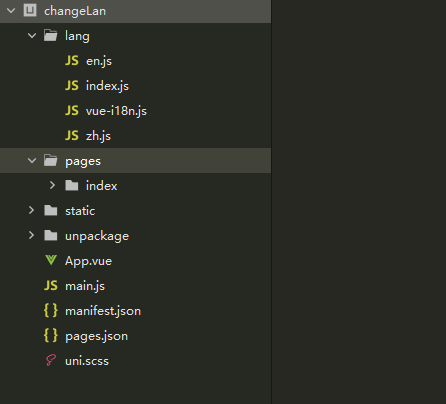
2. 准备好vue-i18n的js文件(下方有源码地址)
3. lang 文件夹下面写国际化语言的逻辑
1.将所需要的文件引入(en.js zh.js vue-i18n 等) 2. 获取设备信息 ,并保存本地
目的:
为了知道用户手机用的是什么语言,方便用户一进来看到的就是他设备设置的语言,我这里是将获取到的信息全部保存了(项目中需要),也可以只保存system_info.language代码如下(写在lang/index.js文件中):
1import LangEn from './en.js'
2import LangChs from './zh.js'
3import Vue from 'vue'
4import VueI18n from './vue-i18n'
5Vue.use(VueI18n)
6const system_info = uni.getStorageSync('system_info')
7if (!system_info) {
8	// 获取设备信息
9	uni.getSystemInfo({
10		success: function (res) {
11			uni.setStorageSync('system_info', res);
12		}
13	})
14}
15	const cur_lang = system_info.language == 'en' ? 'en' : 'zh_CN'
16	const i18n = new VueI18n({
17		locale: cur_lang || 'zh_CN',  // 默认选择的语言
18		messages: {
19				'en': LangEn,
20				'zh_CN': LangChs
21			}
22	})
23	export default i18n
4. main.js中引入
1import Vue from 'vue'
2import App from './App'
3
4Vue.config.productionTip = false
5
6App.mpType = 'app'
7
8import i18n from './lang/index'
9Vue.prototype._i18n = i18n
10const app = new Vue({
11    i18n,
12		...App
13})
14app.$mount()
5.项目中引入
uniapp 不支持在取值表达式中直接调方法,因此,$t方法不可用,所以通过计算属性的方式:
1<template>
2	<view class="content">
3		<image class="logo" src="/static/logo.png"></image>
4		<view class="text-area">
5			<text>{{ i18n.game }}</text>
6		</view>
7		<button type="primary" @tap="change">切换语言</button>
8	</view>
9</template>
10
11
12computed: {
13  i18n () {
14     return this.$t('index')
15  }
16},