
::: warning 这个教程是Salesforce的Marketing Cloud :::
首先先下载一个SoapUI的工具,它是一个Soap测试工具,类似于PostMan,是专门测试Soap接口的工具。
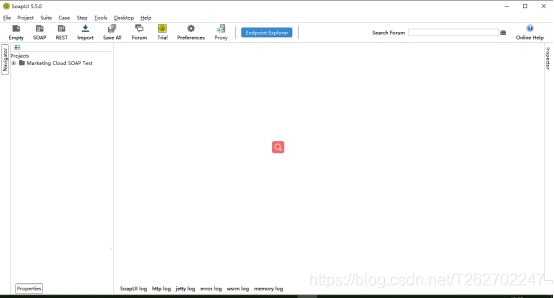
然后使用该工具,向Marketing Cloud发送Xml(Soap的报文都是xml格式的)
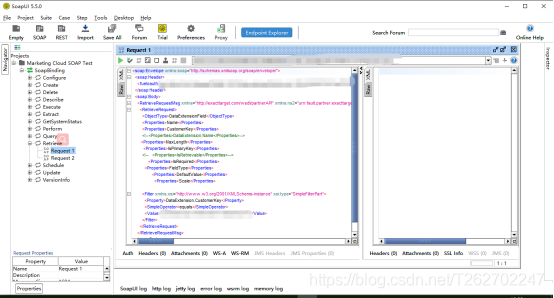
在SoapUI创建项目,点击File-New SOAP Project 即可创建一个SOAP项目。
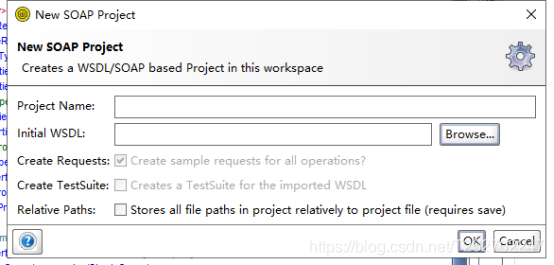
其中WSDL可以在下面链接的文章中找: 点这里点这里
等待一会儿,就可以看见树图了。
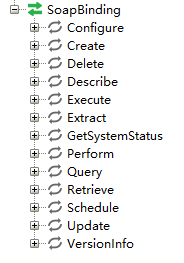
其中Retrieve用作查询,其他的是否有效有待验证。
然后就可以发送报文了,但报文中需要添加你的身份信息,即token。如何获得token呢?
下面是获取token的方法:
首先得在Marketing Cloud中配置读写权限,比如读取Automation,读取DE等,在 头像-setup-Apps-Installed Packages中就能创建一个Package,用来配置权限和调用API。
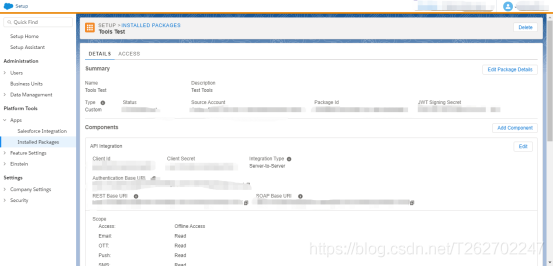
Client Id 和 Client Secret 就是调用API的用户名和密码,在package中提供了Authentication Base URI,REST Base URI和SOAP Base URI。
使用Authentication Base URI可以获取token信息,使用PostMan,向http://Authentication Base URI/v2/token 发送Post请求,就会获得供Soap API使用的token信息,要发送的要素有:
grant_type,client_id,client_secret,account_id,scope
其中参数说明:点这里点这里
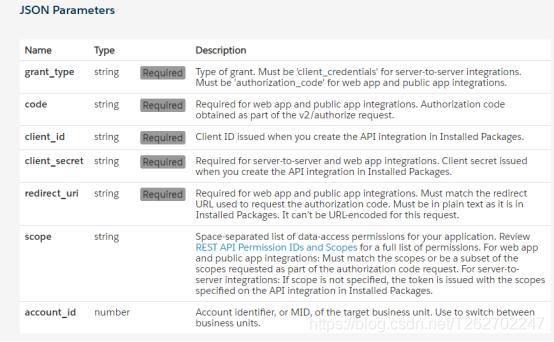
grant_type要素值设为client_credentials即可,client_id,client_secret就是package中的Client Id 和 Client Secret,account_id是环境号,即头像旁边选环境的MID,scope为权限信息,比如你想读automation,就设置成 automations_read,多权限用空格分隔。
获取的报文:
1  {
2
3"access_token": "xxxxxxxxxxxxxxxxxxxxxxxxxxxxxxxxxxxxxx",
4
5"token_type": "Bearer",
6
7"expires_in": 1080,
8
9"scope": "data_extensions_read data_extensions_write automations_read",
10
11"soap_instance_url": "https://xxxxxxxxxxxxx.soap.marketingcloudapis.com/",
12
13"rest_instance_url": "https://xxxxxxxxxxxxx.rest.marketingcloudapis.com/"
14
15}
把accenss_token复制出来,粘贴到要发送的Soap报文中,就可以通过身份验证。
下面是Soap API要发送的查询报文示例
查询时要发送的XML:
1<soapenv:envelope xmlns:soapenv=""http://schemas.xmlsoap.org/soap/envelope/"" xmlns:xsd=""http://www.w3.org/2001/XMLSchema"" xmlns:xsi=""http://www.w3.org/2001/XMLSchema-instance"">
2
3   <soapenv:header>
4
5       <fueloauth>xxxxxxxxxxxxxxxxxxxxxxxxxxxxxxxxxxxxxxxxx这里放刚才获得的token</fueloauth>
6
7   </soapenv:header>
8
9   <soapenv:body>
10
11      <retrieverequestmsg xmlns=""http://exacttarget.com/wsdl/partnerAPI"">
12
13         <retrieverequest>
14
15            <objecttype>SubscriberList</objecttype>
16
17            <properties>ID</properties>
18
19            <properties>PartnerKey</properties>
20
21            <properties>CreatedDate</properties>
22
23            <properties>Client.ID</properties>
24
25            <properties>Status</properties>
26
27            <properties>List.ID</properties>
28
29            <properties>List.ListName</properties>
30
31            <properties>Subscriber.Status</properties>
32
33            <properties>Subscriber.CreatedDate</properties>
34
35            <properties>Subscriber.ID</properties>
36
37            <properties>Subscriber.EmailAddress</properties>
38
39            <properties>Subscriber.SubscriberKey</properties>
40
41            <filter xsi:type=""par:ComplexFilterPart"" xmlns:par=""http://exacttarget.com/wsdl/partnerAPI"">
42
43               <leftoperand xsi:type=""par:SimpleFilterPart"">
44
45                  <property>List.ID</property>
46
47                  <simpleoperator>equals</simpleoperator>
48
49                  <value>xxxxxx</value>
50
51               </leftoperand>
52
53               <logicaloperator>AND</logicaloperator>
54
55               <rightoperand xsi:type=""par:SimpleFilterPart"">
56
57                  <property>CreatedDate</property>
58
59                  <simpleoperator>between</simpleoperator>
60
61                  <datevalue>2013-03-01T08:42:00</datevalue>
62
63                  <datevalue>2013-03-18T08:42:00</datevalue>
64
65               </rightoperand>
66
67            </filter>
68
69            <queryallaccounts>false</queryallaccounts>
70
71         </retrieverequest>
72
73      </retrieverequestmsg>
74
75   </soapenv:body>
76
77</soapenv:envelope>
这是subscriberList对象所包含的元素: 点这里点这里
可以看到,Subscriber 是一个Subscriber对象,如何查出该对象中的元素呢?那就需要这么写:Subscriber.ID 代表Subscriber对象的ID值。
有时候可以看到对象中含有数组元素,那么这种得怎么写properties呢?没法写。。。但这种包含数组的,基本都是一个对象数组,可以通过该种对象进行查询,比如:
查询DataExtension时,Fields就是一个DataExtensionField[]对象数组,这时,就可以通过DataExtensionField对象,查询该DE的所有DataExtensionField信息。即修改报文为<objecttype>DataExtensionField</objecttype>,来查询DE的所有字段。该对象中会包含关于DE的要素,可以与DE关联。
如果想开发一些方便的工具,Marketing Cloud还提供了SDK,并且是开源的。 这是SDK 的地址:点这里点这里
有C# SDK、Java SDK、Node SDK、PHP SDK、Ruby SDK、Python SDK
有趣的是,Java的SDK里有的方法还是带有中文备注的。
这个SDK还是不完善的,有的对象查询需要自己创建。