
HTML/CSS标签透明度效果的实现
在HTML+CSS编程中,实现半透明背景,通常有3中做法,分别是使用RGBA,PNG和CSS filter。
方法一.
第一种是HTML5的透明,在H5中支持透明背景颜色,但遗憾的是,H5中的办透明背景颜色只支持 rgba的写法,不支持16进制的写法如:
1background-color:rgba(0,152,50,0.7);// -->70%的不透明度
2
3background-color:transparent;支持完全透明

在传统浏览器中,IE浏览器的独特性也是某些透明度设置的不确定性因素
一般来说,firefox和webkit,khtml阵营中实现透明的方式非常简单,也包括IE9+及大于IE9的浏览器使用上述HTML5设置透明。但是此方法,在IE9以下的浏览器中完全无效。
方法二
第二种是使用半透明粒子图片,图案或者渐变半透明PNG图片,这种方法是兼容性兼容性的,除了IE6需要使用插件来修改PNG不透明的bug外,
支持性非常好,设置可以重复,还可以定位,在H5中也可以设置大小,不过在网页中追求极致的话加载图片越少越好。
(粒子:透明度匀称的图片裁剪至5px * 5px以下,这样加载速度要快的多)
background:url(path/my_png_bg.png) no-repeat center center scroll;

方法三.
第三种方式是使用透明度+背景颜色或者背景图片来实现。
1background-color:rgb(0,152,50);
2opacity:0.7;
3
4background:url(path/my_bg.jpg) no-repeat center center scroll;
5opacity:0.7;
那么,问题来了,IE6-IE8完全不支持 opacity,所以还得考虑一下 IE的滤镜
IE中有很多滤镜,其中使用alpha通道来设置不透明度
filter:(opactity=70)
因此上述方案改造如下
1background-color:rgb(0,152,50);
2opacity:0.7;
3filter:alpha(opacity=70);
4
5background:url(path/my_bg.jpg) no-repeat center center scroll;
6opacity:0.7;
7filter:alpha(opacity=70);

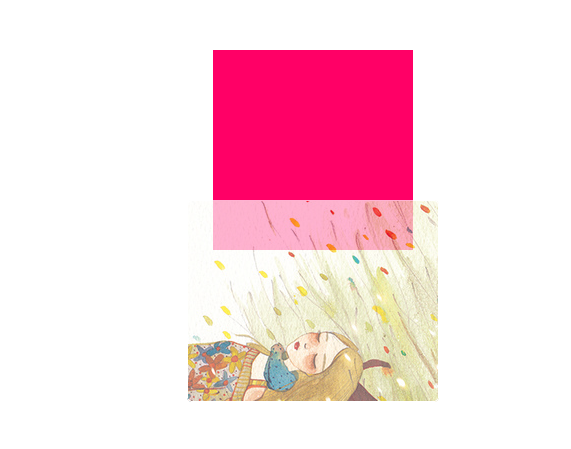
注意:opacity或者alpha的值强调的是“不”透明度
综上所述,推荐使用第三种方案。
开发实践
1<html>
2	<head>
3		<meta charset="utf-8">
4		<title>Opacity</title>
5		<meta http-equiv="X-UA-Compatible" content="IE=7,chrome=1.0">
6
7		<style type="text/css" rel="stylesheet">
8			*{
9				padding: 0px;
10				margin:0px;
11			}
12			.mainbox{
13				width: 200px;
14				height: 200px;
15				clear: both;
16				overflow: hidden;
17				margin: 100px auto 0px auto;
18				background-color: #f06;
19			}
20			.sub-mainbox
21			{
22				width: 250px;
23				height: 200px;
24				margin: -50px auto 0px auto;
25				border:1px solid white;
26				border-radius: 5px;
27				/**background-color:rgb(0,152,50);**/
28				background:url(path/my_bg.jpg) no-repeat center center scroll;
29				opacity: 0.7;
30				filter:alpha(opacity=70);
31			}
32		</style>
33	</head>
34	<body>
35
36		<div class="mainbox">
37
38		</div>
39
40		<div class="sub-mainbox">
41
42		</div>
43
44	</body>
45</html>
try doing it;