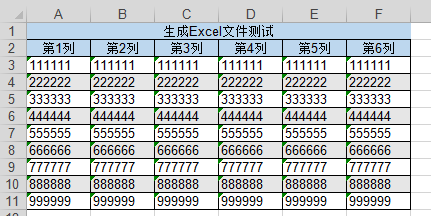
背景今天分配到任务,要导出很多表格,懒得一个个写导出代码,故准备写个工具类
工具类代码如下:
1  1 package com.swyx.tools.utils.poi;
2  2
3  3 import java.io.File;
4  4 import java.io.FileOutputStream;
5  5 import java.io.OutputStream;
6  6 import java.util.List;
7  7 import java.util.Map;
8  8
9  9 import org.apache.poi.hssf.usermodel.HSSFCell;
10 10 import org.apache.poi.hssf.usermodel.HSSFCellStyle;
11 11 import org.apache.poi.hssf.usermodel.HSSFPalette;
12 12 import org.apache.poi.hssf.usermodel.HSSFRow;
13 13 import org.apache.poi.hssf.usermodel.HSSFSheet;
14 14 import org.apache.poi.hssf.usermodel.HSSFWorkbook;
15 15 import org.apache.poi.ss.usermodel.BorderStyle;
16 16 import org.apache.poi.ss.usermodel.FillPatternType;
17 17 import org.apache.poi.ss.usermodel.HorizontalAlignment;
18 18 import org.apache.poi.ss.util.CellRangeAddress;
19 19 import org.apache.poi.ss.util.RegionUtil;
20 20
21 21 /**
22 22  *
23 23  * @author wangbaojun1992@163.com
24 24  * @version poi version : 4.1.0
25 25  */
26 26 public class ExcelWriteUtil {
27 27
28 28     /**
29 29      *
30 30      * @param titleMape 标题行,为第一行标题内容与样式,参数Map<String,String>结构,字段如下:
31 31      *         {
32 32      *             value:内容值
33 33      *             backgroundColor:背景色,为RGB颜色,3个色值以","隔开,默认"189,215,238"
34 34      *         }
35 35      * @param titleList 表头行,为第二行表头内容与样式,参数List<Map<String,String>>结构,字段如下:
36 36      *         [
37 37      *             {
38 38      *                 value:内容值
39 39      *                 backgroundColor:背景色,为RGB颜色,3个色值以","隔开,默认"189,215,238"
40 40      *             }
41 41      *         ]
42 42      * @param contentList 内容,所有取值均被转换位String类型,参数List<List<String>>结构。
43 43      * @param contentStyle 内容样式,参数为Map<String,String>结构,字段如下:
44 44      *         {
45 45      *             isZebra:内容区是否使用斑马线,枚举值:0是,1否,默认0
46 46      *             zebraColor:斑马线颜色,为RGB颜色,3个色值以","隔开,默认"230,230,230"
47 47      * @param dirName 缓存文件的文件夹的绝对路径
48 48      * @param fileName 文件名,不要带后缀
49 49      * @return
50 50      * @throws Exception
51 51      */
52 52     @SuppressWarnings("deprecation")
53 53     public static String exportXlsExcel(Map<String, String> titleMape,List<Map<String, String>> titleList,List<List<String>> contentList,Map<String, String> contentStyle,String dirName,String fileName) throws Exception {
54 54         //1.验证文件和文件夹名并创建Excel文件
55 55         if(fileName == null || fileName.trim().equals("")) {
56 56             throw new Exception("生成Excel文件异常:传入的文件名fileName不可为null、空字符串");
57 57         }
58 58         File parentDir = null;
59 59         if(dirName == null || dirName.trim().equals("")) {
60 60             throw new Exception("生成Excel文件异常:传入的文件夹名dirName不可为null、空字符串");
61 61         }
62 62         try {
63 63             parentDir = new File(dirName);
64 64             if(!parentDir.exists()) {
65 65                 parentDir.mkdirs();
66 66             }
67 67         } catch (Exception e) {
68 68             throw new Exception("生成Excel文件异常:传入的文件夹名dirName有误,dirName="+dirName);
69 69         }finally {
70 70             if(parentDir == null) {
71 71                 throw new Exception("生成Excel文件异常:创建文件夹出错,dirName="+dirName);
72 72             }
73 73         }
74 74         File excelFile = null;
75 75         try {
76 76             excelFile = new File(parentDir, fileName+".xls");
77 77             if(excelFile.exists()) {
78 78                 excelFile.delete();
79 79             }
80 80             excelFile.createNewFile();
81 81         } catch (Exception e) {
82 82             throw new Exception("生成Excel文件异常:生成File文件出错,fileName="+fileName);
83 83         }finally {
84 84             if(excelFile == null) {
85 85                 throw new Exception("生成Excel文件异常:生成File文件出错,fileName="+fileName);
86 86             }
87 87         }
88 88
89 89         //2创建工作簿
90 90         HSSFWorkbook wb=new HSSFWorkbook();
91 91         HSSFSheet sheet=wb.createSheet();
92 92
93 93         //3编辑标题
94 94         //3.1标题样式
95 95         HSSFCellStyle titleStyle=wb.createCellStyle();
96 96         //3.1.1标题背景色
97 97         HSSFPalette palette0_0 = wb.getCustomPalette();
98 98         String backgroundColorStr0_0 = titleMape.get("backgroundColor");
99 99         if(backgroundColorStr0_0 == null || backgroundColorStr0_0.trim().equals("")) {
100100             backgroundColorStr0_0 = "189,215,238";
101101         }
102102         String[] backGroundColorStr0_0Strs = backgroundColorStr0_0.split(",");
103103         if(backGroundColorStr0_0Strs.length != 3) {
104104             backGroundColorStr0_0Strs = "189,215,238".split(",");
105105         }
106106         palette0_0.setColorAtIndex((short)9 ,(byte)new Integer(backGroundColorStr0_0Strs[0]).intValue(),(byte)(new Integer(backGroundColorStr0_0Strs[1]).intValue()),(byte)(new Integer(backGroundColorStr0_0Strs[2]).intValue()));
107107         titleStyle.setFillForegroundColor((short)9 );
108108         titleStyle.setFillPattern(FillPatternType.SOLID_FOREGROUND);
109109         //3.1.2标题合并单元格
110110         // Region region1 = new Region(0, (short) 0, 0, (short) 6);//参数1:行号 参数2:起始列号 参数3:行号 参数4:终止列号
111111         CellRangeAddress rg0_0 = new CellRangeAddress(0,0,(short)0,(short)titleList.size()-1);
112112         sheet.addMergedRegion(rg0_0);
113113         //3.1.3标题边框
114114         //TODO 此处合并单元格的边框样式没有生效,网络上一大堆复制黏贴的东西,试了很多未成功,头痛,暂时遗留该问题
115115         //使用RegionUtil类为合并后的单元格添加边框
116116         RegionUtil.setBorderBottom(BorderStyle.THIN, rg0_0, sheet); // 下边框
117117         RegionUtil.setBorderLeft(BorderStyle.THIN, rg0_0, sheet); // 左边框
118118         RegionUtil.setBorderRight(BorderStyle.THIN, rg0_0, sheet); // 有边框
119119         RegionUtil.setBorderTop(BorderStyle.THIN, rg0_0, sheet); // 上边框
120120         //3.1.4对齐
121121         titleStyle.setAlignment(HorizontalAlignment.CENTER); //居中
122122
123123         //3.2写入标题
124124         HSSFRow row0 = sheet.createRow(0);
125125         HSSFCell cell0_0 = row0.createCell(0);
126126         cell0_0.setCellValue(titleMape.get("value"));
127127         cell0_0.setCellStyle(titleStyle);
128128
129129         //4编辑表头
130130         short fi = 11;
131131         HSSFRow row1 = sheet.createRow(1);
132132         for(int i = 0;i < titleList.size();i ++,fi++) {
133133             Map<String, String> oneTitle = titleList.get(i);
134134             //4.1当前列表头样式
135135             HSSFCellStyle titleStyleI = wb.createCellStyle();
136136             //4.1.1当前列表头背景色
137137             HSSFPalette palette1_I = wb.getCustomPalette();
138138             String backGroundColor1_I = oneTitle.get("backgroundColor");
139139             if(backGroundColor1_I == null || backGroundColor1_I.trim().equals("")) {
140140                 backGroundColor1_I = "189,215,238";
141141             }
142142             String[] backGroundColor1_IStrs = backGroundColor1_I.split(",");
143143             if(backGroundColor1_IStrs.length != 3) {
144144                 backGroundColor1_IStrs = "189,215,238".split(",");
145145             }
146146             palette1_I.setColorAtIndex(fi,(byte)(new Integer(backGroundColor1_IStrs[0]).intValue()),(byte)(new Integer(backGroundColor1_IStrs[1]).intValue()),(byte)(new Integer(backGroundColor1_IStrs[2]).intValue()));
147147             titleStyleI.setFillPattern(FillPatternType.SOLID_FOREGROUND);
148148             titleStyleI.setFillForegroundColor(fi);
149149             //4.1.2当前列表头边框
150150             titleStyleI.setBorderBottom(BorderStyle.THIN); //下边框
151151             titleStyleI.setBorderLeft(BorderStyle.THIN);//左边框
152152             titleStyleI.setBorderTop(BorderStyle.THIN);//上边框
153153             titleStyleI.setBorderRight(BorderStyle.THIN);//右边框
154154             //4.1.3对齐
155155             titleStyleI.setAlignment(HorizontalAlignment.CENTER); //居中
156156             //4.2写入当前列表头
157157             HSSFCell cell1_I = row1.createCell(i);
158158             cell1_I.setCellValue(oneTitle.get("value"));
159159             cell1_I.setCellStyle(titleStyleI);
160160         }
161161
162162         //5编辑内容区
163163         //5.1准备样式
164164         String isZebraStr = contentStyle.get("isZebra");
165165         boolean isZebra = true;
166166         if(isZebraStr != null && isZebraStr.equals("1")) {
167167             isZebra = false;
168168         }
169169         //5.1.1斑马线行样式
170170         HSSFCellStyle style1 = wb.createCellStyle();
171171         //背景色
172172         HSSFPalette paletteC = wb.getCustomPalette();
173173         String backGroundColorC = contentStyle.get("zebraColor");
174174         if(backGroundColorC == null || backGroundColorC.trim().equals("")) {
175175             backGroundColorC = "230,230,230";
176176         }
177177         String[] backGroundColorCStrs = backGroundColorC.split(",");
178178         if(backGroundColorCStrs.length != 3) {
179179             backGroundColorCStrs = "230,230,230".split(",");
180180         }
181181         paletteC.setColorAtIndex((short)10 ,  (byte)(new Integer(backGroundColorCStrs[0]).intValue()),(byte)(new Integer(backGroundColorCStrs[1]).intValue()),(byte)(new Integer(backGroundColorCStrs[2]).intValue()));
182182         style1.setFillPattern(FillPatternType.SOLID_FOREGROUND);
183183         style1.setFillForegroundColor((short)10);
184184         //边框
185185         style1.setBorderBottom(BorderStyle.THIN); //下边框
186186         style1.setBorderLeft(BorderStyle.THIN);//左边框
187187         style1.setBorderTop(BorderStyle.THIN);//上边框
188188         style1.setBorderRight(BorderStyle.THIN);//右边框
189189         //5.1.2非斑马线行样式
190190         HSSFCellStyle style0 = wb.createCellStyle();
191191         //背景色
192192         style0.setFillPattern(FillPatternType.SOLID_FOREGROUND);
193193         //边框
194194         style0.setBorderBottom(BorderStyle.THIN); //下边框
195195         style0.setBorderLeft(BorderStyle.THIN);//左边框
196196         style0.setBorderTop(BorderStyle.THIN);//上边框
197197         style0.setBorderRight(BorderStyle.THIN);//右边框
198198
199199         //5.2写入内容
200200         for(int i = 0;i < contentList.size();i ++) {
201201             List<String> contents = contentList.get(i);
202202             HSSFRow rowI = sheet.createRow(i+2);
203203             for(int j = 0;j < contents.size();j ++) {
204204                 HSSFCell cellJ = rowI.createCell(j);
205205                 cellJ.setCellValue(contents.get(j));
206206                 if(i % 2 == 1) {
207207                     if(isZebra) {
208208                         cellJ.setCellStyle(style1);
209209                     }else {
210210                         cellJ.setCellStyle(style0);
211211                     }
212212                 }else {
213213                     cellJ.setCellStyle(style0);
214214                 }
215215             }
216216         }
217217
218218         //6将文件输出
219219         OutputStream ouputStream = null;
220220         try {
221221              ouputStream = new FileOutputStream(excelFile);
222222              wb.write(ouputStream);
223223              ouputStream.flush();
224224              wb.close();
225225         } catch (Exception e) {
226226             throw new Exception("生成Excel文件异常:写出Excel文件异常");
227227         }finally {
228228             try {
229229                 if(ouputStream != null) {
230230                     ouputStream.close();
231231                 }
232232             } catch (Exception e2) {
233233             }
234234         }
235235
236236         return excelFile.getAbsolutePath();
237237     }
238238 }
工具类调用:
1 1 package com.swyx.tools.utils.poi;
2 2
3 3 import java.util.ArrayList;
4 4 import java.util.HashMap;
5 5 import java.util.List;
6 6 import java.util.Map;
7 7
8 8 public class ExcelWriteUtilTest {
9 9     public static void main(String[] args) throws Exception {
1010         exportXlsExcel_Test();
1111     }
1212
1313     private static void exportXlsExcel_Test() throws Exception {
1414         Map<String, String> titleMape = new HashMap<String, String>();
1515         titleMape.put("value", "生成Excel文件测试");
1616
1717         List<Map<String, String>> titleList = new ArrayList<Map<String,String>>();
1818         Map<String, String> tm1 = new HashMap<String, String>();
1919         tm1.put("value", "第1列");
2020         titleList.add(tm1);
2121         Map<String, String> tm2 = new HashMap<String, String>();
2222         tm2.put("value", "第2列");
2323         titleList.add(tm2);
2424         Map<String, String> tm3 = new HashMap<String, String>();
2525         tm3.put("value", "第3列");
2626         titleList.add(tm3);
2727         Map<String, String> tm4 = new HashMap<String, String>();
2828         tm4.put("value", "第4列");
2929         titleList.add(tm4);
3030         Map<String, String> tm5 = new HashMap<String, String>();
3131         tm5.put("value", "第5列");
3232         titleList.add(tm5);
3333         Map<String, String> tm6 = new HashMap<String, String>();
3434         tm6.put("value", "第6列");
3535         titleList.add(tm6);
3636
3737         List<List<String>> contentList = new ArrayList<List<String>>();
3838         List<String> cl1 = new ArrayList<String>();
3939         cl1.add("111111");cl1.add("111111");cl1.add("111111");cl1.add("111111");cl1.add("111111");cl1.add("111111");
4040         contentList.add(cl1);
4141
4242         List<String> cl2 = new ArrayList<String>();
4343         cl2.add("222222");cl2.add("222222");cl2.add("222222");cl2.add("222222");cl2.add("222222");cl2.add("222222");
4444         contentList.add(cl2);
4545
4646         List<String> cl3 = new ArrayList<String>();
4747         cl3.add("333333");cl3.add("333333");cl3.add("333333");cl3.add("333333");cl3.add("333333");cl3.add("333333");
4848         contentList.add(cl3);
4949
5050         List<String> cl4 = new ArrayList<String>();
5151         cl4.add("444444");cl4.add("444444");cl4.add("444444");cl4.add("444444");cl4.add("444444");cl4.add("444444");
5252         contentList.add(cl4);
5353
5454         List<String> cl5 = new ArrayList<String>();
5555         cl5.add("555555");cl5.add("555555");cl5.add("555555");cl5.add("555555");cl5.add("555555");cl5.add("555555");
5656         contentList.add(cl5);
5757
5858         List<String> cl6 = new ArrayList<String>();
5959         cl6.add("666666");cl6.add("666666");cl6.add("666666");cl6.add("666666");cl6.add("666666");cl6.add("666666");
6060         contentList.add(cl6);
6161
6262         List<String> cl7 = new ArrayList<String>();
6363         cl7.add("777777");cl7.add("777777");cl7.add("777777");cl7.add("777777");cl7.add("777777");cl7.add("777777");
6464         contentList.add(cl7);
6565
6666         List<String> cl8 = new ArrayList<String>();
6767         cl8.add("888888");cl8.add("888888");cl8.add("888888");cl8.add("888888");cl8.add("888888");cl8.add("888888");
6868         contentList.add(cl8);
6969
7070         List<String> cl9 = new ArrayList<String>();
7171         cl9.add("999999");cl9.add("999999");cl9.add("999999");cl9.add("999999");cl9.add("999999");cl9.add("999999");
7272         contentList.add(cl9);
7373
7474         Map<String, String> contentStyle = new HashMap<String, String>();
7575         String dirName = "C:\\WorkSpaces\\dxc";
7676         String fileName = "ExcelWriteUtil_exportXlsExcel_Test";
7777
7878         String name = ExcelWriteUtil.exportXlsExcel(titleMape, titleList, contentList, contentStyle, dirName, fileName);
7979         System.out.println(name);
8080     }
8181 }
生成Excel: