
Python数据可视化 -- Wordcloud
安装
启动命令行,输入:pip install wordcloud
word cloud 库介绍 及简单使用
1wordcloud库,可以说是python非常优秀的词云展示第三方库。词云以词语为基本单位更加直观和艺术的展示文本
2词云图,也叫文字云,是对文本中出现频率较高的“关键词”予以视觉化的展现,词云图过滤掉大量的低频低质的文本信息,使得浏览者只要一眼扫过文本就可领略文本的主旨。
3基于Python的词云生成类库,很好用,而且功能强大。在做统计分析的时候有着很好的应用,比较推荐。
快速生成词云
1#导入所需库
2from wordcloud import WordCloud
3f = open(r'C:\Users\JluTIger\Desktop\texten.txt','r').read()
4wordcloud = WordCloud(background_color="white",
5						width=1000,
6                        height=860,
7                        margin=2).generate(f)
8
9# width,height,margin可以设置图片属性
10# generate 可以对全部文本进行自动分词,但是对中文支持不好
11# 可以设置font_path参数来设置字体集   添加一个中文字体文件,一般是.ttf或.otf格式
12#background_color参数为设置背景颜色,默认颜色为黑色
13
14
15import matplotlib.pyplot as plt
16plt.imshow(wordcloud)
17plt.axis("off")#不显示坐标轴
18plt.show()#显示图片
19wordcloud.to_file('test.png')#保存图片
20# 保存图片,但是在第三模块的例子中 图片大小将会按照 mask 保存



1from wordcloud import WordCloud
2fontpath='SourceHanSansCN-Regular.otf'
3
4wc = WordCloud(font_path=fontpath,  # 设置字体
5               background_color="white",  # 背景颜色
6               max_words=1000,  # 词云显示的最大词数
7               max_font_size=500,  # 字体最大值
8               min_font_size=20, #字体最小值
9               random_state=42, #随机数
10               collocations=False, #避免重复单词
11               width=1600,height=1200,margin=10, #图像宽高,字间距,需要配合下面的plt.figure(dpi=xx)放缩才有效
12              )
13wc.generate(cuted)
分词工具 -- jieba
1import jieba
2cut = jieba.cut(text)  #text为你需要分词的字符串/句子
3string = ' '.join(cut)  #将分开的词用空格连接
4print(string)
5
6
7Building prefix dict from the default dictionary ...
8Loading model from cache C:\Users\mengx7\AppData\Local\Temp\jieba.cache
9这是 一个 简单 的 例子
10Loading model cost 0.978 seconds.
11Prefix dict has been built succesfully.
去除冗余单词
1import jieba
2
3removes =['熟悉', '技术', '职位', '相关', '工作', '开发', '使用','能力','优先','描述','任职']
4for w in removes:
5    jieba.del_word(w)
6
7words = jieba.lcut(text)
8cuted = ' '.join(words)
9print(cuted[:100])
10
11或者
12words = jieba.lcut(text)
13words = [w for w in words if w not in removes]
区分中英文
如果我们只关注英文技术点,比如python,tensorflow等,那就忽略中文内容。 使用正则表达式来匹配提取哪些由az小写字母和AZ大写字母加上0~9数字组成的单词。
1import jieba
2words = jieba.lcut(text)
3import re
4pattern = re.compile(r'^[a-zA-Z0-1]+$')
5words = [w for w in words if pattern.match(w)]
6cuted = ' '.join(words)
7print(cuted[:100])
分好词后就需要将词做成词云了,使用的是wordclould
1from matplotlib import pyplot as plt
2from wordcloud import WordCloud
3
4string = 'Importance of relative word frequencies for font-size. With relative_scaling=0, only word-ranks are considered. With relative_scaling=1, a word that is twice as frequent will have twice the size. If you want to consider the word frequencies and not only their rank, relative_scaling around .5 often looks good.'
5font = r'C:\Windows\Fonts\FZSTK.TTF'
6wc = WordCloud(font_path=font, #如果是中文必须要添加这个,否则会显示成框框
7               background_color='white',
8               width=1000,
9               height=800,
10               ).generate(string)
11wc.to_file('ss.png') #保存图片
12plt.imshow(wc)  #用plt显示图片
13plt.axis('off') #不显示坐标轴
14plt.show() #显示图片
例子
-
读取文件
-
jieba分词
-
利用re正则表达式选出英文单词
-
生成词云对象,利用图片遮罩形状和改变颜色
-
使用Matplotlib来显示图片
#cell-1 text='' with open('./lagou-job1000-ai-details.txt','r') as f: text=f.read() f.close() print(text[:100])
#cell-2 import jieba words = jieba.lcut(text) import re pattern = re.compile(r'^[a-zA-Z0-1]+$') words = [w for w in words if pattern.match(w)] cuted = ' '.join(words) print(cuted[:500])
#cell-3 from wordcloud import WordCloud from wordcloud import ImageColorGenerator #它是直接用来生成一个color_func颜色函数的,它括号里需要一个nd-array多维数组的图像 fontpath='SourceHanSansCN-Regular.otf'
import numpy as np from PIL import Image aimask=np.array(Image.open("ai-mask.png")) #获取遮罩图片,这个数据应该是nd-array格式,这是一个多维数组格式(N-dimensional Array)。
genclr=ImageColorGenerator(aimask)
wc = WordCloud(font_path=fontpath, # 设置字体 background_color="white", # 背景颜色 max_words=1000, # 词云显示的最大词数 max_font_size=100, # 字体最大值 min_font_size=5, #字体最小值 random_state=42, #随机数 collocations=False, #避免重复单词 mask=aimask, #造型遮盖 color_func=genclr, width=1600,height=1200,margin=2, #图像宽高,字间距,需要配合下面的plt.figure(dpi=xx)放缩才有效 ) wc.generate(cuted)
#cell-4 import matplotlib.pyplot as plt plt.figure(dpi=150) #通过这里可以放大或缩小 plt.imshow(wc, interpolation='catrom',vmax=1000) plt.axis("off") #隐藏坐标
官方例子
自定义字体颜色:
下段代码来自wordcloud官方的github。
1#!/usr/bin/env python
2"""
3Colored by Group Example
4========================
5
6Generating a word cloud that assigns colors to words based on
7a predefined mapping from colors to words
8基于颜色到单次的映射,将颜色分配给单次,生成词云。
9"""
10
11from wordcloud import (WordCloud, get_single_color_func)
12import matplotlib.pyplot as plt
13
14
15class SimpleGroupedColorFunc(object):
16    """Create a color function object which assigns EXACT colors
17       to certain words based on the color to words mapping
18       创建一个颜色函数对象,它根据颜色到单词的映射关系,为单词分配精准的颜色。
19
20       Parameters
21       参数
22       ----------
23       color_to_words : dict(str -> list(str))
24         A dictionary that maps a color to the list of words.
25
26       default_color : str
27         Color that will be assigned to a word that's not a member
28         of any value from color_to_words.
29    """
30
31    def __init__(self, color_to_words, default_color):
32        self.word_to_color = {word: color
33                              for (color, words) in color_to_words.items()
34                              for word in words}
35
36        self.default_color = default_color
37
38    def __call__(self, word, **kwargs):
39        return self.word_to_color.get(word, self.default_color)
40
41
42class GroupedColorFunc(object):
43    """Create a color function object which assigns DIFFERENT SHADES of
44       specified colors to certain words based on the color to words mapping.
45
46       Uses wordcloud.get_single_color_func
47
48       Parameters
49       ----------
50       color_to_words : dict(str -> list(str))
51         A dictionary that maps a color to the list of words.
52
53       default_color : str
54         Color that will be assigned to a word that's not a member
55         of any value from color_to_words.
56    """
57
58    def __init__(self, color_to_words, default_color):
59        self.color_func_to_words = [
60            (get_single_color_func(color), set(words))
61            for (color, words) in color_to_words.items()]
62
63        self.default_color_func = get_single_color_func(default_color)
64
65    def get_color_func(self, word):
66        """Returns a single_color_func associated with the word"""
67        try:
68            color_func = next(
69                color_func for (color_func, words) in self.color_func_to_words
70                if word in words)
71        except StopIteration:
72            color_func = self.default_color_func
73
74        return color_func
75
76    def __call__(self, word, **kwargs):
77        return self.get_color_func(word)(word, **kwargs)
78
79#text是要分析的文本内容
80text = """The Zen of Python, by Tim Peters
81Beautiful is better than ugly.
82Explicit is better than implicit.
83Simple is better than complex.
84Complex is better than complicated.
85Flat is better than nested.
86Sparse is better than dense.
87Readability counts.
88Special cases aren't special enough to break the rules.
89Although practicality beats purity.
90Errors should never pass silently.
91Unless explicitly silenced.
92In the face of ambiguity, refuse the temptation to guess.
93There should be one-- and preferably only one --obvious way to do it.
94Although that way may not be obvious at first unless you're Dutch.
95Now is better than never.
96Although never is often better than *right* now.
97If the implementation is hard to explain, it's a bad idea.
98If the implementation is easy to explain, it may be a good idea.
99Namespaces are one honking great idea -- let's do more of those!"""
100
101# Since the text is small collocations are turned off and text is lower-cased
102wc = WordCloud(collocations=False).generate(text.lower())
103
104
105# 自定义所有单词的颜色
106color_to_words = {
107    # words below will be colored with a green single color function
108    '#00ff00': ['beautiful', 'explicit', 'simple', 'sparse',
109                'readability', 'rules', 'practicality',
110                'explicitly', 'one', 'now', 'easy', 'obvious', 'better'],
111    # will be colored with a red single color function
112    'red': ['ugly', 'implicit', 'complex', 'complicated', 'nested',
113            'dense', 'special', 'errors', 'silently', 'ambiguity',
114            'guess', 'hard']
115}
116
117# Words that are not in any of the color_to_words values
118# will be colored with a grey single color function
119#不属于上述设定的颜色词的词语会用灰色来着色
120default_color = 'grey'
121
122# Create a color function with single tone
123# grouped_color_func = SimpleGroupedColorFunc(color_to_words, default_color)
124
125# Create a color function with multiple tones
126grouped_color_func = GroupedColorFunc(color_to_words, default_color)
127
128# Apply our color function
129# 如果你也可以将color_func的参数设置为图片,详细的说明请看 下一部分
130wc.recolor(color_func=grouped_color_func)
131
132# 画图
133plt.figure()
134plt.imshow(wc, interpolation="bilinear")
135plt.axis("off")
136plt.show()
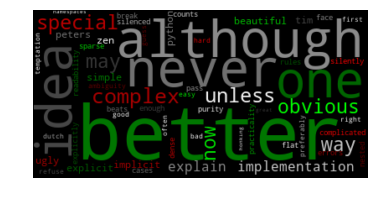
利用背景图片生成词云,设置停用词词集:
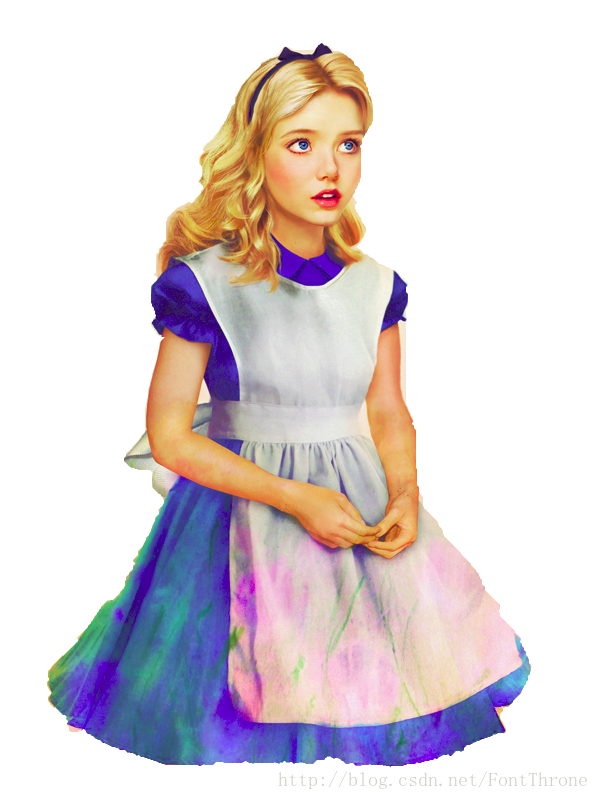
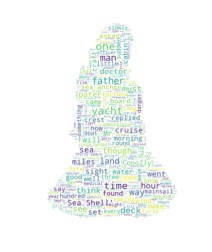
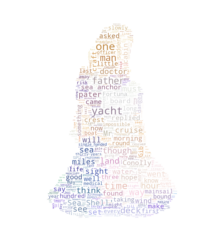
该段代码主要来自于wordcloud的github,你同样可以在github下载该例子以及原图片与效果图。wordcloud会把背景图中白色区域去除,只在有色区域进行绘制。
1#!/usr/bin/env python
2"""
3Image-colored wordcloud
4=======================
5
6You can color a word-cloud by using an image-based coloring strategy
7implemented in ImageColorGenerator. It uses the average color of the region
8occupied by the word in a source image. You can combine this with masking -
9pure-white will be interpreted as 'don't occupy' by the WordCloud object when
10passed as mask.
11If you want white as a legal color, you can just pass a different image to
12"mask", but make sure the image shapes line up.
13"""
14#导入必要的库
15from os import path
16from PIL import Image
17import numpy as np
18import matplotlib.pyplot as plt
19
20from wordcloud import WordCloud, STOPWORDS, ImageColorGenerator
21
22
23# Read the whole text.
24text = open(r'C:\Users\JluTIger\Desktop\texten.txt').read()
25
26# read the mask / color image taken from
27# http://jirkavinse.deviantart.com/art/quot-Real-Life-quot-Alice-282261010
28alice_coloring = np.array(Image.open(r"C:\Users\JluTIger\Desktop\alice.png"))
29
30# 设置停用词
31stopwords = set(STOPWORDS)
32stopwords.add("said")
33
34# 你可以通过 mask 参数 来设置词云形状
35wc = WordCloud(background_color="white", max_words=2000, mask=alice_coloring,
36               stopwords=stopwords, max_font_size=40, random_state=42)
37# generate word cloud
38wc.generate(text)
39
40# create coloring from image
41image_colors = ImageColorGenerator(alice_coloring)
42
43# show
44# 在只设置mask的情况下,你将会得到一个拥有图片形状的词云
45plt.imshow(wc, interpolation="bilinear")
46plt.axis("off")
47plt.figure()
48# recolor wordcloud and show
49# we could also give color_func=image_colors directly in the constructor
50# 我们还可以直接在构造函数中直接给颜色
51# 通过这种方式词云将会按照给定的图片颜色布局生成字体颜色策略
52plt.imshow(wc.recolor(color_func=image_colors), interpolation="bilinear")
53plt.axis("off")
54plt.figure()
55plt.imshow(alice_coloring, cmap=plt.cm.gray, interpolation="bilinear")
56plt.axis("off")
57plt.show()
-
原图
-
效果:
参考链接