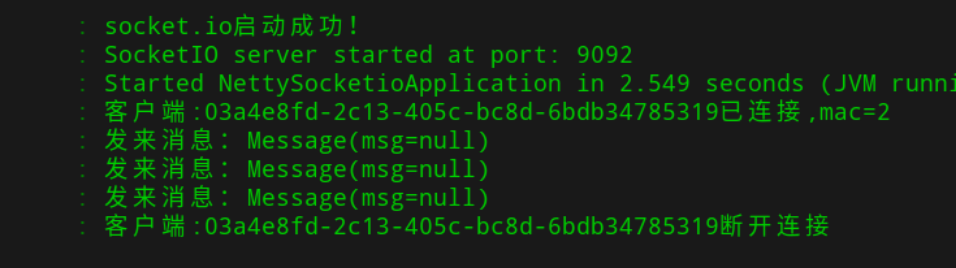
netty-socketio 概述
netty-socketio是一个开源的Socket.io服务器端的一个java的实现,它基于Netty框架,可用于服务端推送消息给客户端。
说到服务端推送技术,一般会涉及WebSocket,WebSocket是HTML5最新提出的规范,虽然主流浏览器都已经支持,但仍然可能有不兼容的情况,为了兼容所有浏览器,给程序员提供一致的编程体验,SocketIO将WebSocket、AJAX和其它的通信方式全部封装成了统一的通信接口,也就是说,使用SocketIO时不用担心兼容问题,底层会自动选用最佳的通信方式。
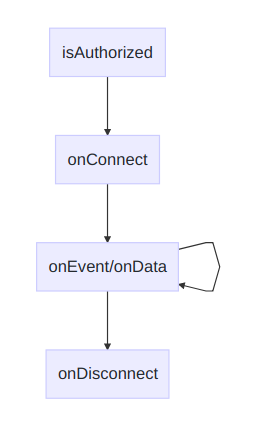
netty-socketio 框架事件流程
netty-socketio 示例demo
pom.xml
1<dependencies>
2    <dependency>
3        <groupId>org.springframework.boot</groupId>
4        <artifactId>spring-boot-starter-web</artifactId>
5    </dependency>
6    <dependency>
7        <groupId>com.corundumstudio.socketio</groupId>
8        <artifactId>netty-socketio</artifactId>
9        <version>1.7.17</version>
10    </dependency>
11    <dependency>
12        <groupId>org.projectlombok</groupId>
13        <artifactId>lombok</artifactId>
14        <version>1.18.4</version>
15        <scope>provided</scope>
16    </dependency>
17
18</dependencies>
启动类 NettySocketioApplication
1@SpringBootApplication
2@Slf4j
3public class NettySocketioApplication implements CommandLineRunner {
4
5    public static void main(String[] args) {
6        SpringApplication.run(NettySocketioApplication.class, args);
7    }
8
9    @Autowired
10    private SocketIOServer socketIOServer;
11
12    @Override
13    public void run(String... strings) {
14        socketIOServer.start();
15        log.info("socket.io启动成功!");
16    }
17}
Message
1@Data
2public class Message {
3
4    private String msg;
5}
配置类 NettySocketioConfig
1@Configuration
2public class NettySocketioConfig {
3    /**
4     * netty-socketio服务器
5     */
6    @Bean
7    public SocketIOServer socketIOServer() {
8        com.corundumstudio.socketio.Configuration config = new com.corundumstudio.socketio.Configuration();
9        config.setHostname("localhost");
10        config.setPort(9092);
11
12        SocketIOServer server = new SocketIOServer(config);
13        return server;
14    }
15
16    /**
17     * 用于扫描netty-socketio的注解,比如 @OnConnect、@OnEvent
18     */
19    @Bean
20    public SpringAnnotationScanner springAnnotationScanner() {
21        return new SpringAnnotationScanner(socketIOServer());
22    }
23}
消息处理器 MessageEventHandler
1@Component
2@Slf4j
3public class MessageEventHandler {
4
5    @Autowired
6    private SocketIOServer socketIoServer;
7
8    public static ConcurrentMap<String, SocketIOClient> socketIOClientMap = new ConcurrentHashMap<>();
9
10    /**
11     * 客户端连接的时候触发
12     *
13     * @param client
14     */
15    @OnConnect
16    public void onConnect(SocketIOClient client) {
17        String mac = client.getHandshakeData().getSingleUrlParam("mac");
18        //存储SocketIOClient,用于发送消息
19        socketIOClientMap.put(mac, client);
20        //回发消息
21        client.sendEvent("message", "onConnect back");
22        log.info("客户端:" + client.getSessionId() + "已连接,mac=" + mac);
23    }
24
25    /**
26     * 客户端关闭连接时触发
27     *
28     * @param client
29     */
30    @OnDisconnect
31    public void onDisconnect(SocketIOClient client) {
32        log.info("客户端:" + client.getSessionId() + "断开连接");
33    }
34
35    /**
36     * 客户端事件
37     *
38     * @param client   客户端信息
39     * @param request 请求信息
40     * @param data     客户端发送数据
41     */
42    @OnEvent(value = "messageevent")
43    public void onEvent(SocketIOClient client, AckRequest request, Message data) {
44        log.info("发来消息:" + data);
45        //回发消息
46        client.sendEvent("messageevent", "我是服务器都安发送的信息");
47        //广播消息
48        sendBroadcast();
49    }
50
51    /**
52     * 广播消息
53     */
54    public void sendBroadcast() {
55        for (SocketIOClient client : socketIOClientMap.values()) {
56            if (client.isChannelOpen()) {
57                client.sendEvent("Broadcast", "当前时间", System.currentTimeMillis());
58            }
59        }
60
61    }
62}
html 页面
1<!doctype html>
2<html lang="en">
3<head>
4    <meta charset="UTF-8">
5    <meta name="viewport" content="width=device-width,initial-scale=1, maximum-scale=1, user-scalable=no">
6    <title>websocket-java-socketio</title>
7    <script src="https://cdn.bootcss.com/socket.io/2.2.0/socket.io.js"></script>
8</head>
9<body>
10<h1>Socket.io Test</h1>
11<div><p id="status">Waiting for input</p></div>
12<div><p id="message">hello world!</p></div>
13<button id="connect" onClick='connect()'/>Connect</button>
14<button id="disconnect" onClick='disconnect()'>Disconnect</button>
15<button id="send" onClick='send()'/>Send Message</button>
16</body>
17
18<script type="text/javascript">
19
20    /**
21     * 前端js的 socket.emit("事件名","参数数据")方法,是触发后端自定义消息事件的时候使用的,
22     * 前端js的 socket.on("事件名",匿名函数(服务器向客户端发送的数据))为监听服务器端的事件
23     **/
24    var socket = io.connect("http://localhost:9092?mac=2");
25    var firstconnect = true;
26
27    function connect() {
28        if(firstconnect) {
29
30            //socket.on('reconnect', function(){ status_update("Reconnected to Server"); });
31            //socket.on('reconnecting', function( nextRetry ){ status_update("Reconnecting in "
32            //+ nextRetry + " seconds"); });
33            //socket.on('reconnect_failed', function(){ message("Reconnect Failed"); });
34            //firstconnect = false;
35        } else {
36            socket.socket.reconnect();
37        }
38    }
39
40    //监听服务器连接事件
41    socket.on('connect', function(){ status_update("Connected to Server"); });
42    //监听服务器关闭服务事件
43    socket.on('disconnect', function(){ status_update("Disconnected from Server"); });
44    //监听服务器端发送消息事件
45    socket.on('messageevent', function(data) {
46        message(data)
47        //console.log("服务器发送的消息是:"+data);
48    });
49
50    //断开连接
51    function disconnect() {
52        socket.disconnect();
53    }
54
55    function message(data) {
56        document.getElementById('message').innerHTML = "Server says: " + data;
57    }
58
59    function status_update(txt){
60        document.getElementById('status').innerHTML = txt;
61    }
62
63    function esc(msg){
64        return msg.replace(/</g, '<').replace(/>/g, '>');
65    }
66    //点击发送消息触发
67    function send() {
68        console.log("点击了发送消息,开始向服务器发送消息")
69        var msg = "我很好的,是的.";
70        socket.emit('messageevent', {msgContent: msg});
71    };
72</script>
73</html>
执行输出
运行 SpringBoot 服务器
> mvn spring-boot:run
点击网页按钮