
前言
由于公司的问题,重构后的微服务必须要部署在Jboss上, 版本为Jboss EAP 7.1,Springboot 2.1.3.RELEASE。部署时候遇到了一些问题,在这记录下来
一、修改Jboss根目录为应用访问目录
首先将jboos的默认欢迎页修改为空,否则会冲突,打开jboss-eap-7.1\standalone\configuration\standalone.xml, 找到
1<subsystem xmlns="urn:jboss:domain:undertow:4.0">
2            <buffer-cache name="default"/>
3            <server name="default-server">
4                <http-listener name="default" socket-binding="http" redirect-socket="https" enable-http2="true"/>
5                <https-listener name="https" socket-binding="https" security-realm="ApplicationRealm" enable-http2="true"/>
6                <host name="default-host" alias="localhost">
7                    <location name="/" handler="welcome-content"/>
8                    <filter-ref name="server-header"/>
9                    <filter-ref name="x-powered-by-header"/>
10                    <http-invoker security-realm="ApplicationRealm"/>
11                </host>
12            </server>
13            <servlet-container name="default">
14                <jsp-config/>
15                <websockets/>
16            </servlet-container>
17            <handlers>
18                <file name="welcome-content" path="${jboss.home.dir}/welcome-content"/>
19            </handlers>
20            <filters>
21                <response-header name="server-header" header-name="Server" header-value="JBoss-EAP/7"/>
22                <response-header name="x-powered-by-header" header-name="X-Powered-By" header-value="Undertow/1"/>
23            </filters>
24        </subsystem>
修改为
1<subsystem xmlns="urn:jboss:domain:undertow:4.0">
2            <buffer-cache name="default"/>
3            <server name="default-server">
4                <http-listener name="default" socket-binding="http" redirect-socket="https" enable-http2="true"/>
5                <https-listener name="https" socket-binding="https" security-realm="ApplicationRealm" enable-http2="true"/>
6                <host name="default-host" alias="localhost">
7                    <!--<location name="/" handler="welcome-content"/>-->
8                    <filter-ref name="server-header"/>
9                    <filter-ref name="x-powered-by-header"/>
10                    <http-invoker security-realm="ApplicationRealm"/>
11                </host>
12            </server>
13            <servlet-container name="default">
14                <jsp-config/>
15                <websockets/>
16            </servlet-container>
17            <!--<handlers>
18                <file name="welcome-content" path="${jboss.home.dir}/welcome-content"/>
19            </handlers>-->
20            <filters>
21                <response-header name="server-header" header-name="Server" header-value="JBoss-EAP/7"/>
22                <response-header name="x-powered-by-header" header-name="X-Powered-By" header-value="Undertow/1"/>
23            </filters>
24        </subsystem>
修改前记得备份,jboss启动后会将这些注释的部分自动清除
此时的根路径已经为空,我们需要将项目路径映射到根路径,
新建一个文件jboss-web.xml,文件内容如下
1<?xml version="1.0" encoding="UTF-8"?>
2<jboss-web>
3    <context-root>/</context-root>
4</jboss-web>
将我们的war包用WinRAR打开,这个文件放到WEB-INF目录下
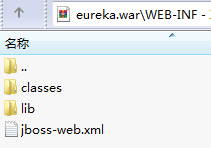
此时启动jboss访问根路径就是我们的项目路径了
二、Springboot项目打包成war的注意事项
<!-- 打war包时加入此项, 告诉spring-boot tomcat相关jar包用外部的,不要打进去 --><dependency> <groupId>org.springframework.boot</groupId> <artifactId>spring-boot-starter-tomcat</artifactId> <scope>provided</scope></dependency>
尤其在使用非tomcat容器时,必须加入将tomcat相关包exclusions,或者像上面一样改为provided,否则启动容器时会有类转换异常
三、Jboss正常启动,但没有启动SpringBoot项目

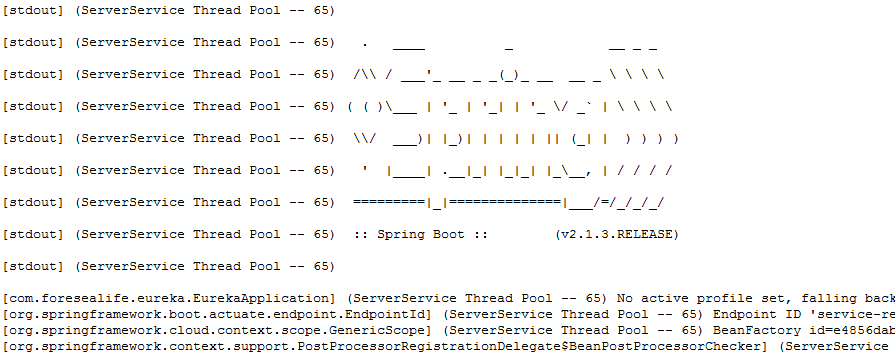
可以看到Jboss正常启动了,但是没有Springboot项目启动的标识,这个时候是由于Jboss无法识别我们的Servlet
正常的Springboot项目启动类是这样的。
1@EnableEurekaServer
2@SpringBootApplication(exclude = {DataSourceAutoConfiguration.class})
3public class EurekaApplication {
4
5    public static void main(String[] args) {
6        SpringApplication.run(EurekaApplication.class,args);
7    }
8}
这种方式在tomcat容器中启动可以,但是Jboss无法这样启动,需要改成
1@EnableEurekaServer
2@SpringBootApplication(exclude = {DataSourceAutoConfiguration.class})
3public class EurekaApplication extends SpringBootServletInitializer {
4
5    @Override
6    protected SpringApplicationBuilder configure(SpringApplicationBuilder builder) {
7        return builder.sources(EurekaApplication.class);
8    }
9
10    public static void main(String[] args) {
11        SpringApplication.run(EurekaApplication.class,args);
12    }
13}
这样Jboss启动时才能查找到我们的Servlet
四、Eureka启动成功,可以注册服务但是访问页面空白
...

可以看到此时的Springboot项目已经加载进来,服务也可以正常注册,但打开Eureka页面时一片空白
此时打开控制台发现,访问路径404(这里我没有修改根路径为项目路径,Jboss默认war包名字是访问路径)
这是由于Springboot使用freeMark导致的

解决方案:
yml文件中添加
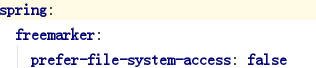
这个配置的意思是 是否优先从文件系统加载template,默认值为true
修改后再打包启动
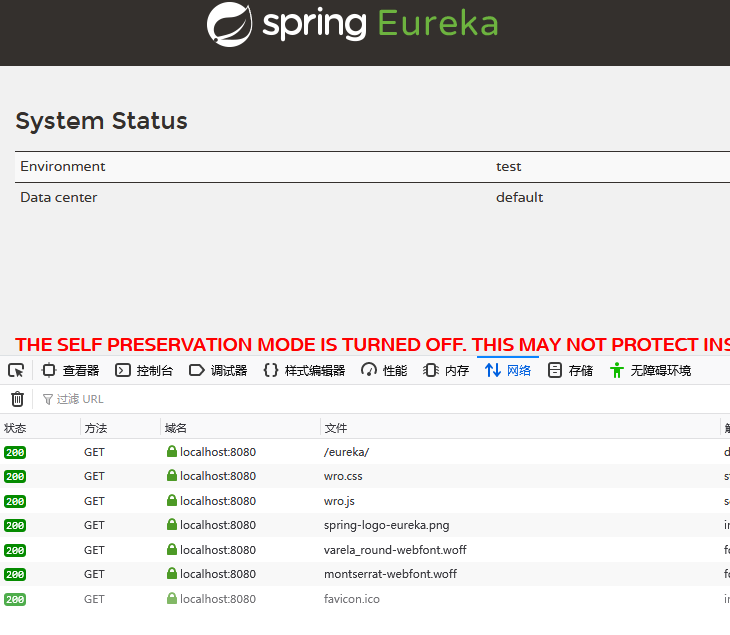
页面可以正常访问