
1、环境
1OS:SUSE Linux Enterprise 12 SP3 X86_64 (Kernel: 4.4.162-94.69.2)
2DB:12.2.0.1 两节点RAC
参考文档:在 SLES 12 上安装 Oracle Database 12.2 64-bit(AMD64/EM64T)的要求 (文档 ID 2298414.1)
2、节点1 root.sh
1WWJD-DB1:/root #/oracle/app/12.2.0/grid/root.sh
2Performing root user operation.
3
4The following environment variables are set as:
5    ORACLE_OWNER= grid
6    ORACLE_HOME=  /oracle/app/12.2.0/grid
7
8Enter the full pathname of the local bin directory: [/usr/local/bin]:
9   Copying dbhome to /usr/local/bin ...
10   Copying oraenv to /usr/local/bin ...
11   Copying coraenv to /usr/local/bin ...
12
13
14Creating /etc/oratab file...
15Entries will be added to the /etc/oratab file as needed by
16Database Configuration Assistant when a database is created
17Finished running generic part of root script.
18Now product-specific root actions will be performed.
19Relinking oracle with rac_on option
20Using configuration parameter file: /oracle/app/12.2.0/grid/crs/install/crsconfig_params
21The log of current session can be found at:
22  /oracle/app/grid/crsdata/WWJD-DB1/crsconfig/rootcrs_WWJD-DB1_2019-01-26_01-11-40AM.log
232019/01/26 01:11:42 CLSRSC-594: Executing installation step 1 of 19: 'SetupTFA'.
242019/01/26 01:11:42 CLSRSC-4001: Installing Oracle Trace File Analyzer (TFA) Collector.
252019/01/26 01:12:08 CLSRSC-4002: Successfully installed Oracle Trace File Analyzer (TFA) Collector.
262019/01/26 01:12:08 CLSRSC-594: Executing installation step 2 of 19: 'ValidateEnv'.
272019/01/26 01:12:14 CLSRSC-363: User ignored prerequisites during installation
282019/01/26 01:12:14 CLSRSC-594: Executing installation step 3 of 19: 'CheckFirstNode'.
292019/01/26 01:12:16 CLSRSC-594: Executing installation step 4 of 19: 'GenSiteGUIDs'.
302019/01/26 01:12:17 CLSRSC-594: Executing installation step 5 of 19: 'SaveParamFile'.
312019/01/26 01:12:25 CLSRSC-594: Executing installation step 6 of 19: 'SetupOSD'.
322019/01/26 01:12:25 CLSRSC-594: Executing installation step 7 of 19: 'CheckCRSConfig'.
332019/01/26 01:12:26 CLSRSC-594: Executing installation step 8 of 19: 'SetupLocalGPNP'.
342019/01/26 01:12:49 CLSRSC-594: Executing installation step 9 of 19: 'ConfigOLR'.
352019/01/26 01:12:58 CLSRSC-594: Executing installation step 10 of 19: 'ConfigCHMOS'.
362019/01/26 01:12:58 CLSRSC-594: Executing installation step 11 of 19: 'CreateOHASD'.
372019/01/26 01:13:05 CLSRSC-594: Executing installation step 12 of 19: 'ConfigOHASD'.
382019/01/26 01:13:20 CLSRSC-330: Adding Clusterware entries to file 'oracle-ohasd.service'
392019/01/26 01:13:50 CLSRSC-594: Executing installation step 13 of 19: 'InstallAFD'.
402019/01/26 01:13:57 CLSRSC-594: Executing installation step 14 of 19: 'InstallACFS'.
41CRS-2791: Starting shutdown of Oracle High Availability Services-managed resources on 'WWJD-DB1'
42CRS-2793: Shutdown of Oracle High Availability Services-managed resources on 'WWJD-DB1' has completed
43CRS-4133: Oracle High Availability Services has been stopped.
44CRS-4123: Oracle High Availability Services has been started.
452019/01/26 01:14:19 CLSRSC-594: Executing installation step 15 of 19: 'InstallKA'.
462019/01/26 01:14:25 CLSRSC-594: Executing installation step 16 of 19: 'InitConfig'.
47CRS-2791: Starting shutdown of Oracle High Availability Services-managed resources on 'WWJD-DB1'
48CRS-2793: Shutdown of Oracle High Availability Services-managed resources on 'WWJD-DB1' has completed
49CRS-4133: Oracle High Availability Services has been stopped.
50CRS-4123: Oracle High Availability Services has been started.
51CRS-2672: Attempting to start 'ora.evmd' on 'WWJD-DB1'
52CRS-2672: Attempting to start 'ora.mdnsd' on 'WWJD-DB1'
53CRS-2676: Start of 'ora.mdnsd' on 'WWJD-DB1' succeeded
54CRS-2676: Start of 'ora.evmd' on 'WWJD-DB1' succeeded
55CRS-2672: Attempting to start 'ora.gpnpd' on 'WWJD-DB1'
56CRS-2676: Start of 'ora.gpnpd' on 'WWJD-DB1' succeeded
57CRS-2672: Attempting to start 'ora.cssdmonitor' on 'WWJD-DB1'
58CRS-2672: Attempting to start 'ora.gipcd' on 'WWJD-DB1'
59CRS-2676: Start of 'ora.cssdmonitor' on 'WWJD-DB1' succeeded
60CRS-2674: Start of 'ora.gipcd' on 'WWJD-DB1' failed
61CRS-2679: Attempting to clean 'ora.gipcd' on 'WWJD-DB1'
62CRS-2681: Clean of 'ora.gipcd' on 'WWJD-DB1' succeeded
63CRS-2673: Attempting to stop 'ora.cssdmonitor' on 'WWJD-DB1'
64CRS-2677: Stop of 'ora.cssdmonitor' on 'WWJD-DB1' succeeded
65CRS-2673: Attempting to stop 'ora.mdnsd' on 'WWJD-DB1'
66CRS-2677: Stop of 'ora.mdnsd' on 'WWJD-DB1' succeeded
67CRS-5804: Communication error with agent process
68CRS-4000: Command Start failed, or completed with errors.
692019/01/26 01:14:45 CLSRSC-119: Start of the exclusive mode cluster failed
70Died at /oracle/app/12.2.0/grid/crs/install/crsinstall.pm line 2053.
71The command '/oracle/app/12.2.0/grid/perl/bin/perl -I/oracle/app/12.2.0/grid/perl/lib -I/oracle/app/12.2.0/grid/crs/install /oracle/app/12.2.0/grid/crs/install/rootcrs.pl ' execution failed
72WWJD-DB1:/root #
-
查看一下/oracle/app/12.2.0/grid/crs/install/crsinstall.pm文件
2041 if ((!$css_up_normal) && $excl_ret != CSS_EXCL_SUCCESS) 2042 { 2043 if ($excl_ret == CSS_EXCL_FAIL_CLUSTER_ACTIVE) 2044 { 2045 # The exclusive mode startup failure should not happen due to 2046 # another node being already up 2047 print_error(443); 2048 $success = FALSE; 2049 } 2050 else { 2051 trace("The exlusive mode cluster start failed, see Clusterware alert log", 2052 "for more information"); 2053 die(dieformat(119)); 2054 }
WWJD-DB1:/root #find / -name rootcrs*log
/oracle/app/grid/crsdata/WWJD-DB1/crsconfig/rootcrs_WWJD-DB1_2019-01-26_01-11-40AM.log--/oracle/app/grid/crsdata/WWJD-DB1/crsconfig/rootcrs_WWJD-DB1_2019-01-26_01-11-40AM.log 2019-01-26 01:11:41: Executing cmd: pwdx 132986 >/dev/null 2>&1 2019-01-26 01:11:41: Running /oracle/app/12.2.0/grid/bin/acfsdriverstate installed -s 2019-01-26 01:11:41: Executing cmd: /oracle/app/12.2.0/grid/bin/acfsdriverstate installed -s 2019-01-26 01:11:41: acfs is not installed 2019-01-26 01:11:41: Running /oracle/app/12.2.0/grid/bin/acfsdriverstate installed -s 2019-01-26 01:11:41: Executing cmd: /oracle/app/12.2.0/grid/bin/acfsdriverstate installed -s 2019-01-26 01:11:41: acfs is not installed 2019-01-26 01:11:41: ckpt: -ckpt -global -oraclebase /oracle/app/grid -chkckpt -name ROOTCRS_FIRSTNODE 2019-01-26 01:11:41: Invoking "/oracle/app/12.2.0/grid/bin/cluutil -ckpt -global -oraclebase /oracle/app/grid -chkckpt -name ROOTCRS_FIRSTNODE" 2019-01-26 01:11:41: trace file=/oracle/app/grid/crsdata/WWJD-DB1/crsconfig/cluutil2.log ......
CLSRSC-594: Executing installation step 6 of 19: 'SetupOSD'. End Command output 2019-01-26 01:12:25: CLSRSC-594: Executing installation step 6 of 19: 'SetupOSD'. 2019-01-26 01:12:25: /etc/oracle/cell/network-config/cellip.ora not found 2019-01-26 01:12:25: Executing cmd: /oracle/app/12.2.0/grid/bin/afddriverstate supported 2019-01-26 01:12:25: Command output: AFD-620: AFD is not supported on this operating system version: '4.4.162-94.69-default SP3' AFD-9201: Not Supported End Command output 2019-01-26 01:12:25: AFD is not supported 2019-01-26 01:12:25: Platform specific setup actions are done 2019-01-26 01:12:25: Executing the [CheckCRSConfig] step with checkpoint [null] ... 2019-01-26 01:12:25: Executing cmd: /oracle/app/12.2.0/grid/bin/clsecho -p has -f clsrsc -m 594 "7" "19" "CheckCRSConfig" 2019-01-26 01:12:26: Command output: CLSRSC-594: Executing installation step 7 of 19: 'CheckCRSConfig'. ...... 2019-01-26 01:13:47: Executing cmd: /oracle/app/12.2.0/grid/bin/okadriverstate supported 2019-01-26 01:13:47: Command output: OKA-620: OKA is not supported on this operating system version: '4.4.162-94.69-default SP3' OKA-9201: Not Supported End Command output 2019-01-26 01:13:47: OKA is not supported 2019-01-26 01:13:47: OKA is not supported on this platform. 2019-01-26 01:13:47: isOKASupported: 0 2019-01-26 01:13:47: OKA is not supported on this platform. 2019-01-26 01:13:47: Executing the step [acfs_ConfigCurrentNode_step_3] to configure ACFS on the first node 2019-01-26 01:13:47: Executing cmd: /oracle/app/12.2.0/grid/bin/acfsdriverstate supported 2019-01-26 01:13:47: Command output: ACFS-9459: ADVM/ACFS is not supported on this OS version: '4.4.162-94.69-default SP3' ACFS-9201: Not Supported End Command output 2019-01-26 01:13:47: acfs is not supported ...... 2019-01-26 01:14:45: CRS-2677: Stop of 'ora.cssdmonitor' on 'WWJD-DB1' succeeded 2019-01-26 01:14:45: CRS-2673: Attempting to stop 'ora.mdnsd' on 'WWJD-DB1' 2019-01-26 01:14:45: CRS-2677: Stop of 'ora.mdnsd' on 'WWJD-DB1' succeeded 2019-01-26 01:14:45: CRS-5804: Communication error with agent process 2019-01-26 01:14:45: CRS-4000: Command Start failed, or completed with errors. 2019-01-26 01:14:45: The exlusive mode cluster start failed, see Clusterware alert log for more information 2019-01-26 01:14:45: Executing cmd: /oracle/app/12.2.0/grid/bin/clsecho -p has -f clsrsc -m 119 2019-01-26 01:14:45: Command output: CLSRSC-119: Start of the exclusive mode cluster failed
在上面的日志文件中发现一些Not Supported,去搜一下MOS发现如下一篇文章
- MOS:Installation Grid Infrastructure 12c Release 2 - root.sh, CLSRSC-184, CLSRSC-258 (文档 ID 2289380.1)
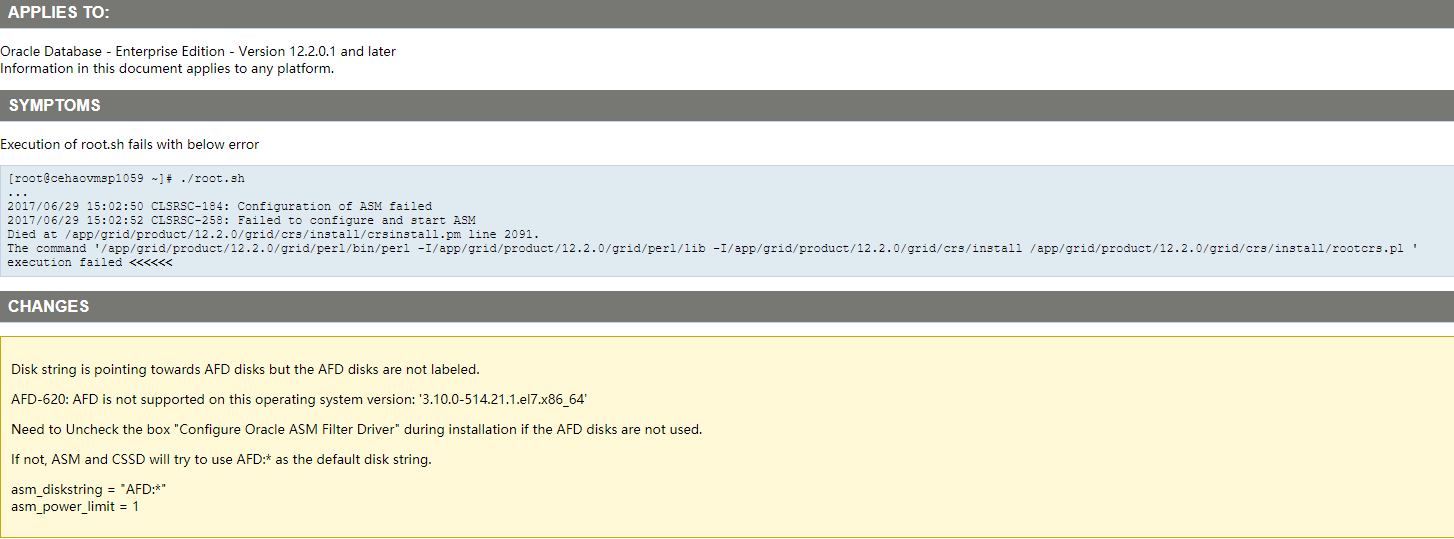
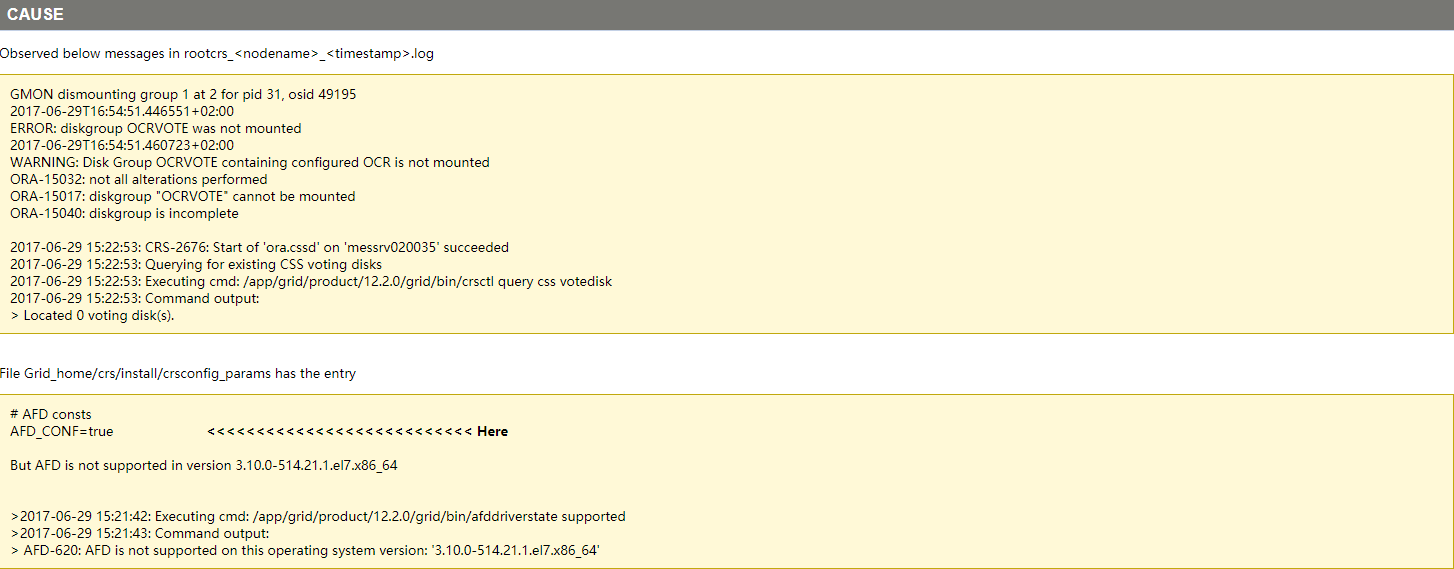
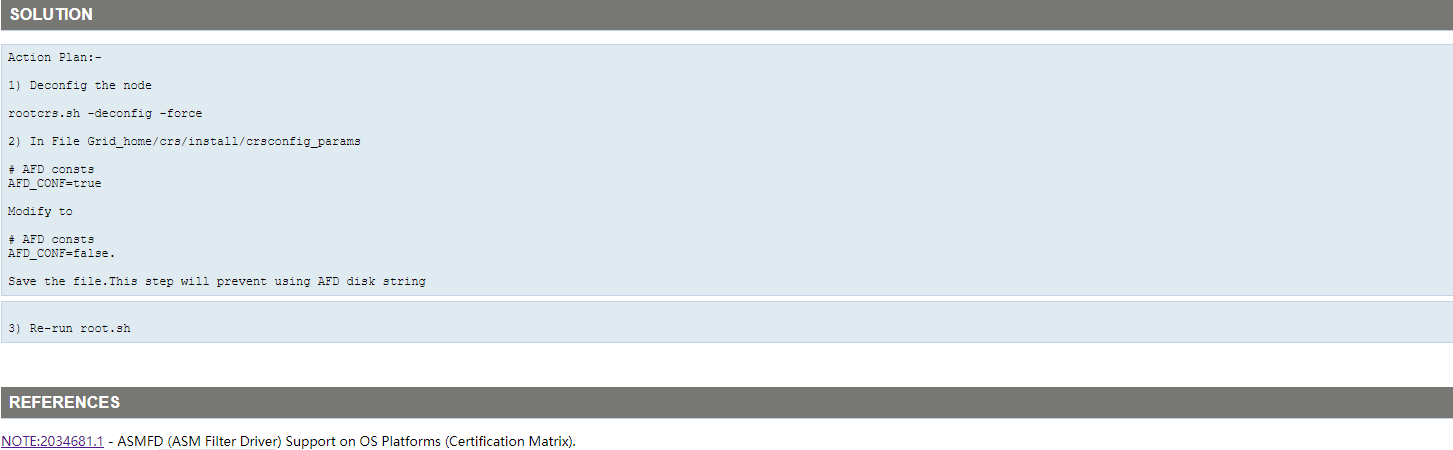
1$ cat /oracle/app/12.2.0/grid/crs/install/crsconfig_params|grep AFD_CONF
2
3#    ssprasad   12/05/15 - Bug 21496397: Add AFD_CONF
4AFD_CONF=false
5
6$ uname -a
7Linux WWJD-DB1 4.4.162-94.69-default #1 SMP Mon Nov 5 18:58:52 UTC 2018 (9e06c56) x86_64 x86_64 x86_64 GNU/Linux
本身就是false,因此不符合该文档。
1--/oracle/app/grid/diag/crs/WWJD-DB1/crs/trace/alert.log
22019-01-26 01:11:41.126 [CLSECHO(132976)]CLSRSC-0567: Beginning Oracle Grid Infrastructure configuration.
32019-01-26 01:12:52.645 [OCRCONFIG(141494)]CRS-2101: The OLR was formatted using version 4.
42019-01-26 01:13:37.348 [OHASD(143468)]CRS-8500: Oracle Clusterware OHASD process is starting with operating system process ID 143468
52019-01-26 01:13:37.350 [OHASD(143468)]CRS-0714: Oracle Clusterware Release 12.2.0.1.0.
62019-01-26 01:13:37.357 [OHASD(143468)]CRS-2112: The OLR service started on node WWJD-DB1.
72019-01-26 01:13:37.368 [OHASD(143468)]CRS-1301: Oracle High Availability Service started on node WWJD-DB1.
82019-01-26 01:13:47.694 [CLSECHO(144377)]OKA-0620: OKA is not supported on this operating system version: '4.4.162-94.69-default SP3'
92019-01-26 01:14:12.483 [OHASD(146159)]CRS-8500: Oracle Clusterware OHASD process is starting with operating system process ID 146159
102019-01-26 01:14:12.485 [OHASD(146159)]CRS-0714: Oracle Clusterware Release 12.2.0.1.0.
112019-01-26 01:14:12.492 [OHASD(146159)]CRS-2112: The OLR service started on node WWJD-DB1.
122019-01-26 01:14:12.505 [OHASD(146159)]CRS-1301: Oracle High Availability Service started on node WWJD-DB1.
132019-01-26 01:14:12.705 [ORAAGENT(146265)]CRS-8500: Oracle Clusterware ORAAGENT process is starting with operating system process ID 146265
142019-01-26 01:14:12.738 [CSSDAGENT(146287)]CRS-8500: Oracle Clusterware CSSDAGENT process is starting with operating system process ID 146287
152019-01-26 01:14:12.743 [CSSDMONITOR(146293)]CRS-8500: Oracle Clusterware CSSDMONITOR process is starting with operating system process ID 146293
162019-01-26 01:14:12.751 [ORAROOTAGENT(146276)]CRS-8500: Oracle Clusterware ORAROOTAGENT process is starting with operating system process ID 146276
172019-01-26 01:14:12.813 [ORAROOTAGENT(146276)]CRS-8503: Oracle Clusterware process ORAROOTAGENT with operating system process ID 146276 experienced fatal signal or exception code 11.
182019-01-26T01:14:12.970341-08:00
19Errors in file /oracle/app/grid/diag/crs/WWJD-DB1/crs/trace/ohasd_orarootagent_root.trc  (incident=1):
20CRS-8503 [__lll_unlock_elision()+48] [Signal/Exception: 11] [Instruction Addr: 0x7f4fcee7d4a0] [Memory Addr: (nil)] [] [] [] [] [] [] [] []
21Incident details in: /oracle/app/grid/diag/crs/WWJD-DB1/crs/incident/incdir_1/ohasd_orarootagent_root_i1.trc
22
232019-01-26 01:14:13.251 [ORAROOTAGENT(146344)]CRS-8500: Oracle Clusterware ORAROOTAGENT process is starting with operating system process ID 146344
242019-01-26 01:14:13.306 [ORAROOTAGENT(146344)]CRS-8503: Oracle Clusterware process ORAROOTAGENT with operating system process ID 146344 experienced fatal signal or exception code 11.
252019-01-26T01:14:13.374216-08:00
26Errors in file /oracle/app/grid/diag/crs/WWJD-DB1/crs/trace/ohasd_orarootagent_root.trc  (incident=9):
27CRS-8503 [__lll_unlock_elision()+48] [Signal/Exception: 11] [Instruction Addr: 0x7fc51b1f44a0] [Memory Addr: (nil)] [] [] [] [] [] [] [] []
28Incident details in: /oracle/app/grid/diag/crs/WWJD-DB1/crs/incident/incdir_9/ohasd_orarootagent_root_i9.trc
29
30
31--/oracle/app/grid/diag/crs/WWJD-DB1/crs/trace/ohasd_orarootagent_root.trc
32
- MOS:Installation of Oracle Clusterware 12c(12cR1 & 12cR2) on SLES 12 fails with CRS-8503 [Signal / Exception: 11] (文档 ID 2270947.1)
- MOS中有三种解决方案,这里采用方案2
1、假若已经执行失败, 以root用户将失败的安装程序去除: 注: 别把图形用户界面窗口关闭退出,我们还需要在成功执行root.sh后使得这个窗口来完成安装。
1/oracle/app/12.2.0/grid/crs/install/roothas.pl -deconfig -force
2
3
4WWJD-DB1:/root #ls -l /oracle/app/12.2.0/grid/crs/install/roothas.pl
5-rwxr-xr-x 1 root oinstall 9995 Jul  3  2016 /oracle/app/12.2.0/grid/crs/install/roothas.pl
6WWJD-DB1:/root #/oracle/app/12.2.0/grid/crs/install/roothas.pl -deconfig -force
7Using configuration parameter file: /oracle/app/12.2.0/grid/crs/install/crsconfig_params
8The log of current session can be found at:
9  /oracle/app/grid/crsdata/WWJD-DB1/crsconfig/hadeconfig.log
10Usage: srvctl <command> <object> [<options>]
11    commands: enable|disable|export|import|start|stop|relocate|status|add|remove|modify|getenv|setenv|unsetenv|config|convert|update|upgrade|downgrade|predict
12    objects: database|instance|service|nodeapps|vip|network|asm|diskgroup|listener|srvpool|server|scan|scan_listener|qosmserver|home|filesystem|gns|cvu|havip|exportfs|rhpserver|rhpclient|mgmtdb|mgmtlsnr|volume|cha|mountfs|vm|ovmm|ccmb|oraclehome
13For detailed help on each command and object and its options use:
14  srvctl <command> -help [-compatible] or
15  srvctl <command> <object> -help [-compatible]
16PRKO-2013 : ons object is not supported in Oracle Clusterware
172019/01/26 02:30:32 CLSRSC-180: An error occurred while executing the command '/oracle/app/12.2.0/grid/bin/srvctl config ons'
18CRS-2791: Starting shutdown of Oracle High Availability Services-managed resources on 'WWJD-DB1'
19CRS-2793: Shutdown of Oracle High Availability Services-managed resources on 'WWJD-DB1' has completed
20CRS-4133: Oracle High Availability Services has been stopped.
212019/01/26 02:30:34 CLSRSC-337: Successfully deconfigured Oracle Restart stack
22WWJD-DB1:/root #
2、修改/etc/ld.so.conf,将/lib64/noelision 加为首行。修改的结果类似下面这样:
1cp /etc/ld.so.conf /etc/ld.so.conf20190126
2
3WWJD-DB1:/root #cat /etc/ld.so.conf
4/lib64/noelision              >>>>>>>>>>>>>新增改行
5/usr/local/lib64
6/usr/local/lib
7include /etc/ld.so.conf.d/*.conf
8# /lib64, /lib, /usr/lib64 and /usr/lib gets added
9# automatically by ldconfig after parsing this file.
10# So, they do not need to be listed.
3、创建一个libpthread library的noelision版的链接到 $GI_HOME/lib目录下:
1WWJD-DB1:/root #find / -name libpthread*
2/oracle/app/12.2.0/grid/lib/stubs/libpthread.so
3/oracle/app/12.2.0/grid/lib/stubs/libpthread-2.12.0-stub.so
4/oracle/app/12.2.0/grid/lib/stubs/libpthread.so.0
5/oracle/app/12.2.0/grid/lib/stubs/libpthread.tmp
6/usr/lib/libpthread_nonshared.a
7/usr/lib/libpthread.so
8/usr/lib64/libpthread.so
9/usr/lib64/libpthread_nonshared.a
10/lib/libpthread-2.22.so
11/lib/libpthread.so.0
12/lib/noelision/libpthread-2.22.so
13/lib/noelision/libpthread.so.0
14/lib64/libpthread-2.22.so
15/lib64/libpthread.so.0
16/lib64/noelision/libpthread-2.22.so
17/lib64/noelision/libpthread.so.0
18WWJD-DB1:/root #
19
20--MOS要求
21# ln -s 源文件 目标文件
22# ln -s /lib64/noelision/libpthread-2.19.so /oracle/app/12.2.0/grid/lib/libpthread.so.0
23
24WWJD-DB1:/root #ls -l /lib64/noelision/
25total 136
26-rwxr-xr-x 1 root root 135896 Jun  7  2017 libpthread-2.22.so
27lrwxrwxrwx 1 root root     18 Jan 11 20:48 libpthread.so.0 -> libpthread-2.22.so
28
29--实际环境
30# ln -s /lib64/noelision/libpthread-2.22.so /oracle/app/12.2.0/grid/lib/libpthread.so.0
31
32WWJD-DB1:/root #ls -l /oracle/app/12.2.0/grid/lib/libpthread.*
33lrwxrwxrwx 1 root root 35 Jan 26 18:38 /oracle/app/12.2.0/grid/lib/libpthread.so.0 -> /lib64/noelision/libpthread-2.22.so
4、重新运行root.sh,等root.sh成功完全后,通过前述的图形用户界面来完成安装。
执行root.sh正常了...
3、节点2
1WWJD-DB2:/root #/oracle/app/12.2.0/grid/root.sh
2Performing root user operation.
3
4The following environment variables are set as:
5    ORACLE_OWNER= grid
6    ORACLE_HOME=  /oracle/app/12.2.0/grid
7
8Enter the full pathname of the local bin directory: [/usr/local/bin]:
9   Copying dbhome to /usr/local/bin ...
10   Copying oraenv to /usr/local/bin ...
11   Copying coraenv to /usr/local/bin ...
12
13
14Creating /etc/oratab file...
15Entries will be added to the /etc/oratab file as needed by
16Database Configuration Assistant when a database is created
17Finished running generic part of root script.
18Now product-specific root actions will be performed.
19Relinking oracle with rac_on option
20Using configuration parameter file: /oracle/app/12.2.0/grid/crs/install/crsconfig_params
21The log of current session can be found at:
22  /oracle/app/grid/crsdata/WWJD-DB2/crsconfig/rootcrs_WWJD-DB2_2019-01-26_02-55-55AM.log
232019/01/26 02:55:57 CLSRSC-594: Executing installation step 1 of 19: 'SetupTFA'.
242019/01/26 02:55:57 CLSRSC-4001: Installing Oracle Trace File Analyzer (TFA) Collector.
252019/01/26 02:56:23 CLSRSC-4002: Successfully installed Oracle Trace File Analyzer (TFA) Collector.
262019/01/26 02:56:23 CLSRSC-594: Executing installation step 2 of 19: 'ValidateEnv'.
272019/01/26 02:56:24 CLSRSC-363: User ignored prerequisites during installation
282019/01/26 02:56:24 CLSRSC-594: Executing installation step 3 of 19: 'CheckFirstNode'.
292019/01/26 02:56:25 CLSRSC-594: Executing installation step 4 of 19: 'GenSiteGUIDs'.
302019/01/26 02:56:25 CLSRSC-594: Executing installation step 5 of 19: 'SaveParamFile'.
312019/01/26 02:56:28 CLSRSC-594: Executing installation step 6 of 19: 'SetupOSD'.
322019/01/26 02:56:28 CLSRSC-594: Executing installation step 7 of 19: 'CheckCRSConfig'.
332019/01/26 02:56:29 CLSRSC-594: Executing installation step 8 of 19: 'SetupLocalGPNP'.
342019/01/26 02:56:31 CLSRSC-594: Executing installation step 9 of 19: 'ConfigOLR'.
352019/01/26 02:56:33 CLSRSC-594: Executing installation step 10 of 19: 'ConfigCHMOS'.
362019/01/26 02:56:33 CLSRSC-594: Executing installation step 11 of 19: 'CreateOHASD'.
372019/01/26 02:56:34 CLSRSC-594: Executing installation step 12 of 19: 'ConfigOHASD'.
382019/01/26 02:56:50 CLSRSC-330: Adding Clusterware entries to file 'oracle-ohasd.service'
392019/01/26 02:57:15 CLSRSC-594: Executing installation step 13 of 19: 'InstallAFD'.
402019/01/26 02:57:16 CLSRSC-594: Executing installation step 14 of 19: 'InstallACFS'.
41CRS-2791: Starting shutdown of Oracle High Availability Services-managed resources on 'WWJD-DB2'
42CRS-2793: Shutdown of Oracle High Availability Services-managed resources on 'WWJD-DB2' has completed
43CRS-4133: Oracle High Availability Services has been stopped.
44CRS-4123: Oracle High Availability Services has been started.
452019/01/26 02:57:34 CLSRSC-594: Executing installation step 15 of 19: 'InstallKA'.
462019/01/26 02:57:35 CLSRSC-594: Executing installation step 16 of 19: 'InitConfig'.
47CRS-2791: Starting shutdown of Oracle High Availability Services-managed resources on 'WWJD-DB2'
48CRS-2793: Shutdown of Oracle High Availability Services-managed resources on 'WWJD-DB2' has completed
49CRS-4133: Oracle High Availability Services has been stopped.
50CRS-4123: Oracle High Availability Services has been started.
512019/01/26 02:57:53 CLSRSC-366: Failed to import credentials for ASM
52Died at /oracle/app/12.2.0/grid/crs/install/crsutils.pm line 8456.
53The command '/oracle/app/12.2.0/grid/perl/bin/perl -I/oracle/app/12.2.0/grid/perl/lib -I/oracle/app/12.2.0/grid/crs/install /oracle/app/12.2.0/grid/crs/install/rootcrs.pl ' execution failed
54WWJD-DB2:/root #
55WWJD-DB2:/root #/oracle/app/12.2.0/grid/crs/install/rootcrs.sh -deconfig -force
56Using configuration parameter file: /oracle/app/12.2.0/grid/crs/install/crsconfig_params
57The log of current session can be found at:
58  /oracle/app/grid/crsdata/WWJD-DB2/crsconfig/crsdeconfig_WWJD-DB2_2019-01-26_03-01-01AM.log
59PRCR-1070 : Failed to check if resource ora.net1.network is registered
60CRS-0184 : Cannot communicate with the CRS daemon.
61PRCR-1070 : Failed to check if resource ora.helper is registered
62CRS-0184 : Cannot communicate with the CRS daemon.
63PRCR-1070 : Failed to check if resource ora.ons is registered
64CRS-0184 : Cannot communicate with the CRS daemon.
65
662019/01/26 03:01:12 CLSRSC-180: An error occurred while executing the command '/oracle/app/12.2.0/grid/bin/srvctl config nodeapps'
67CRS-2791: Starting shutdown of Oracle High Availability Services-managed resources on 'WWJD-DB2'
68CRS-2793: Shutdown of Oracle High Availability Services-managed resources on 'WWJD-DB2' has completed
69CRS-4133: Oracle High Availability Services has been stopped.
702019/01/26 03:01:23 CLSRSC-4006: Removing Oracle Trace File Analyzer (TFA) Collector.
712019/01/26 03:03:20 CLSRSC-4007: Successfully removed Oracle Trace File Analyzer (TFA) Collector.
722019/01/26 03:03:21 CLSRSC-336: Successfully deconfigured Oracle Clusterware stack on this node
73WWJD-DB2:/root #
按照节点1的处理方法处理即可
1WWJD-DB2:/root #/oracle/app/12.2.0/grid/root.sh
2Performing root user operation.
3
4The following environment variables are set as:
5    ORACLE_OWNER= grid
6    ORACLE_HOME=  /oracle/app/12.2.0/grid
7
8Enter the full pathname of the local bin directory: [/usr/local/bin]:
9The contents of "dbhome" have not changed. No need to overwrite.
10The contents of "oraenv" have not changed. No need to overwrite.
11The contents of "coraenv" have not changed. No need to overwrite.
12
13Entries will be added to the /etc/oratab file as needed by
14Database Configuration Assistant when a database is created
15Finished running generic part of root script.
16Now product-specific root actions will be performed.
17Relinking oracle with rac_on option
18Using configuration parameter file: /oracle/app/12.2.0/grid/crs/install/crsconfig_params
19The log of current session can be found at:
20  /oracle/app/grid/crsdata/WWJD-DB2/crsconfig/rootcrs_WWJD-DB2_2019-01-26_03-05-26AM.log
212019/01/26 03:05:28 CLSRSC-594: Executing installation step 1 of 19: 'SetupTFA'.
222019/01/26 03:05:28 CLSRSC-4001: Installing Oracle Trace File Analyzer (TFA) Collector.
232019/01/26 03:05:53 CLSRSC-4002: Successfully installed Oracle Trace File Analyzer (TFA) Collector.
242019/01/26 03:05:53 CLSRSC-594: Executing installation step 2 of 19: 'ValidateEnv'.
252019/01/26 03:05:54 CLSRSC-363: User ignored prerequisites during installation
262019/01/26 03:05:54 CLSRSC-594: Executing installation step 3 of 19: 'CheckFirstNode'.
272019/01/26 03:05:56 CLSRSC-594: Executing installation step 4 of 19: 'GenSiteGUIDs'.
282019/01/26 03:05:56 CLSRSC-594: Executing installation step 5 of 19: 'SaveParamFile'.
292019/01/26 03:05:59 CLSRSC-594: Executing installation step 6 of 19: 'SetupOSD'.
302019/01/26 03:05:59 CLSRSC-594: Executing installation step 7 of 19: 'CheckCRSConfig'.
312019/01/26 03:05:59 CLSRSC-594: Executing installation step 8 of 19: 'SetupLocalGPNP'.
322019/01/26 03:06:01 CLSRSC-594: Executing installation step 9 of 19: 'ConfigOLR'.
332019/01/26 03:06:03 CLSRSC-594: Executing installation step 10 of 19: 'ConfigCHMOS'.
342019/01/26 03:06:03 CLSRSC-594: Executing installation step 11 of 19: 'CreateOHASD'.
352019/01/26 03:06:05 CLSRSC-594: Executing installation step 12 of 19: 'ConfigOHASD'.
362019/01/26 03:06:20 CLSRSC-330: Adding Clusterware entries to file 'oracle-ohasd.service'
372019/01/26 03:06:46 CLSRSC-594: Executing installation step 13 of 19: 'InstallAFD'.
382019/01/26 03:06:47 CLSRSC-594: Executing installation step 14 of 19: 'InstallACFS'.
39CRS-2791: Starting shutdown of Oracle High Availability Services-managed resources on 'WWJD-DB2'
40CRS-2793: Shutdown of Oracle High Availability Services-managed resources on 'WWJD-DB2' has completed
41CRS-4133: Oracle High Availability Services has been stopped.
42CRS-4123: Oracle High Availability Services has been started.
432019/01/26 03:07:04 CLSRSC-594: Executing installation step 15 of 19: 'InstallKA'.
442019/01/26 03:07:05 CLSRSC-594: Executing installation step 16 of 19: 'InitConfig'.
45CRS-2791: Starting shutdown of Oracle High Availability Services-managed resources on 'WWJD-DB2'
46CRS-2793: Shutdown of Oracle High Availability Services-managed resources on 'WWJD-DB2' has completed
47CRS-4133: Oracle High Availability Services has been stopped.
48CRS-4123: Oracle High Availability Services has been started.
49CRS-2791: Starting shutdown of Oracle High Availability Services-managed resources on 'WWJD-DB2'
50CRS-2793: Shutdown of Oracle High Availability Services-managed resources on 'WWJD-DB2' has completed
51CRS-4133: Oracle High Availability Services has been stopped.
522019/01/26 03:07:24 CLSRSC-594: Executing installation step 17 of 19: 'StartCluster'.
53CRS-4123: Starting Oracle High Availability Services-managed resources
54CRS-2672: Attempting to start 'ora.mdnsd' on 'WWJD-DB2'
55CRS-2672: Attempting to start 'ora.evmd' on 'WWJD-DB2'
56CRS-2676: Start of 'ora.mdnsd' on 'WWJD-DB2' succeeded
57CRS-2676: Start of 'ora.evmd' on 'WWJD-DB2' succeeded
58CRS-2672: Attempting to start 'ora.gpnpd' on 'WWJD-DB2'
59CRS-2676: Start of 'ora.gpnpd' on 'WWJD-DB2' succeeded
60CRS-2672: Attempting to start 'ora.gipcd' on 'WWJD-DB2'
61CRS-2676: Start of 'ora.gipcd' on 'WWJD-DB2' succeeded
62CRS-2672: Attempting to start 'ora.cssdmonitor' on 'WWJD-DB2'
63CRS-2676: Start of 'ora.cssdmonitor' on 'WWJD-DB2' succeeded
64CRS-2672: Attempting to start 'ora.cssd' on 'WWJD-DB2'
65CRS-2672: Attempting to start 'ora.diskmon' on 'WWJD-DB2'
66CRS-2676: Start of 'ora.diskmon' on 'WWJD-DB2' succeeded
67CRS-2676: Start of 'ora.cssd' on 'WWJD-DB2' succeeded
68CRS-2672: Attempting to start 'ora.cluster_interconnect.haip' on 'WWJD-DB2'
69CRS-2672: Attempting to start 'ora.ctssd' on 'WWJD-DB2'
70CRS-2676: Start of 'ora.ctssd' on 'WWJD-DB2' succeeded
71CRS-2676: Start of 'ora.cluster_interconnect.haip' on 'WWJD-DB2' succeeded
72CRS-2672: Attempting to start 'ora.asm' on 'WWJD-DB2'
73CRS-2676: Start of 'ora.asm' on 'WWJD-DB2' succeeded
74CRS-2672: Attempting to start 'ora.storage' on 'WWJD-DB2'
75CRS-2676: Start of 'ora.storage' on 'WWJD-DB2' succeeded
76CRS-2672: Attempting to start 'ora.crf' on 'WWJD-DB2'
77CRS-2676: Start of 'ora.crf' on 'WWJD-DB2' succeeded
78CRS-2672: Attempting to start 'ora.crsd' on 'WWJD-DB2'
79CRS-2676: Start of 'ora.crsd' on 'WWJD-DB2' succeeded
80CRS-6017: Processing resource auto-start for servers: WWJD-DB2
81CRS-2672: Attempting to start 'ora.net1.network' on 'WWJD-DB2'
82CRS-2672: Attempting to start 'ora.ASMNET1LSNR_ASM.lsnr' on 'WWJD-DB2'
83CRS-2676: Start of 'ora.net1.network' on 'WWJD-DB2' succeeded
84CRS-2672: Attempting to start 'ora.ons' on 'WWJD-DB2'
85CRS-2676: Start of 'ora.ASMNET1LSNR_ASM.lsnr' on 'WWJD-DB2' succeeded
86CRS-2672: Attempting to start 'ora.asm' on 'WWJD-DB2'
87CRS-2676: Start of 'ora.ons' on 'WWJD-DB2' succeeded
88CRS-2676: Start of 'ora.asm' on 'WWJD-DB2' succeeded
89CRS-6016: Resource auto-start has completed for server WWJD-DB2
90CRS-6024: Completed start of Oracle Cluster Ready Services-managed resources
91CRS-4123: Oracle High Availability Services has been started.
922019/01/26 03:08:53 CLSRSC-343: Successfully started Oracle Clusterware stack
932019/01/26 03:08:53 CLSRSC-594: Executing installation step 18 of 19: 'ConfigNode'.
942019/01/26 03:09:06 CLSRSC-594: Executing installation step 19 of 19: 'PostConfig'.
952019/01/26 03:09:15 CLSRSC-325: Configure Oracle Grid Infrastructure for a Cluster ... succeeded
96WWJD-DB2:/root #
4、后记
在后来的维护过程中发现还存在问题,根本原因应该是缺少了一些包,即使自检的时候是没有问题的。最终还是需要根据官档要求的包全部安装上去,附包名
1--12CR2 SUSE官方文档要求包
2bc
3binutils-2.24-2.165.x86_64
4gcc-c++-32bit-4.8-6.189.x86_64
5gcc-c++-4.8-6.189.x86_64
6gcc48-c++-4.8.3+r212056-6.3.x86_64
7gcc-32bit-4.8-6.189.x86_64
8gcc-4.8-6.189.x86_64
9gcc-info-4.8-6.189.x86_64
10gcc-locale-4.8-6.189.x86_64
11gcc48-32bit-4.8.3+r212056-6.3.x86_64
12gcc48-4.8.3+r212056-6.3.x86_64
13gcc48-info-4.8.3+r212056-6.3.noarch
14gcc48-locale-4.8.3+r212056-6.3.x86_64
15glibc-2.19-17.72.x86_64
16glibc-devel-2.19-17.72.x86_64
17libaio-devel-0.3.109-17.15.x86_64
18libaio1-0.3.109-17.15.x86_64
19libaio1-32bit-0.3.109-17.15.x86_64
20libgfortran3-4.8.3+r212056-6.3.x86_64
21libX11-6-1.6.2-4.12.x86_64
22libX11-6-32bit-1.6.2-4.12.x86_64
23libXau6-1.0.8-4.58.x86_64
24libXau6-32bit-1.0.8-4.58.x86_64
25libXtst6-1.2.2-3.60.x86_64
26libXtst6-32bit-1.2.1-2.4.1.x86_64
27libcap-ng-utils-0.7.3-4.125.x86_64
28libcap-ng0-0.7.3-4.125.x86_64
29libcap-ng0-32bit-0.7.3-4.125.x86_64
30libcap-progs-2.22-11.709.x86_64
31libcap1-1.10-59.61.x86_64
32libcap1-32bit-1.10-59.61.x86_64
33libcap2-2.22-11.709.x86_64
34libcap2-32bit-2.22-11.709.x86_64
35libgcc_s1-32bit-4.8.3+r212056-6.3.x86_64
36libgcc_s1-4.8.3+r212056-6.3.x86_64
37libpcap1-1.5.3-2.18.x86_64
38libstdc++6-32bit-4.8.3+r212056-6.3.x86_64
39libstdc++6-4.8.3+r212056-6.3.x86_64
40make-4.0-2.107.x86_64
41mksh-50-2.13.x86_64
42net-tools-1.60-764.185.x86_64 (for Oracle RAC and Oracle Clusterware)
43nfs-kernel-server-1.3.0-6.9.x86_64 (for Oracle ACFS)
44smartmontools-6.2-4.33.x86_64
45sysstat-8.1.5-7.32.1.x86_64
46xorg-x11-libs-7.6-45.14
47
48
49{
50rpm -q bc
51rpm -q binutils
52rpm -q gcc-c++-32bit
53rpm -q gcc-c++
54rpm -q gcc48-c++
55rpm -q gcc-32bit
56rpm -q gcc
57rpm -q gcc-info
58rpm -q gcc-locale
59rpm -q gcc48-32bit
60rpm -q gcc48
61rpm -q gcc48-info
62rpm -q gcc48-locale
63rpm -q glibc
64rpm -q glibc-devel
65rpm -q libaio-devel
66rpm -q libaio1
67rpm -q libaio1-32bit
68rpm -q libgfortran3
69rpm -q libX11-6
70rpm -q libX11-6-32bit
71rpm -q libXau6-1.0.8
72rpm -q libXau6-32bit-1.0.8
73rpm -q libXtst6
74rpm -q libXtst6-32bit
75rpm -q libcap-ng-utils
76rpm -q libcap-ng0
77rpm -q libcap-ng0-32bit
78rpm -q libcap-progs
79rpm -q libcap1
80rpm -q libcap1-32bit
81rpm -q libcap2
82rpm -q libcap2-32bit
83rpm -q libgcc_s1-32bit
84rpm -q libgcc_s1
85rpm -q libpcap1
86rpm -q libstdc++6-32bit
87rpm -q libstdc++6
88rpm -q make
89rpm -q mksh
90rpm -q net-tools
91rpm -q nfs-kernel-server
92rpm -q smartmontools
93rpm -q sysstat
94rpm -q xorg-x11-libs
95}
96
97
98--安装缺失补丁包
99zypper in libaio1-32bit libgfortran3
100
101
102--12C官方文档要求 libstdc++33-3.3.3-62.1.x86_64.rpm
103Installation and Upgrade Guide for Linux                4.7.5  Supported SUSE Linux Enterprise Server 12 Distributions for x86-64 无要求安装
104Installation Guide for Linux                                   Supported SUSE Linux Enterprise Server 12 Distributions for x86-64   要求安装
105Client Installation Guide for Linux                            Supported SUSE Linux Enterprise Server 12 Distributions for x86-64   要求安装
106Grid Infrastructure Installation and Upgrade Guide for Linux   Supported SUSE Linux Enterprise Server 12 Distributions for x86-64   要求安装