
一、编写python脚本,远程执行命令获取MD5校验码,脚本放到CGI路径下
1#!/usr/bin/env python
2
3#-*- coding: utf-8 -*-
4
5
6"""
7
8This runs a command on a remote host using SSH. At the prompts enter hostname,
9
10user, password and the command.
11
12"""
13
14
15print "Content-type:text/html"
16
17print
18
19print '<html>'
20
21print '<head>'
22
23print '<title>Hello</title>'
24
25print '</head>'
26
27print '<body>'
28
29
30import pexpect
31
32import getpass, os
33
34import traceback
35
36#user: ssh 主机的用户名
37
38#host:ssh 主机的域名
39
40#password:ssh 主机的密码
41
42#command:即将在远端 ssh 主机上运行的命令
43
44def ssh_command (user, host, password, command):
45
46    """
47
48    This runs a command on the remote host. This could also be done with the
49
50    pxssh class, but this demonstrates what that class does at a simpler level.
51
52    This returns a pexpect.spawn object. This handles the case when you try to
53
54    connect to a new host and ssh asks you if you want to accept the public key
55
56    fingerprint and continue connecting.
57
58    """
59
60    ssh_newkey = 'Are you sure you want to continue connecting'
61
62    # 为 ssh 命令生成一个 spawn 类的子程序对象.
63
64    child = pexpect.spawn('ssh -l %s %s %s'%(user, host, command))
65
66    i = child.expect([pexpect.TIMEOUT, ssh_newkey, 'password: '])
67
68    # 如果登录超时,打印出错信息,并退出.
69
70    if i == 0: # Timeout
71
72        print 'ERROR!'
73
74        print 'SSH could not login. Here is what SSH said:'
75
76        print child.before, child.after
77
78        return None
79
80    # 如果 ssh 没有 public key,接受它.
81
82    if i == 1: # SSH does not have the public key. Just accept it.
83
84        child.sendline ('yes')
85
86        child.expect ('password: ')
87
88        i = child.expect([pexpect.TIMEOUT, 'password: '])
89
90        if i == 0: # Timeout
91
92            print 'ERROR!'
93
94            print 'SSH could not login. Here is what SSH said:'
95
96            print child.before, child.after
97
98        return None
99
100    # 输入密码.
101
102    child.sendline(password)
103
104    return child
105
106
107def main ():
108
109    # 获得用户指定 ssh 主机域名.
110
111    #host = raw_input('Hostname: ')
112
113    host = "192.168.1.100"
114
115    # 获得用户指定 ssh 主机用户名.
116
117    #user = raw_input('User: ')
118
119    user = "centos"
120
121    # 获得用户指定 ssh 主机密码.
122
123    #password = getpass.getpass()
124
125    password = "************"
126
127    # 获得用户指定 ssh 主机上即将运行的命令.
128
129    #command = raw_input('Enter the command: ')
130
131    command = "md5sum /usr/local/tomcat8.0.15/webapps/ROOT/caijinquanInHouse/caijinquan.plist | awk '{print\$1}'"
132
133    child = ssh_command (user, host, password, command)
134
135    # 匹配 pexpect.EOF
136
137    child.expect(pexpect.EOF)
138
139    # 输出命令结果.
140
141    print child.before
142
143
144if __name__ == '__main__':
145
146    try:
147
148        main()
149
150    except Exception, e:
151
152        print str(e)
153
154        traceback.print_exc()
155
156        os._exit(1)
157
158
159print '</body>'
160
161print '</html>'
二、配置Apache调用python脚本
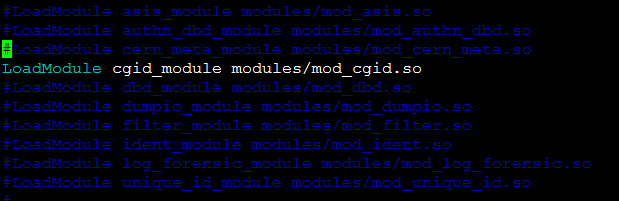
1开启CGI功能
2配置CGI路径,设置用户名验证方式
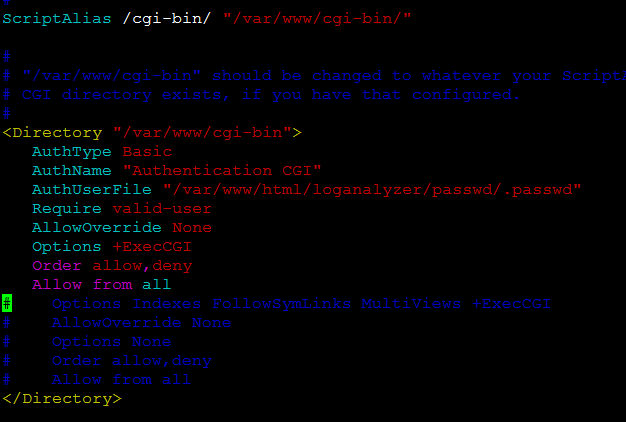
密码文件用Apache自带命令htpaddwd生成
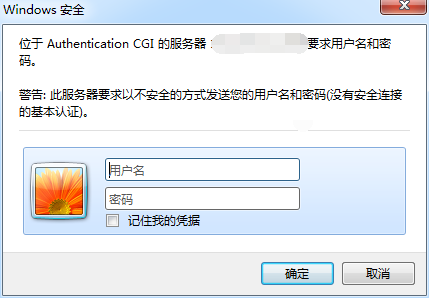
给userA创建密码认证
htpaddwd /var/www/html/loganalyzer/passwd/.passwd userA
3报错解决
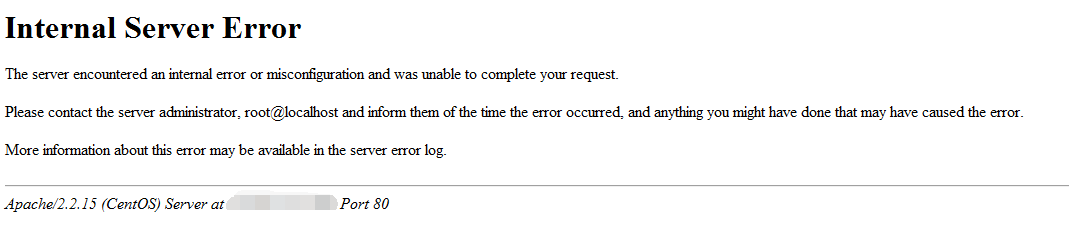
查看日志显示权限不足

chown apache.apache ssh.py
修改后成功访问
