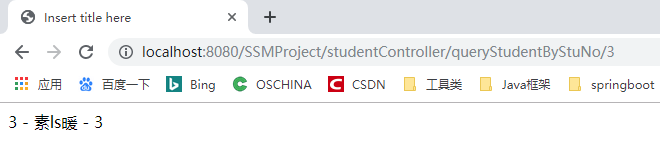
一、思路
SSH --> Spring+SpringMVC+MyBatis
SM整合 --> SS整合 -->SSM

二、大体框架
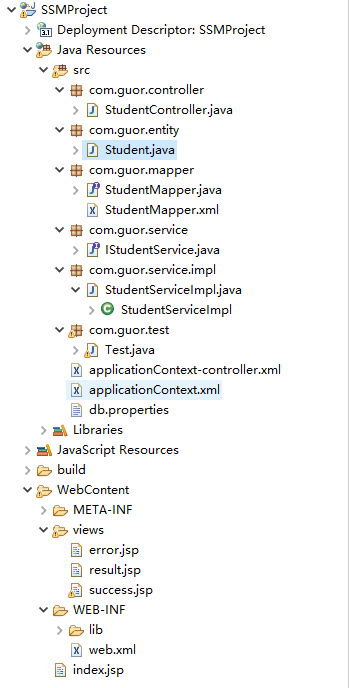
三、Spring整合MyBatis
SqlSessionFactory ->SqlSession -> StudentMapper ->CRUD
MyBatis最终通过SqlSessionFactory 来操作数据库,Spring整合MyBatis,其实就是将MyBatis的SqlSessionFactory交给Spring。
1、jar包
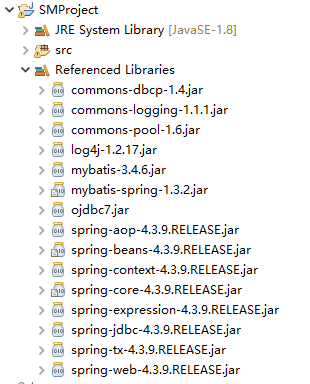
2、配置
与spring整合时,mybatis的配置文件conf.xml(数据源+mapper.xml)可省,将其配置在applicationContext.xml中。
1<?xml version="1.0" encoding="UTF-8"?>
2<beans xmlns="http://www.springframework.org/schema/beans"
3	xmlns:xsi="http://www.w3.org/2001/XMLSchema-instance"
4	xsi:schemaLocation="http://www.springframework.org/schema/beans http://www.springframework.org/schema/beans/spring-beans.xsd">
5
6	<bean id="config" class="org.springframework.beans.factory.config.PreferencesPlaceholderConfigurer">
7		<property name="locations">
8			<array>
9				<value>classpath:db.properties</value>
10			</array>
11		</property>
12	</bean>
13
14	<!-- 配置数据库信息(替代mybatis的配置文件confx.ml)   -->
15	<bean id="dataSource" class="org.apache.commons.dbcp.BasicDataSource">
16		<property name="driverClassName" value="${driver}"></property>
17		<property name="url" value="${url}"></property>
18		<property name="username" value="${username}"></property>
19		<property name="password" value="${password}"></property>
20	</bean>
21
22	<!-- 在springIOC中创建mybatis的核心类SqlSessionFactoryBean  -->
23	<bean id="sqlSessionFactory" class="org.mybatis.spring.SqlSessionFactoryBean">
24		<property name="dataSource" ref="dataSource"></property>
25		<property name="mapperLocations" value="classpath:com/guor/mapper/*.xml"></property>
26	</bean>
27
28	<bean id="studentService" class="com.guor.service.impl.StudentServiceImpl">
29		<property name="studentMapper" ref="studentMapper"></property>
30	</bean>
31
32	<!-- 批量产生mapper对象在IOC中的id值默认就是接口名-->
33	<bean id="mappers" class="org.mybatis.spring.mapper.MapperScannerConfigurer">
34		<property name="sqlSessionFactoryBeanName" value="sqlSessionFactory"></property>
35		<!-- 指定批量产生哪个包的mapper对象 -->
36		<property name="basePackage" value="com.guor.mapper"></property>
37	</bean>
38</beans>
39
40
41driver=oracle.jdbc.OracleDriver
42url=jdbc:oracle:thin:@127.0.0.1:1521:ORCL
43username=orcl
44password=orcl
3、编写代码
(1)entity
1package com.guor.entity;
2
3public class Student {
4	private int id;
5	private String name;
6	private int age;
7
8	...
9}
(2)mapper
1package com.guor.mapper;
2
3import com.guor.entity.Student;
4
5public interface StudentMapper {
6	public void addStudent(Student student);
7
8	public Student queryStudentByStuNo(int id);
9}
10
11
12<?xml version="1.0" encoding="UTF-8" ?>
13<!DOCTYPE mapper
14        PUBLIC "-//mybatis.org//DTD Config 3.0//EN"
15        "http://mybatis.org/dtd/mybatis-3-mapper.dtd">
16<mapper namespace="com.guor.mapper.StudentMapper">
17	<select id="queryStudentByStuNo" parameterType="int" resultType="com.guor.entity.Student">
18		select * from student where id = #{stuNo}
19	</select>
20
21	<insert id="addStudent" parameterType="com.guor.entity.Student">
22		insert into student(id,name,age) values (#{id},#{name},#{age})
23	</insert>
24</mapper>
(3)service(面向接口编程)
1package com.guor.service;
2
3import com.guor.entity.Student;
4
5public interface IStudentService {
6	public void addStudent(Student student);
7	public Student queryStudentByStuNo(int id);
8}
9
10
11package com.guor.service.impl;
12
13import com.guor.entity.Student;
14import com.guor.mapper.StudentMapper;
15import com.guor.service.IStudentService;
16
17public class StudentServiceImpl implements IStudentService {
18	private StudentMapper studentMapper;
19
20	public void setStudentMapper(StudentMapper studentMapper) {
21		this.studentMapper = studentMapper;
22	}
23
24	@Override
25	public void addStudent(Student student) {
26		studentMapper.addStudent(student);
27	}
28
29	@Override
30	public Student queryStudentByStuNo(int id) {
31		return studentMapper.queryStudentByStuNo(id);
32	}
33}
(4)controller
1package com.guor.controller;
2
3import java.util.Map;
4import org.springframework.beans.factory.annotation.Autowired;
5import org.springframework.beans.factory.annotation.Qualifier;
6import org.springframework.stereotype.Controller;
7import org.springframework.web.bind.annotation.PathVariable;
8import org.springframework.web.bind.annotation.RequestMapping;
9import com.guor.entity.Student;
10import com.guor.service.IStudentService;
11
12@Controller
13@RequestMapping("studentController")
14public class StudentController {
15	@Autowired
16	@Qualifier("studentService")
17	private IStudentService studentService;
18
19	public void setStudentService(IStudentService studentService) {
20		this.studentService = studentService;
21	}
22
23	@RequestMapping("queryStudentByStuNo/{id}")//映射
24	public String queryStudentByStuNo(@PathVariable("id") Integer id,Map<String,Object> map) {
25		Student student = studentService.queryStudentByStuNo(id);
26		map.put("student", student);
27		return "result";
28	}
29}
四、Spring整合SpringMVC
1、jar包
一个就行,spring-webmvc-4.3.9.RELEASE.jar
2、配置
1<?xml version="1.0" encoding="UTF-8"?>
2<beans xmlns="http://www.springframework.org/schema/beans"
3       xmlns:xsi="http://www.w3.org/2001/XMLSchema-instance"
4       xmlns:context="http://www.springframework.org/schema/context"
5       xmlns:mvc="http://www.springframework.org/schema/mvc" xmlns:tx="http://www.springframework.org/schema/tx"
6       xsi:schemaLocation="http://www.springframework.org/schema/beans
7           http://www.springframework.org/schema/beans/spring-beans.xsd
8        http://www.springframework.org/schema/mvc
9        http://www.springframework.org/schema/mvc/spring-mvc-4.0.xsd
10        http://www.springframework.org/schema/context
11        http://www.springframework.org/schema/context/spring-context.xsd
12        http://www.springframework.org/schema/tx
13        http://www.springframework.org/schema/tx/spring-tx.xsd">
14
15	<!-- 扫描有注解的包 -->
16	<context:component-scan base-package="com.guor.controller"></context:component-scan>
17
18	<!-- 配置视图解析器(InternalResourceViewResolver) -->
19	<bean class="org.springframework.web.servlet.view.InternalResourceViewResolver">
20		<property name="prefix" value="/views/"></property>
21		<property name="suffix" value=".jsp"></property>
22	</bean>
23
24	<!-- springMVC基础配置、标配 -->
25	<mvc:annotation-driven></mvc:annotation-driven>
26
27	<bean class="org.springframework.web.servlet.mvc.annotation.AnnotationMethodHandlerAdapter">
28		<property name="messageConverters">
29			<list>
30				<ref bean="mappingJacksonHttpMessageConverter" />
31			</list>
32		</property>
33	</bean>
34	<bean id="mappingJacksonHttpMessageConverter" class="org.springframework.http.converter.json.MappingJackson2HttpMessageConverter">
35		<property name="supportedMediaTypes">
36			<list>
37				<value>text/html;charset=UTF-8</value>
38			</list>
39		</property>
40	</bean>
41
42	<bean class="org.springframework.web.servlet.handler.SimpleMappingExceptionResolver">
43		<!-- <property name="exceptionAttribute" value = "ex"></property> 异常变量的默认值是exception-->
44		<property name="exceptionMappings">
45			<props>
46				<!-- 相当于catch -->
47				<prop key="java.lang.ArithmeticException">
48					error
49				</prop>
50				<prop key="java.lang.NullPointException">
51					error
52				</prop>
53			</props>
54		</property>
55	</bean>
56</beans>
3、index.jsp
1<%@ page language="java" contentType="text/html; charset=UTF-8"
2    pageEncoding="UTF-8"%>
3<!DOCTYPE html>
4<html>
5<head>
6<meta charset="UTF-8">
7<title>Insert title here</title>
8</head>
9<body>
10	<a href="studentController/queryStudentByStuNo/3">queryStudentByStuNo</a>
11</body>
12</html>
4、运行