
pom.xml引入依赖包
1<!--jedis.jar -->
2  <dependency>
3    <groupId>redis.clients</groupId>
4    <artifactId>jedis</artifactId>
5    <version>2.9.0</version>
6  </dependency>
7
8  <!-- Spring下使用Redis -->
9  <dependency>
10    <groupId>org.springframework.data</groupId>
11    <artifactId>spring-data-redis</artifactId>
12    <version>2.1.3.RELEASE</version>
13  </dependency>
其余的依赖包就不贴出来了
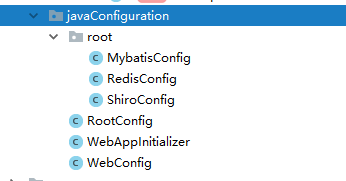
java配置目录结构
1WebAppInitializer.java
2
3/*
4 * Spring Mvc的配置
5 *createDate: 2018年12月21日
6 * author: dz
7 * */
8public class WebAppInitializer extends AbstractAnnotationConfigDispatcherServletInitializer {
9    private final static Logger LOG = Logger.getLogger(String.valueOf(WebAppInitializer.class));
10
11    @Override
12    protected Class<?>[] getRootConfigClasses() {
13        LOG.info("root配置类初始化");
14        return new Class<?>[]{RootConfig.class};
15    }
16
17    @Override
18    protected Class<?>[] getServletConfigClasses() {
19        LOG.info("------web配置类初始化------");
20        return new Class<?>[]{WebConfig.class};
21    }
22
23    @Override
24    protected String[] getServletMappings() {
25        LOG.info("------映射根路径初始化------");
26        return new String[]{"/"};//请求路径映射,根路径
27    }
28
29    @Override
30    protected Filter[] getServletFilters() {
31        LOG.info("-----编码过滤配置-------");
32        CharacterEncodingFilter encodingFilter = new CharacterEncodingFilter("UTF-8");
33        return new Filter[]{encodingFilter};
34    }
35}
RootConfig.java
1/**
2 * <p>Title: RootConfig.java</p>
3 * <p>Description: 配置类,用于管理ContextLoadListener创建的上下文的bean</p>
4 * <p>CreateDate: 2018年12月20日</p>
5 *
6 * @author dz
7 */
8@Configuration
9@ComponentScan(basePackages = {"com.dznfit.service"})
10@PropertySource("classpath:jdbc.properties")
11@PropertySource("classpath:redis.properties")
12@Import({MybatisConfig.class, ShiroConfig.class, RedisConfig.class})
13public class RootConfig {
14
15    @Bean
16    public static PropertySourcesPlaceholderConfigurer sourcesPlaceholderConfigurer() {
17        return new PropertySourcesPlaceholderConfigurer();
18    }
19
20
21}
WebConfig.java
1/**
2 * <p>Title: WebConfig.java</p>
3 * <p>Description: 配置类,用于定义DispatcherServlet上下文的bean</p>
4 * <p>CreateDate: 2018年12月20日</p>
5 *
6 * @author dz
7 */
8@Configuration
9@EnableWebMvc
10@EnableAspectJAutoProxy
11@ComponentScan(basePackages = "com.dznfit.controller")
12@ComponentScan(basePackages = "com.dznfit.cache")
13public class WebConfig implements WebMvcConfigurer {
14
15
16    @Override
17    public void configureViewResolvers(ViewResolverRegistry registry) {
18        registry.jsp("/WEB-INF/view/", ".jsp");
19    }
20
21    @Bean
22    public CustomExceptionResolver getExceptionResolver(){
23        return new CustomExceptionResolver();
24    }
25
26
27}
MybatisConfig.java
1/**
2 * <p>Title: DruidDataSourceConfig.java</p>
3 * <p>Description: 数据源属性配置</p>
4 * <p>CreateDate: 2018年12月20日</p>
5 *
6 * @author dz
7 */
8@Configuration
9@MapperScan(basePackages = "com.dznfit.dao")
10@EnableTransactionManagement
11public class MybatisConfig {
12
13    @Value("${driver}")
14    private String driver;
15
16    @Value("${url}")
17    private String url;
18
19    @Value("${name}")
20    private String user;
21
22    @Value("${password}")
23    private String password;
24
25    @Autowired
26    private Environment environment;
27
28    @Bean("dataSource")
29    public DataSource dataSourceConfig() throws PropertyVetoException {
30        // 使用c3p0
31        ComboPooledDataSource source = new ComboPooledDataSource();
32        source.setDriverClass(driver);
33        source.setJdbcUrl(url);
34        source.setUser(user);
35        source.setPassword(password);
36        return source;
37    }
38
39    @Bean("sqlSessionFactoryBean")
40    public SqlSessionFactoryBean sqlSessionFactoryBeanConfig() throws PropertyVetoException, IOException {
41        SqlSessionFactoryBean factoryBean = new SqlSessionFactoryBean();
42        factoryBean.setDataSource(this.dataSourceConfig());
43        factoryBean.setTypeAliasesPackage("com.dznfit.entity");
44        factoryBean.setConfigLocation(new ClassPathResource("mybatis-config.xml"));
45        PathMatchingResourcePatternResolver resolver = new PathMatchingResourcePatternResolver();
46
47        factoryBean.setMapperLocations(resolver.getResources("Mapper/*.xml"));
48        return factoryBean;
49    }
50    /* <!-- 事务管理器 对mybatis操作数据库事务控制,spring使用jdbc的事务控制类 -->*/
51    @Bean("transactionManager")
52    public DataSourceTransactionManager dataSourceTransactionManagerConfig() throws PropertyVetoException {
53        DataSourceTransactionManager manager = new DataSourceTransactionManager();
54        manager.setDataSource(this.dataSourceConfig());
55        return manager;
56    }
57
58}
RedisConfig.java
注意必须是java1.8以上才可以编译通过
1@Configuration
2@EnableCaching
3public class RedisConfig {
4
5    @Bean
6    RedisConnectionFactory redisFactory() {
7        RedisStandaloneConfiguration config = new RedisStandaloneConfiguration();
8        return new JedisConnectionFactory(config);
9    }
10
11    @Bean
12    RedisTemplate redisTemplate() {
13        StringRedisTemplate template = new StringRedisTemplate(redisFactory());
14        template.setValueSerializer(RedisSerializer.json());
15        return template;
16    }
17
18    @Bean
19    RedisCacheManager cacheManager() {
20        RedisCacheConfiguration with = RedisCacheConfiguration
21                .defaultCacheConfig()
22                .computePrefixWith(cacheName -> "dz147." + cacheName)
23                .serializeKeysWith(RedisSerializationContext.SerializationPair.
24                        fromSerializer(RedisSerializer.string()))
25                .serializeValuesWith(RedisSerializationContext.SerializationPair.
26                        fromSerializer(RedisSerializer.json()));
27        return RedisCacheManager.builder(redisFactory()).cacheDefaults(with).build();
28    }
29}
使用就非常简单了
Controller部分
1@GetMapping(value = "/redis/{id}")
2    //@GetCache(name="news",value="id")
3    public @ResponseBody News redisTest(@PathVariable("id")int id) {
4        return newsService.getNewsById(id);
5    }
Service部分
我们只需要加上@Cacheable注解即可
1@Service
2public class NewsServiceImpl {
3    @Autowired
4    NewsMapper newsMapper;
5
6    @Cacheable("news")
7    public News getNewsById(int id) {
8        return newsMapper.selectByPrimaryKey(id);
9    }
10}
Test部分
1@RunWith(SpringRunner.class)
2@ContextConfiguration(classes = RootConfig.class)
3public class NewsServiceImplTest {
4    @Autowired
5    NewsServiceImpl newsService;
6
7
8    @Test
9    public void getNewsById() {
10        newsService.getNewsById(2);
11    }
12}
