
基于Flutter 1.5,从源码视角来深入剖析flutter动画原理,相关源码目录见文末附录
一、概述
动画效果对于系统的用户体验非常重要,好的动画能让用户感觉界面更加顺畅,提升用户体验。
1.1 动画类型
Flutter动画大的分类来说主要分为两大类:
- 补间动画:给定初值与终值,系统自动补齐中间帧的动画
- 物理动画:遵循物理学定律的动画,实现了弹簧、阻尼、重力三种物理效果
在应用使用过程中常见动画模式:
- 动画列表或者网格:例如元素的添加或者删除操作;
- 转场动画Shared element transition:例如从当前页面打开另一页面的过渡动画;
- 交错动画Staggered animations:比如部分或者完全交错的动画。
1.2 类图
核心类:
- Animation对象是整个动画中非常核心的一个类;
- AnimationController用于管理Animation;
- CurvedAnimation过程是非线性曲线;
- Tween补间动画
- Listeners和StatusListeners用于监听动画状态改变。
AnimationStatus是枚举类型,有4个值;
| 取值 | 解释 |
|---|---|
| dismissed | 动画在开始时停止 |
| forward | 动画从头到尾绘制 |
| reverse | 动画反向绘制,从尾到头 |
| completed | 动画在结束时停止 |
1.3 动画实例
1 //[见小节2.1]
2AnimationController animationController = AnimationController(
3    vsync: this, duration: Duration(milliseconds: 1000));
4Animation animation = Tween(begin: 0.0,end: 10.0).animate(animationController);
5animationController.addListener(() {
6  setState(() {});
7});
8 //[见小节2.2]
9animationController.forward();
该过程说明:
- AnimationController作为Animation子类,在屏幕刷新时生成一系列值,默认情况下从0到1区间的取值。
- Tween的animate()方法来自于父类Animatable,该方法返回的对象类型为_AnimatedEvaluation,而该对象最核心的工作就是通过value来调用Tween的transform();
调用链:
1AnimationController.forward
2  AnimationController._animateToInternal
3    AnimationController._startSimulation
4      Ticker.start()
5        Ticker.scheduleTick()
6          SchedulerBinding.scheduleFrameCallback()
7            SchedulerBinding.scheduleFrame()
8              ...
9                Ticker._tick
10                  AnimationController._tick
11                  Ticker.scheduleTick
二、原理分析
2.1 AnimationController初始化
[-> lib/src/animation/animation_controller.dart]
1AnimationController({
2  double value,
3  this.duration,
4  this.debugLabel,
5  this.lowerBound = 0.0,
6  this.upperBound = 1.0,
7  this.animationBehavior = AnimationBehavior.normal,
8  @required TickerProvider vsync,
9}) : _direction = _AnimationDirection.forward {
10  _ticker = vsync.createTicker(_tick);  //[见小节2.1.1]
11  _internalSetValue(value ?? lowerBound); //[见小节2.1.3]
12}
该方法说明:
- AnimationController初始化过程,一般都设置duration和vsync初值;
- upperBound(上边界值)和lowerBound(下边界值)都不能为空,且upperBound必须大于等于lowerBound;
- 创建默认的动画方向为向前(_AnimationDirection.forward);
- 调用类型为TickerProvider的vsync对象的createTicker()方法来创建Ticker对象;
TickerProvider作为抽象类,主要的子类有SingleTickerProviderStateMixin和TickerProviderStateMixin,这两个类的区别就是是否支持创建多个TickerProvider,这里SingleTickerProviderStateMixin为例展开。
2.1.1 createTicker
[-> lib/src/widgets/ticker_provider.dart]
1mixin SingleTickerProviderStateMixin<T extends StatefulWidget> on State<T> implements TickerProvider {
2  Ticker _ticker;
3
4  Ticker createTicker(TickerCallback onTick) {
5     //[见小节2.1.2]
6    _ticker = Ticker(onTick, debugLabel: 'created by $this');
7    return _ticker;
8  }
2.1.2 Ticker初始化
[-> lib/src/scheduler/ticker.dart]
1class Ticker {
2  Ticker(this._onTick, { this.debugLabel }) {
3  }
4
5  final TickerCallback _onTick;
6}
将AnimationControllerd对象中的_tick()方法,赋值给Ticker对象的_onTick成员变量,再来看看该_tick方法。
2.1.3 _internalSetValue
[-> lib/src/animation/animation_controller.dart ::AnimationController]
1void _internalSetValue(double newValue) {
2  _value = newValue.clamp(lowerBound, upperBound);
3  if (_value == lowerBound) {
4    _status = AnimationStatus.dismissed;
5  } else if (_value == upperBound) {
6    _status = AnimationStatus.completed;
7  } else {
8    _status = (_direction == _AnimationDirection.forward) ?
9      AnimationStatus.forward :
10      AnimationStatus.reverse;
11  }
12}
根据当前的value值来初始化动画状态_status
2.2 forward
[-> lib/src/animation/animation_controller.dart ::AnimationController]
1TickerFuture forward({ double from }) {
2  //默认采用向前的动画方向
3  _direction = _AnimationDirection.forward;
4  if (from != null)
5    value = from;
6  return _animateToInternal(upperBound); //[见小节2.3]
7}
_AnimationDirection是枚举类型,有forward(向前)和reverse(向后)两个值,也就是说该方法的功能是指从from开始向前滑动,
2.3 _animateToInternal
[-> lib/src/animation/animation_controller.dart ::AnimationController]
1TickerFuture _animateToInternal(double target, { Duration duration, Curve curve = Curves.linear }) {
2  double scale = 1.0;
3  if (SemanticsBinding.instance.disableAnimations) {
4    switch (animationBehavior) {
5      case AnimationBehavior.normal:
6        scale = 0.05;
7        break;
8      case AnimationBehavior.preserve:
9        break;
10    }
11  }
12  Duration simulationDuration = duration;
13  if (simulationDuration == null) {
14    final double range = upperBound - lowerBound;
15    final double remainingFraction = range.isFinite ? (target - _value).abs() / range : 1.0;
16    //根据剩余动画的百分比来评估仿真动画剩余时长
17    simulationDuration = this.duration * remainingFraction;
18  } else if (target == value) {
19    //已到达动画终点,不再执行动画
20    simulationDuration = Duration.zero;
21  }
22  //停止老的动画[见小节2.3.1]
23  stop();
24  if (simulationDuration == Duration.zero) {
25    if (value != target) {
26      _value = target.clamp(lowerBound, upperBound);
27      notifyListeners();
28    }
29    _status = (_direction == _AnimationDirection.forward) ?
30      AnimationStatus.completed :
31      AnimationStatus.dismissed;
32    _checkStatusChanged();
33    //当动画执行时间已到,则直接结束
34    return TickerFuture.complete();
35  }
36  //[见小节2.4]
37  return _startSimulation(_InterpolationSimulation(_value, target, simulationDuration, curve, scale));
38}
默认采用的是线性动画曲线Curves.linear。
2.3.1 AnimationController.stop
1void stop({ bool canceled = true }) {
2  _simulation = null;
3  _lastElapsedDuration = null;
4  //[见小节2.3.2]
5  _ticker.stop(canceled: canceled);
6}
2.3.2 Ticker.stop
[-> lib/src/scheduler/ticker.dart]
1void stop({ bool canceled = false }) {
2  if (!isActive) //已经不活跃,则直接返回
3    return;
4
5  final TickerFuture localFuture = _future;
6  _future = null;
7  _startTime = null;
8
9  //[见小节2.3.3]
10  unscheduleTick();
11  if (canceled) {
12    localFuture._cancel(this);
13  } else {
14    localFuture._complete();
15  }
16}
2.3.3 Ticker.unscheduleTick
[-> lib/src/scheduler/ticker.dart]
1void unscheduleTick() {
2  if (scheduled) {
3    SchedulerBinding.instance.cancelFrameCallbackWithId(_animationId);
4    _animationId = null;
5  }
6}
2.3.4 _InterpolationSimulation初始化
[-> lib/src/animation/animation_controller.dart ::_InterpolationSimulation]
1class _InterpolationSimulation extends Simulation {
2  _InterpolationSimulation(this._begin, this._end, Duration duration, this._curve, double scale)
3    : _durationInSeconds = (duration.inMicroseconds * scale) / Duration.microsecondsPerSecond;
4
5  final double _durationInSeconds;
6  final double _begin;
7  final double _end;
8  final Curve _curve;
9}
该方法创建插值模拟器对象,并初始化起点、终点、动画曲线以及时长。这里用的Curve是线性模型,也就是说采用的是匀速运动。
2.4 _startSimulation
[-> lib/src/animation/animation_controller.dart]
1TickerFuture _startSimulation(Simulation simulation) {
2  _simulation = simulation;
3  _lastElapsedDuration = Duration.zero;
4  _value = simulation.x(0.0).clamp(lowerBound, upperBound);
5  //[见小节2.5]
6  final TickerFuture result = _ticker.start();
7  _status = (_direction == _AnimationDirection.forward) ?
8    AnimationStatus.forward :
9    AnimationStatus.reverse;
10  //[见小节2.4.1]
11  _checkStatusChanged();
12  return result;
13}
2.4.1 _checkStatusChanged
[-> lib/src/animation/animation_controller.dart]
1void _checkStatusChanged() {
2  final AnimationStatus newStatus = status;
3  if (_lastReportedStatus != newStatus) {
4    _lastReportedStatus = newStatus;
5    notifyStatusListeners(newStatus); //通知状态改变
6  }
7}
这里会回调_statusListeners中的所有状态监听器,这里的状态就是指AnimationStatus的dismissed、forward、reverse以及completed。
2.5 Ticker.start
[-> lib/src/scheduler/ticker.dart]
1TickerFuture start() {
2  _future = TickerFuture._();
3  if (shouldScheduleTick) {
4    scheduleTick();   //[见小节2.6]
5  }
6  if (SchedulerBinding.instance.schedulerPhase.index > SchedulerPhase.idle.index &&
7      SchedulerBinding.instance.schedulerPhase.index < SchedulerPhase.postFrameCallbacks.index)
8    _startTime = SchedulerBinding.instance.currentFrameTimeStamp;
9  return _future;
10}
此处的shouldScheduleTick等于!muted && isActive && !scheduled,也就是没有调度过的活跃状态才会调用Tick。
2.6 Ticker.scheduleTick
[-> lib/src/scheduler/ticker.dart]
1void scheduleTick({ bool rescheduling = false }) {
2  //[见小节2.7]
3  _animationId = SchedulerBinding.instance.scheduleFrameCallback(_tick, rescheduling: rescheduling);
4}
此处的_tick会在下一次vysnc触发时回调执行,见小节2.10。
2.7 scheduleFrameCallback
[-> lib/src/scheduler/binding.dart]
1int scheduleFrameCallback(FrameCallback callback, { bool rescheduling = false }) {
2    //[见小节2.8]
3  scheduleFrame();
4  _nextFrameCallbackId += 1;
5  _transientCallbacks[_nextFrameCallbackId] = _FrameCallbackEntry(callback, rescheduling: rescheduling);
6  return _nextFrameCallbackId;
7}
将前面传递过来的Ticker._tick()方法保存在_FrameCallbackEntry的callback中,然后将_FrameCallbackEntry记录在Map类型的_transientCallbacks,
2.8 scheduleFrame
[-> lib/src/scheduler/binding.dart]
1void scheduleFrame() {
2  if (_hasScheduledFrame || !_framesEnabled)
3    return;
4  ui.window.scheduleFrame();
5  _hasScheduledFrame = true;
6}
从文章Flutter之setState更新机制,可知此处调用的ui.window.scheduleFrame(),会注册vsync监听。当当下一次vsync信号的到来时会执行handleBeginFrame()。
2.9 handleBeginFrame
[-> lib/src/scheduler/binding.dart:: SchedulerBinding]
1void handleBeginFrame(Duration rawTimeStamp) {
2  Timeline.startSync('Frame', arguments: timelineWhitelistArguments);
3  _firstRawTimeStampInEpoch ??= rawTimeStamp;
4  _currentFrameTimeStamp = _adjustForEpoch(rawTimeStamp ?? _lastRawTimeStamp);
5  if (rawTimeStamp != null)
6    _lastRawTimeStamp = rawTimeStamp;
7  ...
8
9  //此时阶段等于SchedulerPhase.idle;
10  _hasScheduledFrame = false;
11  try {
12    Timeline.startSync('Animate', arguments: timelineWhitelistArguments);
13    _schedulerPhase = SchedulerPhase.transientCallbacks;
14    //执行动画的回调方法
15    final Map<int, _FrameCallbackEntry> callbacks = _transientCallbacks;
16    _transientCallbacks = <int, _FrameCallbackEntry>{};
17    callbacks.forEach((int id, _FrameCallbackEntry callbackEntry) {
18      if (!_removedIds.contains(id))
19        _invokeFrameCallback(callbackEntry.callback, _currentFrameTimeStamp, callbackEntry.debugStack);
20    });
21    _removedIds.clear();
22  } finally {
23    _schedulerPhase = SchedulerPhase.midFrameMicrotasks;
24  }
25}
该方法主要功能是遍历_transientCallbacks,从前面小节[2.7],可知该过程会执行Ticker._tick()方法。
2.10 Ticker._tick
[-> lib/src/scheduler/ticker.dart]
1void _tick(Duration timeStamp) {
2  _animationId = null;
3  _startTime ??= timeStamp;
4  //[见小节2.11]
5  _onTick(timeStamp - _startTime);
6  //根据活跃状态来决定是否再次调度
7  if (shouldScheduleTick)
8    scheduleTick(rescheduling: true);
9}
该方法主要功能:
- 小节[2.1.2]的Ticker初始化中,可知此处_onTick便是AnimationController的_tick()方法;
- 小节[2.5]已介绍当仍处于活跃状态,则会再次调度,回到小节[2.6]的scheduleTick(),从而形成动画的连续绘制过程。
2.11 AnimationController._tick
[-> lib/src/animation/animation_controller.dart]
1void _tick(Duration elapsed) {
2  _lastElapsedDuration = elapsed;
3  //获取已过去的时长
4  final double elapsedInSeconds = elapsed.inMicroseconds.toDouble() / Duration.microsecondsPerSecond;
5  _value = _simulation.x(elapsedInSeconds).clamp(lowerBound, upperBound);
6  if (_simulation.isDone(elapsedInSeconds)) {
7    _status = (_direction == _AnimationDirection.forward) ?
8      AnimationStatus.completed :
9      AnimationStatus.dismissed;
10    stop(canceled: false); //当动画已完成,则停止
11  }
12  notifyListeners();   //通知监听器[见小节2.11.1]
13  _checkStatusChanged(); //通知状态监听器[见小节2.11.2]
14}
2.11.1 notifyListeners
[-> lib/src/animation/listener_helpers.dart ::AnimationLocalListenersMixin]
1void notifyListeners() {
2  final List<VoidCallback> localListeners = List<VoidCallback>.from(_listeners);
3  for (VoidCallback listener in localListeners) {
4    try {
5      if (_listeners.contains(listener))
6        listener();
7    } catch (exception, stack) {
8      ...
9    }
10  }
11}
AnimationLocalListenersMixin的addListener()会向_listeners中添加监听器
2.11.2 _checkStatusChanged
[-> lib/src/animation/listener_helpers.dart ::AnimationLocalStatusListenersMixin]
1void notifyStatusListeners(AnimationStatus status) {
2  final List<AnimationStatusListener> localListeners = List<AnimationStatusListener>.from(_statusListeners);
3  for (AnimationStatusListener listener in localListeners) {
4    try {
5      if (_statusListeners.contains(listener))
6        listener(status);
7    } catch (exception, stack) {
8      ...
9    }
10  }
11}
从前面的小节[2.4.1]可知,当状态改变时会调用notifyStatusListeners方法。AnimationLocalStatusListenersMixin的addStatusListener()会向_statusListeners添加状态监听器。
三、总结
3.1 动画流程图
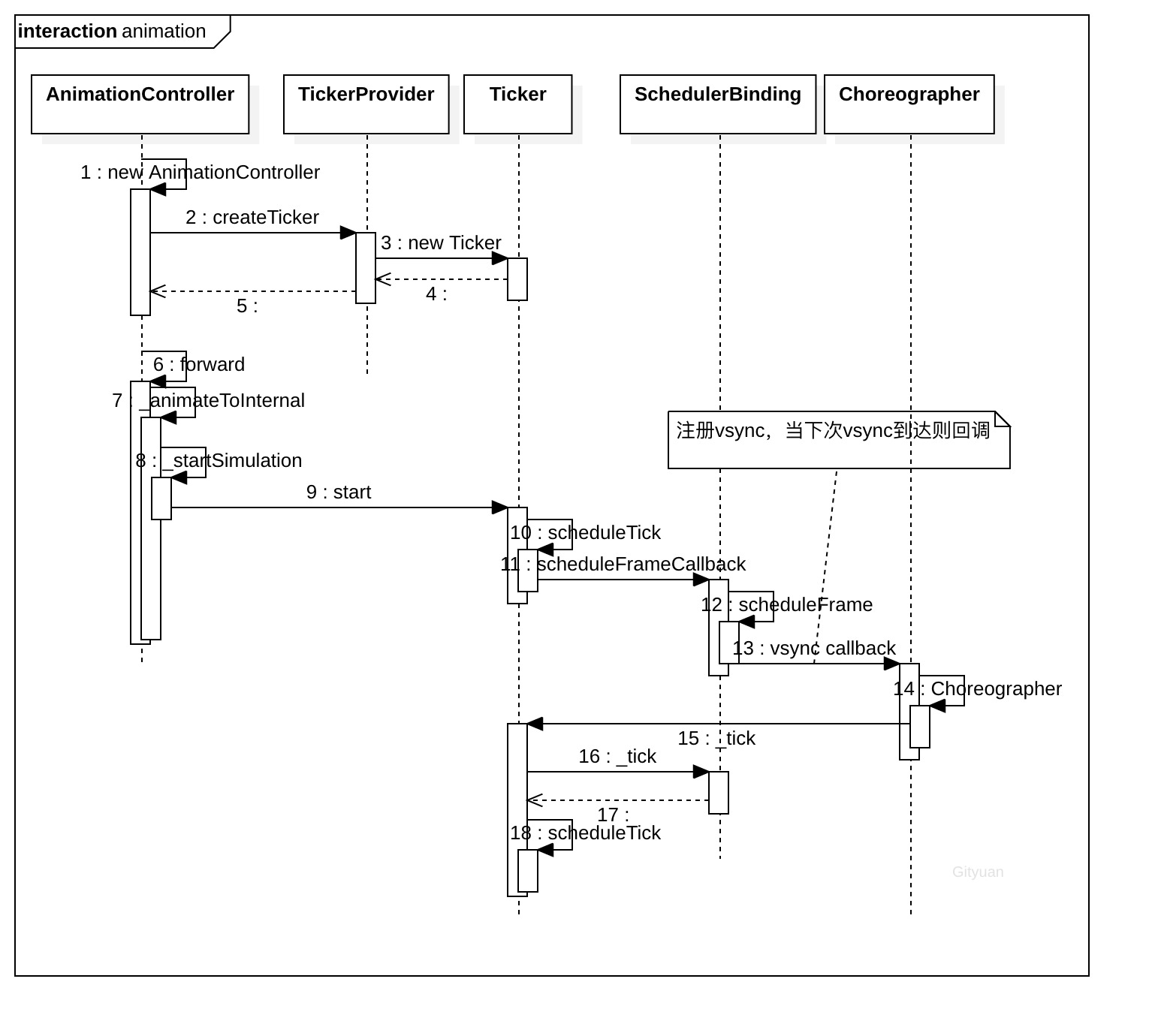
微信公众号 Gityuan | 微博 weibo.com/gityuan | 博客 留言区交流

CATALOG
本文转自 http://gityuan.com/2019/07/13/flutter_animator/,如有侵权,请联系删除。