
1//xxx.m 文件
2#import "BasicMapAnnotation.h"
3#import "BMKClusterManager.h"
4
5/*
6 *点聚合Annotation
7 */
8@interface ClusterAnnotation : BMKPointAnnotation
9
10///所包含annotation个数
11@property (nonatomic, assign) NSInteger size;
12
13@end
14
15@implementation ClusterAnnotation
16
17@synthesize size = _size;
18
19@end
20
21
22/*
23 *点聚合AnnotationView
24 */
25@interface ClusterAnnotationView : BMKPinAnnotationView {
26
27}
28
29@property (nonatomic, assign) NSInteger size;
30@property (nonatomic, strong) UILabel *label;
31
32@end
33
34@implementation ClusterAnnotationView
35
36@synthesize size = _size;
37@synthesize label = _label;
38
39- (id)initWithAnnotation:(id<BMKAnnotation>)annotation reuseIdentifier:(NSString *)reuseIdentifier {
40    self = [super initWithAnnotation:annotation reuseIdentifier:reuseIdentifier];
41    if (self) {
42        [self setBounds:CGRectMake(0.f, 0.f, 55.f, 55.f)];
43        _label = [[UILabel alloc] initWithFrame:CGRectMake(0.f, 0.f, 22.f, 22.f)];
44        _label.textColor = [UIColor whiteColor];
45        _label.font = [UIFont systemFontOfSize:11];
46        _label.textAlignment = NSTextAlignmentCenter;
47        [self addSubview:_label];
48        self.alpha = 1;
49    }
50    return self;
51}
52
53- (void)setSize:(NSInteger)size {
54    _size = size;
55    if (_size == 1) {
56        self.label.hidden = YES;
57        self.pinColor = BMKPinAnnotationColorRed;
58        return;
59    }
60    self.label.hidden = NO;
61    if (size > 20) {
62        self.label.backgroundColor = [UIColor redColor];
63    } else if (size > 10) {
64        self.label.backgroundColor = [UIColor purpleColor];
65    } else if (size > 5) {
66        self.label.backgroundColor = [UIColor blueColor];
67    } else {
68        self.label.backgroundColor = [UIColor greenColor];
69    }
70    _label.text = [NSString stringWithFormat:@"%ld", (long)size];
71}
72
73@end
74
75@interface WrapperMainViewController ()<UIScrollViewDelegate, UISearchBarDelegate, CitySelDelegate,UITableViewDataSource,UITableViewDelegate,BMKMapViewDelegate>
76{
77    IBOutlet BMKMapView* _mapView;
78    BMKClusterManager *_clusterManager;//点聚合管理类
79    NSInteger _clusterZoom;//聚合级别
80    NSMutableArray *_clusterCaches;//点聚合缓存标注
81}
82@end
83
84@implementation WrapperMainViewController
85- (void)viewDidLoad {
86    [super viewDidLoad];
87
88    // Do any additional setup after loading the view from its nib.
89    //[super.navigationController setNavigationBarHidden:NO animated:FALSE];
90//    [self.navigationController setNavigationBarHidden:YES];
91
92//    [self.scrollViewMain addSubview:viewMain];
93    [self.scrollViewMain setContentSize:CGSizeMake(self.view.bounds.size.width, self.view.bounds.size.height - 106)];
94
95
96    mutableArrayButton = [[NSMutableArray alloc] init];
97
98    [self addHeader];
99
100    labelCity.text = [[AppDelegate instance].dicCurrentCity valueForKeyPath:@"cname"];
101    labelCity.textAlignment = NSTextAlignmentCenter;
102    //[btnCity setTitle:[[AppDelegate instance].dicCurrentCity valueForKeyPath:@"cname"] forState:UIControlStateNormal];
103
104    [[LocationManagement sharedInstance] startGPS];
105    [LocationManagement sharedInstance].delegate = self;
106
107    [super getAPPVersion:NO AppId:@"1"];
108    UITapGestureRecognizer *click = [[UITapGestureRecognizer alloc]initWithTarget:self action:@selector(disappear)];
109    [blackAlpha addGestureRecognizer:click];
110    blackAlpha.frame = CGRectMake(0, 568, self.view.bounds.size.width, self.view.bounds.size.height);
111
112    [self.view addSubview:blackAlpha];
113
114    weatherTableView.frame = CGRectMake(0, 568, weatherTableView.bounds.size.width, 200);
115
116    [self.view addSubview:weatherTableView];
117
118    if (iPhone4s) {
119        scrollViewMain.contentSize = CGSizeMake(scrollViewMain.contentSize.width, 548);
120    }
121
122    _clusterCaches = [[NSMutableArray alloc] init];
123    for (NSInteger i = 3; i < 21; i++) {
124        [_clusterCaches addObject:[NSMutableArray array]];
125    }
126
127    //点聚合管理类(初始化)
128    _clusterManager = [[BMKClusterManager alloc] init];
129}
130
131- (void)didReceiveMemoryWarning {
132    [super didReceiveMemoryWarning];
133    // Dispose of any resources that can be recreated.
134}
135
136- (void)viewWillAppear:(BOOL)animated
137{
138    [_mapView viewWillAppear];
139    _mapView.delegate = self; // 此处记得不用的时候需要置nil,否则影响内存的释放
140}
141
142- (void)viewWillDisappear:(BOOL)animated
143{
144    [_mapView viewWillDisappear];
145    _mapView.delegate = nil; // 不用时,置nil
146}
147
148//更新聚合状态
149- (void)updateClusters {
150    _clusterZoom = (NSInteger)_mapView.zoomLevel;
151    @synchronized(_clusterCaches) {
152        __block NSMutableArray *clusters = [_clusterCaches objectAtIndex:(_clusterZoom - 3)];
153
154        if (clusters.count > 0) {
155            [_mapView removeAnnotations:_mapView.annotations];
156            [_mapView addAnnotations:clusters];
157        } else {
158            dispatch_async(dispatch_get_global_queue(0, 0), ^{
159
160                ///获取聚合后的标注
161                __block NSArray *array = [_clusterManager getClusters:_clusterZoom];
162
163                dispatch_async(dispatch_get_main_queue(), ^{
164                    for (int i=0;i<[array count];i++) {
165                        BMKCluster *item=array[i];
166                        ClusterAnnotation *annotation = [[ClusterAnnotation alloc] init];
167                        annotation.coordinate = item.coordinate;
168                        annotation.size = item.size;
169//                        annotation.title = [NSString stringWithFormat:@"我是%ld个", (unsigned long)item.size];
170                        annotation.title = [NSString stringWithFormat:@"%d",i];
171                        ParkEntity *entity = homeEntity.mutableArrayPark[i];
172                        annotation.subtitle = entity.album_thumb;
173                        [clusters addObject:annotation];
174                    }
175                    [_mapView removeAnnotations:_mapView.annotations];
176                    [_mapView addAnnotations:clusters];
177                });
178            });
179        }
180    }
181}
182
183#pragma mark - BMKMapViewDelegate
184//// Override (单个标注)
185//-(BMKAnnotationView *)mapView:(BMKMapView *)mapView viewForAnnotation:(id<BMKAnnotation>)annotation{
186//    if ([annotation isKindOfClass:[BMKPointAnnotation class]]) {
187//        BMKPinAnnotationView *newAnnotationView = [[BMKPinAnnotationView alloc] initWithAnnotation:annotation reuseIdentifier:@"myAnnotation"];
188//        newAnnotationView.pinColor = BMKPinAnnotationColorPurple;
189//        newAnnotationView.animatesDrop = YES;// 设置该标注点动画显示
190//        newAnnotationView.image=[UIImage imageWithData:[NSData dataWithContentsOfURL:[NSURL URLWithString:annotation.subtitle]]];
191////        newAnnotationView.image=[UIImage imageNamed:@"地图图标_景点@2x"];
192//        return newAnnotationView;
193//    }
194//
195//    return nil;
196//}
197
198// 根据anntation生成对应的View
199- (BMKAnnotationView *)mapView:(BMKMapView *)mapView viewForAnnotation:(id <BMKAnnotation>)annotation
200{
201    //普通annotation
202    NSString *AnnotationViewID = @"ClusterMark";
203    ClusterAnnotation *cluster = (ClusterAnnotation*)annotation;
204    ClusterAnnotationView *annotationView = [[ClusterAnnotationView alloc] initWithAnnotation:annotation reuseIdentifier:AnnotationViewID];
205    annotationView.size = cluster.size;
206    annotationView.canShowCallout = NO;//在点击大头针的时候会弹出那个黑框框
207    annotationView.draggable = NO;//禁止标注在地图上拖动
208    annotationView.annotation = cluster;
209    annotationView.image=[UIImage imageWithData:[NSData dataWithContentsOfURL:[NSURL URLWithString:annotation.subtitle]]];
210    return annotationView;
211
212}
213
214/**
215 *当点击annotation view弹出的泡泡时,调用此接口
216 *@param mapView 地图View
217 *@param view 泡泡所属的annotation view
218 */
219- (void)mapView:(BMKMapView *)mapView annotationViewForBubble:(BMKAnnotationView *)view {
220    if ([view isKindOfClass:[ClusterAnnotationView class]]) {
221        ClusterAnnotation *clusterAnnotation = (ClusterAnnotation*)view.annotation;
222        if (clusterAnnotation.size > 1) {
223            [mapView setCenterCoordinate:view.annotation.coordinate];
224            [mapView zoomIn];
225        }
226    }
227}
228
229/**
230 *地图初始化完毕时会调用此接口
231 *@param mapview 地图View
232 */
233- (void)mapViewDidFinishLoading:(BMKMapView *)mapView {
234    [self updateClusters];
235}
236
237/**
238 *地图渲染每一帧画面过程中,以及每次需要重绘地图时(例如添加覆盖物)都会调用此接口
239 *@param mapview 地图View
240 *@param status 此时地图的状态
241 */
242- (void)mapView:(BMKMapView *)mapView onDrawMapFrame:(BMKMapStatus *)status {
243    if (_clusterZoom != 0 && _clusterZoom != (NSInteger)mapView.zoomLevel) {
244        [self updateClusters];
245    }
246}
247
248//标注 单击事件
249-(void)mapView:(BMKMapView *)mapView didSelectAnnotationView:(BMKAnnotationView *)view {
250   if ([view isKindOfClass:[ClusterAnnotationView class]]) {
251        ClusterAnnotation *clusterAnnotation = (ClusterAnnotation*)view.annotation;
252        if (clusterAnnotation.size > 1) {
253            [mapView setCenterCoordinate:view.annotation.coordinate];
254            [mapView zoomIn];
255        }else {
256            ParkEntity *entity = [homeEntity.mutableArrayPark objectAtIndex:[clusterAnnotation.title integerValue]];
257            if ([entity.is_business isEqualToString:@"0"] == YES) {
258                IntroduceViewController *vc = [[IntroduceViewController alloc] init];
259                vc.parkEntity = entity;
260                [self.navigationController pushViewController:vc animated:YES];
261            } else {
262                WrapperViewController *vc = [[WrapperViewController alloc] init];
263                vc.parkEntity = entity;
264                [self.navigationController pushViewController:vc animated:YES];
265            }
266        }
267    }
268
269}
270
271@end
272
273//核心代码
274//添加单点标注
275for(int i=0;i<[homeEntity.mutableArrayPark count];i++){
276    ParkEntity *entity = homeEntity.mutableArrayPark[i];
277    // 添加一个PointAnnotation (景点标注)
278    BMKPointAnnotation* annotation = [[BMKPointAnnotation alloc]init];
279    CLLocationCoordinate2D coor;
280    coor.latitude = [entity.latitude floatValue];
281    coor.longitude = [entity.longitude floatValue];
282    annotation.coordinate = coor;
283    annotation.title = entity.title;
284    annotation.subtitle=entity.album_thumb;
285    [_mapView addAnnotation:annotation];
286    }
287
288[_clusterManager clearClusterItems];//清除点聚合元素
289//添加多点标注(点聚合)
290for(int i=0;i<[homeEntity.mutableArrayPark count];i++){
291    ParkEntity *entity = homeEntity.mutableArrayPark[i];
292    BMKClusterItem *clusterItem = [[BMKClusterItem alloc] init];
293    clusterItem.coor = CLLocationCoordinate2DMake([entity.latitude floatValue],[entity.longitude floatValue]);
294    [_clusterManager addClusterItem:clusterItem];
295}
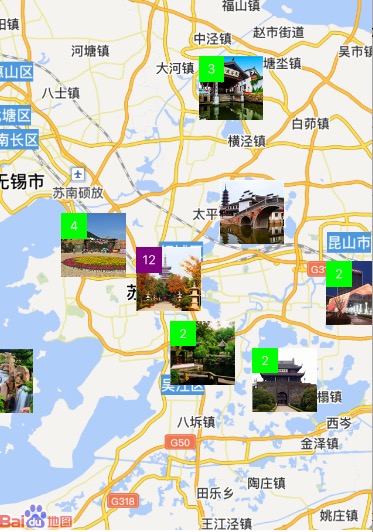
ps:
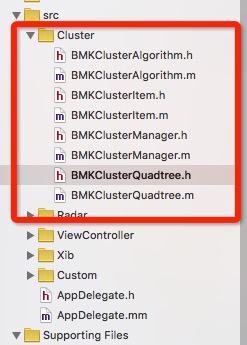
1、需要用到 Cluster 中的一些类(BMKClusterAlgorithm、BMKClusterItem、BMKClusterManager、BMKClusterQuadtree)
2、annotationView.image 设置标注图片的时候,缩小地图汇出现图片重叠的问题。
可以通过设置 BMKClusterAlgorithm.m 文件中的 #define MAX_DISTANCE_IN_DP 400 //300dp 来设置点聚合算法的距离
3、[_clusterManager clearClusterItems];//清除点聚合元素
for(int i=0;i<[homeEntity.mutableArrayPark count];i++){
ParkEntity *entity = homeEntity.mutableArrayPark[i];
BMKClusterItem *clusterItem = [[BMKClusterItem alloc] init];
clusterItem.coor = CLLocationCoordinate2DMake([entity.latitude floatValue],[entity.longitude floatValue]);
[_clusterManager addClusterItem:clusterItem];
}
//移动地图
ParkEntity *entity = homeEntity.mutableArrayPark[0];
CLLocation *location = [[CLLocation alloc] initWithLatitude:[entity.latitude doubleValue] longitude:[entity.longitude doubleValue]];
[_mapView setCenterCoordinate:location.coordinate animated:YES];
[self updateClusters];
4、
//删除标注
NSArray* array = [NSArray arrayWithArray:_mapView.annotations];
[_mapView removeAnnotations:array];
//清除地图缓存
[_clusterCaches removeAllObjects];
for (NSInteger i = 3; i < 21; i++) {
[_clusterCaches addObject:[NSMutableArray array]];
}