
[toc]
1. 主从简介
1.1 主从作用及条件
作用:
- 实时灾备,用于故障切换
- 读写分离,提供查询服务
- 备份,避免影响业务
主从部署必要条件:
- 主库开启binlog日志(设置log-bin参数)
- 主从server-id不同
- 从库服务器能连通主库
1.2 主从形式
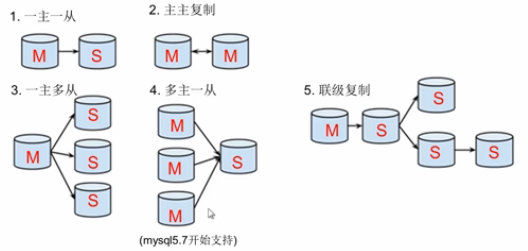
- 一主一从
- 主主复制
- 一主多从---扩展系统读取的性能,因为读是在从库读取的
- 多主一从---5.7开始支持
- 联级复制
2. 主从复制原理
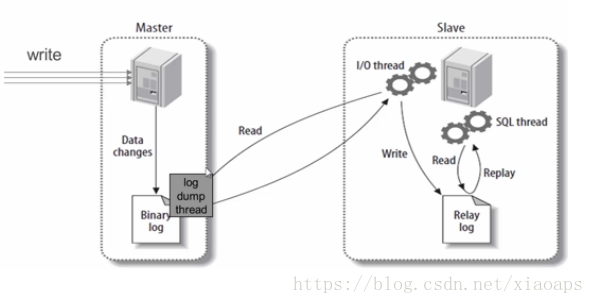
1.从库的IO线程向主库的主进程发送请求,主库验证从库,交给主库IO线程负责数据传输;
2.主库IO线程对比从库发送过来的master.info里的信息,将binlog文件信息,偏移量和binlog文件名等发送给从库
3.从库接收到信息后,将binlog信息保存到relay-bin中,同时更新master.info的偏移量和binlog文件名
4.从库的SQL线程不断的读取relay-bin的信息,同时将读到的偏移量和文件名写道relay-log.info文件,binlog信息写进自己的数据库,一次同步操作完成。
5.完成上次同步后,从库IO线程不断的向主库IO线程要binlog信息
6.从库如果也要做主库,也要打开log_bin 和log-slave-update参数
3. 主从复制配置
主从复制配置步骤:
- 确保从数据库与主数据库里的数据一样
- 在主数据库里创建一个同步账号授权给从数据库使用
- 配置主数据库(修改配置文件)
- 配置从数据库(修改配置文件)
需求:
搭建两台MySQL服务器,一台作为主服务器,一台作为从服务器,主服务器进行写操作,从服务器进行读操作
环境说明:
数据库角色
IP
应用与系统版本
有无数据
主数据库
192.168.163.128
centos7/redhat7 mysql-5.7
有数据
从数据库
192.168.163.130
centos7/redhat7 mysql-5.7
与主库数据相同
从数据库
192.168.163.129
centos7/redhat7 mysql-5.7
无数据
3.1mysql主从配置
为确保从数据库与主数据库里的数据一样,先全备主数据库并还原到从数据库中
3.2 mysql主从配置
3.2.1 确保从数据库与主数据库里的数据一样
1//先查看主库有哪些库
2
3[root@cl ~]# mysql -uroot -pcl
4
5mysql> show databases;
6+--------------------+
7| Database           |
8+--------------------+
9| information_schema |
10| chen               |
11| cljhfy             |
12| liang              |
13| mysql              |
14| performance_schema |
15| sys                |
16+--------------------+
177 rows in set (0.01 sec)
18
19//再查看从库有哪些库
20
21[root@cl130 ~]# mysql -uroot -pcljhfy
22
23mysql> show databases;
24+--------------------+
25| Database           |
26+--------------------+
27| information_schema |
28| chen               |
29| cljhfy             |
30| liang              |
31| mysql              |
32| performance_schema |
33| sys                |
34+--------------------+
357 rows in set (0.00 sec)
36
3.2.2 在主数据库里创建一个同步账号授权给从数据库使用
1mysql> CREATE USER 'repl'@'172.16.12.129' IDENTIFIED BY 'repl123';
2Query OK, 0 rows affected (0.00 sec)
3
4mysql> GRANT REPLICATION SLAVE ON *.* TO 'repl'@'172.16.12.129';
5Query OK, 0 rows affected (0.00 sec)
6
7mysql> flush privileges;
8Query OK, 0 rows affected (0.00 sec)
9
10
3.2.3 配置主数据库
1[root@cl ~]# vim /etc/my.cnf
2//在[mysqld]这段的后面加上如下内容
3[mysqld]
4datadir=/var/lib/mysql
5socket=/var/lib/mysql/mysql.sock
6log-bin=mysql-bin   //启用binlog日志
7server-id=1     //数据库服务器唯一标识符,主库的server-id值必须比从库的小
8
9symbolic-links=0
10
11log-error=/var/log/mysqld.log
12pid-file=/var/run/mysqld/mysqld.pid
13
14
15//重启mysql服务
16[root@cl ~]# systemctl restart mysqld
17[root@cl ~]# ss -antl
18State       Recv-Q Send-Q      Local Address:Port                     Peer Address:Port
19LISTEN      0      128                     *:22                                  *:*
20LISTEN      0      100             127.0.0.1:25                                  *:*
21LISTEN      0      128                    :::22                                 :::*
22LISTEN      0      100                   ::1:25                                 :::*
23LISTEN      0      80                     :::3306                               :::*
24
25
26//查看主库的状态
27mysql> show master status;
28+------------------+----------+--------------+------------------+-------------------+
29| File             | Position | Binlog_Do_DB | Binlog_Ignore_DB | Executed_Gtid_Set |
30+------------------+----------+--------------+------------------+-------------------+
31| mysql-bin.000001 |      989 |              |                  |                   |
32+------------------+----------+--------------+------------------+-------------------+
331 row in set (0.01 sec)
34
3.2.4 配置从数据库
1[root@cl130 ~]# vim /etc/my.cnf
2//添加如下内容
3[mysqld]
4datadir=/var/lib/mysql
5socket=/var/lib/mysql/mysql.sock
6server-id=2     //设置从库的唯一标识符,从库的server-id值必须小于主库的该值
7relay-log=mysql-relay-bin       //启用中继日志relay-log
8
9symbolic-links=0
10
11log-error=/var/log/mysqld.log
12pid-file=/var/run/mysqld/mysqld.pid
13
14
15//重启从库的mysql服务
16[root@cl130 ~]# systemctl restart mysqld
17[root@cl130 ~]# ss -antl
18State      Recv-Q Send-Q           Local Address:Port                          Peer Address:Port
19LISTEN     0      128                          *:22                                       *:*
20LISTEN     0      100                  127.0.0.1:25                                       *:*
21LISTEN     0      128                         :::22                                      :::*
22LISTEN     0      100                        ::1:25                                      :::*
23LISTEN     0      80                          :::3306                                    :::*
24
25
26
27
28//配置并启动主从复制
29mysql> CHANGE MASTER TO
30    -> MASTER_HOST='192.168.163.128',
31    -> MASTER_USER='repl',
32    -> MASTER_PASSWORD='repl123',
33    -> MASTER_LOG_FILE='mysql-bin.000001',
34    -> MASTER_LOG_POS=989;
35Query OK, 0 rows affected, 2 warnings (0.33 sec)
36
37mysql> start slave;
38Query OK, 0 rows affected (0.01 sec)
39
40
41//查看从服务器状态
42mysql> show slave status \G
43*************************** 1. row ***************************
44               Slave_IO_State: Waiting for master to send event
45                  Master_Host: 172.16.12.128
46                  Master_User: repl
47                  Master_Port: 3306
48                Connect_Retry: 60
49              Master_Log_File: mysql-bin.000001
50          Read_Master_Log_Pos: 154
51               Relay_Log_File: mysql-relay-bin.000002
52                Relay_Log_Pos: 320
53        Relay_Master_Log_File: mysql-bin.000001
54             Slave_IO_Running: Yes      //此处必须为Yes
55            Slave_SQL_Running: Yes      //此处必须为Yes
56              Replicate_Do_DB:
57          Replicate_Ignore_DB:
58
3.2.5 测试验证
在主服务器的student库的name表中插入数据:
1//主库
2mysql>
3mysql> use chen;
4Reading table information for completion of table and column names
5You can turn off this feature to get a quicker startup with -A
6
7Database changed
8mysql> select * from name;
9Empty set (0.00 sec)
10
11mysql> insert name values('tom',35),('jerry',33);
12Query OK, 2 rows affected (0.00 sec)
13Records: 2  Duplicates: 0  Warnings: 0
14
15mysql> select * from name;
16+-------+------+
17| name  | age  |
18+-------+------+
19| tom   |   35 |
20| jerry |   33 |
21+-------+------+
222 rows in set (0.00 sec)
23
24mysql>
在从数据库中查看数据是否同步:
1//从库
2
3[root@cl130 ~]# mysql -uroot -pcljhfy
4
5mysql> use chen;
6Reading table information for completion of table and column names
7You can turn off this feature to get a quicker startup with -A
8
9Database changed
10mysql> select * from name;
11+-------+------+
12| name  | age  |
13+-------+------+
14| tom   |   35 |
15| jerry |   33 |
16+-------+------+
172 rows in set (0.00 sec)
18
3.3.6 拓展--从库与主库数据不同时
1//全备主库
2//全备主库时需要另开一个终端,给数据库加上读锁,避免在备份期间有其他人在写入导致数据不一致
3mysql> FLUSH TABLES WITH READ LOCK;
4Query OK, 0 rows affected (0.00 sec)
5//此锁表的终端必须在主从配置完成以后才能退出
6
7//备份主库并将备份文件传送到从库
8[root@cl ~]# mysqldump -uroot -pcl --all-databases > /opt/all-201905151700.sql
9mysqldump: [Warning] Using a password on the command line interface can be insecure.
10[root@cl ~]# ls /opt/
11all-201905151700.sql
12[root@cl ~]# scp /opt/all-201905151700.sql root@192.168.163.129:/opt/
13root@192.168.163.129's password:
14all-201905151700.sql                              100%  786KB  10.6MB/s   00:00
15
16//在从库上恢复主库的备份并查看从库有哪些库,确保与主库一致
17[root@cl129 ~]# mysql -uroot -pcljhfy! < /opt/all-201905151700.sql
18mysql: [Warning] Using a password on the command line interface can be insecure.
19[root@cl129 ~]# mysql -uroot -pcljhfy! -e 'show databases;'
20mysql: [Warning] Using a password on the command line interface can be insecure.
21+--------------------+
22| Database           |
23+--------------------+
24| information_schema |
25| chen               |
26| cljhfy             |
27| liang              |
28| mysql              |
29| performance_schema |
30| sys                |
31+--------------------+
32
33//进行上面3.2.1---->3.2.5 的操作,然后验证是否同步
34
35//验证:在主库的name表添加数据
36
37mysql> insert name values('kele',35),('lisi',33);
38Query OK, 2 rows affected (0.01 sec)
39Records: 2  Duplicates: 0  Warnings: 0
40
41mysql> select * from name;
42+-------+------+
43| name  | age  |
44+-------+------+
45| tom   |   35 |
46| jerry |   33 |
47| kele  |   35 |
48| lisi  |   33 |
49+-------+------+
504 rows in set (0.00 sec)
51
52//在从库上验证
53
54[root@cl129 ~]# mysql -uroot -pcljhfy -e 'select * from chen.name;'
55mysql: [Warning] Using a password on the command line interface can be insecure.
56+-------+------+
57| name  | age  |
58+-------+------+
59| tom   |   35 |
60| jerry |   33 |
61| kele  |   35 |
62| lisi  |   33 |
63+-------+------+
64
65
66
67//最后解除主库的锁表状态,直接退出交互式界面即可
68mysql> quit
69Bye