
由于后台使用了chen框架,所以代码不能完全列出,可以到http://git.oschina.net/eternal_rider/chen下载项目,运行后,即可看到菜单效果级管理。
示例框架中写了一个jquery菜单插件实现,可以使用存html代码+样式使用,也可以给出json格式数据,以****jquery插件方式。
对应json格式,我写了示例代码,从数据库表总读取记录,转成json。sql只要select * from 表 order by 父id,即按照父编号排序,这样生成html时,先生成根节点,然后子节点,孙子节点。。。这样。我也做后台管理,可以在后台添加编辑,前台自动展现,以后会加授权功能。
先看下效果,然后在看代码。
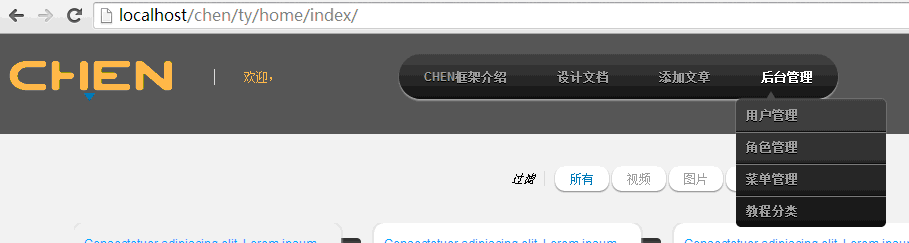
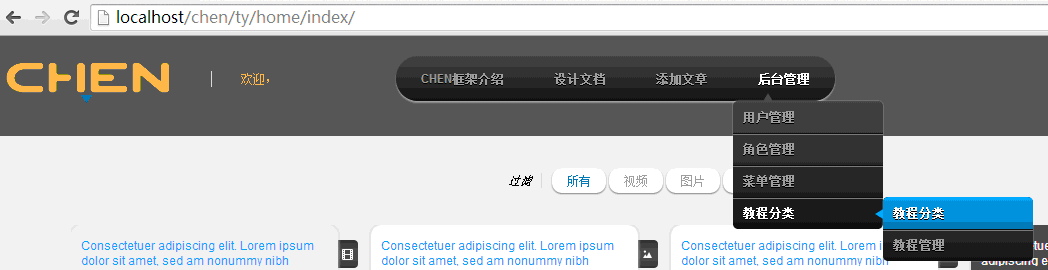
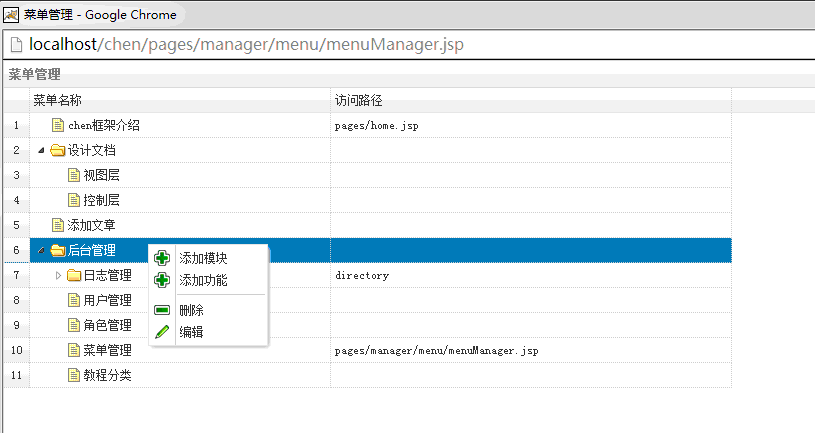
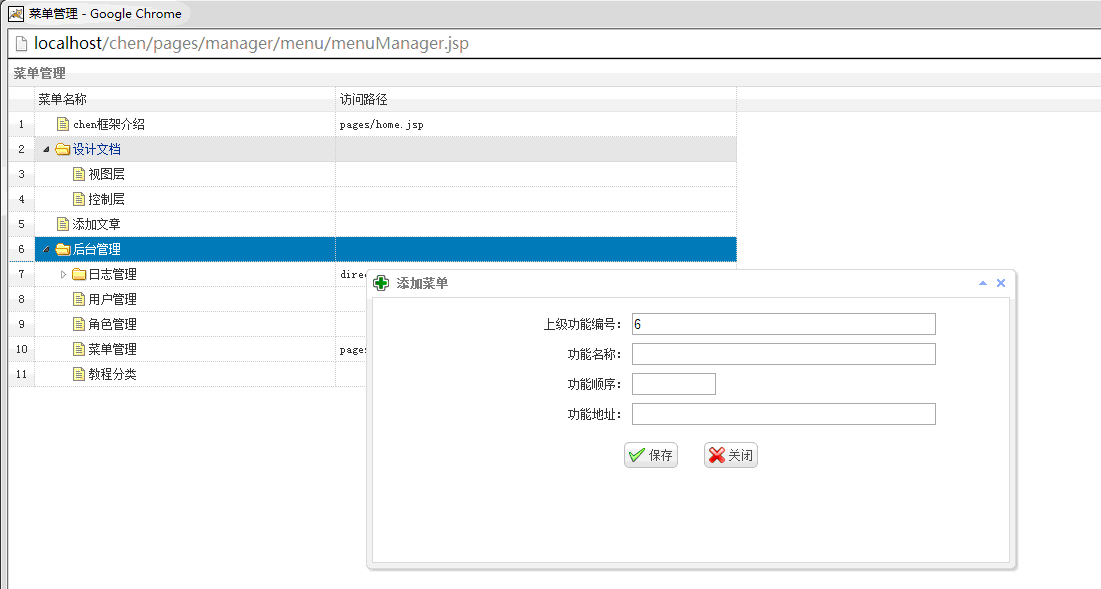

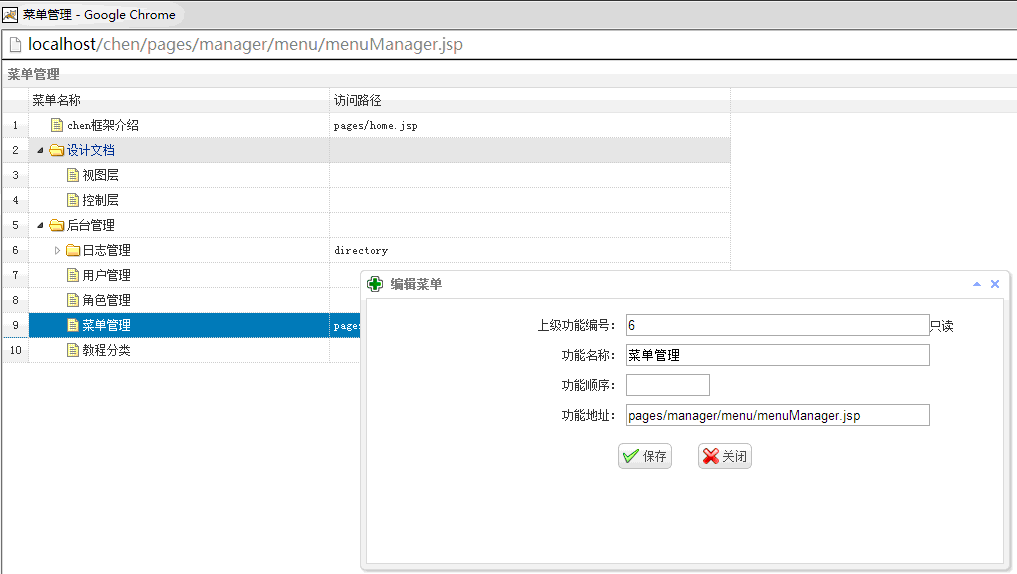
HTML-scheme:
1<ul id="menu">
2    <li><a href="#">chen框架介绍</a></li>
3    <li>
4        <a href="#">设计文档</a>
5        <ul>
6            <li><a href="#">视图层</a></li>
7            <li><a href="#">控制层</a></li>
8            <li><a href="#">模型层</a></li>
9            <li><a href="#">仓储层</a></li>
10        </ul>
11    </li>
12    <li><a href="#">示例项目</a></li>
13    <li><a href="#">后台管理</a></li>
14</ul>
**
css样式**
1#menu
2{
3	width: 100%;
4	margin: 0;
5	padding: 10px 0 0 0;
6	list-style: none;
7	background: #111;
8	background: -moz-linear-gradient(#444, #111);
9    background: -webkit-gradient(linear,left bottom,left top,color-stop(0, #111),color-stop(1, #444));
10	background: -webkit-linear-gradient(#444, #111);
11	background: -o-linear-gradient(#444, #111);
12	background: -ms-linear-gradient(#444, #111);
13	background: linear-gradient(#444, #111);
14	-moz-border-radius: 50px;
15	border-radius: 50px;
16	-moz-box-shadow: 0 2px 1px #9c9c9c;
17	-webkit-box-shadow: 0 2px 1px #9c9c9c;
18	box-shadow: 0 2px 1px #9c9c9c;
19}
20
21#menu li
22{
23	float: left;
24	padding: 0 0 10px 0;
25	position: relative;
26	line-height: 0;
27}
28
29#menu a
30{
31	float: left;
32	height: 25px;
33	padding: 0 25px;
34	color: #999;
35	text-transform: uppercase;
36	font: bold 12px/25px Arial, Helvetica;
37	text-decoration: none;
38	text-shadow: 0 1px 0 #000;
39}
40
41#menu li:hover > a
42{
43	color: #fafafa;
44}
45
46*html #menu li a:hover /* IE6 */
47{
48	color: #fafafa;
49}
50
51#menu li:hover > ul
52{
53	display: block;
54}
55
56/* Sub-menu */
57
58#menu ul
59{
60    list-style: none;
61    margin: 0;
62    padding: 0;
63    display: none;
64    position: absolute;
65    top: 35px;
66    left: 0;
67    z-index: 99999;
68    background: #444;
69    background: -moz-linear-gradient(#444, #111);
70    background: -webkit-gradient(linear,left bottom,left top,color-stop(0, #111),color-stop(1, #444));
71    background: -webkit-linear-gradient(#444, #111);
72    background: -o-linear-gradient(#444, #111);
73    background: -ms-linear-gradient(#444, #111);
74    background: linear-gradient(#444, #111);
75    -moz-box-shadow: 0 0 2px rgba(255,255,255,.5);
76    -webkit-box-shadow: 0 0 2px rgba(255,255,255,.5);
77    box-shadow: 0 0 2px rgba(255,255,255,.5);
78    -moz-border-radius: 5px;
79    border-radius: 5px;
80}
81
82#menu ul ul
83{
84  top: 0;
85  left: 150px;
86}
87
88#menu ul li
89{
90    float: none;
91    margin: 0;
92    padding: 0;
93    display: block;
94    -moz-box-shadow: 0 1px 0 #111111, 0 2px 0 #777777;
95    -webkit-box-shadow: 0 1px 0 #111111, 0 2px 0 #777777;
96    box-shadow: 0 1px 0 #111111, 0 2px 0 #777777;
97}
98
99#menu ul li:last-child
100{
101    -moz-box-shadow: none;
102    -webkit-box-shadow: none;
103    box-shadow: none;
104}
105
106#menu ul a
107{
108    padding: 10px;
109	height: 10px;
110	width: 130px;
111	height: auto;
112    line-height: 1;
113    display: block;
114    white-space: nowrap;
115    float: none;
116	text-transform: none;
117}
118
119*html #menu ul a /* IE6 */
120{
121	height: 10px;
122}
123
124*:first-child+html #menu ul a /* IE7 */
125{
126	height: 10px;
127}
128
129#menu ul a:hover
130{
131    background: #0186ba;
132	background: -moz-linear-gradient(#04acec,  #0186ba);
133	background: -webkit-gradient(linear, left top, left bottom, from(#04acec), to(#0186ba));
134	background: -webkit-linear-gradient(#04acec,  #0186ba);
135	background: -o-linear-gradient(#04acec,  #0186ba);
136	background: -ms-linear-gradient(#04acec,  #0186ba);
137	background: linear-gradient(#04acec,  #0186ba);
138}
139
140#menu ul li:first-child > a
141{
142    -moz-border-radius: 5px 5px 0 0;
143    border-radius: 5px 5px 0 0;
144}
145
146#menu ul li:first-child > a:after
147{
148    content: '';
149    position: absolute;
150    left: 30px;
151    top: -8px;
152    width: 0;
153    height: 0;
154    border-left: 5px solid transparent;
155    border-right: 5px solid transparent;
156    border-bottom: 8px solid #444;
157}
158
159#menu ul ul li:first-child a:after
160{
161    left: -8px;
162    top: 12px;
163    width: 0;
164    height: 0;
165    border-left: 0;
166    border-bottom: 5px solid transparent;
167    border-top: 5px solid transparent;
168    border-right: 8px solid #444;
169}
170
171#menu ul li:first-child a:hover:after
172{
173    border-bottom-color: #04acec;
174}
175
176#menu ul ul li:first-child a:hover:after
177{
178    border-right-color: #04acec;
179    border-bottom-color: transparent;
180}
181
182
183#menu ul li:last-child > a
184{
185    -moz-border-radius: 0 0 5px 5px;
186    border-radius: 0 0 5px 5px;
187}
188
189/* Clear floated elements */
190#menu:after
191{
192	visibility: hidden;
193	display: block;
194	font-size: 0;
195	content: " ";
196	clear: both;
197	height: 0;
198}
199
200* html #menu             { zoom: 1; } /* IE6 */
201*:first-child+html #menu { zoom: 1; } /* IE7 */
202</style>
203
204<!-- AdPacks -->
205<style>
206#adpacks-wrapper{font-family: Arial, Helvetica;width:280px;position: fixed;_position:absolute;bottom: 0;right: 20px;z-index: 9999;background: #eaeaea;padding: 10px;-moz-box-shadow: 0 0 15px #444;-webkit-box-shadow: 0 0 15px #444;box-shadow: 0 0 15px #444;}
207body .adpacks{background:#fff;padding:15px;margin:15px 0 0;border:3px solid #eee;}
208body .one .bsa_it_ad{background:transparent;border:none;font-family:inherit;padding:0;margin:0;}
209body .one .bsa_it_ad .bsa_it_i{display:block;padding:0;float:left;margin:0 10px 0 0;}
210body .one .bsa_it_ad .bsa_it_i img{padding:0;border:none;}
211body .one .bsa_it_ad .bsa_it_t{padding: 0 0 6px 0; font-size: 11px;}
212body .one .bsa_it_p{display:none;}
213body #bsap_aplink,body #bsap_aplink:hover{display:block;font-size:9px;margin: -15px 0 0 0;text-align:right;}
214body .one .bsa_it_ad .bsa_it_d{font-size: 11px;}
215body .one{overflow: hidden}
**
html方式是,使用以上css+html代码即可生成菜单。**
一下为jquery插件方式:
menu.js
1 (function(jQuery){
2	jQuery.fn.menu=function(data){
3		if(typeof data=="string"){
4			data = eval("("+data+")");
5		}
6		var jQuerythis=jQuery(this);
7		var jQuerycoldrop=jQuery(document.createElement("ul")).attr("id","menu");
8		var ids=jQuerythis.attr("id");
9		jQuerythis.append(jQuerycoldrop);
10
11		for(var i=0;i<data.length;i++){
12			var n = data[i];
13			var jQueryitem=jQuery(document.createElement("li"));
14			if(n.pid==0){
15				jQuerycoldrop.append(jQueryitem);
16				jQueryitem.html("<a href=\"javascript:void(0);\" onClick=\"goUrl(\'"+n.name+"\',\'"+n.mode+"\',\'"+n.url+"\')\">"+n.name+"</a>").attr({"id":"col_"+ids+"_"+n.id});
17			}else{
18				if(jQuery("#col_"+ids+"_"+n.pid).find("ul").length<=0){
19					jQuery("#col_"+ids+"_"+n.pid).append("<ul></ul>");
20					jQuery("#col_"+ids+"_"+n.pid).find("ul:first").append(jQueryitem);
21					jQueryitem.html("<a href=\"javascript:void(0);\" onClick=\"goUrl(\'"+n.name+"\',\'"+n.mode+"\',\'"+n.url+"\')\">"+n.name+"</a>").attr({"id":"col_"+ids+"_"+n.id});
22				}else{
23					jQuery("#col_"+ids+"_"+n.pid).find("ul:first").append(jQueryitem);
24					jQueryitem.html("<a href=\"javascript:void(0);\" onClick=\"goUrl(\'"+n.name+"\',\'"+n.mode+"\',\'"+n.url+"\')\">"+n.name+"</a>").attr({"id":"col_"+ids+"_"+n.id});
25				}
26			}
27		}
28	}
29 })(jQuery);
30 function goUrl(title,mode,iurl){
31	if(iurl == ""){
32		return;
33	}
34   	var h = window.screen.height;
35   	var w = window.screen.width;
36   	if(mode == "modal"){
37   		window.showModalDialog(iurl,{name:title},"dialogWidth="+w+";dialogHeight="+h+";resizable=true;location=no;toolbar=no;titlebar=no");
38   	}else if(mode == "dialog"){
39   		//open div
40   	}else if(mode == "_blank"){
41
42   	}else{
43
44   	}
45 }
**
goUrl函数,可以自己修改为,任意的展现方式,如更新iframe等。
插件方式例子代码:
1<!doctype html>
2<html>
3<head>
4    <meta http-equiv="content-type" content="text/html;charset=utf-8" />
5    <meta name="viewport" content="width=device-width, initial-scale=1">
6    <meta http-equiv="X-UA-Compatible" content="IE=edge">
7    <title>jquery菜单插件</title>
8    <link type="text/css" href="resources/menu/menu.css" rel="stylesheet" />
9    <script type="text/javascript" src="resources/jquery.min.js"></script>
10    <script type="text/javascript" src="resources/menu/menu.js"></script>
11    <script type="text/javascript">
12    jQuery(function(){
13		//jQuery("#mymenu").menu('json数组'),下面为从后台获得
14    	jQuery("#mymenu").menu('${sessionScope.UserInfo.MenuJson}');
15    	});
16    </script>
17</head>
18</head>
19<body>
20	<div id="mymenu" class="mainMenu"></div>
21</body>
22</html>
上面为了jquery库布和其他库冲突我没用使用$,而是用JQuery。
json格式
[{"id":"1","icon":"","name":"chen框架介绍","pid":"0","leaf":"1","url":"pages/home.jsp","mode":"modal"},{"id":"3f076f9aa6d74220b1f86b33ffb68387","icon":null,"name":"访问日志","pid":"e50d1c568d19412ca1a97d8bdc01629d","leaf":"1","url":"","mode":"modal"},{"id":"2","icon":"","name":"设计文档","pid":"0","leaf":"0","url":"","mode":"modal"},{"id":"79fe85544ed34957a0a638899ba5709e","icon":null,"name":"模块访问日志","pid":"e50d1c568d19412ca1a97d8bdc01629d","leaf":"1","url":"","mode":"modal"},{"id":"3","icon":"","name":"视图层","pid":"2","leaf":"1","url":"","mode":"modal"},{"id":"688881325bd941dc860afd5437c212a6","icon":null,"name":"操作日志","pid":"e50d1c568d19412ca1a97d8bdc01629d","leaf":"1","url":"","mode":"modal"},{"id":"4","icon":"","name":"控制层","pid":"2","leaf":"1","url":"","mode":"modal"},{"id":"e50d1c568d19412ca1a97d8bdc01629d","icon":null,"name":"日志管理","pid":"6","leaf":"0","url":"directory","mode":"modal"},{"id":"6","icon":"","name":"后台管理","pid":"0","leaf":"0","url":"","mode":"modal"},{"id":"7","icon":"","name":"用户管理","pid":"6","leaf":"1","url":"","mode":"modal"},{"id":"8","icon":"","name":"角色管理","pid":"6","leaf":"1","url":"","mode":"modal"},{"id":"9","icon":"","name":"菜单管理","pid":"6","leaf":"1","url":"pages/manager/menu/menuManager.jsp","mode":"modal"},{"id":"10","icon":"","name":"教程分类","pid":"6","leaf":"1","url":"","mode":"modal"},{"id":"11","icon":"","name":"教程分类","pid":"10","leaf":"1","url":"","mode":"modal"},{"id":"12","icon":"","name":"教程管理","pid":"10","leaf":"1","url":"","mode":"modal"}]
{"id":"1","icon":"","name":"chen框架介绍","pid":"0","leaf":"1","url":"pages/home.jsp","mode":"modal"}
id:菜单的编号
icon:菜单图标(这个我还没有加,过几天加上)
name:菜单名称
pid:菜单的父级编号
leaf:是否为叶子节点,即是否目录(这个在后台管理中用到了,如果你不用后台管理,可以忽略)
url:菜单地址
mode:菜单展现方式,如弹出div,弹出新窗口等,具体见goUrl函数。
菜单数据库表,一般结构如下:
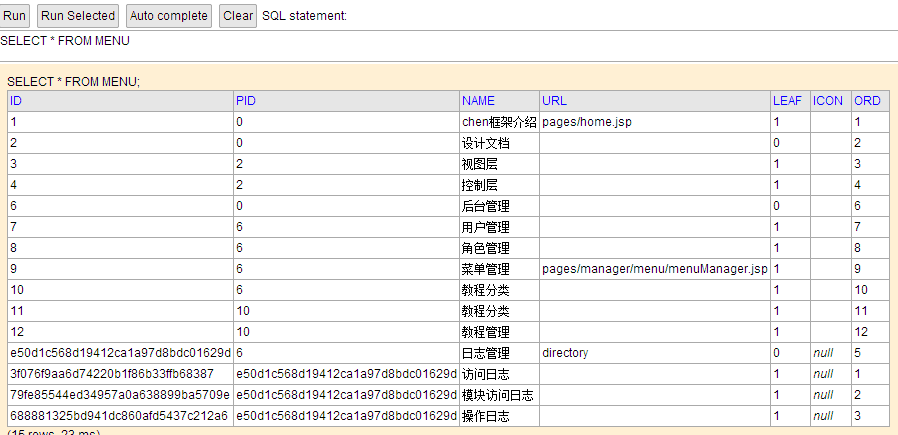
后台管理,java
1package my.action;
2
3import java.util.Map;
4
5import my.model.MenuModel;
6import chen.ioc.Chen;
7import chen.view.Renderer;
8import chen.view.TextRenderer;
9
10public class MenuAction {
11
12	public Renderer list(Map<String,Object> args){
13		MenuModel mmodel = Chen.container.get(MenuModel.class);
14		String jsonStr = mmodel.loadMenuById(args);
15		return new TextRenderer(jsonStr);
16	}
17
18	public Renderer add(Map<String,Object> args){
19		MenuModel mmodel = Chen.container.get(MenuModel.class);
20		int n = mmodel.add(args);
21		return new TextRenderer(String.valueOf(n));
22	}
23
24	public Renderer edit(Map<String,Object> args){
25		MenuModel mmodel = Chen.container.get(MenuModel.class);
26		int n = mmodel.edit(args);
27		return new TextRenderer(String.valueOf(n));
28	}
29
30	public Renderer delete(Map<String,Object> args){
31		MenuModel mmodel = Chen.container.get(MenuModel.class);
32		int n = mmodel.delete(args);
33		return new TextRenderer(String.valueOf(n));
34	}
35}
36
37
38
39
40
41package my.model;
42
43import java.util.List;
44import java.util.Map;
45
46import net.sf.json.JSONArray;
47import chen.util.DbUtil;
48
49public class MenuModel{
50
51	public int add(Map<String,Object> args) {
52		try {
53			return DbUtil.dao.save(this, args);
54		}catch (Exception e) {
55			e.printStackTrace();
56			return 0;
57		}
58	}
59
60	public int edit(Map<String,Object> args) {
61		try {
62			return DbUtil.dao.update(this, args, "id=#id#");
63		}catch (Exception e) {
64			e.printStackTrace();
65			return 0;
66		}
67	}
68	public int delete(Map<String,Object> args) {
69		try {
70			return DbUtil.dao.delete(this, args, "id=#id#");
71		}catch (Exception e) {
72			e.printStackTrace();
73			return 0;
74		}
75	}
76
77	public String loadAllMenu(Map<String,Object> args) {
78		return this.loadMenu(selectAllMenu,null);
79	}
80
81	public String loadMenuById(Map<String,Object> args) {
82		if(args.get("id") == null){
83			args.put("id","0");
84		}
85		return this.loadMenu(selectMenuById,args);
86	}
87
88	public String loadMenu(String sql,Map<String,Object> args) {
89		try {
90			List<Map<String, Object>> menus = null;
91			if(args == null){
92				menus = DbUtil.dao.query(sql);
93			}else{
94				menus = DbUtil.dao.query(sql,args);
95			}
96			return JSONArray.fromObject(menus).toString();
97		} catch (Exception e) {
98			e.printStackTrace();
99			return null;
100		}
101	}
102
103
104	private String selectAllMenu = "select id,pid,name,url,leaf,icon,'modal' mode from menu order by ord asc";
105	private String selectMenuById = "select id,pid,name,url,leaf,icon,'modal' mode,decode(leaf,'1','','closed') state from menu where pid=#id# order by ord asc";
106}
jsp
1<%@ page language="java" pageEncoding="UTF-8"%> 2<%@ taglib prefix="c" uri="http://my.oschina.net/eternal/chen" %> 3<!doctype html> 4<html> 5<head> 6<base href="${c:base()}"> 7 <meta http-equiv="content-type" content="text/html;charset=utf-8" /> 8 <meta name="viewport" content="width=device-width, initial-scale=1"> 9 <meta http-equiv="X-UA-Compatible" content="IE=edge"> 10 <title>菜单管理</title> 11 <%@ include file="/pages/manager/lib.jsp"%> 12<script type="text/javascript"> 13var index = 0; 14$(function(){ 15 $('#MenuGrid').treegrid({ 16 nowrap: false, 17 collapsible:true, 18 fit:true, 19 title:"菜单管理", 20 rownumbers: true, 21 animate:true, 22 url:'ty/menu/list/', 23 idField:'id', 24 treeField:'name', 25 columns:[[ 26 {field:'name',title:'菜单名称',width:300}, 27 {field:'url',title:'访问路径',width:400} 28 ]], 29 onContextMenu: function(e,row){ 30 e.preventDefault(); 31 $(this).treegrid('unselectAll'); 32 $(this).treegrid('select', row.id); 33 if(row.leaf=='1'){ 34 $("#mm_add_menu").attr("disabled","disabled"); 35 $("#mm_add_dir").attr("disabled","disabled"); 36 }else{ 37 $("#mm_add_menu").removeAttr("disabled"); 38 $("#mm_add_dir").removeAttr("disabled"); 39 } 40 $('#cm').menu('show', { 41 left: e.pageX, 42 top: e.pageY 43 }); 44 }, 45 onLoadSuccess:function (row){ 46 if(index++<1){ 47 $('#MenuGrid').treegrid('expandAll'); 48 } 49 } 50 }); 51}); 52function getSelected(){ 53 return $('#MenuGrid').treegrid('getSelected'); 54} 55 56function add(flag){ 57 var node = getSelected(); 58 if(node.leaf == '1'){ 59 $.messager.alert('警告', '不能在功能节点上添加!', 'warning'); 60 return; 61 } 62 if(flag == 1){ 63 $('#win').load('pages/manager/menu/moduleCreator.jsp',null,function(){ 64 $(this).window({title: ' 添加目录',iconCls:'icon-add'}); 65 $(this).window('open'); 66 }); 67 }else{ 68 $('#win').load('pages/manager/menu/menuCreator.jsp?fid=aq1',null,function(){ 69 $(this).window({title: ' 添加菜单',iconCls:'icon-add'}); 70 $(this).window('open'); 71 }); 72 } 73} 74 75function dele(){ 76 var node = getSelected(); 77 var b = $('#MenuGrid').treegrid('isLeaf', node.target); 78 if(b){ 79 $.messager.confirm('信息', '是否确认删除[' + node.name + ']?', function(r){ 80 if(r){ 81 $.post('ty/menu/delete/',{id:node.id},function (data){ 82 if(data >= 1){ 83 $('#MenuGrid').treegrid('reload',node.pid); 84 }else{ 85 $.messager.alert('错误', '删除失败,请联系管理员!', 'error'); 86 } 87 }); 88 } 89 }); 90 }else{ 91 $.messager.alert('警告', '请先删除子节点!', 'warning'); 92 } 93} 94 95function edit(){ 96 var node = getSelected(); 97 if(node.leaf==1){ 98 $('#win').load('pages/manager/menu/menuEditor.jsp',{id:node.id},function(){ 99 $(this).window({title: ' 编辑菜单',iconCls:'icon-add'}); 100 $(this).window('open'); 101 }); 102 }else{ 103 $('#win').load('pages/manager/menu/moduleEditor.jsp',null,function(){ 104 $(this).window({title: ' 编辑目录',iconCls:'icon-add'}); 105 $(this).window('open'); 106 }); 107 } 108} 109</script> 110</head> 111 <body topmargin="0" leftmargin="1" rightmargin="1"> 112 <table id="MenuGrid"></table> 113 <div id="cm" class="easyui-menu" style="width: 120px;"> 114 <div id="mm_add_menu" onclick="add()" iconCls="icon-add"> 115 添加模块 116 </div> 117 <div id="mm_add_dir" onclick="add()" iconCls="icon-add"> 118 添加功能 119 </div> 120 <div class="menu-sep"></div> 121 <div id="mm_dele" onclick="dele()" iconCls="icon-remove"> 122 删除 123 </div> 124 <div id="mm_edit" onclick="edit()" iconCls="icon-edit"> 125 编辑 126 </div> 127 </div> 128 <div id="win" style="width: 650px; height: 300px; padding: 10px;" closed="true" shadow="true" resizable="false" collapsible="true" minimizable="false" maximizable="false"></div> 129 </body> 130</html>
由于使用了chen框架,所以代码不能完全列出,可以到http://git.oschina.net/eternal_rider/chen下载项目,运行后,即可看到菜单效果级管理(没有完全开发完。)
**