
上贴传送门
electron 自定义标题栏
隐藏默认标题栏
1const { BrowserWindow } = require('electron')
2const win = new BrowserWindow({ frame: false })// frame设置为false
支持拖拽
默认情况下, 无边框窗口是不可拖拽的。 应用程序需要在 CSS 中指定 -webkit-app-region: drag 来告诉 Electron 哪些区域是可拖拽的(如操作系统的标准标题栏).
在可拖拽区域内部使用 -webkit-app-region: no-drag 则可以将其中部分区域排除。
可拖拽
1body {
2  -webkit-app-region: drag;
3}
不可拖拽
1body {
2  -webkit-app-region: drag;
3}
示例
目标
- 制作自定义标题栏,支持拖拽
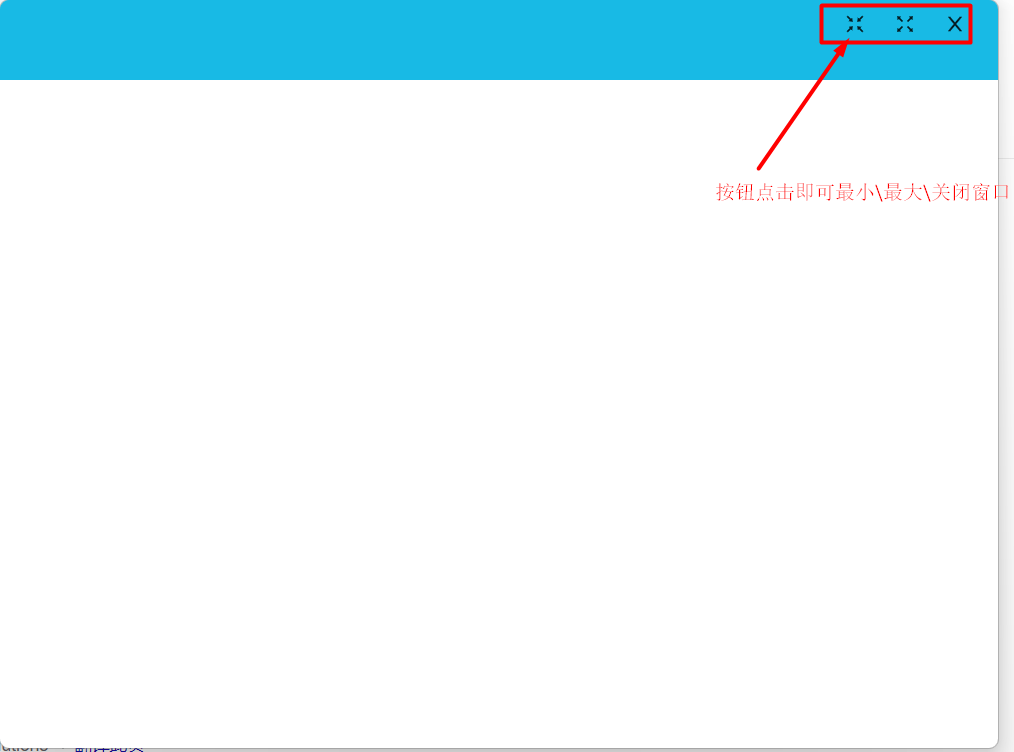
- 制作自定义的最大\最小\关闭按钮
前提
基于上一帖的代码
1https://github.com/NightsLight-hub/vcped-test
2tag:1-ipc
引入ant-design-vue
本人非常喜欢ant-design-vue框架, 本节主要以其作为基础组件库
在vcpeb-test 根目录使用如下命令安装ant-desing-vue
1yarn add ant-design-vue@next
在main.js中引入antd
1import { createApp } from 'vue';
2import App from './App.vue';
3import router from './router';
4import store from './store';
5import Antd from 'ant-design-vue';
6import 'ant-design-vue/dist/antd.css';
7
8createApp(App).use(Antd).use(store).use(router).mount('#app');
9
修改App.vue,只保留一个router-view即可
1<template>
2  <router-view/>
3</template>
4
5<style lang="less">
6#app {
7  font-family: Avenir, Helvetica, Arial, sans-serif;
8  -webkit-font-smoothing: antialiased;
9  -moz-osx-font-smoothing: grayscale;
10  text-align: center;
11  color: #2c3e50;
12}
13</style>
14
修改background.js的frame=false
1const browserWindow = new BrowserWindow({
2    width: 800,
3    height: 600,
4    frame: false, // 关闭默认标题栏
5    webPreferences: {
6      // Use pluginOptions.nodeIntegration, leave this alone
7      // See nklayman.github.io/vue-cli-plugin-electron-builder/guide/security.html#node-integration for more info
8      nodeIntegration: process.env.ELECTRON_NODE_INTEGRATION,
9      contextIsolation: !process.env.ELECTRON_NODE_INTEGRATION,
10      preload: path.join(__dirname, 'preload.js')
11    }
12  });
修改Home.vue
1<template>
2<!--  使用antd的header 布局,作为标题栏-->
3  <a-layout-header>
4
5  </a-layout-header>
6  <a-layout-content class="layout-content">
7    <div class="home">
8      <span>{{ msg }}</span>
9    </div>
10  </a-layout-content>
11
12</template>
13
14<script>
15// @ is an alias to /src
16
17export default {
18  name: 'Home',
19  data () {
20    return {
21      msg: ''
22    };
23  },
24  mounted () {
25    // eslint-disable-next-line no-debugger
26    debugger;
27    window.ipcRenderer.receive('mainMsg', (event, ...args) => {
28      console.log('get mainMsg');
29      this.msg = args[0];
30    });
31  }
32};
33</script>
34<style scoped>
35.ant-layout-header{
36  width: 100%;
37  height: 65px;
38  /* 标题栏设置个便于区分的颜色,可以拖拽用 */
39  background-color: #2c3e50;
40  /* 设置标题栏可以拖拽 */
41  -webkit-app-region: drag;
42
43}
44.layout-content{
45  height: calc(100vh - 100px);
46  width: 100%;
47}
48</style>
49
调试
yarn electron:serve
深色部分可以按住左键拖拽窗口
增加最大\最小\关闭按钮
增加三个按钮的组件 关闭按钮组件
1<template>
2  <a-button id="closeButton" type="text" title="close" @click="closeWindow">
3    <template #icon><CloseOutlined /></template>
4  </a-button>
5</template>
6
7<script>
8import { CloseOutlined } from '@ant-design/icons-vue';
9export default {
10  name: 'closeButton',
11  components: {
12    CloseOutlined
13  },
14  methods: {
15    closeWindow () {
16      const ipcRenderer = window.ipcRenderer;
17      ipcRenderer.send('control', 'close');
18    }
19  }
20};
21</script>
22
23<style>
24#closeButton {
25  position: absolute;
26  width: 30px;
27  height: 30px;
28  top: 5px;
29  right: 20px;
30  margin: auto 0;
31  -webkit-app-region: no-drag;
32}
33</style>
34
最大化窗口按钮
1<template>
2  <a-button id="maxButton" type="text" @click="maxWindow">
3    <template #icon><FullscreenOutlined /></template>
4  </a-button>
5</template>
6
7<script>
8import { FullscreenOutlined } from '@ant-design/icons-vue';
9export default {
10  name: 'maxButton',
11  components: {
12    FullscreenOutlined
13  },
14  methods: {
15    maxWindow () {
16      const ipcRenderer = window.ipcRenderer;
17      ipcRenderer.send('control', 'max');
18    }
19  }
20};
21</script>
22
23<style>
24#maxButton {
25  position: absolute;
26  width: 30px;
27  height: 30px;
28  top: 5px;
29  right: 60px;
30  margin: auto 0;
31  -webkit-app-region: no-drag;
32}
33</style>
最小化按钮
1<template>
2  <a-button id="minButton" type="text" @click="minWindow">
3    <template #icon>
4      <FullscreenExitOutlined />
5    </template>
6  </a-button>
7</template>
8
9<script>
10import { FullscreenExitOutlined } from '@ant-design/icons-vue';
11export default {
12  name: 'MinButton',
13  components: {
14    FullscreenExitOutlined
15  },
16  methods: {
17    minWindow () {
18      const ipcRenderer = window.ipcRenderer;
19      ipcRenderer.send('control', 'min');
20    }
21  }
22};
23</script>
24
25<style>
26#minButton {
27  position: absolute;
28  width: 30px;
29  height: 30px;
30  top: 5px;
31  right: 100px;
32  margin: auto 0;
33  -webkit-app-region: no-drag;
34}
35</style>
三个按钮的点击事件利用ipcRender ,通过control通道发送响应控制消息给主进程
比如最小化按钮
1minWindow () {
2  const ipcRenderer = window.ipcRenderer;
3  ipcRenderer.send('control', 'min');
4}
主进程增加对control通道的响应
1ipcMain.on('control', (event, ...args) => {
2    if (args[0] === 'min') {
3      browserWindow.minimize();
4    } else if (args[0] === 'max') {
5      if (browserWindow.isMaximized()) {
6        browserWindow.unmaximize();
7      } else {
8        browserWindow.maximize();
9      }
10    } else if (args[0] === 'close') {
11      console.log('close event');
12      browserWindow.close();
13    }
14  });
Home.vue 把三个按钮放到标题栏
1<a-layout-header>
2    <close-button></close-button>
3    <max-button></max-button>
4    <min-button></min-button>
5  </a-layout-header>
适当调整了 标题栏背景色
1.ant-layout-header{
2  width: 100%;
3  height: 65px;
4  /* 标题栏设置个便于区分的颜色,可以拖拽用 */
5  background-color: #18bae5;
6  /* 设置标题栏可以拖拽 */
7  -webkit-app-region: drag;
8
9}
调试
获取本章代码
1https://github.com/NightsLight-hub/vcped-test
2tag: 2-customTitleBar