简介
将静态图转化为分块加载的动态图
方案
11. PIL:
2    1. 创建背景图
3    2. 将原图拆分成N块并依次合成到背景图的相应位置, 得到N张素材图
4    3. 将N张素材图合成GIF
5
62. pygifsicle
7    对合成的GIF进行优化(无损压缩, 精简体积)
8    注意: 需要电脑安装gifsicle, 官网: https://www.lcdf.org/gifsicle/,
9    若看不懂英文, 网上资料一大把, (其实不安装也不影响正常使用, 只是没有优化GIF而已)
10
113. tkinter:
12    用于图形化界面的实现, 便于操作
13
144. pyinstaller
15    用于将脚本打包成exe
源码

https://gitee.com/tianshl/img2gif.git
脚本介绍
img2gif.py
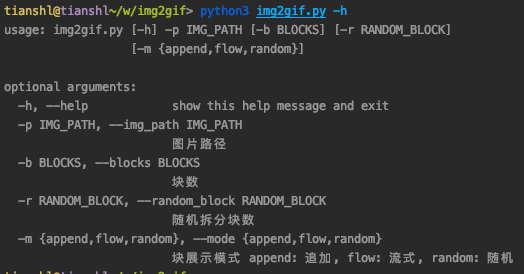
1简介: 将图片转成gif 命令行模式
2使用: python img2gif.py -h
3示例: python img2gif.py -p /Users/tianshl/Documents/sample.jpg
img2gif_gui.py
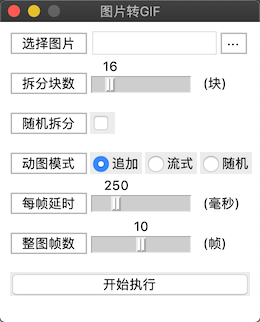
1简介: 将图片转成gif 图像化界面
2使用: python img2gif_gui.py
打包成exe
1pyinstaller -F -w -i gif.ico img2gif_gui.py
2# 执行完指令后, exe文件在dist目录下
3# 我打包的exe: https://download.csdn.net/download/xiaobuding007/12685554
效果图
命令行模式
图形化界面
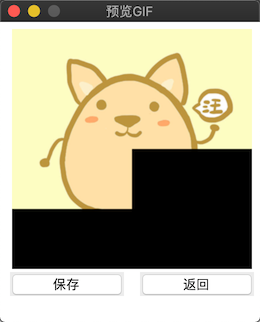
代码
requirements.txt (依赖)
1Pillow==7.2.0
2pygifsicle==1.0.1
img2gif.py (命令行模式 )
1# -*- coding: utf-8 -*-
2"""
3 **********************************************************
4 * Author        : tianshl
5 * Email         : xiyuan91@126.com
6 * Last modified : 2020-07-29 14:58:57
7 * Filename      : img2gif.py
8 * Description   : 图片转动图
9 * Documents     : https://www.lcdf.org/gifsicle/
10 * ********************************************************
11"""
12import argparse
13import copy
14import logging
15import os
16import random
17
18from PIL import Image
19from pygifsicle import optimize
20
21LOG_FORMAT = '%(asctime)s - %(name)s - %(levelname)s - %(message)s'
22logging.basicConfig(level=logging.INFO, format=LOG_FORMAT)
23log = logging.getLogger(__name__)
24
25
26class Img2Gif:
27    """
28    图片转动图
29    """
30
31    def __init__(self, img_path, blocks=16, mode='append', random_block=False):
32        """
33        初始化
34        :param img_path:        图片地址
35        :param blocks:          分块数
36        :param mode:            展示模式 append: 追加, flow: 流式, random: 随机
37        :param random_block:    随机拆分
38        """
39        self.mode = mode if mode in ['flow', 'append', 'random'] else 'append'
40
41        self.blocks = blocks
42        self.random_block = random_block
43
44        # 背景图
45        self.img_background = None
46
47        self.img_path = img_path
48        self.img_dir, self.img_name = os.path.split(img_path)
49        self.img_name = os.path.splitext(self.img_name)[0]
50
51        self.gif_path = os.path.join(self.img_dir, '{}.gif'.format(self.img_name))
52
53    def get_ranges(self):
54        """
55        获取横向和纵向块数
56        """
57        if not self.random_block:
58            w = int(self.blocks ** 0.5)
59            return w, w
60
61        ranges = list()
62        for w in range(2, int(self.blocks ** 0.5) + 1):
63            if self.blocks % w == 0:
64                ranges.append((w, self.blocks // w))
65
66        if ranges:
67            return random.choice(ranges)
68        else:
69            return self.blocks, 1
70
71    def materials(self):
72        """
73        素材
74        """
75
76        log.info('分割图片')
77        img_origin = Image.open(self.img_path)
78        (width, height) = img_origin.size
79        self.img_background = Image.new(img_origin.mode, img_origin.size)
80
81        # 单方向分割次数
82        blocks_w, blocks_h = self.get_ranges()
83
84        block_width = width // blocks_w
85        block_height = height // blocks_h
86
87        img_tmp = copy.copy(self.img_background)
88        # 动图中的每一帧
89        _materials = list()
90        for h in range(blocks_h):
91            for w in range(blocks_w):
92                block_box = (w * block_width, h * block_height, (w + 1) * block_width, (h + 1) * block_height)
93                block_img = img_origin.crop(block_box)
94                if self.mode in ['flow', 'random']:
95                    img_tmp = copy.copy(self.img_background)
96                img_tmp.paste(block_img, (w * block_width, h * block_height))
97                _materials.append(copy.copy(img_tmp))
98
99        # 随机打乱顺序
100        if self.mode == 'random':
101            random.shuffle(_materials)
102
103        log.info('分割完成')
104        # 最后十帧展示原图
105        [_materials.append(copy.copy(img_origin)) for _ in range(10)]
106        return _materials
107
108    def gif(self):
109        """
110        合成gif
111        """
112
113        materials = self.materials()
114        log.info('合成GIF')
115        self.img_background.save(self.gif_path, save_all=True, loop=True, append_images=materials, duration=250)
116        log.info('合成完成')
117
118        log.info('压缩GIF')
119        optimize(self.gif_path)
120        log.info('压缩完成')
121
122
123if __name__ == '__main__':
124    parser = argparse.ArgumentParser()
125    parser.add_argument("-p", "--img_path", required=True, help="图片路径")
126    parser.add_argument("-b", "--blocks", type=int, default=16, help="块数")
127    parser.add_argument("-r", "--random_block", type=bool, default=False, help="随机拆分块数")
128    parser.add_argument(
129        '-m', '--mode', default='append', choices=['append', 'flow', 'random'],
130        help="块展示模式 append: 追加, flow: 流式, random: 随机"
131    )
132    args = parser.parse_args()
133
134    Img2Gif(**args.__dict__).gif()
135
img2gif_gui.py (图形化界面)
1# -*- coding: utf-8 -*-
2"""
3 **********************************************************
4 * Author        : tianshl
5 * Email         : xiyuan91@126.com
6 * Last modified : 2020-07-29 14:58:57
7 * Filename      : img2gif_gui.py
8 * Description   : 图片转动图
9 * Documents     : https://www.lcdf.org/gifsicle/
10 * ********************************************************
11"""
12import copy
13import random
14from tkinter import *
15from tkinter import ttk, messagebox
16from tkinter.filedialog import askopenfilename, asksaveasfilename
17
18from PIL import Image, ImageTk
19from pygifsicle import optimize
20
21
22class Img2Gif(Frame):
23    """
24    图形化界面
25    """
26
27    def __init__(self):
28        """
29        初始化
30        """
31        Frame.__init__(self)
32
33        # 设置窗口信息
34        self.__set_win_info()
35
36        # 渲染窗口
37        self._gif_pane = None
38        self.__render_pane()
39
40    def __set_win_info(self):
41        """
42        设置窗口信息
43        """
44        # 获取屏幕分辨率
45        win_w = self.winfo_screenwidth()
46        win_h = self.winfo_screenheight()
47        # 设置窗口尺寸/位置
48        self._width = 260
49        self._height = 300
50        self.master.geometry('{}x{}+{}+{}'.format(
51            self._width, self._height, (win_w - self._width) // 2, (win_h - self._height) // 2)
52        )
53        # 设置窗口不可变
54        self.master.resizable(width=False, height=False)
55
56    @staticmethod
57    def __destroy_frame(frame):
58        """
59        销毁frame
60        """
61        if frame is None:
62            return
63
64        for widget in frame.winfo_children():
65            widget.destroy()
66
67        frame.destroy()
68
69    def __render_pane(self):
70        """
71        渲染窗口
72        """
73
74        self._main_pane = Frame(self.master, width=self._width, height=self._height)
75        self._main_pane.pack()
76
77        # 设置窗口标题
78        self.master.title('图片转GIF')
79
80        # 选择图片
81        image_path_label = Label(self._main_pane, text='选择图片', relief=RIDGE, padx=10)
82        image_path_label.place(x=10, y=10)
83
84        self._image_path_entry = Entry(self._main_pane, width=13)
85        self._image_path_entry.place(x=90, y=7)
86
87        image_path_button = Label(self._main_pane, text='···', relief=RIDGE, padx=5)
88        image_path_button.bind('<Button-1>', self.__select_image)
89        image_path_button.place(x=220, y=10)
90
91        # 拆分块数
92        blocks_label = Label(self._main_pane, text='拆分块数', relief=RIDGE, padx=10)
93        blocks_label.place(x=10, y=50)
94
95        self._blocks_scale = Scale(
96            self._main_pane, from_=2, to=100, orient=HORIZONTAL, sliderlength=10
97        )
98        self._blocks_scale.set(16)
99        self._blocks_scale.place(x=90, y=33)
100
101        Label(self._main_pane, text='(块)').place(x=200, y=50)
102
103        # 随机拆分
104        random_block_label = Label(self._main_pane, text='随机拆分', relief=RIDGE, padx=10)
105        random_block_label.place(x=10, y=90)
106
107        self._random_block = BooleanVar(value=False)
108        random_block_check_button = ttk.Checkbutton(
109            self._main_pane, variable=self._random_block,
110            width=0, onvalue=True, offvalue=False
111        )
112        random_block_check_button.place(x=90, y=90)
113
114        # 动图模式
115        mode_label = Label(self._main_pane, text='动图模式', relief=RIDGE, padx=10)
116        mode_label.place(x=10, y=130)
117
118        self._mode = StringVar(value='append')
119        ttk.Radiobutton(self._main_pane, text='追加', variable=self._mode, value='append').place(x=90, y=130)
120        ttk.Radiobutton(self._main_pane, text='流式', variable=self._mode, value='flow').place(x=145, y=130)
121        ttk.Radiobutton(self._main_pane, text='随机', variable=self._mode, value='random').place(x=200, y=130)
122
123        # 每帧延时
124        duration_label = Label(self._main_pane, text='每帧延时', relief=RIDGE, padx=10)
125        duration_label.place(x=10, y=170)
126        self._duration_scale = Scale(
127            self._main_pane, from_=50, to=1000, orient=HORIZONTAL, sliderlength=10
128        )
129        self._duration_scale.set(250)
130        self._duration_scale.place(x=90, y=152)
131
132        Label(self._main_pane, text='(毫秒)').place(x=200, y=170)
133
134        # 整图帧数
135        whole_frames_label = Label(self._main_pane, text='整图帧数', relief=RIDGE, padx=10)
136        whole_frames_label.place(x=10, y=210)
137
138        self._whole_frames_scale = Scale(
139            self._main_pane, from_=0, to=20, orient=HORIZONTAL, sliderlength=10
140        )
141        self._whole_frames_scale.set(10)
142        self._whole_frames_scale.place(x=90, y=193)
143
144        Label(self._main_pane, text='(帧)').place(x=200, y=210)
145
146        # 开始转换
147        execute_button = ttk.Button(self._main_pane, text='开始执行', width=23, command=self.__show_gif)
148        execute_button.place(x=10, y=250)
149
150    def __select_image(self, event):
151        """
152        选择图片
153        """
154        image_path = askopenfilename(title='选择图片', filetypes=[
155            ('PNG', '*.png'), ('JPG', '*.jpg'), ('JPG', '*.jpeg'), ('BMP', '*.bmp'), ('ICO', '*.ico')
156        ])
157        self._image_path_entry.delete(0, END)
158        self._image_path_entry.insert(0, image_path)
159
160    def __block_ranges(self):
161        """
162        获取图片横向和纵向需要拆分的块数
163        """
164        blocks = self._blocks_scale.get()
165        if not self._random_block.get():
166            n = int(blocks ** 0.5)
167            return n, n
168
169        ranges = list()
170        for horizontally in range(1, blocks + 1):
171            if blocks % horizontally == 0:
172                ranges.append((horizontally, blocks // horizontally))
173
174        if ranges:
175            return random.choice(ranges)
176        else:
177            return blocks, 1
178
179    def __generate_materials(self):
180        """
181        根据原图生成N张素材图
182        """
183        image_path = self._image_path_entry.get()
184        if not image_path:
185            messagebox.showerror(title='错误', message='请选择图片')
186            return
187        self._image_origin = Image.open(image_path)
188
189        # 获取图片分辨率
190        (width, height) = self._image_origin.size
191
192        # 创建底图
193        self._image_background = Image.new(self._image_origin.mode, self._image_origin.size)
194        image_tmp = copy.copy(self._image_background)
195
196        # 获取横向和纵向块数
197        horizontally_blocks, vertically_blocks = self.__block_ranges()
198
199        # 计算每块尺寸
200        block_width = width // horizontally_blocks
201        block_height = height // vertically_blocks
202
203        width_diff = width - block_width * horizontally_blocks
204        height_diff = height - block_height * vertically_blocks
205
206        # GIF模式
207        gif_mode = self._mode.get()
208        # 生成N帧图片素材
209        materials = list()
210        for v_idx, v in enumerate(range(vertically_blocks)):
211            for h_idx, h in enumerate(range(horizontally_blocks)):
212                _block_width = (h + 1) * block_width
213                # 最右一列 宽度+误差
214                if h_idx + 1 == horizontally_blocks:
215                    _block_width += width_diff
216
217                _block_height = (v + 1) * block_height
218                # 最后一行 高度+误差
219                if v_idx + 1 == vertically_blocks:
220                    _block_height += height_diff
221
222                block_box = (h * block_width, v * block_height, _block_width, _block_height)
223                block_img = self._image_origin.crop(block_box)
224                if gif_mode in ['flow', 'random']:
225                    image_tmp = copy.copy(self._image_background)
226                image_tmp.paste(block_img, (h * block_width, v * block_height))
227                materials.append(copy.copy(image_tmp))
228
229        # mode=random时随机打乱顺序
230        if gif_mode == 'random':
231            random.shuffle(materials)
232
233        # 整图帧数
234        [materials.append(copy.copy(self._image_origin)) for _ in range(self._whole_frames_scale.get())]
235
236        return materials
237
238    def __show_gif(self):
239        """
240        展示GIF
241        """
242
243        self._materials = self.__generate_materials()
244        if not self._materials:
245            return
246
247        self._main_pane.place(x=0, y=-1 * self._height)
248        self._gif_pane = Frame(self.master, width=self._width, height=self._height)
249        self._gif_pane.pack()
250
251        # 设置窗口标题
252        self.master.title('预览GIF')
253
254        label_width = 240
255        label = Label(self._gif_pane, width=label_width, height=label_width)
256        label.place(x=8, y=5)
257
258        button_save = ttk.Button(self._gif_pane, text='保存', width=9, command=self.__save_gif)
259        button_save.place(x=8, y=250)
260
261        button_cancel = ttk.Button(self._gif_pane, text='返回', width=9, command=self.__show_main_pane)
262        button_cancel.place(x=138, y=250)
263
264        # 尺寸
265        (width, height) = self._image_origin.size
266        # 帧速
267        duration = self._duration_scale.get()
268        # 缩放
269        gif_size = (label_width, int(height / width * label_width))
270
271        frames = [ImageTk.PhotoImage(img.resize(gif_size, Image.ANTIALIAS)) for img in self._materials]
272        # 帧数
273        idx_max = len(frames)
274
275        def show(idx):
276            """
277            展示图片
278            """
279            frame = frames[idx]
280            label.configure(image=frame)
281            idx = 0 if idx == idx_max else idx + 1
282            self._gif_pane.after(duration, show, idx % idx_max)
283
284        show(0)
285
286    def __save_gif(self):
287        """
288        存储GIF
289        """
290        gif_path = asksaveasfilename(title='保存GIF', filetypes=[('GIF', '.gif')])
291        if not gif_path:
292            return
293
294        gif_path += '' if gif_path.endswith('.gif') or gif_path.endswith('.GIF') else '.gif'
295        # 存储GIF
296        Image.new(self._image_origin.mode, self._image_origin.size).save(
297            gif_path, save_all=True, loop=True, duration=self._duration_scale.get(), append_images=self._materials
298        )
299
300        # 优化GIF
301        optimize(gif_path)
302        messagebox.showinfo(title='提示', message='保存成功')
303
304        self.__show_main_pane()
305
306    def __show_main_pane(self):
307        """
308        取消保存
309        """
310        self.__destroy_frame(self._gif_pane)
311        self._main_pane.place(x=0, y=0)
312
313
314if __name__ == '__main__':
315    Img2Gif().mainloop()
