
网易云课堂视频在线教学,地址:https://study.163.com/course/introduction/1209401942.htm
11.1 Kafka模式简介
上一章介绍的Solo模式只存在一个排序(orderer)服务,是一种中心化结构,一旦排序(orderer)服务出现了问题,整个区块链网络将会崩溃,为了能在正式环境中稳定运行,需要对排序(orderer)服务采用集群方式,Hyperledger Fabric采用kafka方式实现排序(orderer)服务的集群,kafka模块被认为是半中心化结构。
顺便提一下,去中心化的BFT(拜占庭容错)排序(orderer)服务集群方式目前还在开发,还没有规定发布时间,将在1.x周期内发布,可以关注跟踪FAB-33的更新。
11.2 Kafka网络拓扑
Kafka模式通过Kafka集群和zookeeper集群保证数据的一致性,实现排序功能,网络拓扑图如下:
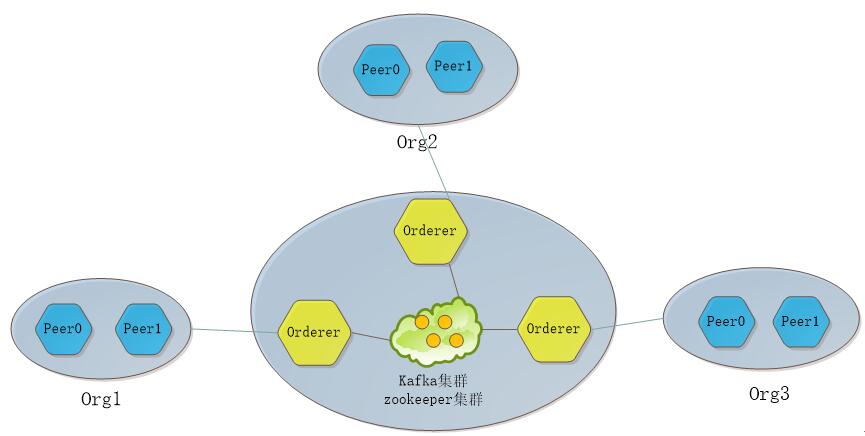
图:网络拓扑
Kafka模式由排序(orderer)服务、kafka集群和zookeeper集群组成。每个排序(orderer)服务相互之间不通信,只与kafka集群通信,kafka集群与zookeeper相互连接。
Fabric网络中的各节点(Peer)收到客户端发送的交易请求时,把交易信息发送给与其连接的排序(orderer)服务,交由排序(orderer)服务集群进行排序处理。
11.3 Kafka运行配置
Kafka生产环境部署案例采用三个排序(orderer)服务、四个kafka、三个zookeeper和四个节点(peer)组成,共准备八台服务器,每台服务器对应的服务如下表所示:
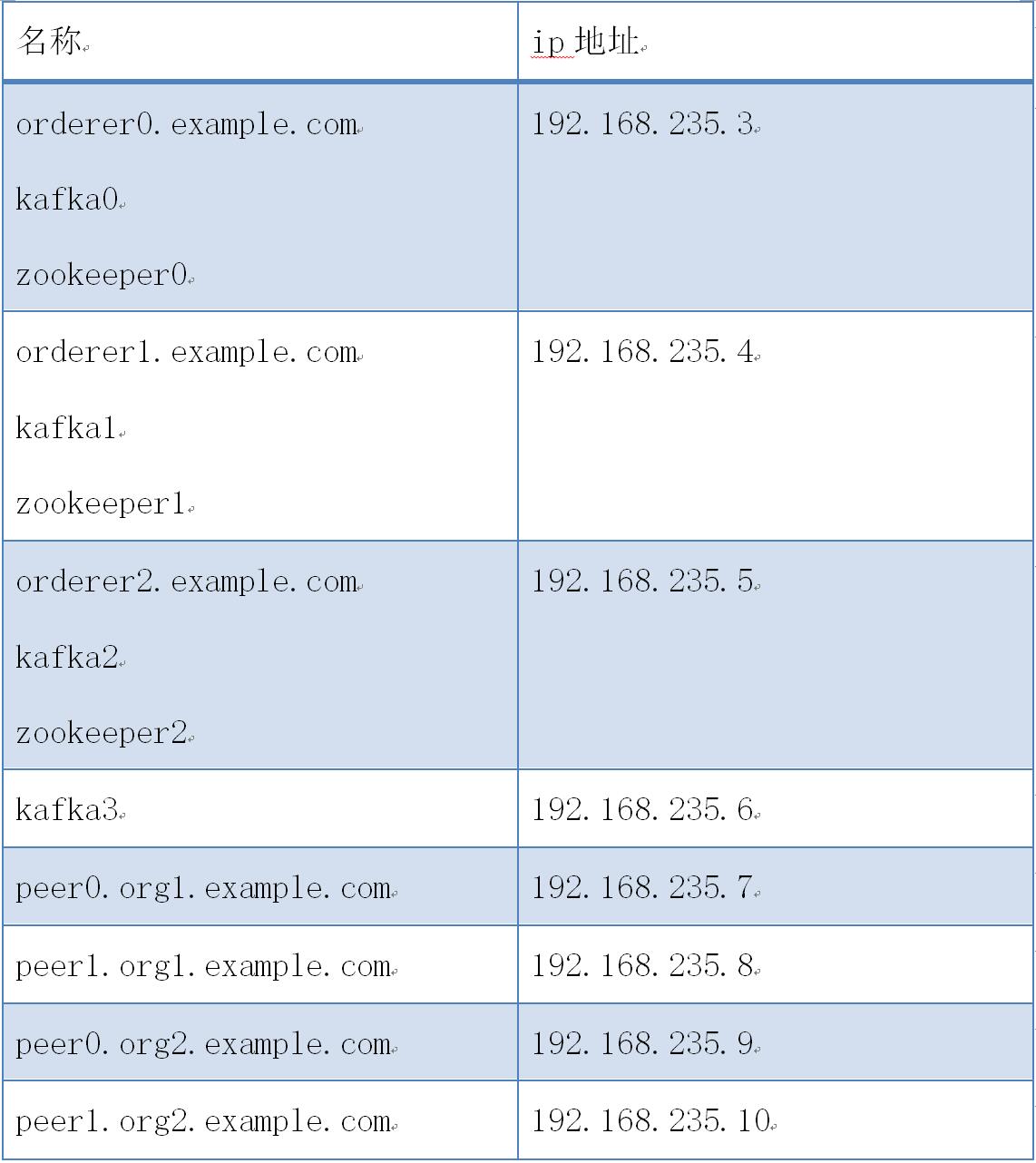
kafka案例网络拓扑图如下:

图:kafka案例网络拓扑
kafka案例部署步骤如下:
11.3.1 服务器(192.168.235.3)部署配置
-
创建kafkapeer目录
cd $GOPATH/src/github.com/hyperledger/fabric
mkdir kafkapeer
cd kafkapeer
-
获取生成工具
把下载的hyperledger-fabric-linux-amd64-1.2.0.tar.gz二进制文件包解压,把其中的bin目录拷贝到kafkapeer目录下。chmod -R 777 ./bin
-
准备生成证书和区块配置文件
配置crypto-config.yaml和configtx.yaml文件,拷贝到kafkapeer目录下。
-
crypto-config.yaml:
Copyright IBM Corp. All Rights Reserved.
SPDX-License-Identifier: Apache-2.0
---------------------------------------------------------------------------
"OrdererOrgs" - Definition of organizations managing orderer nodes
---------------------------------------------------------------------------
OrdererOrgs:
---------------------------------------------------------------------------
Orderer
---------------------------------------------------------------------------
- Name: Orderer
Domain: example.com
CA:
Country: US
Province: California
Locality: San Francisco
---------------------------------------------------------------------------
"Specs" - See PeerOrgs below for complete description
---------------------------------------------------------------------------
Specs:- Hostname: orderer0
- Hostname: orderer1
- Hostname: orderer2
---------------------------------------------------------------------------
"PeerOrgs" - Definition of organizations managing peer nodes
---------------------------------------------------------------------------
PeerOrgs:
---------------------------------------------------------------------------
Org1
---------------------------------------------------------------------------
- Name: Org1
Domain: org1.example.com
EnableNodeOUs: true
CA:
Country: US
Province: California
Locality: San Francisco
---------------------------------------------------------------------------
"Specs"
---------------------------------------------------------------------------
Uncomment this section to enable the explicit definition of hosts in your
configuration. Most users will want to use Template, below
Specs is an array of Spec entries. Each Spec entry consists of two fields:
- Hostname: (Required) The desired hostname, sans the domain.
- CommonName: (Optional) Specifies the template or explicit override for
the CN. By default, this is the template:
"{{.Hostname}}.{{.Domain}}"
which obtains its values from the Spec.Hostname and
Org.Domain, respectively.
---------------------------------------------------------------------------
Specs:
- Hostname: foo # implicitly "foo.org1.example.com"
CommonName: foo27.org5.example.com # overrides Hostname-based FQDN set above
- Hostname: bar
- Hostname: baz
---------------------------------------------------------------------------
"Template"
---------------------------------------------------------------------------
Allows for the definition of 1 or more hosts that are created sequentially
from a template. By default, this looks like "peer%d" from 0 to Count-1.
You may override the number of nodes (Count), the starting index (Start)
or the template used to construct the name (Hostname).
Note: Template and Specs are not mutually exclusive. You may define both
sections and the aggregate nodes will be created for you. Take care with
name collisions
---------------------------------------------------------------------------
Template: Count: 2Start: 5
Hostname: {{.Prefix}}{{.Index}} # default
---------------------------------------------------------------------------
"Users"
---------------------------------------------------------------------------
Count: The number of user accounts in addition to Admin
---------------------------------------------------------------------------
Users: Count: 1
---------------------------------------------------------------------------
Org2: See "Org1" for full specification
---------------------------------------------------------------------------
- Name: Org2 Domain: org2.example.com EnableNodeOUs: true CA: Country: US Province: California Locality: San Francisco Template: Count: 2 Users: Count: 1
- Name: Orderer
Domain: example.com
CA:
Country: US
Province: California
Locality: San Francisco
-
configtx.yaml
Copyright IBM Corp. All Rights Reserved.
SPDX-License-Identifier: Apache-2.0
################################################################################
Section: Organizations
- This section defines the different organizational identities which will
be referenced later in the configuration.
################################################################################ Organizations:
1# SampleOrg defines an MSP using the sampleconfig.  It should never be used
2# in production but may be used as a template for other definitions
3- &OrdererOrg
4    # DefaultOrg defines the organization which is used in the sampleconfig
5    # of the fabric.git development environment
6    Name: OrdererOrg
7
8    # ID to load the MSP definition as
9    ID: OrdererMSP
10
11    # MSPDir is the filesystem path which contains the MSP configuration
12    MSPDir: crypto-config/ordererOrganizations/example.com/msp
13
14    # Policies defines the set of policies at this level of the config tree
15    # For organization policies, their canonical path is usually
16    #   /Channel/<Application|Orderer>/<OrgName>/<PolicyName>
17    Policies:
18        Readers:
19            Type: Signature
20            Rule: "OR('OrdererMSP.member')"
21        Writers:
22            Type: Signature
23            Rule: "OR('OrdererMSP.member')"
24        Admins:
25            Type: Signature
26            Rule: "OR('OrdererMSP.admin')"
27
28- &Org1
29    # DefaultOrg defines the organization which is used in the sampleconfig
30    # of the fabric.git development environment
31    Name: Org1MSP
32
33    # ID to load the MSP definition as
34    ID: Org1MSP
35
36    MSPDir: crypto-config/peerOrganizations/org1.example.com/msp
37
38    # Policies defines the set of policies at this level of the config tree
39    # For organization policies, their canonical path is usually
40    #   /Channel/<Application|Orderer>/<OrgName>/<PolicyName>
41    Policies:
42        Readers:
43            Type: Signature
44            Rule: "OR('Org1MSP.admin', 'Org1MSP.peer', 'Org1MSP.client')"
45        Writers:
46            Type: Signature
47            Rule: "OR('Org1MSP.admin', 'Org1MSP.client')"
48        Admins:
49            Type: Signature
50            Rule: "OR('Org1MSP.admin')"
51
52    AnchorPeers:
53        # AnchorPeers defines the location of peers which can be used
54        # for cross org gossip communication.  Note, this value is only
55        # encoded in the genesis block in the Application section context
56        - Host: peer0.org1.example.com
57          Port: 7051
58
59- &Org2
60    # DefaultOrg defines the organization which is used in the sampleconfig
61    # of the fabric.git development environment
62    Name: Org2MSP
63
64    # ID to load the MSP definition as
65    ID: Org2MSP
66
67    MSPDir: crypto-config/peerOrganizations/org2.example.com/msp
68
69    # Policies defines the set of policies at this level of the config tree
70    # For organization policies, their canonical path is usually
71    #   /Channel/<Application|Orderer>/<OrgName>/<PolicyName>
72    Policies:
73        Readers:
74            Type: Signature
75            Rule: "OR('Org2MSP.admin', 'Org2MSP.peer', 'Org2MSP.client')"
76        Writers:
77            Type: Signature
78            Rule: "OR('Org2MSP.admin', 'Org2MSP.client')"
79        Admins:
80            Type: Signature
81            Rule: "OR('Org2MSP.admin')"
82
83    AnchorPeers:
84        # AnchorPeers defines the location of peers which can be used
85        # for cross org gossip communication.  Note, this value is only
86        # encoded in the genesis block in the Application section context
87        - Host: peer0.org2.example.com
88          Port: 7051
################################################################################
SECTION: Capabilities
- This section defines the capabilities of fabric network. This is a new
concept as of v1.1.0 and should not be utilized in mixed networks with
v1.0.x peers and orderers. Capabilities define features which must be
present in a fabric binary for that binary to safely participate in the
fabric network. For instance, if a new MSP type is added, newer binaries
might recognize and validate the signatures from this type, while older
binaries without this support would be unable to validate those
transactions. This could lead to different versions of the fabric binaries
having different world states. Instead, defining a capability for a channel
informs those binaries without this capability that they must cease
processing transactions until they have been upgraded. For v1.0.x if any
capabilities are defined (including a map with all capabilities turned off)
then the v1.0.x peer will deliberately crash.
################################################################################ Capabilities: # Channel capabilities apply to both the orderers and the peers and must be # supported by both. Set the value of the capability to true to require it. Global: &ChannelCapabilities # V1.1 for Global is a catchall flag for behavior which has been # determined to be desired for all orderers and peers running v1.0.x, # but the modification of which would cause incompatibilities. Users # should leave this flag set to true. V1_1: true
1# Orderer capabilities apply only to the orderers, and may be safely
2# manipulated without concern for upgrading peers.  Set the value of the
3# capability to true to require it.
4Orderer: &OrdererCapabilities
5    # V1.1 for Order is a catchall flag for behavior which has been
6    # determined to be desired for all orderers running v1.0.x, but the
7    # modification of which  would cause incompatibilities.  Users should
8    # leave this flag set to true.
9    V1_1: true
10
11# Application capabilities apply only to the peer network, and may be safely
12# manipulated without concern for upgrading orderers.  Set the value of the
13# capability to true to require it.
14Application: &ApplicationCapabilities
15    # V1.1 for Application is a catchall flag for behavior which has been
16    # determined to be desired for all peers running v1.0.x, but the
17    # modification of which would cause incompatibilities.  Users should
18    # leave this flag set to true.
19    V1_2: true
################################################################################
SECTION: Application
- This section defines the values to encode into a config transaction or
genesis block for application related parameters
################################################################################ Application: &ApplicationDefaults
1# Organizations is the list of orgs which are defined as participants on
2# the application side of the network
3Organizations:
4
5# Policies defines the set of policies at this level of the config tree
6# For Application policies, their canonical path is
7#   /Channel/Application/<PolicyName>
8Policies:
9    Readers:
10        Type: ImplicitMeta
11        Rule: "ANY Readers"
12    Writers:
13        Type: ImplicitMeta
14        Rule: "ANY Writers"
15    Admins:
16        Type: ImplicitMeta
17        Rule: "MAJORITY Admins"
18
19# Capabilities describes the application level capabilities, see the
20# dedicated Capabilities section elsewhere in this file for a full
21# description
22Capabilities:
23    <<: *ApplicationCapabilities
################################################################################
SECTION: Orderer
- This section defines the values to encode into a config transaction or
genesis block for orderer related parameters
################################################################################ Orderer: &OrdererDefaults
1# Orderer Type: The orderer implementation to start
2# Available types are "solo" and "kafka"
3OrdererType: kafka
4
5Addresses:
6    - orderer0.example.com:7050
7    - orderer1.example.com:7050
8    - orderer2.example.com:7050
9
10# Batch Timeout: The amount of time to wait before creating a batch
11BatchTimeout: 2s
12
13# Batch Size: Controls the number of messages batched into a block
14BatchSize:
15
16    # Max Message Count: The maximum number of messages to permit in a batch
17    MaxMessageCount: 10
18
19    # Absolute Max Bytes: The absolute maximum number of bytes allowed for
20    # the serialized messages in a batch.
21    AbsoluteMaxBytes: 98 MB
22
23    # Preferred Max Bytes: The preferred maximum number of bytes allowed for
24    # the serialized messages in a batch. A message larger than the preferred
25    # max bytes will result in a batch larger than preferred max bytes.
26    PreferredMaxBytes: 512 KB
27
28Kafka:
29    # Brokers: A list of Kafka brokers to which the orderer connects. Edit
30    # this list to identify the brokers of the ordering service.
31    # NOTE: Use IP:port notation.
32    Brokers:
33        - kafka0:9092
34        - kafka1:9092
35        - kafka2:9092
36        - kafka3:9092
37
38# Organizations is the list of orgs which are defined as participants on
39# the orderer side of the network
40Organizations:
41
42# Policies defines the set of policies at this level of the config tree
43# For Orderer policies, their canonical path is
44#   /Channel/Orderer/<PolicyName>
45Policies:
46    Readers:
47        Type: ImplicitMeta
48        Rule: "ANY Readers"
49    Writers:
50        Type: ImplicitMeta
51        Rule: "ANY Writers"
52    Admins:
53        Type: ImplicitMeta
54        Rule: "MAJORITY Admins"
55    # BlockValidation specifies what signatures must be included in the block
56    # from the orderer for the peer to validate it.
57    BlockValidation:
58        Type: ImplicitMeta
59        Rule: "ANY Writers"
60
61# Capabilities describes the orderer level capabilities, see the
62# dedicated Capabilities section elsewhere in this file for a full
63# description
64Capabilities:
65    <<: *OrdererCapabilities
################################################################################
CHANNEL
This section defines the values to encode into a config transaction or
genesis block for channel related parameters.
################################################################################ Channel: &ChannelDefaults # Policies defines the set of policies at this level of the config tree # For Channel policies, their canonical path is # /Channel/<PolicyName> Policies: # Who may invoke the 'Deliver' API Readers: Type: ImplicitMeta Rule: "ANY Readers" # Who may invoke the 'Broadcast' API Writers: Type: ImplicitMeta Rule: "ANY Writers" # By default, who may modify elements at this config level Admins: Type: ImplicitMeta Rule: "MAJORITY Admins"
1# Capabilities describes the channel level capabilities, see the
2# dedicated Capabilities section elsewhere in this file for a full
3# description
4Capabilities:
5    <<: *ChannelCapabilities
################################################################################
Profile
- Different configuration profiles may be encoded here to be specified
as parameters to the configtxgen tool
################################################################################ Profiles:
1TwoOrgsOrdererGenesis:
2    <<: *ChannelDefaults
3    Orderer:
4        <<: *OrdererDefaults
5        Organizations:
6            - *OrdererOrg
7    Consortiums:
8        SampleConsortium:
9            Organizations:
10                - *Org1
11                - *Org2
12
13TwoOrgsChannel:
14    Consortium: SampleConsortium
15    Application:
16        <<: *ApplicationDefaults
17        Organizations:
18            - *Org1
19            - *Org2
-
生成公私钥和证书
./bin/cryptogen generate --config=./crypto-config.yaml
-
生成创世区块
mkdir channel-artifacts
./bin/configtxgen -profile TwoOrgsOrdererGenesis -outputBlock ./channel-artifacts/genesis.block
-
生成通道配置区块
./bin/configtxgen -profile TwoOrgsChannel -outputCreateChannelTx ./channel-artifacts/mychannel.tx -channelID mychannel
-
拷贝生成文件到其它服务器
cd ..
scp -r kafkapeer root@192.168.235.4:/opt/gopath/src/github.com/hyperledger/fabric
scp -r kafkapeer root@192.168.235.5:/opt/gopath/src/github.com/hyperledger/fabric
scp -r kafkapeer root@192.168.235.6:/opt/gopath/src/github.com/hyperledger/fabric
scp -r kafkapeer root@192.168.235.7:/opt/gopath/src/github.com/hyperledger/fabric
scp -r kafkapeer root@192.168.235.8:/opt/gopath/src/github.com/hyperledger/fabric
scp -r kafkapeer root@192.168.235.9:/opt/gopath/src/github.com/hyperledger/fabric
scp -r kafkapeer root@192.168.235.10:/opt/gopath/src/github.com/hyperledger/fabric
-
准备zookeeper配置文件
配置docker-compose-zookeeper.yaml文件,拷贝到kafkapeer目录下。Copyright IBM Corp. All Rights Reserved.
SPDX-License-Identifier: Apache-2.0
version: '2'
services: zookeeper0: container_name: zookeeper0 hostname: zookeeper0 image: hyperledger/fabric-zookeeper restart: always environment: - ZOO_MY_ID=1 - ZOO_SERVERS=server.1=zookeeper0:2888:3888 server.2=zookeeper1:2888:3888 server.3=zookeeper2:2888:3888 ports: - 2181:2181 - 2888:2888 - 3888:3888 extra_hosts: - "zookeeper0:192.168.235.3" - "zookeeper1:192.168.235.4" - "zookeeper2:192.168.235.5" - "kafka0:192.168.235.3" - "kafka1:192.168.235.4" - "kafka2:192.168.235.5" - "kafka3:192.168.235.6"
-
准备kafka配置文件
配置docker-compose-kafka.yaml文件,拷贝到kafkapeer目录下。Copyright IBM Corp. All Rights Reserved.
SPDX-License-Identifier: Apache-2.0
version: '2'
services: kafka0: container_name: kafka0 hostname: kafka0 image: hyperledger/fabric-kafka restart: always environment: - KAFKA_MESSAGE_MAX_BYTES=103809024 # 99 * 1024 * 1024 B - KAFKA_REPLICA_FETCH_MAX_BYTES=103809024 # 99 * 1024 * 1024 B - KAFKA_UNCLEAN_LEADER_ELECTION_ENABLE=false environment: - KAFKA_BROKER_ID=1 - KAFKA_MIN_INSYNC_REPLICAS=2 - KAFKA_DEFAULT_REPLICATION_FACTOR=3 - KAFKA_ZOOKEEPER_CONNECT=zookeeper0:2181,zookeeper1:2181,zookeeper2:2181 ports: - 9092:9092 extra_hosts: - "zookeeper0:192.168.235.3" - "zookeeper1:192.168.235.4" - "zookeeper2:192.168.235.5" - "kafka0:192.168.235.3" - "kafka1:192.168.235.4" - "kafka2:192.168.235.5" - "kafka3:192.168.235.6"
-
准备orderer配置文件
配置docker-compose-orderer.yaml文件,拷贝到kafkapeer目录下。Copyright IBM Corp. All Rights Reserved.
SPDX-License-Identifier: Apache-2.0
version: '2'
services: orderer0.example.com: container_name: orderer0.example.com image: hyperledger/fabric-orderer environment: - ORDERER_GENERAL_LOGLEVEL=debug - ORDERER_GENERAL_LISTENADDRESS=0.0.0.0 - ORDERER_GENERAL_GENESISMETHOD=file - ORDERER_GENERAL_GENESISFILE=/var/hyperledger/orderer/orderer.genesis.block - ORDERER_GENERAL_LOCALMSPID=OrdererMSP - ORDERER_GENERAL_LOCALMSPDIR=/var/hyperledger/orderer/msp # enabled TLS - ORDERER_GENERAL_TLS_ENABLED=true - ORDERER_GENERAL_TLS_PRIVATEKEY=/var/hyperledger/orderer/tls/server.key - ORDERER_GENERAL_TLS_CERTIFICATE=/var/hyperledger/orderer/tls/server.crt - ORDERER_GENERAL_TLS_ROOTCAS=[/var/hyperledger/orderer/tls/ca.crt] - ORDERER_KAFKA_RETRY_LONGINTERVAL=10s - ORDERER_KAFKA_RETRY_LONGTOTAL=100s - ORDERER_KAFKA_RETRY_SHORTINTERVAL=1s - ORDERER_KAFKA_RETRY_SHORTTOTAL=30s - ORDERER_KAFKA_VERBOSE=true working_dir: /opt/gopath/src/github.com/hyperledger/fabric command: orderer volumes: - ./channel-artifacts/genesis.block:/var/hyperledger/orderer/orderer.genesis.block - ./crypto-config/ordererOrganizations/example.com/orderers/orderer0.example.com/msp:/var/hyperledger/orderer/msp - ./crypto-config/ordererOrganizations/example.com/orderers/orderer0.example.com/tls/:/var/hyperledger/orderer/tls ports: - 7050:7050 extra_hosts: - "kafka0:192.168.235.3" - "kafka1:192.168.235.4" - "kafka2:192.168.235.5" - "kafka3:192.168.235.6"
11.3.2 服务器(192.168.235.4)部署配置
-
准备zookeeper配置文件
配置docker-compose-zookeeper.yaml文件,拷贝到kafkapeer目录下。Copyright IBM Corp. All Rights Reserved.
SPDX-License-Identifier: Apache-2.0
version: '2'
services: zookeeper1: container_name: zookeeper1 hostname: zookeeper1 image: hyperledger/fabric-zookeeper restart: always environment: - ZOO_MY_ID=2 - ZOO_SERVERS=server.1=zookeeper0:2888:3888 server.2=zookeeper1:2888:3888 server.3=zookeeper2:2888:3888 ports: - 2181:2181 - 2888:2888 - 3888:3888 extra_hosts: - "zookeeper0:192.168.235.3" - "zookeeper1:192.168.235.4" - "zookeeper2:192.168.235.5" - "kafka0:192.168.235.3" - "kafka1:192.168.235.4" - "kafka2:192.168.235.5" - "kafka3:192.168.235.6"
-
准备kafka配置文件
配置docker-compose-kafka.yaml文件,拷贝到kafkapeer目录下。Copyright IBM Corp. All Rights Reserved.
SPDX-License-Identifier: Apache-2.0
version: '2'
services: kafka1: container_name: kafka1 hostname: kafka1 image: hyperledger/fabric-kafka restart: always environment: - KAFKA_MESSAGE_MAX_BYTES=103809024 # 99 * 1024 * 1024 B - KAFKA_REPLICA_FETCH_MAX_BYTES=103809024 # 99 * 1024 * 1024 B - KAFKA_UNCLEAN_LEADER_ELECTION_ENABLE=false environment: - KAFKA_BROKER_ID=2 - KAFKA_MIN_INSYNC_REPLICAS=2 - KAFKA_DEFAULT_REPLICATION_FACTOR=3 - KAFKA_ZOOKEEPER_CONNECT=zookeeper0:2181,zookeeper1:2181,zookeeper2:2181 ports: - 9092:9092 extra_hosts: - "zookeeper0:192.168.235.3" - "zookeeper1:192.168.235.4" - "zookeeper2:192.168.235.5" - "kafka0:192.168.235.3" - "kafka1:192.168.235.4" - "kafka2:192.168.235.5" - "kafka3:192.168.235.6"
-
准备orderer配置文件
配置docker-compose-orderer.yaml文件,拷贝到kafkapeer目录下。Copyright IBM Corp. All Rights Reserved.
SPDX-License-Identifier: Apache-2.0
version: '2'
services: orderer1.example.com: container_name: orderer1.example.com image: hyperledger/fabric-orderer environment: - ORDERER_GENERAL_LOGLEVEL=debug - ORDERER_GENERAL_LISTENADDRESS=0.0.0.0 - ORDERER_GENERAL_GENESISMETHOD=file - ORDERER_GENERAL_GENESISFILE=/var/hyperledger/orderer/orderer.genesis.block - ORDERER_GENERAL_LOCALMSPID=OrdererMSP - ORDERER_GENERAL_LOCALMSPDIR=/var/hyperledger/orderer/msp # enabled TLS - ORDERER_GENERAL_TLS_ENABLED=true - ORDERER_GENERAL_TLS_PRIVATEKEY=/var/hyperledger/orderer/tls/server.key - ORDERER_GENERAL_TLS_CERTIFICATE=/var/hyperledger/orderer/tls/server.crt - ORDERER_GENERAL_TLS_ROOTCAS=[/var/hyperledger/orderer/tls/ca.crt] - ORDERER_KAFKA_RETRY_LONGINTERVAL=10s - ORDERER_KAFKA_RETRY_LONGTOTAL=100s - ORDERER_KAFKA_RETRY_SHORTINTERVAL=1s - ORDERER_KAFKA_RETRY_SHORTTOTAL=30s - ORDERER_KAFKA_VERBOSE=true working_dir: /opt/gopath/src/github.com/hyperledger/fabric command: orderer volumes: - ./channel-artifacts/genesis.block:/var/hyperledger/orderer/orderer.genesis.block - ./crypto-config/ordererOrganizations/example.com/orderers/orderer1.example.com/msp:/var/hyperledger/orderer/msp - ./crypto-config/ordererOrganizations/example.com/orderers/orderer1.example.com/tls/:/var/hyperledger/orderer/tls ports: - 7050:7050 extra_hosts: - "kafka0:192.168.235.3" - "kafka1:192.168.235.4" - "kafka2:192.168.235.5" - "kafka3:192.168.235.6"
11.3.3 服务器(192.168.235.5)部署配置
-
准备zookeeper配置文件
配置docker-compose-zookeeper.yaml文件,拷贝到kafkapeer目录下。Copyright IBM Corp. All Rights Reserved.
SPDX-License-Identifier: Apache-2.0
version: '2'
services: zookeeper2: container_name: zookeeper2 hostname: zookeeper2 image: hyperledger/fabric-zookeeper restart: always environment: - ZOO_MY_ID=3 - ZOO_SERVERS=server.1=zookeeper0:2888:3888 server.2=zookeeper1:2888:3888 server.3=zookeeper2:2888:3888 ports: - 2181:2181 - 2888:2888 - 3888:3888 extra_hosts: - "zookeeper0:192.168.235.3" - "zookeeper1:192.168.235.4" - "zookeeper2:192.168.235.5" - "kafka0:192.168.235.3" - "kafka1:192.168.235.4" - "kafka2:192.168.235.5" - "kafka3:192.168.235.6"
-
准备kafka配置文件
配置docker-compose-kafka.yaml文件,拷贝到kafkapeer目录下。Copyright IBM Corp. All Rights Reserved.
SPDX-License-Identifier: Apache-2.0
version: '2'
services: kafka2: container_name: kafka2 hostname: kafka2 image: hyperledger/fabric-kafka restart: always environment: - KAFKA_MESSAGE_MAX_BYTES=103809024 # 99 * 1024 * 1024 B - KAFKA_REPLICA_FETCH_MAX_BYTES=103809024 # 99 * 1024 * 1024 B - KAFKA_UNCLEAN_LEADER_ELECTION_ENABLE=false environment: - KAFKA_BROKER_ID=3 - KAFKA_MIN_INSYNC_REPLICAS=2 - KAFKA_DEFAULT_REPLICATION_FACTOR=3 - KAFKA_ZOOKEEPER_CONNECT=zookeeper0:2181,zookeeper1:2181,zookeeper2:2181 ports: - 9092:9092 extra_hosts: - "zookeeper0:192.168.235.3" - "zookeeper1:192.168.235.4" - "zookeeper2:192.168.235.5" - "kafka0:192.168.235.3" - "kafka1:192.168.235.4" - "kafka2:192.168.235.5" - "kafka3:192.168.235.6"
-
准备orderer配置文件
配置docker-compose-orderer.yaml文件,拷贝到kafkapeer目录下。Copyright IBM Corp. All Rights Reserved.
SPDX-License-Identifier: Apache-2.0
version: '2'
services: orderer2.example.com: container_name: orderer2.example.com image: hyperledger/fabric-orderer environment: - ORDERER_GENERAL_LOGLEVEL=debug - ORDERER_GENERAL_LISTENADDRESS=0.0.0.0 - ORDERER_GENERAL_GENESISMETHOD=file - ORDERER_GENERAL_GENESISFILE=/var/hyperledger/orderer/orderer.genesis.block - ORDERER_GENERAL_LOCALMSPID=OrdererMSP - ORDERER_GENERAL_LOCALMSPDIR=/var/hyperledger/orderer/msp # enabled TLS - ORDERER_GENERAL_TLS_ENABLED=true - ORDERER_GENERAL_TLS_PRIVATEKEY=/var/hyperledger/orderer/tls/server.key - ORDERER_GENERAL_TLS_CERTIFICATE=/var/hyperledger/orderer/tls/server.crt - ORDERER_GENERAL_TLS_ROOTCAS=[/var/hyperledger/orderer/tls/ca.crt] - ORDERER_KAFKA_RETRY_LONGINTERVAL=10s - ORDERER_KAFKA_RETRY_LONGTOTAL=100s - ORDERER_KAFKA_RETRY_SHORTINTERVAL=1s - ORDERER_KAFKA_RETRY_SHORTTOTAL=30s - ORDERER_KAFKA_VERBOSE=true working_dir: /opt/gopath/src/github.com/hyperledger/fabric command: orderer volumes: - ./channel-artifacts/genesis.block:/var/hyperledger/orderer/orderer.genesis.block - ./crypto-config/ordererOrganizations/example.com/orderers/orderer2.example.com/msp:/var/hyperledger/orderer/msp - ./crypto-config/ordererOrganizations/example.com/orderers/orderer2.example.com/tls/:/var/hyperledger/orderer/tls ports: - 7050:7050 extra_hosts: - "kafka0:192.168.235.3" - "kafka1:192.168.235.4" - "kafka2:192.168.235.5" - "kafka3:192.168.235.6"
11.3.4 服务器(192.168.235.6)部署配置
-
准备kafka配置文件
配置docker-compose-kafka.yaml文件,拷贝到kafkapeer目录下。Copyright IBM Corp. All Rights Reserved.
SPDX-License-Identifier: Apache-2.0
version: '2'
services: kafka3: container_name: kafka3 hostname: kafka3 image: hyperledger/fabric-kafka restart: always environment: - KAFKA_MESSAGE_MAX_BYTES=103809024 # 99 * 1024 * 1024 B - KAFKA_REPLICA_FETCH_MAX_BYTES=103809024 # 99 * 1024 * 1024 B - KAFKA_UNCLEAN_LEADER_ELECTION_ENABLE=false environment: - KAFKA_BROKER_ID=4 - KAFKA_MIN_INSYNC_REPLICAS=2 - KAFKA_DEFAULT_REPLICATION_FACTOR=3 - KAFKA_ZOOKEEPER_CONNECT=zookeeper0:2181,zookeeper1:2181,zookeeper2:2181 ports: - 9092:9092 extra_hosts: - "zookeeper0:192.168.235.3" - "zookeeper1:192.168.235.4" - "zookeeper2:192.168.235.5" - "kafka0:192.168.235.3" - "kafka1:192.168.235.4" - "kafka2:192.168.235.5" - "kafka3:192.168.235.6"
11.3.5 服务器(192.168.235.7)部署配置
-
准备peer配置文件
配置docker-compose-peer.yaml文件,拷贝到kafkapeer目录下。All elements in this file should depend on the docker-compose-base.yaml
Provided fabric peer node
version: '2'
services: peer0.org1.example.com: container_name: peer0.org1.example.com hostname: peer0.org1.example.com image: hyperledger/fabric-peer environment: - CORE_PEER_ID=peer0.org1.example.com - CORE_PEER_ADDRESS=peer0.org1.example.com:7051 - CORE_PEER_CHAINCODELISTENADDRESS=peer0.org1.example.com:7052 - CORE_PEER_GOSSIP_EXTERNALENDPOINT=peer0.org1.example.com:7051 - CORE_PEER_LOCALMSPID=Org1MSP - CORE_VM_ENDPOINT=unix:///host/var/run/docker.sock # the following setting starts chaincode containers on the same # bridge network as the peers # https://docs.docker.com/compose/networking/ #- CORE_LOGGING_LEVEL=ERROR - CORE_LOGGING_LEVEL=DEBUG - CORE_PEER_GOSSIP_USELEADERELECTION=true - CORE_PEER_GOSSIP_ORGLEADER=false - CORE_PEER_PROFILE_ENABLED=true - CORE_PEER_TLS_ENABLED=true - CORE_PEER_TLS_CERT_FILE=/etc/hyperledger/fabric/tls/server.crt - CORE_PEER_TLS_KEY_FILE=/etc/hyperledger/fabric/tls/server.key - CORE_PEER_TLS_ROOTCERT_FILE=/etc/hyperledger/fabric/tls/ca.crt working_dir: /opt/gopath/src/github.com/hyperledger/fabric/peer command: peer node start volumes: - /var/run/:/host/var/run/ - ./crypto-config/peerOrganizations/org1.example.com/peers/peer0.org1.example.com/msp:/etc/hyperledger/fabric/msp - ./crypto-config/peerOrganizations/org1.example.com/peers/peer0.org1.example.com/tls:/etc/hyperledger/fabric/tls ports: - 7051:7051 - 7052:7052 - 7053:7053 extra_hosts: - "orderer0.example.com:192.168.235.3" - "orderer1.example.com:192.168.235.4" - "orderer2.example.com:192.168.235.5"
cli: container_name: cli image: hyperledger/fabric-tools tty: true environment: - GOPATH=/opt/gopath - CORE_VM_ENDPOINT=unix:///host/var/run/docker.sock # - CORE_LOGGING_LEVEL=ERROR - CORE_LOGGING_LEVEL=DEBUG - CORE_PEER_ID=cli - CORE_PEER_ADDRESS=peer0.org1.example.com:7051 - CORE_PEER_LOCALMSPID=Org1MSP - CORE_PEER_TLS_ENABLED=true - CORE_PEER_TLS_CERT_FILE=/opt/gopath/src/github.com/hyperledger/fabric/peer/crypto/peerOrganizations/org1.example.com/peers/peer0.org1.example.com/tls/server.crt - CORE_PEER_TLS_KEY_FILE=/opt/gopath/src/github.com/hyperledger/fabric/peer/crypto/peerOrganizations/org1.example.com/peers/peer0.org1.example.com/tls/server.key - CORE_PEER_TLS_ROOTCERT_FILE=/opt/gopath/src/github.com/hyperledger/fabric/peer/crypto/peerOrganizations/org1.example.com/peers/peer0.org1.example.com/tls/ca.crt - CORE_PEER_MSPCONFIGPATH=/opt/gopath/src/github.com/hyperledger/fabric/peer/crypto/peerOrganizations/org1.example.com/users/Admin@org1.example.com/msp working_dir: /opt/gopath/src/github.com/hyperledger/fabric/peer volumes: - /var/run/:/host/var/run/ - ./chaincode/go/:/opt/gopath/src/github.com/hyperledger/fabric/kafkapeer/chaincode/go - ./crypto-config:/opt/gopath/src/github.com/hyperledger/fabric/peer/crypto/ - ./channel-artifacts:/opt/gopath/src/github.com/hyperledger/fabric/peer/channel-artifacts extra_hosts: - "orderer0.example.com:192.168.235.3" - "orderer1.example.com:192.168.235.4" - "orderer2.example.com:192.168.235.5" - "peer0.org1.example.com:192.168.235.7" - "peer1.org1.example.com:192.168.235.8" - "peer0.org2.example.com:192.168.235.9" - "peer1.org2.example.com:192.168.235.10"
11.3.6 服务器(192.168.235.8)部署配置
-
准备peer配置文件
配置docker-compose-peer.yaml文件,拷贝到kafkapeer目录下。All elements in this file should depend on the docker-compose-base.yaml
Provided fabric peer node
version: '2'
services: peer1.org1.example.com: container_name: peer1.org1.example.com hostname: peer1.org1.example.com image: hyperledger/fabric-peer environment: - CORE_PEER_ID=peer1.org1.example.com - CORE_PEER_ADDRESS=peer1.org1.example.com:7051 - CORE_PEER_CHAINCODELISTENADDRESS=peer1.org1.example.com:7052 - CORE_PEER_GOSSIP_EXTERNALENDPOINT=peer1.org1.example.com:7051 - CORE_PEER_LOCALMSPID=Org1MSP - CORE_VM_ENDPOINT=unix:///host/var/run/docker.sock # the following setting starts chaincode containers on the same # bridge network as the peers # https://docs.docker.com/compose/networking/ #- CORE_LOGGING_LEVEL=ERROR - CORE_LOGGING_LEVEL=DEBUG - CORE_PEER_GOSSIP_USELEADERELECTION=true - CORE_PEER_GOSSIP_ORGLEADER=false - CORE_PEER_PROFILE_ENABLED=true - CORE_PEER_TLS_ENABLED=true - CORE_PEER_TLS_CERT_FILE=/etc/hyperledger/fabric/tls/server.crt - CORE_PEER_TLS_KEY_FILE=/etc/hyperledger/fabric/tls/server.key - CORE_PEER_TLS_ROOTCERT_FILE=/etc/hyperledger/fabric/tls/ca.crt working_dir: /opt/gopath/src/github.com/hyperledger/fabric/peer command: peer node start volumes: - /var/run/:/host/var/run/ - ./crypto-config/peerOrganizations/org1.example.com/peers/peer1.org1.example.com/msp:/etc/hyperledger/fabric/msp - ./crypto-config/peerOrganizations/org1.example.com/peers/peer1.org1.example.com/tls:/etc/hyperledger/fabric/tls ports: - 7051:7051 - 7052:7052 - 7053:7053 extra_hosts: - "orderer0.example.com:192.168.235.3" - "orderer1.example.com:192.168.235.4" - "orderer2.example.com:192.168.235.5"
cli: container_name: cli image: hyperledger/fabric-tools tty: true environment: - GOPATH=/opt/gopath - CORE_VM_ENDPOINT=unix:///host/var/run/docker.sock # - CORE_LOGGING_LEVEL=ERROR - CORE_LOGGING_LEVEL=DEBUG - CORE_PEER_ID=cli - CORE_PEER_ADDRESS=peer1.org1.example.com:7051 - CORE_PEER_LOCALMSPID=Org1MSP - CORE_PEER_TLS_ENABLED=true - CORE_PEER_TLS_CERT_FILE=/opt/gopath/src/github.com/hyperledger/fabric/peer/crypto/peerOrganizations/org1.example.com/peers/peer1.org1.example.com/tls/server.crt - CORE_PEER_TLS_KEY_FILE=/opt/gopath/src/github.com/hyperledger/fabric/peer/crypto/peerOrganizations/org1.example.com/peers/peer1.org1.example.com/tls/server.key - CORE_PEER_TLS_ROOTCERT_FILE=/opt/gopath/src/github.com/hyperledger/fabric/peer/crypto/peerOrganizations/org1.example.com/peers/peer1.org1.example.com/tls/ca.crt - CORE_PEER_MSPCONFIGPATH=/opt/gopath/src/github.com/hyperledger/fabric/peer/crypto/peerOrganizations/org1.example.com/users/Admin@org1.example.com/msp working_dir: /opt/gopath/src/github.com/hyperledger/fabric/peer volumes: - /var/run/:/host/var/run/ - ./chaincode/go/:/opt/gopath/src/github.com/hyperledger/fabric/kafkapeer/chaincode/go - ./crypto-config:/opt/gopath/src/github.com/hyperledger/fabric/peer/crypto/ - ./channel-artifacts:/opt/gopath/src/github.com/hyperledger/fabric/peer/channel-artifacts extra_hosts: - "orderer0.example.com:192.168.235.3" - "orderer1.example.com:192.168.235.4" - "orderer2.example.com:192.168.235.5" - "peer0.org1.example.com:192.168.235.7" - "peer1.org1.example.com:192.168.235.8" - "peer0.org2.example.com:192.168.235.9" - "peer1.org2.example.com:192.168.235.10"
11.3.7 服务器(192.168.235.9)部署配置
-
准备peer配置文件
配置docker-compose-peer.yaml文件,拷贝到kafkapeer目录下。All elements in this file should depend on the docker-compose-base.yaml
Provided fabric peer node
version: '2'
services: peer0.org2.example.com: container_name: peer0.org2.example.com hostname: peer0.org2.example.com image: hyperledger/fabric-peer environment: - CORE_PEER_ID=peer0.org2.example.com - CORE_PEER_ADDRESS=peer0.org2.example.com:7051 - CORE_PEER_CHAINCODELISTENADDRESS=peer0.org2.example.com:7052 - CORE_PEER_GOSSIP_EXTERNALENDPOINT=peer0.org2.example.com:7051 - CORE_PEER_LOCALMSPID=Org2MSP - CORE_VM_ENDPOINT=unix:///host/var/run/docker.sock # the following setting starts chaincode containers on the same # bridge network as the peers # https://docs.docker.com/compose/networking/ #- CORE_LOGGING_LEVEL=ERROR - CORE_LOGGING_LEVEL=DEBUG - CORE_PEER_GOSSIP_USELEADERELECTION=true - CORE_PEER_GOSSIP_ORGLEADER=false - CORE_PEER_PROFILE_ENABLED=true - CORE_PEER_TLS_ENABLED=true - CORE_PEER_TLS_CERT_FILE=/etc/hyperledger/fabric/tls/server.crt - CORE_PEER_TLS_KEY_FILE=/etc/hyperledger/fabric/tls/server.key - CORE_PEER_TLS_ROOTCERT_FILE=/etc/hyperledger/fabric/tls/ca.crt working_dir: /opt/gopath/src/github.com/hyperledger/fabric/peer command: peer node start volumes: - /var/run/:/host/var/run/ - ./crypto-config/peerOrganizations/org2.example.com/peers/peer0.org2.example.com/msp:/etc/hyperledger/fabric/msp - ./crypto-config/peerOrganizations/org2.example.com/peers/peer0.org2.example.com/tls:/etc/hyperledger/fabric/tls ports: - 7051:7051 - 7052:7052 - 7053:7053 extra_hosts: - "orderer0.example.com:192.168.235.3" - "orderer1.example.com:192.168.235.4" - "orderer2.example.com:192.168.235.5"
cli: container_name: cli image: hyperledger/fabric-tools tty: true environment: - GOPATH=/opt/gopath - CORE_VM_ENDPOINT=unix:///host/var/run/docker.sock # - CORE_LOGGING_LEVEL=ERROR - CORE_LOGGING_LEVEL=DEBUG - CORE_PEER_ID=cli - CORE_PEER_ADDRESS=peer0.org2.example.com:7051 - CORE_PEER_LOCALMSPID=Org2MSP - CORE_PEER_TLS_ENABLED=true - CORE_PEER_TLS_CERT_FILE=/opt/gopath/src/github.com/hyperledger/fabric/peer/crypto/peerOrganizations/org2.example.com/peers/peer0.org2.example.com/tls/server.crt - CORE_PEER_TLS_KEY_FILE=/opt/gopath/src/github.com/hyperledger/fabric/peer/crypto/peerOrganizations/org2.example.com/peers/peer0.org2.example.com/tls/server.key - CORE_PEER_TLS_ROOTCERT_FILE=/opt/gopath/src/github.com/hyperledger/fabric/peer/crypto/peerOrganizations/org2.example.com/peers/peer0.org2.example.com/tls/ca.crt - CORE_PEER_MSPCONFIGPATH=/opt/gopath/src/github.com/hyperledger/fabric/peer/crypto/peerOrganizations/org2.example.com/users/Admin@org2.example.com/msp working_dir: /opt/gopath/src/github.com/hyperledger/fabric/peer volumes: - /var/run/:/host/var/run/ - ./chaincode/go/:/opt/gopath/src/github.com/hyperledger/fabric/kafkapeer/chaincode/go - ./crypto-config:/opt/gopath/src/github.com/hyperledger/fabric/peer/crypto/ - ./channel-artifacts:/opt/gopath/src/github.com/hyperledger/fabric/peer/channel-artifacts extra_hosts: - "orderer0.example.com:192.168.235.3" - "orderer1.example.com:192.168.235.4" - "orderer2.example.com:192.168.235.5" - "peer0.org1.example.com:192.168.235.7" - "peer1.org1.example.com:192.168.235.8" - "peer0.org2.example.com:192.168.235.9" - "peer1.org2.example.com:192.168.235.10"
11.3.8 服务器(192.168.235.10)部署配置
-
准备peer配置文件
配置docker-compose-peer.yaml文件,拷贝到kafkapeer目录下。All elements in this file should depend on the docker-compose-base.yaml
Provided fabric peer node
version: '2'
services: peer1.org2.example.com: container_name: peer1.org2.example.com hostname: peer1.org2.example.com image: hyperledger/fabric-peer environment: - CORE_PEER_ID=peer1.org2.example.com - CORE_PEER_ADDRESS=peer1.org2.example.com:7051 - CORE_PEER_CHAINCODELISTENADDRESS=peer1.org2.example.com:7052 - CORE_PEER_GOSSIP_EXTERNALENDPOINT=peer1.org2.example.com:7051 - CORE_PEER_LOCALMSPID=Org2MSP - CORE_VM_ENDPOINT=unix:///host/var/run/docker.sock # the following setting starts chaincode containers on the same # bridge network as the peers # https://docs.docker.com/compose/networking/ #- CORE_LOGGING_LEVEL=ERROR - CORE_LOGGING_LEVEL=DEBUG - CORE_PEER_GOSSIP_USELEADERELECTION=true - CORE_PEER_GOSSIP_ORGLEADER=false - CORE_PEER_PROFILE_ENABLED=true - CORE_PEER_TLS_ENABLED=true - CORE_PEER_TLS_CERT_FILE=/etc/hyperledger/fabric/tls/server.crt - CORE_PEER_TLS_KEY_FILE=/etc/hyperledger/fabric/tls/server.key - CORE_PEER_TLS_ROOTCERT_FILE=/etc/hyperledger/fabric/tls/ca.crt working_dir: /opt/gopath/src/github.com/hyperledger/fabric/peer command: peer node start volumes: - /var/run/:/host/var/run/ - ./crypto-config/peerOrganizations/org2.example.com/peers/peer1.org2.example.com/msp:/etc/hyperledger/fabric/msp - ./crypto-config/peerOrganizations/org2.example.com/peers/peer1.org2.example.com/tls:/etc/hyperledger/fabric/tls ports: - 7051:7051 - 7052:7052 - 7053:7053 extra_hosts: - "orderer0.example.com:192.168.235.3" - "orderer1.example.com:192.168.235.4" - "orderer2.example.com:192.168.235.5"
cli: container_name: cli image: hyperledger/fabric-tools tty: true environment: - GOPATH=/opt/gopath - CORE_VM_ENDPOINT=unix:///host/var/run/docker.sock # - CORE_LOGGING_LEVEL=ERROR - CORE_LOGGING_LEVEL=DEBUG - CORE_PEER_ID=cli - CORE_PEER_ADDRESS=peer1.org2.example.com:7051 - CORE_PEER_LOCALMSPID=Org2MSP - CORE_PEER_TLS_ENABLED=true - CORE_PEER_TLS_CERT_FILE=/opt/gopath/src/github.com/hyperledger/fabric/peer/crypto/peerOrganizations/org2.example.com/peers/peer1.org2.example.com/tls/server.crt - CORE_PEER_TLS_KEY_FILE=/opt/gopath/src/github.com/hyperledger/fabric/peer/crypto/peerOrganizations/org2.example.com/peers/peer1.org2.example.com/tls/server.key - CORE_PEER_TLS_ROOTCERT_FILE=/opt/gopath/src/github.com/hyperledger/fabric/peer/crypto/peerOrganizations/org2.example.com/peers/peer1.org2.example.com/tls/ca.crt - CORE_PEER_MSPCONFIGPATH=/opt/gopath/src/github.com/hyperledger/fabric/peer/crypto/peerOrganizations/org2.example.com/users/Admin@org2.example.com/msp working_dir: /opt/gopath/src/github.com/hyperledger/fabric/peer volumes: - /var/run/:/host/var/run/ - ./chaincode/go/:/opt/gopath/src/github.com/hyperledger/fabric/kafkapeer/chaincode/go - ./crypto-config:/opt/gopath/src/github.com/hyperledger/fabric/peer/crypto/ - ./channel-artifacts:/opt/gopath/src/github.com/hyperledger/fabric/peer/channel-artifacts extra_hosts: - "orderer0.example.com:192.168.235.3" - "orderer1.example.com:192.168.235.4" - "orderer2.example.com:192.168.235.5" - "peer0.org1.example.com:192.168.235.7" - "peer1.org1.example.com:192.168.235.8" - "peer0.org2.example.com:192.168.235.9" - "peer1.org2.example.com:192.168.235.10"
11.4 Kafka集群启动
11.4.1 Zookeeper集群启动
1. 服务器(192.168.235.3)启动
1# cd $GOPATH/src/github.com/hyperledger/fabric/kafkapeer
2# docker-compose -f docker-compose-zookeeper.yaml up -d
2. 服务器(192.168.235.4)启动
1# cd $GOPATH/src/github.com/hyperledger/fabric/kafkapeer
2# docker-compose -f docker-compose-zookeeper.yaml up -d
3. 服务器(192.168.235.5)启动
1# cd $GOPATH/src/github.com/hyperledger/fabric/kafkapeer
2# docker-compose -f docker-compose-zookeeper.yaml up -d
11.4.2 Kafka集群启动
1. 服务器(192.168.235.3)启动
1# cd $GOPATH/src/github.com/hyperledger/fabric/kafkapeer
2# docker-compose -f docker-compose-kafka.yaml up -d
2. 服务器(192.168.235.4)启动
1# cd $GOPATH/src/github.com/hyperledger/fabric/kafkapeer
2# docker-compose -f docker-compose-kafka.yaml up -d
3. 服务器(192.168.235.5)启动
1# cd $GOPATH/src/github.com/hyperledger/fabric/kafkapeer
2# docker-compose -f docker-compose-kafka.yaml up -d
4. 服务器(192.168.235.6)启动
1# cd $GOPATH/src/github.com/hyperledger/fabric/kafkapeer
2# docker-compose -f docker-compose-kafka.yaml up -d
11.4.3 Orderer集群启动
1. 服务器(192.168.235.3)启动
1# cd $GOPATH/src/github.com/hyperledger/fabric/kafkapeer
2# docker-compose -f docker-compose-orderer.yaml up -d
2. 服务器(192.168.235.4)启动
1# cd $GOPATH/src/github.com/hyperledger/fabric/kafkapeer
2# docker-compose -f docker-compose-orderer.yaml up -d
3. 服务器(192.168.235.5)启动
1# cd $GOPATH/src/github.com/hyperledger/fabric/kafkapeer
2# docker-compose -f docker-compose-orderer.yaml up -d
11.4.4 Peer节点启动
1. 服务器(192.168.235.7)启动
1# cd $GOPATH/src/github.com/hyperledger/fabric/kafkapeer
2# docker-compose -f docker-compose-peer.yaml up -d
2. 服务器(192.168.235.8)启动
1# cd $GOPATH/src/github.com/hyperledger/fabric/kafkapeer
2# docker-compose -f docker-compose-peer.yaml up -d
3. 服务器(192.168.235.9)启动
1# cd $GOPATH/src/github.com/hyperledger/fabric/kafkapeer
2# docker-compose -f docker-compose-peer.yaml up -d
4. 服务器(192.168.235.10)启动
1# cd $GOPATH/src/github.com/hyperledger/fabric/kafkapeer
2# docker-compose -f docker-compose-peer.yaml up -d
11.5 Kafka运行验证
11.5.1 服务器(192.168.235.7)运行
1. 准备部署智能合约
拷贝examples/chaincode/go/example02目录下的文件到kafkapeer/chaincode/go/example02目录下。
2. 启动Fabric网络
-
启动cli容器
docker exec -it cli bash
-
创建Channel
ORDERER_CA=/opt/gopath/src/github.com/hyperledger/fabric/peer/crypto/ordererOrganizations/example.com/orderers/orderer0.example.com/msp/tlscacerts/tlsca.example.com-cert.pem
peer channel create -o orderer0.example.com:7050 -c mychannel -f ./channel-artifacts/mychannel.tx --tls --cafile $ORDERER_CA
-
Peer加入Channel
peer channel join -b mychannel.block
-
保存mychannel.block
命令的xxxxxxxx替换为图中红框中的字符。
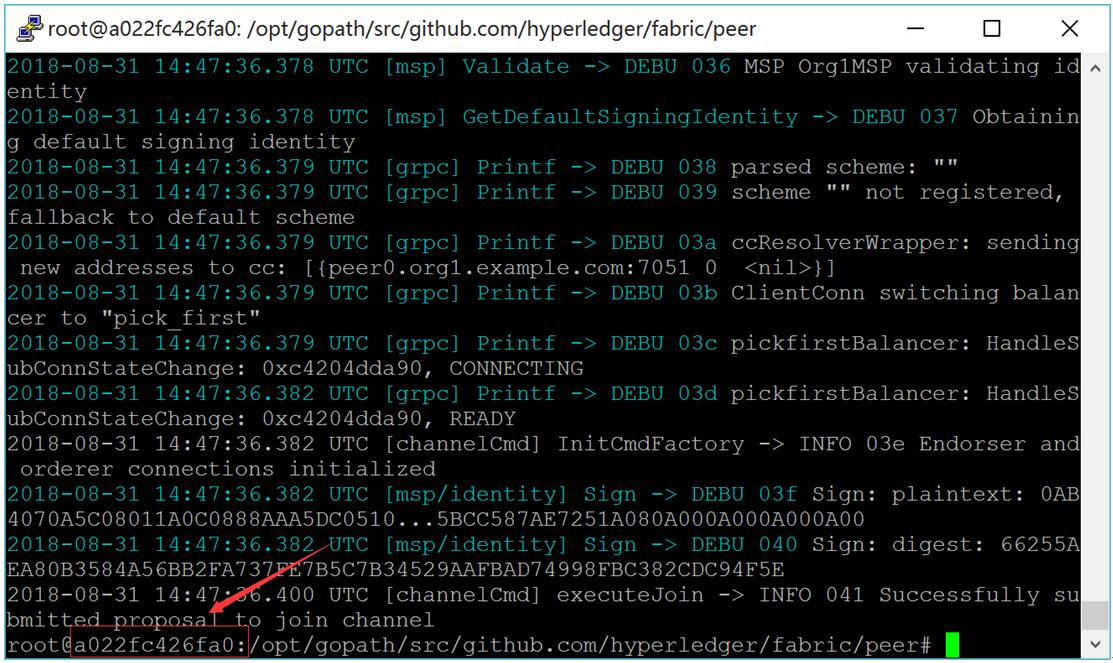
图:cli客户端
1# exit
2# docker cp xxxxxxxx:/opt/gopath/src/github.com/hyperledger/fabric/peer/mychannel.block /opt/gopath/src/github.com/hyperledger/fabric/kafkapeer
5) mychannel.block拷贝到其它电脑
1# scp mychannel.block root@192.168.235.8:/opt/gopath/src/github.com/hyperledger/fabric/kafkapeer
2# scp mychannel.block root@192.168.235.9:/opt/gopath/src/github.com/hyperledger/fabric/kafkapeer
3# scp mychannel.block root@192.168.235.10:/opt/gopath/src/github.com/hyperledger/fabric/kafkapeer
3. 安装与运行智能合约
1) 安装智能合约
1# docker exec -it cli bash
2# peer chaincode install -n mycc -p github.com/hyperledger/fabric/kafkapeer/chaincode/go/example02/cmd/ -v 1.0
2) 实例化智能合约
区块初始化数据为a为200,b为400。
1# ORDERER_CA=/opt/gopath/src/github.com/hyperledger/fabric/peer/crypto/ordererOrganizations/example.com/orderers/orderer0.example.com/msp/tlscacerts/tlsca.example.com-cert.pem
2# peer chaincode instantiate -o orderer0.example.com:7050 --tls --cafile $ORDERER_CA -C mychannel -n mycc -v 1.0 -c '{"Args":["init","a","200","b","400"]}' -P "OR ('Org1MSP.peer','Org2MSP.peer')"
3) Peer上查询a,显示200
# peer chaincode query -C mychannel -n mycc -c '{"Args":["query","a"]}'
查询a成功结果如下图所示:
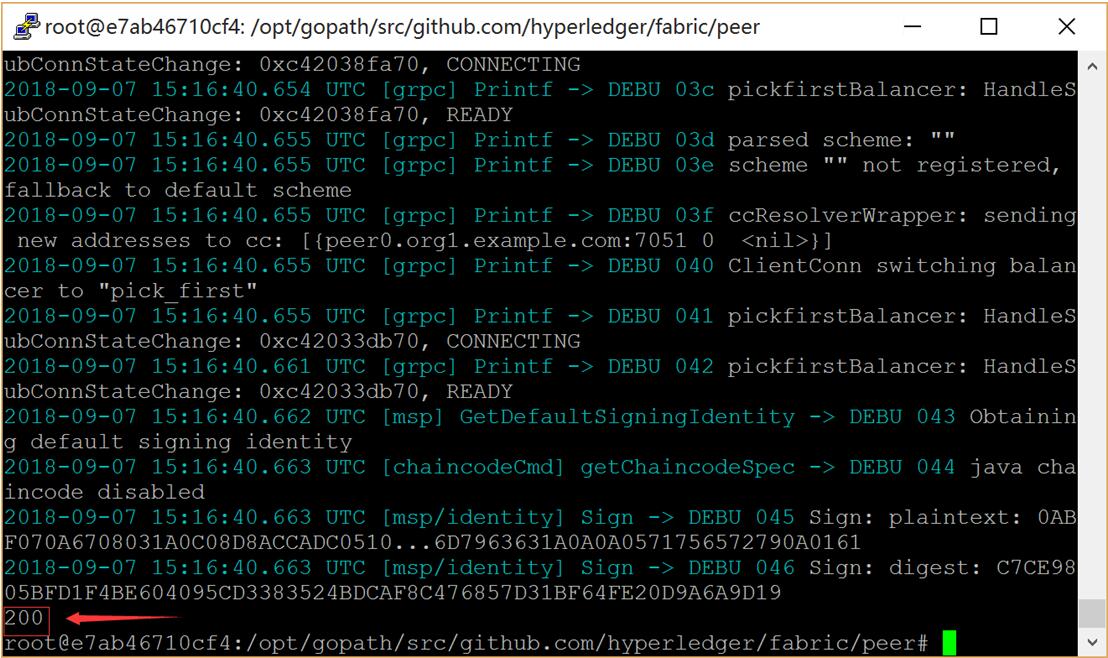
图:查询a成功结果
11.5.2 服务器(192.168.235.8)运行
1 准备部署智能合约
拷贝examples/chaincode/go/example02目录下的文件到kafkapeer/chaincode/go/example02目录下。
2 启动Fabric网络
-
启动peer
cd $GOPATH/src/github.com/hyperledger/fabric/kafkapeer
docker-compose -f docker-compose-peer.yaml up -d
-
启动cli容器
docker exec -it cli bash
-
拷贝mychannel.block到peer中
命令的xxxxxxxx替换为图中红框中的字符。
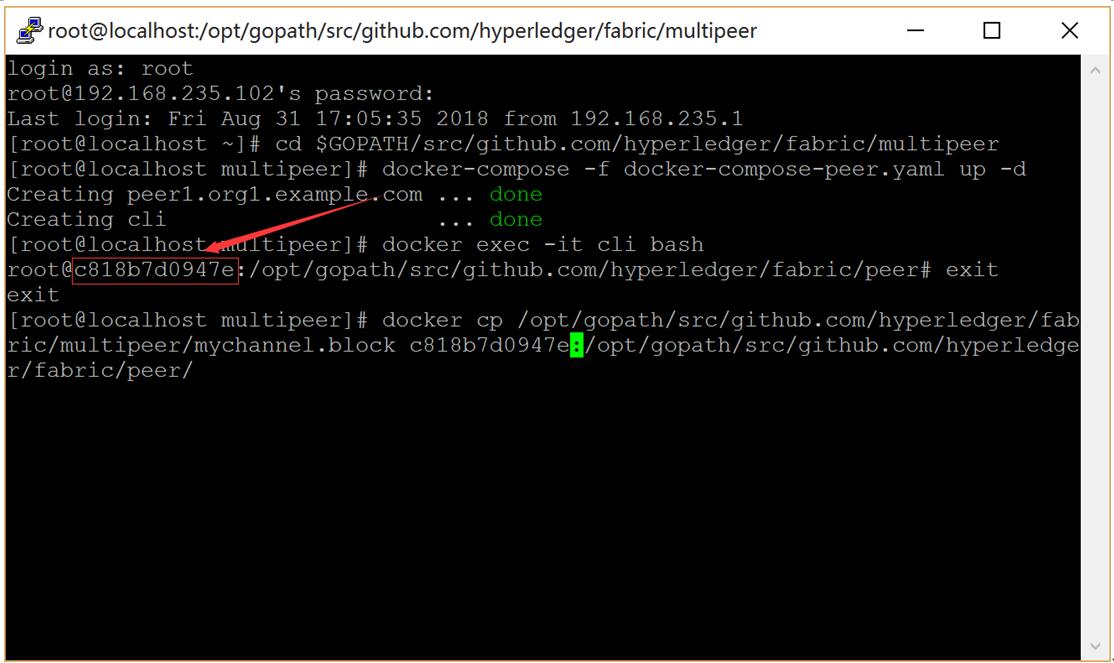
图:cli客户端
1# exit
2# docker cp /opt/gopath/src/github.com/hyperledger/fabric/kafkapeer/mychannel.block xxxxxxxx:/opt/gopath/src/github.com/hyperledger/fabric/peer/
4) Peer加入Channel
1# docker exec -it cli bash
2# peer channel join -b mychannel.block
3 安装与运行智能合约
1) 安装智能合约
# peer chaincode install -n mycc -p github.com/hyperledger/fabric/kafkapeer/chaincode/go/example02/cmd/ -v 1.0
2) Peer上进行a向b转20交易
1# ORDERER_CA=/opt/gopath/src/github.com/hyperledger/fabric/peer/crypto/ordererOrganizations/example.com/orderers/orderer0.example.com/msp/tlscacerts/tlsca.example.com-cert.pem
2# peer chaincode invoke --tls --cafile $ORDERER_CA -C mychannel -n mycc -c '{"Args":["invoke","a","b","20"]}'
交易成功结果如下图所示:
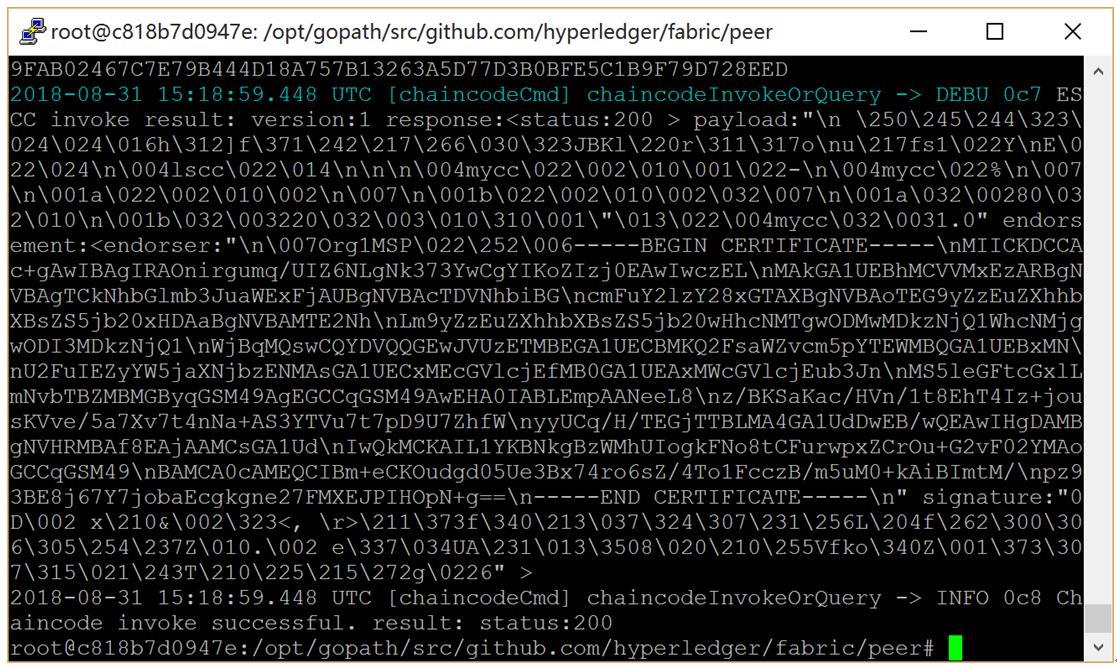
图:交易成功结果
11.5.3 服务器(192.168.235.9)运行
1 准备部署智能合约
拷贝examples/chaincode/go/example02目录下的文件到kafkapeer/chaincode/go/example02目录下。
2 启动Fabric网络
-
启动peer
cd $GOPATH/src/github.com/hyperledger/fabric/kafkapeer
docker-compose -f docker-compose-peer.yaml up -d
-
启动cli容器
docker exec -it cli bash
-
拷贝mychannel.block到peer中
命令的xxxxxxxx替换为图中红框中的字符。
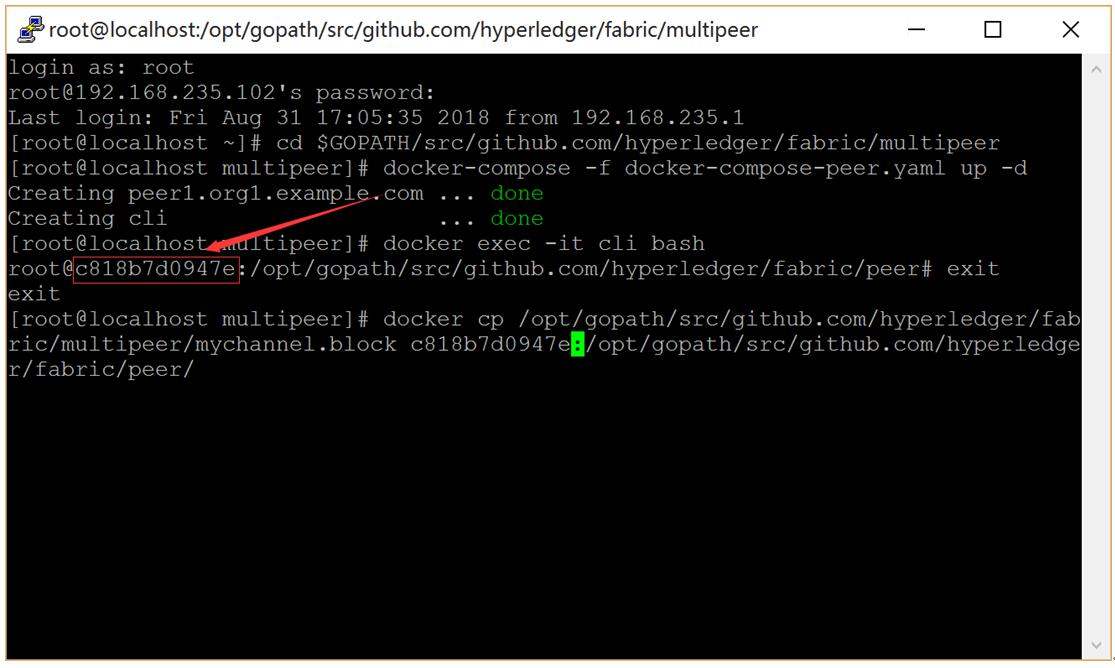
图:cli客户端
1# exit
2# docker cp /opt/gopath/src/github.com/hyperledger/fabric/kafkapeer/mychannel.block xxxxxxxx:/opt/gopath/src/github.com/hyperledger/fabric/peer/
4) Peer加入Channel
1# docker exec -it cli bash
2# peer channel join -b mychannel.block
3 安装与运行智能合约
1) 安装智能合约
# peer chaincode install -n mycc -p github.com/hyperledger/fabric/kafkapeer/chaincode/go/example02/cmd/ -v 1.0
2) Peer上查询a,显示180
# peer chaincode query -C mychannel -n mycc -c '{"Args":["query","a"]}'
查询a成功结果如下图所示:
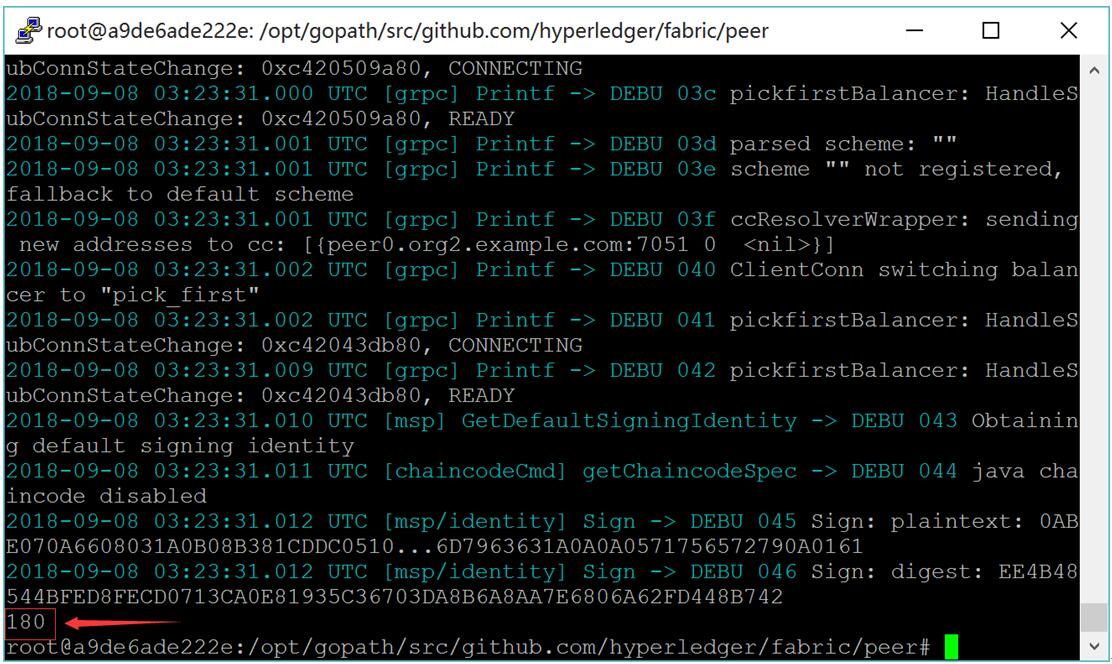
图:查询a成功结果
3) Peer上进行a向b转50交易
1# ORDERER_CA=/opt/gopath/src/github.com/hyperledger/fabric/peer/crypto/ordererOrganizations/example.com/orderers/orderer0.example.com/msp/tlscacerts/tlsca.example.com-cert.pem
2# peer chaincode invoke --tls --cafile $ORDERER_CA -C mychannel -n mycc -c '{"Args":["invoke","a","b","50"]}'
交易成功结果如下图所示:
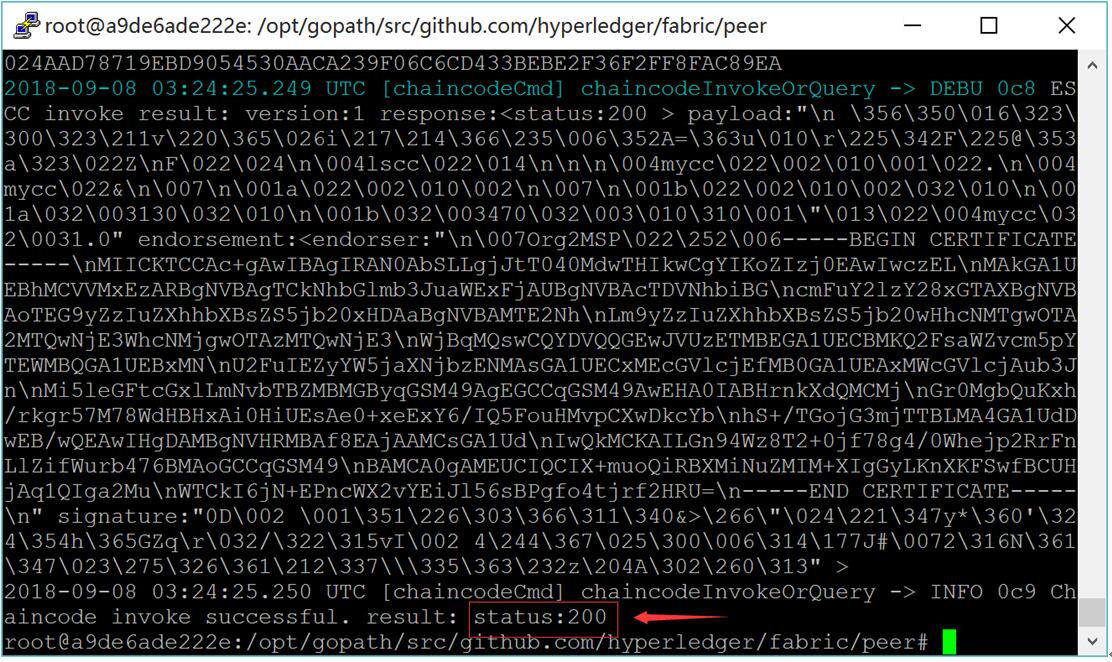
图:交易成功结果
11.5.4 服务器(192.168.235.10)运行
1 准备部署智能合约
拷贝examples/chaincode/go/example02目录下的文件到kafkapeer/chaincode/go/example02目录下。
2 启动Fabric网络
-
启动peer
cd $GOPATH/src/github.com/hyperledger/fabric/kafkapeer
docker-compose -f docker-compose-peer.yaml up -d
-
启动cli容器
docker exec -it cli bash
-
拷贝mychannel.block到peer中
命令的xxxxxxxx替换为图中红框中的字符。
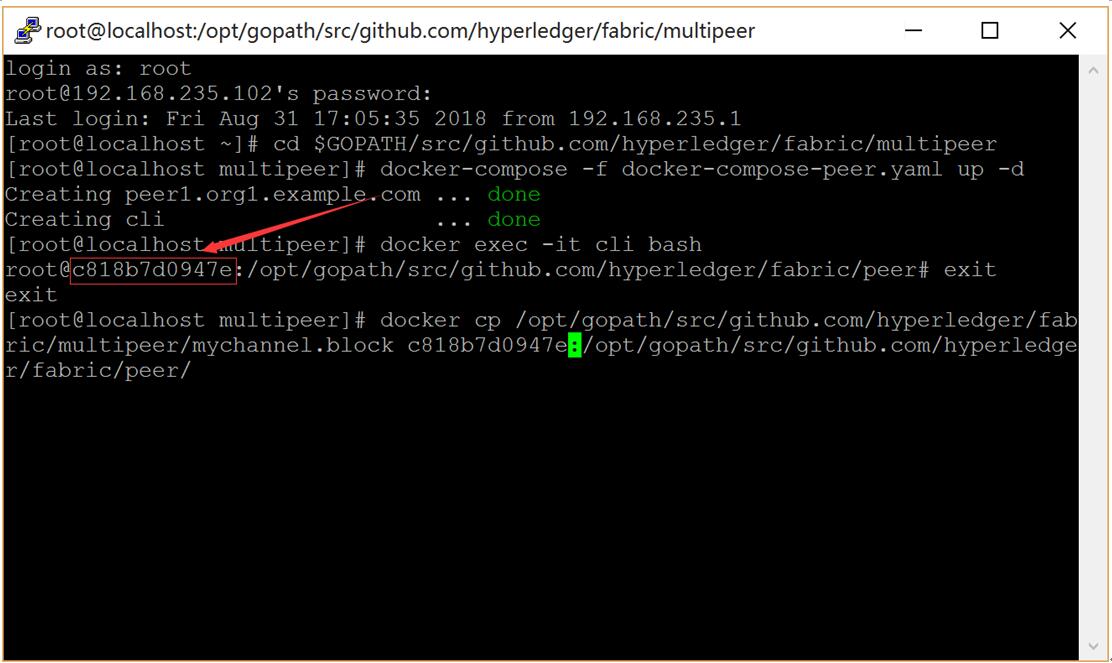
图:cli客户端
1# exit
2# docker cp /opt/gopath/src/github.com/hyperledger/fabric/kafkapeer/mychannel.block xxxxxxxx:/opt/gopath/src/github.com/hyperledger/fabric/peer/
4) Peer加入Channel
1# docker exec -it cli bash
2# peer channel join -b mychannel.block
3 安装与运行智能合约
1) 安装智能合约
# peer chaincode install -n mycc -p github.com/hyperledger/fabric/kafkapeer/chaincode/go/example02/cmd/ -v 1.0
2) Peer上查询a,显示130
# peer chaincode query -C mychannel -n mycc -c '{"Args":["query","a"]}'
查询a成功结果如下图所示:
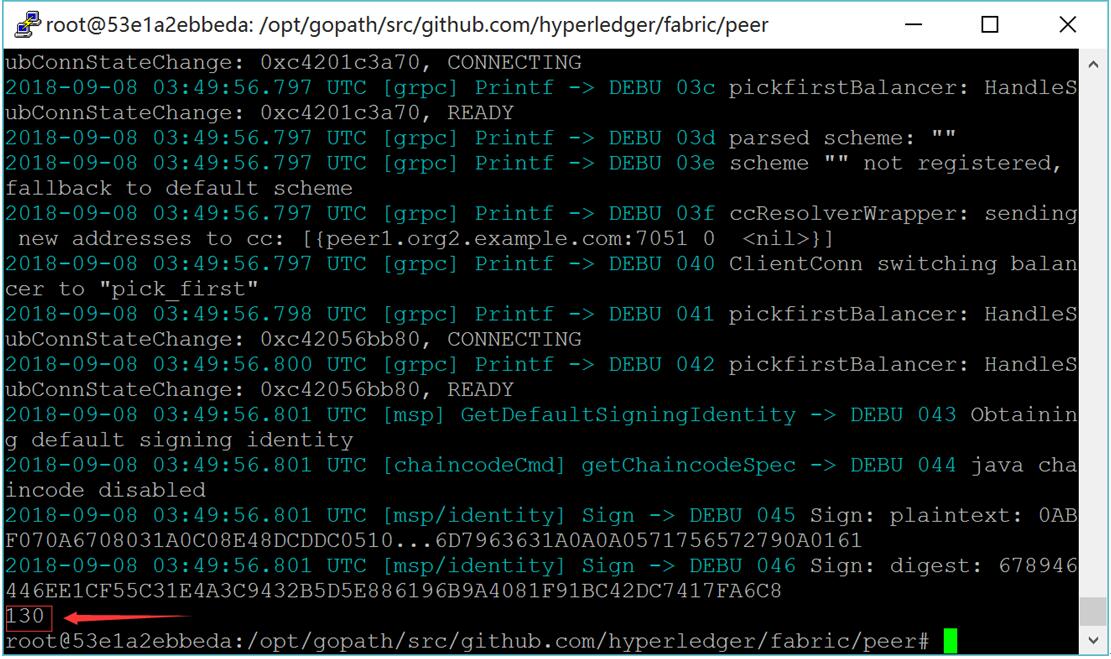
图:查询a成功结果
3) Peer上查询b,显示470
# peer chaincode query -C mychannel -n mycc -c '{"Args":["query","b"]}'
查询b成功结果如下图所示:
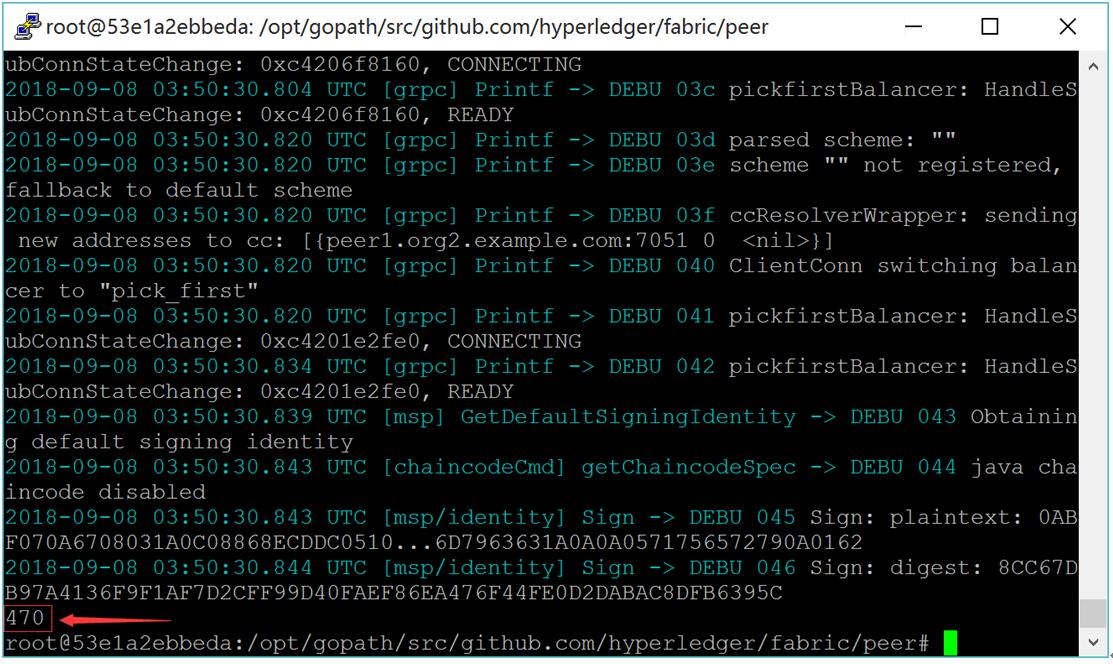
图:查询b成功结果
multipeer