
我并不这么看。
友情提醒:本文建议在PC端阅读。
徐春阳老师发文爆MySQL 8.0 hash join有重大缺陷。
文章核心观点如下:多表(比如3个个表)join时,只会简单的把表数据量小的放在前面作为驱动表,大表放在最后面,从而导致可能产生极大结果集的笛卡尔积,甚至耗尽CPU和磁盘空间。
就此现象,我也做了个测试。
1. 利用TPC-H工具准备测试环境
TPC-H工具在这里下载 http://www.tpc.org/tpch/default5.asp。默认并不支持MySQL,需要自己手动做些调整,参见 https://imysql.com/2012/12/21/tpch-for-mysql-manual.html。
在本案中,我指定的 Scale Factor 参数是10,即:
1[root@yejr.run dbgen]# ./dbgen -s 10 && ls -l *tbl
2-rw-r--r-- 1 root root  244847642 Apr 14 09:52 customer.tbl
3-rw-r--r-- 1 root root 7775727688 Apr 14 09:52 lineitem.tbl
4-rw-r--r-- 1 root root       2224 Apr 14 09:52 nation.tbl
5-rw-r--r-- 1 root root 1749195031 Apr 14 09:52 orders.tbl
6-rw-r--r-- 1 root root  243336157 Apr 14 09:52 part.tbl
7-rw-r--r-- 1 root root 1204850769 Apr 14 09:52 partsupp.tbl
8-rw-r--r-- 1 root root        389 Apr 14 09:52 region.tbl
9-rw-r--r-- 1 root root   14176368 Apr 14 09:52 supplier.tbl
2. 创建测试表,导入测试数据。
查看几个表的数据量分别是:
1+----------+------------+----------+----------------+-------------+--------------+
2| Name     | Row_format | Rows     | Avg_row_length | Data_length | Index_length |
3+----------+------------+----------+----------------+-------------+--------------+
4| customer | Dynamic    |  1476605 |            197 |   291258368 |            0 |
5| lineitem | Dynamic    | 59431418 |            152 |  9035579392 |            0 |
6| nation   | Dynamic    |       25 |            655 |       16384 |            0 |
7| orders   | Dynamic    | 14442405 |            137 |  1992294400 |            0 |
8| part     | Dynamic    |  1980917 |            165 |   327991296 |            0 |
9| partsupp | Dynamic    |  9464104 |            199 |  1885339648 |            0 |
10| region   | Dynamic    |        5 |           3276 |       16384 |            0 |
11| supplier | Dynamic    |    99517 |            184 |    18366464 |            0 |
12+----------+------------+----------+----------------+-------------+--------------+
提醒:几个测试表都不要加任何索引,包括主键,上表中 Index_length 的值均为0。
3. 运行测试SQL
本案选用的MySQL版本是8.0.19:
1[root@yejr.run]> \s
2...
3Server version:         8.0.19-commercial MySQL Enterprise Server - Commercial
4...
徐老师是在用TPC-H中的Q5时遇到的问题,本案也同样选择这个SQL。
不过,本案主要测试Hash Join,因此去掉了其中的GROUP BY和ORDER BY子句。
先看下执行计划吧,都是全表扫描,好可怕...
1[root@yejr.run]> desc select count(*)
2-> from
3->     customer,
4->     orders,
5->     lineitem,
6->     supplier,
7->     nation,
8->     region
9-> where
10->     c_custkey = o_custkey
11->     and l_orderkey = o_orderkey
12->     and l_suppkey = s_suppkey
13->     and c_nationkey = s_nationkey
14->     and s_nationkey = n_nationkey
15->     and n_regionkey = r_regionkey
16->     and r_name = 'AMERICA'
17->     and o_orderdate >= date '1993-01-01'
18->     and o_orderdate < date '1993-01-01' + interval '1' year;
19+----------+------+----------+----------+----------------------------------------------------+
20| table    | type | rows     | filtered | Extra                                              |
21+----------+------+----------+----------+----------------------------------------------------+
22| region   | ALL  |        5 |    20.00 | Using where                                        |
23| nation   | ALL  |       25 |    10.00 | Using where; Using join buffer (Block Nested Loop) |
24| supplier | ALL  |    98705 |    10.00 | Using where; Using join buffer (Block Nested Loop) |
25| customer | ALL  |  1485216 |    10.00 | Using where; Using join buffer (Block Nested Loop) |
26| orders   | ALL  | 14932433 |     1.11 | Using where; Using join buffer (Block Nested Loop) |
27| lineitem | ALL  | 59386314 |     1.00 | Using where; Using join buffer (Block Nested Loop) |
28+----------+------+----------+----------+----------------------------------------------------+
加上 format=tree 再看下(真壮观啊。。。)
1*************************** 1. row ***************************
2EXPLAIN: -> Aggregate: count(0)
3-> Inner hash join (lineitem.L_SUPPKEY = supplier.S_SUPPKEY), (lineitem.L_ORDERKEY = orders.O_ORDERKEY)  (cost=40107736685515472896.00 rows=4010763818487343104)
4    -> Table scan on lineitem  (cost=0.07 rows=59386314)
5    -> Hash
6        -> Inner hash join (orders.O_CUSTKEY = customer.C_CUSTKEY)  (cost=60799566599072.12 rows=6753683238538)
7            -> Filter: ((orders.O_ORDERDATE >= DATE'1993-01-01') and (orders.O_ORDERDATE < <cache>((DATE'1993-01-01' + interval '1' year))))  (cost=0.16 rows=165883)
8                -> Table scan on orders  (cost=0.16 rows=14932433)
9            -> Hash
10                -> Inner hash join (customer.C_NATIONKEY = nation.N_NATIONKEY)  (cost=3664985889.79 rows=3664956624)
11                    -> Table scan on customer  (cost=0.79 rows=1485216)
12                    -> Hash
13                        -> Inner hash join (supplier.S_NATIONKEY = nation.N_NATIONKEY)  (cost=24976.50 rows=24676)
14                            -> Table scan on supplier  (cost=513.52 rows=98705)
15                            -> Hash
16                                -> Inner hash join (nation.N_REGIONKEY = region.R_REGIONKEY)  (cost=3.50 rows=3)
17                                    -> Table scan on nation  (cost=0.50 rows=25)
18                                    -> Hash
19                                        -> Filter: (region.R_NAME = 'AMERICA')  (cost=0.75 rows=1)
20                                            -> Table scan on region  (cost=0.75 rows=5)
看起来的确是把最小的表放在最前面,把最大的放在最后面。
在开始跑之前,我们先看一眼手册中关于Hash Join的描述,其中有一段是这样的:
1Memory usage by hash joins can be controlled using the join_buffer_size
2system variable; a hash join cannot use more memory than this amount.
3When the memory required for a hash join exceeds the amount available,
4MySQL handles this by using files on disk. If thishappens, you should
5be aware that the join may not succeed if a hash join cannot fit into
6memory and it creates more files than set for open_files_limit. To avoid
7such problems, make either of the following changes:
8
9- Increase join_buffer_size so that the hash join does not spill over to disk.
10- Increase open_files_limit.
简言之,当 join_buffer_size 不够时,会在hash join的过程中转储大量的磁盘表(把一个hash表切分成多个小文件放在磁盘上,再逐个读入内存进行hash join),因此建议加大 join_buffer_size,或者加大 open_files_limit 上限。
所以,正式开跑前,我先把join_buffer_size调大到1GB,并顺便看下其他几个参数值:
1[root@yejr.run]> select @@join_buffer_size,  @@tmp_table_size,  @@innodb_buffer_pool_size;
2+--------------------+------------------+---------------------------+
3| @@join_buffer_size | @@tmp_table_size | @@innodb_buffer_pool_size |
4+--------------------+------------------+---------------------------+
5|         1073741824 |         16777216 |               10737418240 |
6+--------------------+------------------+---------------------------+
并且为了保险起见,在执行SQL时也用 SET_VAR(8.0新特性) 设置了 join_bufer_size,走起。
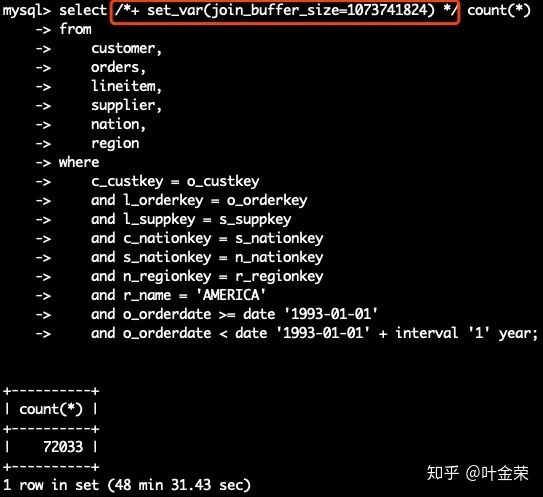
好在最后这个SQL有惊无险的执行成功,总耗时2911秒。
# Query_time: 2911.426483 Lock_time: 0.000251 Rows_sent: 1 Rows_examined: 76586082
当然了,这个SQL执行过程中的代价也确实非常大,产生了大量的磁盘(不可见)临时文件。
我每隔几秒钟就统计一次所有临时文件的总大小,并且观察磁盘空间剩余量。
/data 分区最开始可用空间是 373GB,这条SQL在峰值吃掉了约170GB,着实可怕。
1# 刚开始
2/dev/vdb       524032000 132967368 391064632  26% /data
3
4# 峰值时
5/dev/vdb       524032000 319732288 204299712  62% /data
CPU的负载从监控上看倒是还算能接受,最高约38.4%
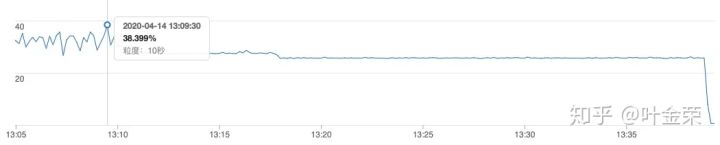
4. 补充测试
上面的测试中,优化器"擅自"修改了驱动顺序,那加上straight_join看看会怎样
1[root@yejr.run]> EXPLAIN STRAIGHT_JOIN select count(*)
2from
3    customer straight_join
4    orders  straight_join
5    lineitem  straight_join
6    supplier  straight_join
7    nation  straight_join
8    region
9where
10    c_custkey = o_custkey
11    and l_orderkey = o_orderkey
12    and l_suppkey = s_suppkey
13    and c_nationkey = s_nationkey
14    and s_nationkey = n_nationkey
15    and n_regionkey = r_regionkey
16    and r_name = 'AMERICA'
17    and o_orderdate >= date '1993-01-01'
18    and o_orderdate < date '1993-01-01' + interval '1' year;
19+----------+----------+----------+----------------------------------------------------+
20| table    | rows     | filtered | Extra                                              |
21+----------+----------+----------+----------------------------------------------------+
22| customer |  1485216 |   100.00 | NULL                                               |
23| orders   | 14932433 |     1.11 | Using where; Using join buffer (Block Nested Loop) |
24| lineitem | 59386314 |    10.00 | Using where; Using join buffer (Block Nested Loop) |
25| supplier |    98705 |     1.00 | Using where; Using join buffer (Block Nested Loop) |
26| nation   |       25 |    10.00 | Using where; Using join buffer (Block Nested Loop) |
27| region   |        5 |    20.00 | Using where; Using join buffer (Block Nested Loop) |
28+----------+----------+----------+----------------------------------------------------+
29
30#format=tree模式下
31| -> Aggregate: count(0)
32    -> Inner hash join (region.R_REGIONKEY = nation.N_REGIONKEY)  (cost=204565289351994015744.00 rows=8021527039324357632)
33        -> Filter: (region.R_NAME = 'AMERICA')  (cost=0.00 rows=1)
34            -> Table scan on region  (cost=0.00 rows=5)
35        -> Hash
36            -> Inner hash join (nation.N_NATIONKEY = customer.C_NATIONKEY)  (cost=200554431911464173568.00 rows=-9223372036854775808)
37                -> Table scan on nation  (cost=0.00 rows=25)
38                -> Hash
39                    -> Inner hash join (supplier.S_NATIONKEY = customer.C_NATIONKEY), (supplier.S_SUPPKEY = lineitem.L_SUPPKEY)  (cost=160446786739199049728.00 rows=-9223372036854775808)
40                        -> Table scan on supplier  (cost=0.00 rows=98705)
41                        -> Hash
42                            -> Inner hash join (lineitem.L_ORDERKEY = orders.O_ORDERKEY)  (cost=16253562153466286.00 rows=16253535510797654)
43                                -> Table scan on lineitem  (cost=0.01 rows=59386314)
44                                -> Hash
45                                    -> Inner hash join (orders.O_CUSTKEY = customer.C_CUSTKEY)  (cost=24638698342.46 rows=2736915995)
46                                        -> Filter: ((orders.O_ORDERDATE >= DATE'1993-01-01') and (orders.O_ORDERDATE < <cache>((DATE'1993-01-01' + interval '1' year))))  (cost=0.94 rows=165883)
47                                            -> Table scan on orders  (cost=0.94 rows=14932433)
48                                        -> Hash
49                                            -> Table scan on customer  (cost=153126.35 rows=1485216)
最后实际执行耗时
1[root@yejr.run]> mysql> select /*+ set_var(join_buffer_size=1073741824) */
2 STRAIGHT_JOIN count(*)
3...
4+----------+
5| count(*) |
6+----------+
7|    72033 |
8+----------+
91 row in set (4 min 12.31 sec)
这个SQL执行过程中,只产生了很少几个临时文件,影响几乎可以忽略不计的那种。
这次之所以会比较快,是因为 orders 表在第二顺序执行,对它还附加了WHERE条件,过滤后数据量变小了(全表1500万,过滤后227万),因此整体执行时间缩短了。
靠着 straight_join 拯救了危机。
此外,在测试的过程中,我还做过一次只有3个表的全表join,下面是执行计划
1[root@yejr.run]> desc select count(*) from orders o , lineitem l, partsupp ps where
2o.O_CUSTKEY = l.L_SUPPKEY and l.L_PARTKEY = ps.PS_AVAILQTY;
3+-------+----------+----------+----------------------------------------------------+
4| table | rows     | filtered | Extra                                              |
5+-------+----------+----------+----------------------------------------------------+
6| ps    |  7697248 |   100.00 | NULL                                               |
7| l     | 59386314 |    10.00 | Using where; Using join buffer (Block Nested Loop) |
8| o     | 14932433 |    10.00 | Using where; Using join buffer (Block Nested Loop) |
9+-------+----------+----------+----------------------------------------------------+
在这个执行计划中,就不会出现徐老师说的问题,不再简单的把最小的表作为驱动表,最大的表放在最后面。
这条SQL耗时304秒,还好吧。
# Query_time: 304.889654 Lock_time: 0.000178 Rows_sent: 1 Rows_examined: 82986052
写在最后
在前几天我的文章《MySQL没前途了吗?》中,其实已经说了MySQL目前不适合做OLAP业务,即便有Hash Join也不行,毕竟其适用的场景很有限。
本案中几个表完全没任何索引,这属于很极端的场景,不应该允许此类现象发生。
另外,在已经明确需要走Hash Join的情况下,就应该人为干预,提前加大join_buffer_size,减少执行过程中生成的临时文件。
当然了,如果遇到多表JOIN不符合预期时,还可以用STRAIGHT_JOIN强制设定驱动顺序,也可以规避这个问题。
不过,MySQL在偏OLAP场景上的性能的确还有很大提升空间,对此我持谨慎乐观态度,比如把ClickHouse给直接收编了呢 :)
对于本文,我心里不是很有底气,毕竟不是啥源码大神,如果理解上的错误,还请留言指正,不吝感激。
SQL优化大神郑松华对本文亦有贡献,谢谢二位老师。
全文完。
由我主讲的知数堂「MySQL优化课」第17期已发车,我们的课程从第15期就升级成MySQL 8.0版本了,现在上车刚刚好,一起开启MySQL 8.0的修行之旅吧
另外,叶老师在腾讯课堂《MySQL性能优化》精编版第一期已完结,本课程讲解读几个MySQL性能优化的核心要素:合理利用索引,降低锁影响,提高事务并发度。
下面是自动拼团的链接,组团价仅需78元
https://ke.qq.com/course/479779?from=800004099&tuin=47bb23#term_id=100575214