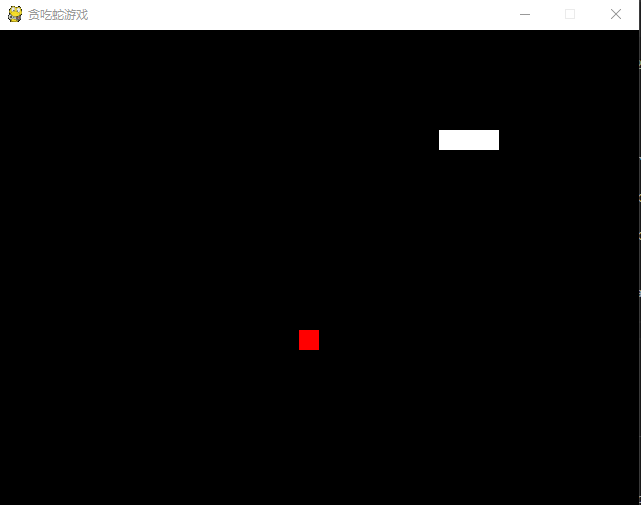
1.游戏介绍
这款游戏通过上下左右键来引导贪吃蛇吃到食物从而贪吃蛇越变越长,当贪吃蛇碰到窗口的四壁是贪吃蛇撞死从而游戏结束。
2. 开发工具
Visual Studio Code
3.部分代码介绍
导入模块
1import pygame,sys,time,random
2from pygame.locals import *
设置窗口
1pygame.init()
2fpsClock = pygame.time.Clock()
3playSurface = pygame.display.set_mode((640,480))
4pygame.display.set_caption('贪吃蛇游戏')
定义颜色
1redColour = pygame.Color(255,0,0)
2blackColour = pygame.Color(0,0,0)
3whiteColour = pygame.Color(255,255,255)
4greyColour = pygame.Color(150,150,150)
初始化变量
1snakePosition = [100, 100]
2snakeSegments = [[100, 100], [80, 100], [60, 100]]
3raspberryPosition = [300, 300] #位置
4raspberrySpawned = 1   #是否吃到树莓
5direction = 'right'
6changeDirection = direction
游戏结束方法
1def gameOver():
2    gameOverFont = pygame.font.Font('simfang.ttf',72)
3    gameOverSurf = gameOverFont.render('Game Over', True, greyColour)
4    gameOverRect = gameOverSurf.get_rect()
5    gameOverRect.midtop = (320, 10)
6    playSurface.blit(gameOverSurf, gameOverRect)
7    pygame.display.flip()
8    time.sleep(5)
9    pygame.quit()
10    sys.exit()
贪吃蛇移动
1while True:
2    for event in pygame.event.get():
3        if event.type == QUIT:
4            pygame.quit()
5            sys.exit()
6        elif event.type == KEYDOWN:
7
8           if event.key == K_RIGHT or event.key == ord('d'):
9              changeDirection = 'right'
10           if event.key == K_LEFT or event.key == ord('a'):
11              changeDirection = 'left'
12           if event.key == K_UP or event.key == ord('w'):
13              changeDirection = 'up'
14           if event.key == K_DOWN or event.key == ord('s'):
15              changeDirection = 'down'
16           if event.key == K_ESCAPE:
17              pygame.event.post(pygame.event.Event(QUIT))
18    if changeDirection == 'right' and not direction == 'left':
19        direction = changeDirection
20    if changeDirection == 'left' and not direction == 'right':
21        direction = changeDirection
22    if changeDirection == 'up' and not direction == 'down':
23        direction = changeDirection
24    if changeDirection == 'down' and not direction == 'up':
25        direction = changeDirection
26        # 根据方向移动蛇头的坐标
27    if direction == 'right':
28           snakePosition[0] += 20
29    if direction == 'left':
30            snakePosition[0] -= 20
31    if direction == 'up':
32            snakePosition[1] -= 20
33    if direction == 'down':
34            snakePosition[1] += 20
4.参考代码
1import pygame,sys,time,random
2from pygame.locals import *
3pygame.init()
4fpsClock = pygame.time.Clock()
5playSurface = pygame.display.set_mode((640,480))
6pygame.display.set_caption('贪吃蛇游戏')
7
8redColour = pygame.Color(255,0,0)
9blackColour = pygame.Color(0,0,0)
10whiteColour = pygame.Color(255,255,255)
11greyColour = pygame.Color(150,150,150)
12
13snakePosition = [100, 100]
14snakeSegments = [[100, 100], [80, 100], [60, 100]]
15raspberryPosition = [300, 300] #位置
16raspberrySpawned = 1   #是否吃到树莓
17direction = 'right'
18changeDirection = direction
19
20def gameOver():
21    gameOverFont = pygame.font.Font('simfang.ttf',72)
22    gameOverSurf = gameOverFont.render('Game Over', True, greyColour)
23    gameOverRect = gameOverSurf.get_rect()
24    gameOverRect.midtop = (320, 10)
25    playSurface.blit(gameOverSurf, gameOverRect)
26    pygame.display.flip()
27    time.sleep(5)
28    pygame.quit()
29    sys.exit()
30while True:
31    for event in pygame.event.get():
32        if event.type == QUIT:
33            pygame.quit()
34            sys.exit()
35        elif event.type == KEYDOWN:
36
37           if event.key == K_RIGHT or event.key == ord('d'):
38              changeDirection = 'right'
39           if event.key == K_LEFT or event.key == ord('a'):
40              changeDirection = 'left'
41           if event.key == K_UP or event.key == ord('w'):
42              changeDirection = 'up'
43           if event.key == K_DOWN or event.key == ord('s'):
44              changeDirection = 'down'
45           if event.key == K_ESCAPE:
46              pygame.event.post(pygame.event.Event(QUIT))
47    if changeDirection == 'right' and not direction == 'left':
48        direction = changeDirection
49    if changeDirection == 'left' and not direction == 'right':
50        direction = changeDirection
51    if changeDirection == 'up' and not direction == 'down':
52        direction = changeDirection
53    if changeDirection == 'down' and not direction == 'up':
54        direction = changeDirection
55
56    if direction == 'right':
57           snakePosition[0] += 20
58    if direction == 'left':
59            snakePosition[0] -= 20
60    if direction == 'up':
61            snakePosition[1] -= 20
62    if direction == 'down':
63            snakePosition[1] += 20
64
65    snakeSegments.insert(0, list(snakePosition))
66
67    if snakePosition[0] == raspberryPosition[0] and snakePosition[1] ==raspberryPosition[1]:
68       raspberrySpawned = 0
69    else:
70        snakeSegments.pop()
71
72    if raspberrySpawned == 0:
73        x = random.randrange(1,32)
74        y = random.randrange(1, 24)
75        raspberryPosition = [int(x * 20), int(y * 20)]
76    raspberrySpawned = 1
77    playSurface.fill(blackColour)
78    for position in snakeSegments:
79        pygame.draw.rect(playSurface, whiteColour, Rect(position[0], position[1], 20, 20))
80    pygame.draw.rect(playSurface, redColour, Rect(raspberryPosition[0], raspberryPosition[1], 20, 20))
81    pygame.display.flip()
82    if snakePosition[0] > 620 or snakePosition[0] < 0:
83        gameOver()
84    if snakePosition[1] > 460 or snakePosition[1] < 0:
85        gameOver()
86    for snakeBody in snakeSegments[1:]:
87        if snakePosition[0] == snakeBody[0] and snakePosition[1] == snakeBody[1]:
88            gameOver()
89    fpsClock.tick(10)
5.结果展示