
引言
首先出这篇文章,一方面是为了记录巩固我所学的知识,明白面试的高频考点。不鼓励大家背题的,初衷是希望总结的一些面试题能帮助你查漏补缺,温故知新。这些题并不是全部,如果你还想看得更多,可以访问GitHub仓库,目前已经有552道大厂真题了,涵盖各类前端的真题,欢迎加入我们一起来讨论~
函数
call
- 语法:fn.call(obj,...args)
- 功能:执行fn,使this为obj,并将后面的n个参数传给fn
1Function.prototype.myCall = function (obj, ...args) {
2  if (obj == undefined || obj == null) {
3    obj = globalThis
4  }
5  obj.fn = this
6  let res = obj.fn(...args)
7  delete obj.fn
8  return res
9}
10value = 2
11
12let foo = {
13  value: 1,
14}
15
16let bar = function (name, age) {
17  console.log(name, age, this.value)
18}
19
20bar.myCall(foo, 'HearLing', 18) //HearLing 18 1
21bar.myCall(null, 'HearLing', 18) //HearLing 18 2
apply
- 语法:fn.apply(obj,arr)
- 功能:执行fn,使this为obj,并arr数组中元素传给fn
1Function.prototype.myAplly = function (obj, arr) {
2  if (obj == undefined || obj == null) {
3    obj = globalThis
4  }
5  obj.fn = this
6  let res = obj.fn(...arr)
7  delete obj.fn
8  return res
9}
10value = 2
11
12let foo = {
13  value: 1,
14}
15
16let bar = function (name, age) {
17  console.log(name, age, this.value)
18}
19
20bar.myAplly(foo, ['HearLing', 18]) //HearLing 18 1
21bar.myAplly(null, ['HearLing', 18]) //HearLing 18 2
bind
- 语法:fn.bind(obj,...args)
- 功能:返回一个新函数,给fn绑定this为obj,并制定参数为后面的n个参数
1Function.prototype.myBind = function (obj, ...args) {
2  let that = this
3  let fn = function () {
4    if (this instanceof fn) {
5      return new that(...args)
6    } else {
7      return that.call(obj, ...args)
8    }
9  }
10  return fn
11}
12
13value = 2
14
15let foo = {
16  value: 1,
17}
18
19let bar = function (name, age) {
20  console.log(name, age, this.value)
21}
22let fn = bar.myBind(foo, 'HearLing', 18)
23//fn() //HearLing 18 1
24let a = new fn() //HearLing 18 undefined
25console.log(a.__proto__)//bar {}
区别call()/apply()/bind()
call(obj)/apply(obj)::调用函数, 指定函数中的this为第一个参数的值 bind(obj): 返回一个新的函数, 新函数内部会调用原来的函数, 且this为bind()指定的第一参数的值
节流
- 理解:在函数多次频繁触发时,函数执行一次后,只有大于设定的执行周期后才会执行第二次
- 场景:页面滚动(scroll)、DOM 元素的拖拽(mousemove)、抢购点击(click)、播放事件算进度信息
- 功能:节流函数在设置的delay毫秒内最多执行一次(简单点说就是,我上个锁,不管你点了多少下,时间到了我才解锁)
1function throttle(fn, delay) {
2  let flag = true
3  return (...args) => {
4    if (!flag) return
5    flag = false
6    setTimeout(() => {
7      fn.apply(this, args)
8      flag = true
9    }, delay)
10  }
11}
防抖
- 理解:在函数频繁触发是,在规定之间以内,只让最后一次生效
- 场景:搜索框实时联想(keyup/input)、按钮点击太快,多次请求(登录、发短信)、窗口调整(resize)
- 功能:防抖函数在被调用后,延迟delay毫秒后调用,没到delay时间,你又点了,清空计时器重新计时,直到真的等了delay这么多秒。
1function debounce(fn, delay) {
2  let timer = null
3  return (...args) => {
4    clearTimeout(timer)
5    timer = setTimeout(() => {
6      fn.apply(this, args)
7    }, delay)
8  }
9}
节流与防抖的区别
首先概念上的不同,解释一下什么是防抖节流;然后就是使用场景的不同; 经典区分图: 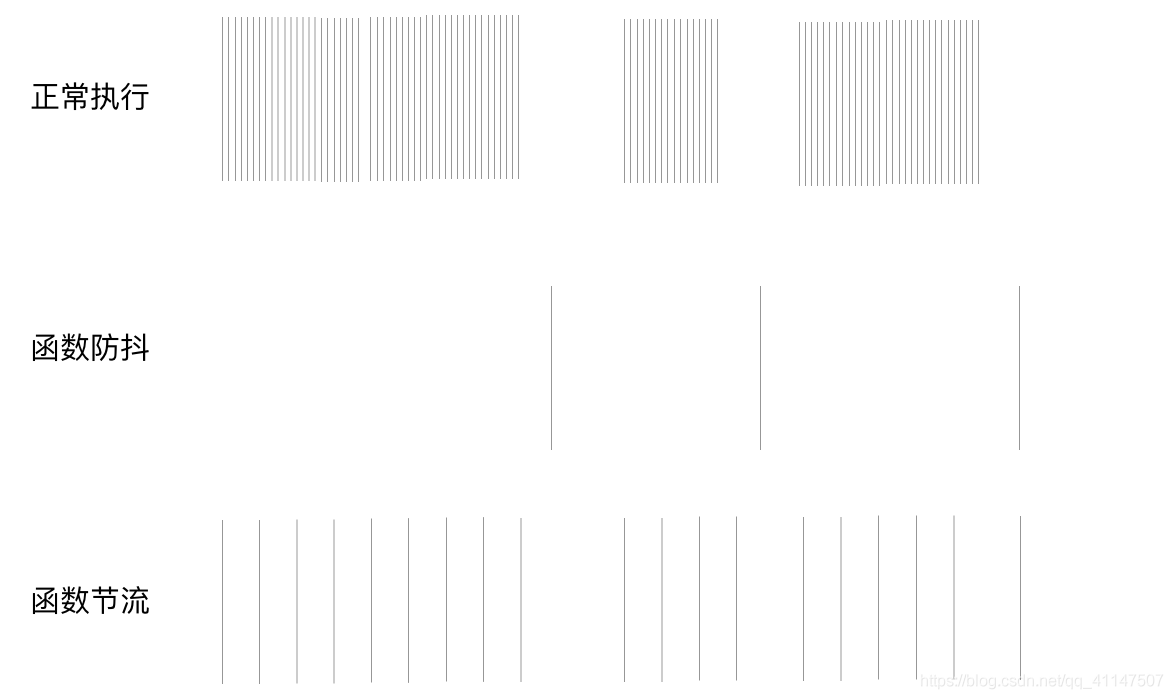
curry
1function mycurry(fn, beforeRoundArg = []) {
2  return function () {
3    let args = [...beforeRoundArg, ...arguments]
4    if (args.length < fn.length) {
5      return mycurry.call(this, fn, args)
6    } else {
7      return fn.apply(this, args)
8    }
9  }
10}
11
12function sum(a, b, c) {
13  return a + b + c
14}
15
16let sumFn = mycurry(sum)
17console.log(sumFn(1)(2)(3))//6
数组
数组去重
1function unique(arr) {
2  const res = []
3  const obj = {}
4  arr.foreach((item) => {
5    if (obj[item] === undefined) {
6      obj[item] = true
7      res.push(item)
8    }
9  })
10  return res
11}
12//其他方法
13//Array.from(new Set(array))
14//[...new Set(array)]
数组扁平化
1// 递归展开
2function flattern1(arr) {
3  let res = []
4  arr.foreach((item) => {
5    if (Array.isArray(item)) {
6      res.push(...flattern1(item))
7    } else {
8      res.push(item)
9    }
10  })
11  return res
12}
对象
new
1function newInstance (Fn, ...args) {
2  const obj = {}
3  obj.__proto__ = Fn.prototype
4  const result = Fn.call(obj, ...args)
5  // 如果Fn返回的是一个对象类型, 那返回的就不再是obj, 而是Fn返回的对象否则返回obj
6  return result instanceof Object ? result : obj
7}
instanceof
1function instance_of(left, right) {
2  let prototype = right.prototype
3  while (true) {
4    if (left === null) {
5      return false
6    } else if (left.__proto__ === prototype) {
7      return true
8    }
9    left = left.__proto__
10  }
11}
12let a = {}
13console.log(instance_of(a, Object))//true
对象数组拷贝
浅拷贝
1// 浅拷贝的方法
2//Object.assign(target,...arr)
3// [...arr]
4// Array.prototype.slice()
5// Array.prototype.concate()
6
7function cloneShallow(origin) {
8  let target = {}
9  for (let key in origin) {
10    if (origin.hasOwnProperty(key)) {
11      target[key] = origin[key]
12    }
13  }
14  return target
15}
16let obj = {
17  name: 'lala',
18  skill: {
19    js: 1,
20    css: 2,
21  },
22}
23let newobj = cloneShallow(obj)
24newobj.name = 'zhl'
25newobj.skill.js = 99
26console.log(obj)//{ name: 'lala', skill: { js: 99, css: 2 } }
27console.log(newobj)//{ name: 'zhl', skill: { js: 99, css: 2 } }
深拷贝
1// 浅拷贝的方法
2//JSON.parse(JSON.stringify(obj))
3function deepClone(source, hashMap = new WeakMap()) {
4  let target = new source.constructor()
5  if (source == undefined || typeof source !== 'object') return source
6  if (source instanceof Date) return source(Date)
7  if (source instanceof RegExp) return source(RegExp)
8  hashMap.set(target, source)//解决循环引用
9  for (let key in source) {
10    if (source.hasOwnProperty(key)) {
11      target[key] = deepClone(source[key], hashMap)
12    }
13  }
14  return target
15}
16
17let obj = {//应该考虑更复杂的数据
18  name: 'lala',
19  skill: {
20    js: 1,
21    css: 2,
22  },
23}
24
25let newobj = deepClone(obj)
26newobj.skill.js = 100
27console.log(obj)//{ name: 'lala', skill: { js: 1, css: 2 } }
28console.log(newobj)//{ name: 'lala', skill: { js: 99, css: 2 } }
最后的话
🚀🚀 更多基础知识总结可以⭐️关注我,后续会持续更新面试题总结~
⭐️⭐️ 最后祝各位正在准备秋招补招和春招的小伙伴面试顺利~,收割offer,我们一起加油吧🤝!还有就是快春节了,提前祝你新年快乐~❤ ❤
本文转自 https://juejin.cn/post/6925599792814882829,如有侵权,请联系删除。