
1- NoSQL简介
- NoSQL(NoSQL = Not Only SQL ),意即"不仅仅是SQL";
- NoSQL是指非关系型的数据库,有时也称作Not Only SQL的缩写,即"不仅仅是SQL",是对非传统关系型数据库管理系统的统称;
- NoSQL用于超大规模数据的存储(数据存储不需要固定的模式,无需多余操作就可以横向扩展);
2- MongoDB简介
HomePage: https://www.mongodb.com/
- MongoDB是一个由C++语言编写、介于关系和非关系之间、基于分布式文件存储的开源数据库系统;
- MongoDB旨在为WEB应用提供可扩展的高性能数据存储解决方案,在高负载的情况下,可以添加更多的节点来保证服务器性能;
- MongoDB将数据存储为一个文档(类似于 JSON 对象),数据结构由键值(key=>value)对组成,字段值可以包含其他文档,数组及文档数组;
- 存储方式和Redis类似,但Redis是内存存储,而MongoDB是和普通数据库目录一样存储在硬盘;
MongoDB的一个显著的特点,所有的数据库和数据集合(数据表)都是在使用中创建,用户无需提前指定创建;
3- 安装与启动
3.1- 官网安装指南(推荐)
- Install MongoDB:https://docs.mongodb.com/manual/installation/
- MongoDB Community Edition on Linux:https://docs.mongodb.com/manual/administration/install-on-linux/
- MongoDB Community Edition on RedHat:https://docs.mongodb.com/manual/tutorial/install-mongodb-on-red-hat/
- MongoDB Community Edition on Windows:https://docs.mongodb.com/manual/tutorial/install-mongodb-on-windows/
3.2- 安装示例(在CentOS7部署单节点MongoDB)
注意:
- 与官网推荐安装方式有所不同,启动MongoDB的方式也有差异,例如需要每次声明环境变量等等。
- 建议通过“官网安装指南”来完成MongoDB的安装及使用
3.2.1- 下载安装包
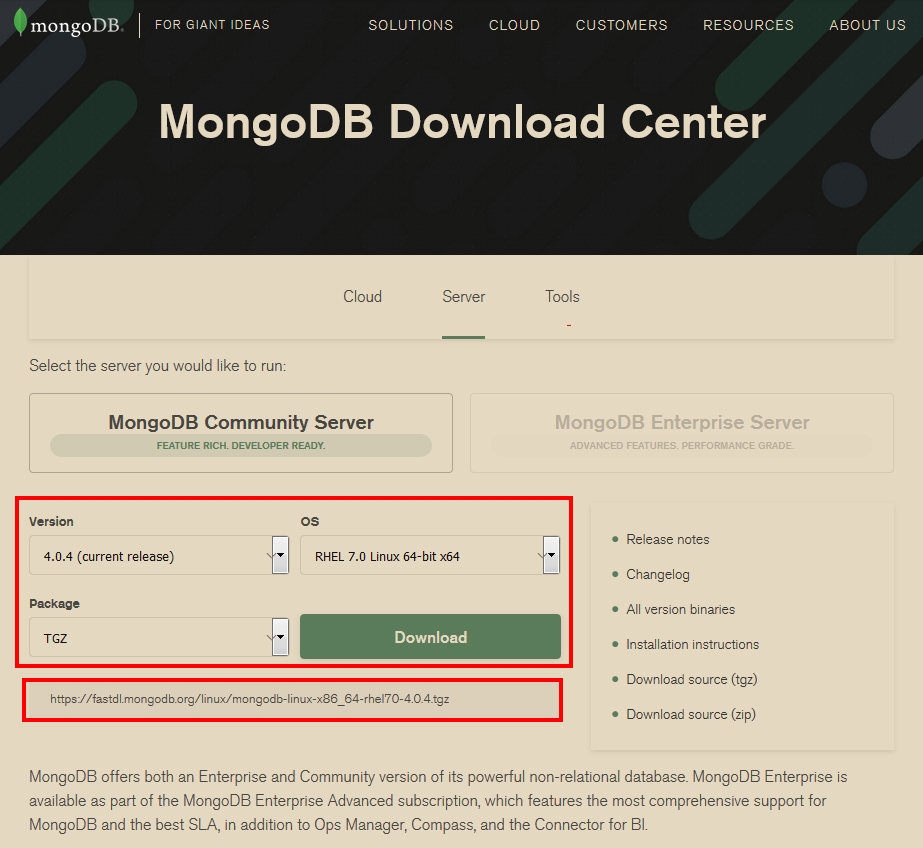
官网下载地址: https://www.mongodb.com/download-center#community
根据实际情况和需要选择下载安装参数,并下载
3.2.2- 安装并设置环境变量
1[root@localhost ~]# ll
2total 82988
3-rw-------. 1 root root     2029 Nov 16 15:05 anaconda-ks.cfg
4-rw-r--r--. 1 root root     2060 Nov 16 15:08 initial-setup-ks.cfg
5-rwxrwxrwx. 1 root root 84970205 Nov 16 15:13 mongodb-linux-x86_64-rhel70-4.0.4.tgz
6[root@localhost ~]#
7[root@localhost ~]# mkdir -p /usr/local/mongodb
8[root@localhost ~]# chmod 755 /usr/local/mongodb
9[root@localhost ~]#
10[root@localhost ~]# tar -zxvf mongodb-linux-x86_64-rhel70-4.0.4.tgz
11mongodb-linux-x86_64-rhel70-4.0.4/README
12mongodb-linux-x86_64-rhel70-4.0.4/THIRD-PARTY-NOTICES
13mongodb-linux-x86_64-rhel70-4.0.4/MPL-2
14mongodb-linux-x86_64-rhel70-4.0.4/LICENSE-Community.txt
15mongodb-linux-x86_64-rhel70-4.0.4/bin/mongodump
16mongodb-linux-x86_64-rhel70-4.0.4/bin/mongorestore
17mongodb-linux-x86_64-rhel70-4.0.4/bin/mongoexport
18mongodb-linux-x86_64-rhel70-4.0.4/bin/mongoimport
19mongodb-linux-x86_64-rhel70-4.0.4/bin/mongostat
20mongodb-linux-x86_64-rhel70-4.0.4/bin/mongotop
21mongodb-linux-x86_64-rhel70-4.0.4/bin/bsondump
22mongodb-linux-x86_64-rhel70-4.0.4/bin/mongofiles
23mongodb-linux-x86_64-rhel70-4.0.4/bin/mongoreplay
24mongodb-linux-x86_64-rhel70-4.0.4/bin/mongod
25mongodb-linux-x86_64-rhel70-4.0.4/bin/mongos
26mongodb-linux-x86_64-rhel70-4.0.4/bin/mongo
27mongodb-linux-x86_64-rhel70-4.0.4/bin/install_compass
28[root@localhost ~]#
29[root@localhost ~]# mv mongodb-linux-x86_64-rhel70-4.0.4/bin /usr/local/mongodb/
30[root@localhost ~]#
31[root@localhost ~]# ll -R /usr/local/mongodb/
32/usr/local/mongodb/:
33total 0
34drwxr-xr-x. 2 root root 231 Nov 19 15:47 bin
35
36/usr/local/mongodb/bin:
37total 253744
38-rwxr-xr-x. 1 root root 12393712 Nov  7 03:48 bsondump
39-rwxr-xr-x. 1 root root     5792 Nov  7 04:06 install_compass
40-rwxr-xr-x. 1 root root 39753304 Nov  7 04:06 mongo
41-rwxr-xr-x. 1 root root 62170704 Nov  7 04:06 mongod
42-rwxr-xr-x. 1 root root 14702992 Nov  7 03:49 mongodump
43-rwxr-xr-x. 1 root root 12733096 Nov  7 03:48 mongoexport
44-rwxr-xr-x. 1 root root 12634648 Nov  7 03:48 mongofiles
45-rwxr-xr-x. 1 root root 12892232 Nov  7 03:49 mongoimport
46-rwxr-xr-x. 1 root root 15800824 Nov  7 03:49 mongoreplay
47-rwxr-xr-x. 1 root root 15821528 Nov  7 03:49 mongorestore
48-rwxr-xr-x. 1 root root 35363672 Nov  7 04:06 mongos
49-rwxr-xr-x. 1 root root 12947464 Nov  7 03:48 mongostat
50-rwxr-xr-x. 1 root root 12589240 Nov  7 03:49 mongotop
51[root@localhost ~]#
52[root@localhost ~]# echo $PATH
53/usr/local/sbin:/usr/local/bin:/sbin:/bin:/usr/sbin:/usr/bin:/root/bin
54[root@localhost ~]#
55[root@localhost ~]# export PATH=/usr/local/mongodb/bin:$PATH
56[root@localhost ~]#
57[root@localhost ~]# echo $PATH
58/usr/local/mongodb/bin:/usr/local/sbin:/usr/local/bin:/sbin:/bin:/usr/sbin:/usr/bin:/root/bin
59[root@localhost ~]#
注意:这里是把bin目录绝对路径临时添加到环境变量中,重启系统后,将恢复默认环境变量;
3.2.3- 创建数据库目录
1[root@localhost ~]# mkdir -p /home/Anliven/data/db
2[root@localhost ~]# chmod 755 /home/Anliven/data/db
MongoDB的数据存储目录不会自动创建,需要手动创建data目录,并设置合适的访问权限;
注意:MongoDB默认启动的数据库路径是“/data/db”,也必须手动创建,否则mongodb会报错;
3.2.4- 运行MongoDB服务
在命令行中执行mongo安装路径bin目录下的mongod命令来启动mongdb服务;
-
参数“--dbpath”:指定数据库目录,数据库目录默认为“/data/db”;
-
参数“--auth”:启用认证(MongoDB 默认安装完成后,只允许本地连接,同时不需要使用任何账号密码就可以直接连接);
[root@localhost ~]# /usr/local/mongodb/bin/mongod --dbpath=/home/Anliven/data/db --auth 2018-11-20T09:57:23.501+0800 I CONTROL [main] Automatically disabling TLS 1.0, to force-enable TLS 1.0 specify --sslDisabledProtocols 'none' 2018-11-20T09:57:23.508+0800 I CONTROL [initandlisten] MongoDB starting : pid=18449 port=27017 dbpath=/home/Anliven/data/db 64-bit host=localhost.localdomain 2018-11-20T09:57:23.508+0800 I CONTROL [initandlisten] db version v4.0.4 2018-11-20T09:57:23.508+0800 I CONTROL [initandlisten] git version: f288a3bdf201007f3693c58e140056adf8b04839 2018-11-20T09:57:23.508+0800 I CONTROL [initandlisten] OpenSSL version: OpenSSL 1.0.1e-fips 11 Feb 2013 2018-11-20T09:57:23.508+0800 I CONTROL [initandlisten] allocator: tcmalloc 2018-11-20T09:57:23.508+0800 I CONTROL [initandlisten] modules: none 2018-11-20T09:57:23.508+0800 I CONTROL [initandlisten] build environment: 2018-11-20T09:57:23.508+0800 I CONTROL [initandlisten] distmod: rhel70 2018-11-20T09:57:23.508+0800 I CONTROL [initandlisten] distarch: x86_64 2018-11-20T09:57:23.508+0800 I CONTROL [initandlisten] target_arch: x86_64 2018-11-20T09:57:23.508+0800 I CONTROL [initandlisten] options: { security: { authorization: "enabled" }, storage: { dbPath: "/home/Anliven/data/db" } } ...... ...... ......
从命令的日志,可以看到详细的启动信息,例如:
- “MongoDB starting : pid=3491 port=27017 dbpath=/home/Anliven/data/db 64-bit host=localhost.localdomain”
- options: { security: { authorization: "enabled" }, storage: { dbPath: "/home/Anliven/data/db" } }
3.2.5- 禁用SELinux
通过在/etc/selinux/config中将 SELINUX 设置为 disabled 来禁用SELinux。SELINUX=disabled
以学习为目的,建议使用此项设置,但是必须重新启动系统才能使更改生效
4- MongoDB后台管理Shell
MongoDB Shell是MongoDB自带的交互式Javascript shell,用来对MongoDB进行操作和管理的交互式环境;
4.1- 进入MongoDB Shell
执行MongoDB安装路径下bin目录中的mongo命令文件就进入MongoDB后台管理;
1[Anliven@localhost ~]$ cd /usr/local/mongodb/bin/
2[Anliven@localhost bin]$ ll
3total 253744
4-rwxr-xr-x. 1 root root 12393712 Nov  7 03:48 bsondump
5-rwxr-xr-x. 1 root root     5792 Nov  7 04:06 install_compass
6-rwxr-xr-x. 1 root root 39753304 Nov  7 04:06 mongo
7-rwxr-xr-x. 1 root root 62170704 Nov  7 04:06 mongod
8-rwxr-xr-x. 1 root root 14702992 Nov  7 03:49 mongodump
9-rwxr-xr-x. 1 root root 12733096 Nov  7 03:48 mongoexport
10-rwxr-xr-x. 1 root root 12634648 Nov  7 03:48 mongofiles
11-rwxr-xr-x. 1 root root 12892232 Nov  7 03:49 mongoimport
12-rwxr-xr-x. 1 root root 15800824 Nov  7 03:49 mongoreplay
13-rwxr-xr-x. 1 root root 15821528 Nov  7 03:49 mongorestore
14-rwxr-xr-x. 1 root root 35363672 Nov  7 04:06 mongos
15-rwxr-xr-x. 1 root root 12947464 Nov  7 03:48 mongostat
16-rwxr-xr-x. 1 root root 12589240 Nov  7 03:49 mongotop
17[Anliven@localhost bin]$ ./mongo
18MongoDB shell version v4.0.4
19connecting to: mongodb://127.0.0.1:27017
20Implicit session: session { "id" : UUID("562febfc-d408-4f7c-b3a7-a230c64c2c38") }
21MongoDB server version: 4.0.4
22Welcome to the MongoDB shell.
23For interactive help, type "help".
24For more comprehensive documentation, see
25	http://docs.mongodb.org/
26Questions? Try the support group
27	http://groups.google.com/group/mongodb-user
28Server has startup warnings:
292018-11-19T15:52:35.148+0800 I CONTROL  [initandlisten]
302018-11-19T15:52:35.148+0800 I CONTROL  [initandlisten] ** WARNING: Access control is not enabled for the database.
312018-11-19T15:52:35.148+0800 I CONTROL  [initandlisten] **          Read and write access to data and configuration is unrestricted.
322018-11-19T15:52:35.148+0800 I CONTROL  [initandlisten] ** WARNING: You are running this process as the root user, which is not recommended.
332018-11-19T15:52:35.148+0800 I CONTROL  [initandlisten]
342018-11-19T15:52:35.148+0800 I CONTROL  [initandlisten] ** WARNING: This server is bound to localhost.
352018-11-19T15:52:35.148+0800 I CONTROL  [initandlisten] **          Remote systems will be unable to connect to this server.
362018-11-19T15:52:35.148+0800 I CONTROL  [initandlisten] **          Start the server with --bind_ip <address> to specify which IP
372018-11-19T15:52:35.148+0800 I CONTROL  [initandlisten] **          addresses it should serve responses from, or with --bind_ip_all to
382018-11-19T15:52:35.148+0800 I CONTROL  [initandlisten] **          bind to all interfaces. If this behavior is desired, start the
392018-11-19T15:52:35.148+0800 I CONTROL  [initandlisten] **          server with --bind_ip 127.0.0.1 to disable this warning.
402018-11-19T15:52:35.148+0800 I CONTROL  [initandlisten]
412018-11-19T15:52:35.149+0800 I CONTROL  [initandlisten]
422018-11-19T15:52:35.149+0800 I CONTROL  [initandlisten] ** WARNING: /sys/kernel/mm/transparent_hugepage/enabled is 'always'.
432018-11-19T15:52:35.149+0800 I CONTROL  [initandlisten] **        We suggest setting it to 'never'
442018-11-19T15:52:35.149+0800 I CONTROL  [initandlisten]
452018-11-19T15:52:35.149+0800 I CONTROL  [initandlisten] ** WARNING: /sys/kernel/mm/transparent_hugepage/defrag is 'always'.
462018-11-19T15:52:35.149+0800 I CONTROL  [initandlisten] **        We suggest setting it to 'never'
472018-11-19T15:52:35.149+0800 I CONTROL  [initandlisten]
48---
49Enable MongoDB's free cloud-based monitoring service, which will then receive and display
50metrics about your deployment (disk utilization, CPU, operation statistics, etc).
51
52The monitoring data will be available on a MongoDB website with a unique URL accessible to you
53and anyone you share the URL with. MongoDB may use this information to make product
54improvements and to suggest MongoDB products and deployment options to you.
55
56To enable free monitoring, run the following command: db.enableFreeMonitoring()
57To permanently disable this reminder, run the following command: db.disableFreeMonitoring()
58---
59
60>
进入MongoDB Shell,默认会选择 test 文档(一个空数据库),以后进入时会选择用户指定的数据库;
- db:查看当前选择的数据库;
- show dbs:查看非空的数据库列表;
- use <db name>:切换选择数据库,如果数据库存在则切换,如果不存在则直接创建;
- exit 或者 quit() :退出MongoDB Shell;
4.2- 获取命令帮助信息
help:显示命令帮助信息;
1> help
2    db.help()                    help on db methods
3    db.mycoll.help()             help on collection methods
4    sh.help()                    sharding helpers
5    rs.help()                    replica set helpers
6    help admin                   administrative help
7    help connect                 connecting to a db help
8    help keys                    key shortcuts
9    help misc                    misc things to know
10    help mr                      mapreduce
11
12    show dbs                     show database names
13    show collections             show collections in current database
14    show users                   show users in current database
15    show profile                 show most recent system.profile entries with time >= 1ms
16    show logs                    show the accessible logger names
17    show log [name]              prints out the last segment of log in memory, 'global' is default
18    use <db_name>                set current database
19    db.foo.find()                list objects in collection foo
20    db.foo.find( { a : 1 } )     list objects in foo where a == 1
21    it                           result of the last line evaluated; use to further iterate
22    DBQuery.shellBatchSize = x   set default number of items to display on shell
23    exit                         quit the mongo shell
24>
db.help():显示db常用命令帮助;
1> db.help()
2DB methods:
3    db.adminCommand(nameOrDocument) - switches to 'admin' db, and runs command [just calls db.runCommand(...)]
4    db.aggregate([pipeline], {options}) - performs a collectionless aggregation on this database; returns a cursor
5    db.auth(username, password)
6    db.cloneDatabase(fromhost) - deprecated
7    db.commandHelp(name) returns the help for the command
8    db.copyDatabase(fromdb, todb, fromhost) - deprecated
9    db.createCollection(name, {size: ..., capped: ..., max: ...})
10    db.createView(name, viewOn, [{$operator: {...}}, ...], {viewOptions})
11    db.createUser(userDocument)
12    db.currentOp() displays currently executing operations in the db
13    db.dropDatabase()
14    db.eval() - deprecated
15    db.fsyncLock() flush data to disk and lock server for backups
16    db.fsyncUnlock() unlocks server following a db.fsyncLock()
17    db.getCollection(cname) same as db['cname'] or db.cname
18    db.getCollectionInfos([filter]) - returns a list that contains the names and options of the db's collections
19    db.getCollectionNames()
20    db.getLastError() - just returns the err msg string
21    db.getLastErrorObj() - return full status object
22    db.getLogComponents()
23    db.getMongo() get the server connection object
24    db.getMongo().setSlaveOk() allow queries on a replication slave server
25    db.getName()
26    db.getPrevError()
27    db.getProfilingLevel() - deprecated
28    db.getProfilingStatus() - returns if profiling is on and slow threshold
29    db.getReplicationInfo()
30    db.getSiblingDB(name) get the db at the same server as this one
31    db.getWriteConcern() - returns the write concern used for any operations on this db, inherited from server object if set
32    db.hostInfo() get details about the server's host
33    db.isMaster() check replica primary status
34    db.killOp(opid) kills the current operation in the db
35    db.listCommands() lists all the db commands
36    db.loadServerScripts() loads all the scripts in db.system.js
37    db.logout()
38    db.printCollectionStats()
39    db.printReplicationInfo()
40    db.printShardingStatus()
41    db.printSlaveReplicationInfo()
42    db.dropUser(username)
43    db.repairDatabase()
44    db.resetError()
45    db.runCommand(cmdObj) run a database command.  if cmdObj is a string, turns it into {cmdObj: 1}
46    db.serverStatus()
47    db.setLogLevel(level,<component>)
48    db.setProfilingLevel(level,slowms) 0=off 1=slow 2=all
49    db.setWriteConcern(<write concern doc>) - sets the write concern for writes to the db
50    db.unsetWriteConcern(<write concern doc>) - unsets the write concern for writes to the db
51    db.setVerboseShell(flag) display extra information in shell output
52    db.shutdownServer()
53    db.stats()
54    db.version() current version of the server
55>
一些示例:
1> db
2test
3>
4> show dbs
5admin   0.000GB
6config  0.000GB
7local   0.000GB
8>
9> use local
10switched to db local
11>
12> db
13local
14>
15> exit
16bye
17[Anliven@localhost bin]$
在此界面不仅可以插入一些简单的数据、对插入的数据进行检索,还可以进行简单数学运算;
1> 111 + 222
2333
3> 666 / 111
46
5>
5- PyMongo
PyMongo is a Python distribution containing tools for working with MongoDB, and is the recommended way to work with MongoDB from Python.
PyMongo 3.7.2 Documentation: https://api.mongodb.com/python/current/
6- 参考信息
- MongoDB教程:http://www.runoob.com/mongodb/