4.31 yum安装Nginx
文档:
http://nginx.org/en/linux_packages.html
编辑yum仓库:
1vi /etc/yum.repos.d/nginx.repo
2粘贴:
3[nginx]
4name=nginx repo
5baseurl=http://nginx.org/packages/centos/7/$basearch/
6gpgcheck=0
7enabled=1
安装:
yum install -y nginx
配置文件路径:
/etc/nginx
查看配置文件有没有语法错误: nginx -t
启动:
systemctl start nginx
补充:
pkill 杀死一个进程,如 pkill nginx
补充:关机重启后,selinux如果没有永久关闭。
1[root@test01 ~]# systemctl start nginx
2Job for nginx.service failed because the control process exited with error code. See "systemctl status nginx.service" and "journalctl -xe" for details.
3[root@test01 ~]# systemctl status nginx
4● nginx.service - nginx - high performance web server
5   Loaded: loaded (/usr/lib/systemd/system/nginx.service; disabled; vendor preset: disabled)
6   Active: failed (Result: exit-code) since 三 2019-02-20 01:46:41 CST; 10s ago
7     Docs: http://nginx.org/en/docs/
8  Process: 2424 ExecStart=/usr/sbin/nginx -c /etc/nginx/nginx.conf (code=exited, status=1/FAILURE)
9
102月 20 01:46:41 test01 systemd[1]: Starting nginx - high performance web server...
112月 20 01:46:41 test01 nginx[2424]: nginx: [emerg] open() "/data/logs/bbs.access.log" failed (13: Pe...nied)
122月 20 01:46:41 test01 systemd[1]: nginx.service: control process exited, code=exited status=1
132月 20 01:46:41 test01 systemd[1]: Failed to start nginx - high performance web server.
142月 20 01:46:41 test01 systemd[1]: Unit nginx.service entered failed state.
152月 20 01:46:41 test01 systemd[1]: nginx.service failed.
16Hint: Some lines were ellipsized, use -l to show in full.
17[root@test01 ~]# journalctl -xe
18-- Subject: Unit session-1.scope has begun start-up
19-- Defined-By: systemd
20-- Support: http://lists.freedesktop.org/mailman/listinfo/systemd-devel
21--
22-- Unit session-1.scope has begun starting up.
232月 20 01:46:33 test01 sshd[2394]: pam_unix(sshd:session): session opened for user root by (uid=0)
242月 20 01:46:41 test01 polkitd[608]: Registered Authentication Agent for unix-process:2418:3196 (system bus n
252月 20 01:46:41 test01 systemd[1]: Starting nginx - high performance web server...
26-- Subject: Unit nginx.service has begun start-up
27-- Defined-By: systemd
28-- Support: http://lists.freedesktop.org/mailman/listinfo/systemd-devel
29--
30-- Unit nginx.service has begun starting up.
312月 20 01:46:41 test01 nginx[2424]: nginx: [emerg] open() "/data/logs/bbs.access.log" failed (13: Permission
322月 20 01:46:41 test01 systemd[1]: nginx.service: control process exited, code=exited status=1
332月 20 01:46:41 test01 systemd[1]: Failed to start nginx - high performance web server.
34-- Subject: Unit nginx.service has failed
35-- Defined-By: systemd
36-- Support: http://lists.freedesktop.org/mailman/listinfo/systemd-devel
37--
38-- Unit nginx.service has failed.
39--
40-- The result is failed.
412月 20 01:46:41 test01 systemd[1]: Unit nginx.service entered failed state.
422月 20 01:46:41 test01 systemd[1]: nginx.service failed.
432月 20 01:46:41 test01 polkitd[608]: Unregistered Authentication Agent for unix-process:2418:3196 (system bus
44[root@test01 ~]# netstat -lntp
45Active Internet connections (only servers)
46Proto Recv-Q Send-Q Local Address           Foreign Address         State       PID/Program name
47tcp        0      0 0.0.0.0:22              0.0.0.0:*               LISTEN      1073/sshd
48tcp        0      0 127.0.0.1:25            0.0.0.0:*               LISTEN      1837/master
49tcp        0      0 127.0.0.1:9000          0.0.0.0:*               LISTEN      1145/php-fpm: maste
50tcp6       0      0 :::3306                 :::*                    LISTEN      1314/mysqld
51tcp6       0      0 :::22                   :::*                    LISTEN      1073/sshd
52tcp6       0      0 ::1:25                  :::*                    LISTEN      1837/master
53
54
55[root@test01 ~]# getenforce
56Enforcing
57[root@test01 ~]# setenforce
58usage:  setenforce [ Enforcing | Permissive | 1 | 0 ]
59[root@test01 ~]# setenforce 0
60[root@test01 ~]# getenforce
61Permissive
62
63[root@test01 ~]# systemctl start nginx
64[root@test01 ~]# ps aux |grep nginx
65root       2447  0.0  0.1  46452  1120 ?        Ss   01:49   0:00 nginx: master process /usr/sbin/nginx -c /etc/nginx/nginx.conf
66nginx      2448  0.0  0.2  46948  2080 ?        S    01:49   0:00 nginx: worker process
67root       2450  0.0  0.0 112728   980 pts/0    R+   01:50   0:00 grep --color=auto nginx
4.32 Nginx虚拟主机
虚拟主机:
1HTTP1.1 --> host (域名) 一个WEB服务可以有多个站点
2定义虚拟主机配置文件,以域名为命名。
iptables -nvL 查看防火墙规则
CentOS7 firewalld
1自带firewalld服务,开启状态。
2关闭firewalld服务: systemctl stop firewalld
3firewall-cmd --add-port=80/tcp --permanent
4firewall-cmd --reload
Nginx配置:
1nginx -t //查看配置文件是否有错误
2nginx -s reload //重载配置文件
3systemctl restart nginx  //重启
/etc/hosts:
1vi /etc/hosts //增加
2192.168.222.128  www.aaa.com
默认虚拟主机:
1就是Nginx的第一个虚拟主机。
2泛解析(就是任何一个域名解析到你的服务器上都可以解析,应该禁用掉)
3禁掉默认虚拟主机,加一行 deny all;
补充:
1快捷键 Ctrl z可以暂停一个进程。 比如,vi的时候,可以先退出vi,然后释放命令行出来。
2按fg 就可以回到vi窗口里。
安装worrdpress
1下载: https://cn.wordpress.org/download/
2 wget https://cn.wordpress.org/wordpress-5.0.2-zh_CN.tar.gz
4.34 安装wordpress
安装worrdpress
1    下载: https://cn.wordpress.org/download/
2    wget https://cn.wordpress.org/wordpress-5.0.2-zh_CN.tar.gz
3tar zxvf xxx
4mv wordpress/*  /data/wwwroot/blog.aminglinux.cc/
5访问http://blog.aminglinux.cc/
设置数据库
1创建库:create database blog;
2创建用户:grant all on blog.* to 'blog'@'127.0.0.1' identified by 'pbxfuej3LR4r';
3切换某个库: use blog;
4查询库里面有什么表: show tables;
问题处理:
1在安装wordpress过程中,需要设定网站程序目录的权限,属主设定为php-fpm服务的那个用户
2chown -R php-fpm  /data/wwwroot/blog.aminglinux.cc
补充:
1yum install -y expect  //为了安装mkpasswd命令,这个命令用来生产随机密码的
2如, mkpasswd -s 0 -l 12
4.25 安装discuz
discuz官网:http://www.discuz.net/forum.php
yum install -y git
git clone https://gitee.com/ComsenzDiscuz/DiscuzX.git
cp -r DiscuzX/upload /data/wwwroot/bbs.aminglinux.cc
定义虚拟主机配置文件:
11)cd /etc/nginx/conf.d
22)cp blog.aminglinux.cc.conf  bbs.aminglinux.cc.conf
33)修改里面的目录
44)nginx -t && nginx -s reload
开始安装:
11)改权限  cd /data/wwwroot/bbs.aminglinux.cc && chown -R php-fpm  config data uc_server/data  uc_client/data
22)数据库相关操作:
3	create database bbs;
4	grant all on bbs.* to 'bbs'@127.0.0.1 identified by 'li60rtvvHAfh';
53)定义数据库相关的信息
64)完成安装
补充:
11) cp   :cp -r 复制目录
2
32)vi 批量查找替换,一般模式下输入 :1,$s/要被替换的字符/替换成的字符/g
4	如果字符串中含有/,则需要脱义, 1,$s/home\/123/home\/abc/g
5	还有一种方法:1,$s#home/123#home/abc#g
代码:
1[root@test01 ~]# vi /etc/yum.repos.d/nginx.repo
2
3[nginx]
4name=nginx repo
5baseurl=http://nginx.org/packages/centos/7/$basearch/
6gpgcheck=0
7enabled=1
8
9[root@test01 ~]# yum list |grep nginx
10nginx.x86_64                                1:1.14.2-1.el7_4.ngx       nginx
11nginx-debug.x86_64                          1:1.8.0-1.el7.ngx          nginx
12nginx-debuginfo.x86_64                      1:1.14.2-1.el7_4.ngx       nginx
13nginx-module-geoip.x86_64                   1:1.14.2-1.el7_4.ngx       nginx
14nginx-module-geoip-debuginfo.x86_64         1:1.14.2-1.el7_4.ngx       nginx
15nginx-module-image-filter.x86_64            1:1.14.2-1.el7_4.ngx       nginx
16nginx-module-image-filter-debuginfo.x86_64  1:1.14.2-1.el7_4.ngx       nginx
17nginx-module-njs.x86_64                     1:1.14.2.0.2.7-1.el7_4.ngx nginx
18nginx-module-njs-debuginfo.x86_64           1:1.14.2.0.2.7-1.el7_4.ngx nginx
19nginx-module-perl.x86_64                    1:1.14.2-1.el7_4.ngx       nginx
20nginx-module-perl-debuginfo.x86_64          1:1.14.2-1.el7_4.ngx       nginx
21nginx-module-xslt.x86_64                    1:1.14.2-1.el7_4.ngx       nginx
22nginx-module-xslt-debuginfo.x86_64          1:1.14.2-1.el7_4.ngx       nginx
23nginx-nr-agent.noarch                       2.0.0-12.el7.ngx           nginx
24pcp-pmda-nginx.x86_64                       4.1.0-5.el7_6              updates
25
26[root@test01 ~]# killall nginx
27-bash: killall: 未找到命令
28[root@test01 ~]# pkill nginx
29
30[root@test01 ~]# ps aux |grep nginx
31root       2953  0.0  0.0 112728   980 pts/0    R+   20:35   0:00 grep --color=auto nginx
32[root@test01 ~]# rm -rf /usr/local/nginx/
33[root@test01 ~]# yum install -y nginx
34
35[root@test01 ~]# ls /etc/nginx/
36conf.d          koi-utf  mime.types  nginx.conf   uwsgi_params
37fastcgi_params  koi-win  modules     scgi_params  win-utf
38
39[root@test01 ~]# ls /etc/nginx/nginx.conf   主配置文件
40/etc/nginx/nginx.conf
41
42[root@test01 ~]# ls /etc/nginx/conf.d  子配置文件
43default.conf
44
45[root@test01 ~]# nginx -v   查看nginx的版本
46nginx version: nginx/1.14.2
47
48[root@test01 ~]# nginx -V   查看nginx的版本及编译参数
49nginx version: nginx/1.14.2
50built by gcc 4.8.5 20150623 (Red Hat 4.8.5-28) (GCC)
51built with OpenSSL 1.0.2k-fips  26 Jan 2017
52TLS SNI support enabled
53configure arguments: --prefix=/etc/nginx --sbin-path=/usr/sbin/nginx --modules-path=/usr/lib64/nginx/modules --conf-path=/etc/nginx/nginx.conf --error-log-path=/var/log/nginx/error.log --http-log-path=/var/log/nginx/access.log --pid-path=/var/run/nginx.pid --lock-path=/var/run/nginx.lock --http-client-body-temp-path=/var/cache/nginx/client_temp --http-proxy-temp-path=/var/cache/nginx/proxy_temp --http-fastcgi-temp-path=/var/cache/nginx/fastcgi_temp --http-uwsgi-temp-path=/var/cache/nginx/uwsgi_temp --http-scgi-temp-path=/var/cache/nginx/scgi_temp --user=nginx --group=nginx --with-compat --with-file-aio --with-threads --with-http_addition_module --with-http_auth_request_module --with-http_dav_module --with-http_flv_module --with-http_gunzip_module --with-http_gzip_static_module --with-http_mp4_module --with-http_random_index_module --with-http_realip_module --with-http_secure_link_module --with-http_slice_module --with-http_ssl_module --with-http_stub_status_module --with-http_sub_module --with-http_v2_module --with-mail --with-mail_ssl_module --with-stream --with-stream_realip_module --with-stream_ssl_module --with-stream_ssl_preread_module --with-cc-opt='-O2 -g -pipe -Wall -Wp,-D_FORTIFY_SOURCE=2 -fexceptions -fstack-protector-strong --param=ssp-buffer-size=4 -grecord-gcc-switches -m64 -mtune=generic -fPIC' --with-ld-opt='-Wl,-z,relro -Wl,-z,now -pie'
54
55[root@test01 ~]# systemctl start nginx   启动nginx
56[root@test01 ~]# ps aux |grep nginx
57root       3024  0.0  0.0  46324   968 ?        Ss   20:52   0:00 nginx: master process /usr/sbin/nginx -c /etc/nginx/nginx.conf
58nginx      3025  0.0  0.1  46724  1932 ?        S    20:52   0:00 nginx: worker process
59root       3027  0.0  0.0 112728   980 pts/0    R+   20:52   0:00 grep --color=auto nginx
60[root@test01 ~]#systemctl restart nginx  重启nginx
61
62[root@test01 ~]# systemctl stop nginx    关闭nginx
63[root@test01 ~]# ps aux |grep nginx
64\root       3038  0.0  0.0 112728   980 pts/0    R+   20:53   0:00 grep --color=auto nginx
65
66[root@test01 ~]# nginx -t                查看nginx的配置文件有没有错误
67nginx: the configuration file /etc/nginx/nginx.conf syntax is ok
68nginx: configuration file /etc/nginx/nginx.conf test is successful
69[root@test01 ~]# which nginx
70/usr/sbin/nginx
71[root@test01 ~]# echo $PATH
72/usr/local/sbin:/usr/local/bin:/usr/sbin:/usr/bin:/root/bin:/usr/local/mysql/bin:/usr/local/mysql/bin:/root/bin
73
74
75[root@test01 ~]# vi /etc/nginx.conf
76[root@test01 ~]# vi /etc/nginx/nginx.conf
77
78[root@test01 ~]# cd /etc/nginx/conf.d/
79[root@test01 conf.d]# ls
80default.conf
81[root@test01 conf.d]# vi default.conf
82
83打开另一台虚拟机测试80端口通不通
84[root@test02 ~]# telnet 192.168.28.107 80
85Trying 192.168.28.107...
86telnet: connect to address 192.168.28.107: No route to host
87
88因为防火墙,因为实验为了方便直接关闭防火墙, firewalld开启状态下,windows用浏览器访问192.168.28.107不能打开,stop firewalld,windows可以打开192.168.28.107。还有一种方法就是添加一条规则
89[root@test01 conf.d]# systemctl stop firewalld
90[root@test01 conf.d]# ps aux |grep firewalld\
91> ^C
92[root@test01 conf.d]# ps aux |grep firewalld\
93> ^C
94[root@test01 conf.d]# ps aux |grep firewalld
95root       3127  0.0  0.0 112728   980 pts/0    R+   21:17   0:00 grep --color=auto firewalld
96
97[root@test01 conf.d]# firewall-cmd --add-port=80/tcp --permanent   加上premanent永久生效,不加测临时生效
98success
99
100添加一条80端口的规则
101[root@test01 conf.d]# firewall-cmd --reload  执行一下reload
102success
103
104每一个虚拟主机就是一个站点。每个站点就有域名,设定一个域名。
105[root@test01 conf.d]# vi default.conf
106
107server {
108    listen       80;
109    server_name  www.aaa.com;   设置www.aaa.com为域名
110
111[root@test01 conf.d]# nginx -t    查看nginx配置文件有没有错
112nginx: the configuration file /etc/nginx/nginx.conf syntax is ok
113nginx: configuration file /etc/nginx/nginx.conf test is successful
114
115[root@test01 conf.d]# nginx -s reload  重载配置文件,重载之前一定要reload一下
116
117如何让访问www.aaa.com,现在www.aaa.com没有指向到192.168.28.107上,有这个域名的dns权限就可以了。可以在买过域名里用dnspad去做解析。我们用另一种方法让aaa.com指向到107上,还可以修改windows的host文件添加一条。用aaa.com访问也可以,用107访问也可以,同一个ip可以加多个域名,同时添加 www.bbb.com也是一样。这个就叫默认的虚拟主机,也是nginx的第一个虚拟主机
118
119[root@test01 conf.d]# ls
120default.conf
121
122[root@test01 conf.d]# vi /etc/hosts
123
124127.0.0.1   localhost localhost.localdomain localhost4 localhost4.localdomain4
125::1         localhost localhost.localdomain localhost6 localhost6.localdomain6
126192.168.28.107 www.aaa.com
127
128[root@test01 conf.d]# ping www.aaa.com
129PING www.aaa.com (192.168.28.107) 56(84) bytes of data.
13064 bytes from www.aaa.com (192.168.28.107): icmp_seq=1 ttl=64 time=0.361 ms
13164 bytes from www.aaa.com (192.168.28.107): icmp_seq=2 ttl=64 time=0.046 ms
132^C
133
134[root@test01 conf.d]# vi default.conf    在80端口后面加上default_server 就是默认虚拟主机
135
136server {
137    listen       80 default_server;
138
139[root@test01 conf.d]# cp default.conf 2.conf
140
141[root@test01 conf.d]# vi 2.conf
142server {
143    listen       80;
144    server_name  www.ccc.com;
145
146    #charset koi8-r;
147    #access_log  /var/log/nginx/host.access.log  main;
148
149    location / {
150        root   /tmp/html;   改下路径
151        index  index.html index.htm;
152    }
153
154    #error_page  404              /404.html;
155
156    # redirect server error pages to the static page /50x.html
157    #
158
159    # proxy the PHP scripts to Apache listening on 127.0.0.1:80
160    #
161    #location ~ \.php$ {
162    #    proxy_pass   http://127.0.0.1;
163    #}
164
165    # pass the PHP scripts to FastCGI server listening on 127.0.0.1:9000
166    #
167    #location ~ \.php$ {
168"2.conf" 41L, 967C
169
170[root@test01 conf.d]# mkdir /tmp/html/
171
172[root@test01 conf.d]# echo > 111 /tmp/html/index.html
173同时在windows的host下添加www.ccc.com,用windows浏览器打开,出现请求到1111,说明没有请求到虚拟主机。如果不能打开,用setenforce 0临时关闭selinux。再用www.bbb.com.打开,出现Welcome to nginx!,说明又请求到默认虚拟主机了
174
175
176泛解析(就是任何一个域名解析到你的服务器上都可以解析,应该禁用掉)
177禁掉默认虚拟主机,加一行 deny all;
178[root@test01 conf.d]# vi default.conf
179
180
181server {
182    listen       80 default_server;
183    server_name  www.aaa.com;
184    deny all;
185
186做网站了,做一个博客
187[root@test01 conf.d]# cp 2.conf www.champin.top.conf
188
189[root@test01 conf.d]# ls
1902.conf  www.champin.top.conf  default.conf
191
192[root@test01 conf.d]# vim www.champin.top.conf
193
194server {
195    listen       80;
196    server_name  www.champin.top;
197
198    #charset koi8-r;                 定义字符集
199    #access_log  /var/log/nginx/host.access.log  main;   访问日志
200
201    location / {
202        root   /data/wwwroot/www.champin.top;
203        index  index.html index.htm index.php;
204    }
205
206    location ~ \.php$ {
207        root           /data/wwwroot/www.champin.top;    定义php所在的路径
208        fastcgi_pass   127.0.0.1:9000;                   php-fpm的监听地址
209        fastcgi_index  index.php;
210        fastcgi_param  SCRIPT_FILENAME  /data/wwwroot/www.champin.top$fastcgi_script_name;
211        include        fastcgi_params;
212    }
213
214[root@test01 conf.d]# nginx -t
215nginx: the configuration file /etc/nginx/nginx.conf syntax is ok
216nginx: configuration file /etc/nginx/nginx.conf test is successful
217[root@test01 conf.d]# nginx -s reload
218
219[root@test01 conf.d]# cd /data/wwwroot/www.champin.top/
220[root@test01 www.champin.top]# wget https://cn.wordpress.org/wordpress-5.0.3-zh_CN.zip
221--2019-02-14 23:42:41--  https://cn.wordpress.org/wordpress-5.0.3-zh_CN.zip
222
223[root@test01 www.champin.top]# ls
224wordpress-5.0.3-zh_CN.zip
225
226[root@test01 www.champin.top]# unzip wordpress-5.0.3-zh_CN.zip 解压
227
228[root@test01 www.champin.top]# ls
229wordpress  wordpress-5.0.3-zh_CN.zip
230
231[root@test01 www.champin.top]# mv wordpress/* ./  把wordpress里面的文件全部移动到当前目录下
232[root@test01 www.champin.top]# ls
233index.php                  wp-admin              wp-includes        wp-signup.php
234license.txt                wp-blog-header.php    wp-links-opml.php  wp-trackback.php
235readme.html                wp-comments-post.php  wp-load.php        xmlrpc.php
236wordpress                  wp-config-sample.php  wp-login.php
237wordpress-5.0.3-zh_CN.zip  wp-content            wp-mail.php
238wp-activate.php            wp-cron.php           wp-settings.php
239
240[root@test01 www.champin.top]# rm -rvf wordpress wordpress-5.0.3-zh_CN.zip
241已删除目录:"wordpress"
242已删除"wordpress-5.0.3-zh_CN.zip"
243
244[root@test01 www.champin.top]# ls
245index.php        wp-blog-header.php    wp-includes        wp-settings.php
246license.txt      wp-comments-post.php  wp-links-opml.php  wp-signup.php
247readme.html      wp-config-sample.php  wp-load.php        wp-trackback.php
248wp-activate.php  wp-content            wp-login.php       xmlrpc.php
249wp-admin         wp-cron.php           wp-mail.php
250
251现在就可以用www.champin.top访问了。
252
253创建数据库
254[root@test01 www.champin.top]# mysql -uroot -pchamlinux
255Welcome to the MariaDB monitor.  Commands end with ; or \g.
256Your MariaDB connection id is 9
257Server version: 10.3.12-MariaDB MariaDB Server
258
259Copyright (c) 2000, 2018, Oracle, MariaDB Corporation Ab and others.
260
261Type 'help;' or '\h' for help. Type '\c' to clear the current input statement.
262
263MariaDB [(none)]>
264
265MariaDB [(none)]> create database blogtop;   创建库
266Query OK, 1 row affected (0.003 sec)
267
268MariaDB [(none)]> grant all on blogtop.* to 'blogtop'@'127.0.0.1' identified by '55gzpzWkdkuS';
269Query OK, 0 rows affected (0.019 sec)    创建用户,用另外一台虚拟机mkpasswd生成随机密码
270
271
272[root@test01 www.champin.top]# mysql -ublogtop -p55gzpzWkdkuS -h127.0.0.1  尝试登录
273Welcome to the MariaDB monitor.  Commands end with ; or \g.
274Your MariaDB connection id is 10
275Server version: 10.3.12-MariaDB MariaDB Server
276
277Copyright (c) 2000, 2018, Oracle, MariaDB Corporation Ab and others.
278
279Type 'help;' or '\h' for help. Type '\c' to clear the current input statement.
280
281MariaDB [(none)]>
282MariaDB [(none)]> show databases;
283+--------------------+
284| Database           |
285+--------------------+
286| blogtop            |
287| information_schema |
288| test               |
289+--------------------+
2903 rows in set (0.009 sec)
291
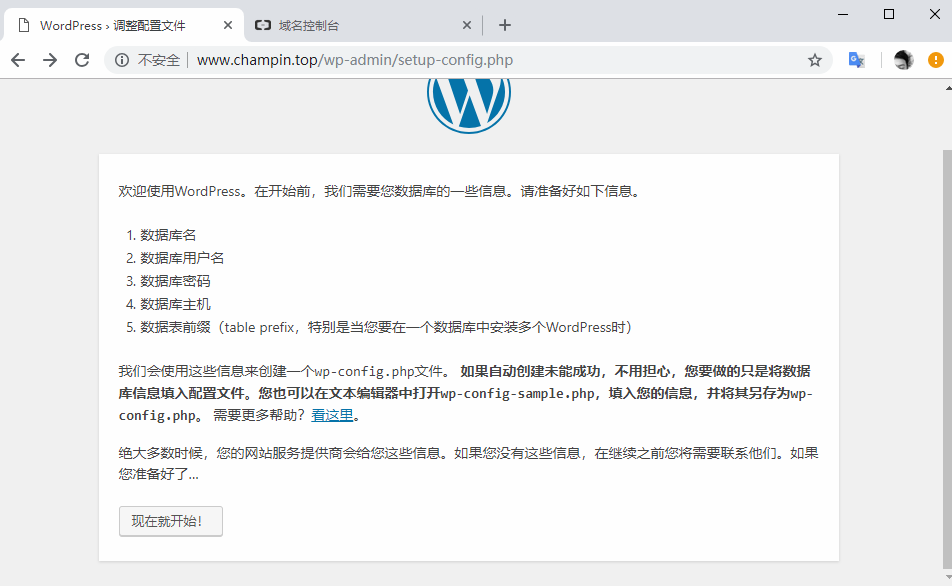
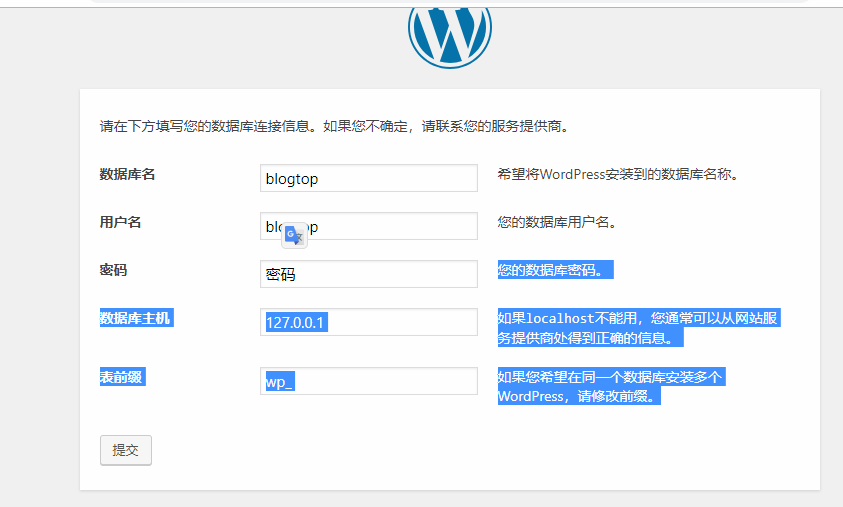
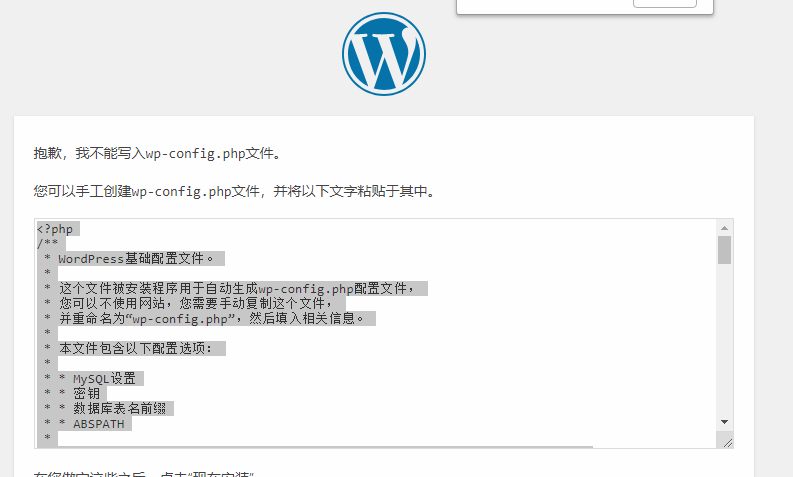
292在网页打开。填入数据,出现   抱歉,我不能写入wp-config.php文件。
293
294您可以手工创建wp-config.php文件,并将以下文字粘贴于其中
295
296
297[root@test01 www.champin.top]# ls -l
298总用量 192
299-rw-r--r--.  1 root root   418 9月  25 2013 index.php
300-rw-r--r--.  1 root root 19935 1月   4 00:24 license.txt
301-rw-r--r--.  1 root root  6989 1月  11 18:02 readme.html
302-rw-r--r--.  1 root root  6878 12月 13 09:30 wp-activate.php
303drwxr-xr-x.  9 root root  4096 1月  11 18:00 wp-admin
304-rw-r--r--.  1 root root   364 12月 19 2015 wp-blog-header.php
305-rw-r--r--.  1 root root  1889 5月   3 2018 wp-comments-post.php
306-rw-r--r--.  1 root root  2735 1月  11 18:02 wp-config-sample.php
307drwxr-xr-x.  5 root root    69 1月  11 18:02 wp-content
308-rw-r--r--.  1 root root  3669 8月  20 2017 wp-cron.php
309drwxr-xr-x. 19 root root  8192 1月  11 18:00 wp-includes
310-rw-r--r--.  1 root root  2422 11月 21 2016 wp-links-opml.php
311-rw-r--r--.  1 root root  3306 8月  22 2017 wp-load.php
312-rw-r--r--.  1 root root 37296 12月 13 08:28 wp-login.php
313-rw-r--r--.  1 root root  8048 1月  11 2017 wp-mail.php
314-rw-r--r--.  1 root root 17421 10月 23 15:04 wp-settings.php
315-rw-r--r--.  1 root root 30091 4月  30 2018 wp-signup.php
316-rw-r--r--.  1 root root  4620 10月 24 2017 wp-trackback.php
317-rw-r--r--.  1 root root  3065 9月   1 2016 xmlrpc.php
318
319[root@test01 www.champin.top]# chown -R php-fpm .   更改当前文件的所有属主
320[root@test01 www.champin.top]# ls -l
321总用量 192
322-rw-r--r--.  1 php-fpm root   418 9月  25 2013 index.php
323-rw-r--r--.  1 php-fpm root 19935 1月   4 00:24 license.txt
324-rw-r--r--.  1 php-fpm root  6989 1月  11 18:02 readme.html
325-rw-r--r--.  1 php-fpm root  6878 12月 13 09:30 wp-activate.php
326drwxr-xr-x.  9 php-fpm root  4096 1月  11 18:00 wp-admin
327-rw-r--r--.  1 php-fpm root   364 12月 19 2015 wp-blog-header.php
328-rw-r--r--.  1 php-fpm root  1889 5月   3 2018 wp-comments-post.php
329-rw-r--r--.  1 php-fpm root  2735 1月  11 18:02 wp-config-sample.php
330drwxr-xr-x.  5 php-fpm root    69 2月  15 00:19 wp-content
331-rw-r--r--.  1 php-fpm root  3669 8月  20 2017 wp-cron.php
332drwxr-xr-x. 19 php-fpm root  8192 1月  11 18:00 wp-includes
333-rw-r--r--.  1 php-fpm root  2422 11月 21 2016 wp-links-opml.php
334-rw-r--r--.  1 php-fpm root  3306 8月  22 2017 wp-load.php
335-rw-r--r--.  1 php-fpm root 37296 12月 13 08:28 wp-login.php
336-rw-r--r--.  1 php-fpm root  8048 1月  11 2017 wp-mail.php
337-rw-r--r--.  1 php-fpm root 17421 10月 23 15:04 wp-settings.php
338-rw-r--r--.  1 php-fpm root 30091 4月  30 2018 wp-signup.php
339-rw-r--r--.  1 php-fpm root  4620 10月 24 2017 wp-trackback.php
340-rw-r--r--.  1 php-fpm root  3065 9月   1 2016 xmlrpc.php
341
342在尝试就可以成功了
343
344
345登录到数据库里面看有没有表
346[root@test01 www.champin.top]# mysql -ublogtop -p55gzpzWkdkuS -h127.0.0.1
347Welcome to the MariaDB monitor.  Commands end with ; or \g.
348Your MariaDB connection id is 17
349Server version: 10.3.12-MariaDB MariaDB Server
350
351Copyright (c) 2000, 2018, Oracle, MariaDB Corporation Ab and others.
352
353Type 'help;' or '\h' for help. Type '\c' to clear the current input statement.
354
355MariaDB [(none)]> use blogtop
356Reading table information for completion of table and column names
357You can turn off this feature to get a quicker startup with -A
358
359Database changed
360MariaDB [blogtop]> show tables;
361+-----------------------+
362| Tables_in_blogtop     |
363+-----------------------+
364| wp_commentmeta        |
365| wp_comments           |
366| wp_links              |
367| wp_options            |
368| wp_postmeta           |
369| wp_posts              |
370| wp_term_relationships |
371| wp_term_taxonomy      |
372| wp_termmeta           |
373| wp_terms              |
374| wp_usermeta           |
375| wp_users              |
376+-----------------------+
37712 rows in set (0.003 sec)
378
379
380[root@test01 www.champin.top]# ls -lt
381总用量 196
382drwxr-xr-x.  5 php-fpm root       69 2月  15 00:21 wp-content
383-rw-rw-rw-.  1 php-fpm php-fpm  3016 2月  15 00:21 wp-config.php    新生成一个文件
384-rw-r--r--.  1 php-fpm root     6989 1月  11 18:02 readme.html
385-rw-r--r--.  1 php-fpm root     2735 1月  11 18:02 wp-config-sample.php
386drwxr-xr-x.  9 php-fpm root     4096 1月  11 18:00 wp-admin
387drwxr-xr-x. 19 php-fpm root     8192 1月  11 18:00 wp-includes
388-rw-r--r--.  1 php-fpm root    19935 1月   4 00:24 license.txt
389-rw-r--r--.  1 php-fpm root     6878 12月 13 09:30 wp-activate.php
390-rw-r--r--.  1 php-fpm root    37296 12月 13 08:28 wp-login.php
391-rw-r--r--.  1 php-fpm root    17421 10月 23 15:04 wp-settings.php
392-rw-r--r--.  1 php-fpm root     1889 5月   3 2018 wp-comments-post.php
393-rw-r--r--.  1 php-fpm root    30091 4月  30 2018 wp-signup.php
394-rw-r--r--.  1 php-fpm root     4620 10月 24 2017 wp-trackback.php
395-rw-r--r--.  1 php-fpm root     3306 8月  22 2017 wp-load.php
396-rw-r--r--.  1 php-fpm root     3669 8月  20 2017 wp-cron.php
397-rw-r--r--.  1 php-fpm root     8048 1月  11 2017 wp-mail.php
398-rw-r--r--.  1 php-fpm root     2422 11月 21 2016 wp-links-opml.php
399-rw-r--r--.  1 php-fpm root     3065 9月   1 2016 xmlrpc.php
400-rw-r--r--.  1 php-fpm root      364 12月 19 2015 wp-blog-header.php
401-rw-r--r--.  1 php-fpm root      418 9月  25 2013 index.php
402
403切记在生产环境中,只需要把可写,和需要写的设置写权限
404
405
406
407安装discuz
408
409[root@test01 ~]# git clone https://gitee.com/ComsenzDiscuz/DiscuzX.git
410正克隆到 'DiscuzX'...
411remote: Enumerating objects: 7404, done.
412remote: Counting objects: 100% (7404/7404), done.
413remote: Compressing objects: 100% (4767/4767), done.
414remote: Total 7404 (delta 2662), reused 7153 (delta 2588)
415接收对象中: 100% (7404/7404), 12.12 MiB | 1.54 MiB/s, done.
416处理 delta 中: 100% (2662/2662), done.
417[root@test01 ~]# ls
41811.txt  1.txt  2.txt  3.txt  anaconda-ks.cfg  DiscuzX  startingup.sh
419
420[root@test01 ~]# cd DiscuzX/
421[root@test01 DiscuzX]# ls
422readme  README.md  upload  utility
423[root@test01 DiscuzX]# ls
424readme  README.md  upload  utility
425[root@test01 DiscuzX]# ls upload/     这个程序下面的就是网站上的程序
426admin.php  config           favicon.ico  index.php   misc.php    search.php  uc_client
427api        connect.php      forum.php    install     plugin.php  source      uc_server
428api.php    crossdomain.xml  group.php    m           portal.php  static
429archiver   data             home.php     member.php  robots.txt  template
430
431[root@test01 DiscuzX]# cp -r upload /data/wwwroot/bbs.champin.top  拷贝目录需要加r
432[root@test01 DiscuzX]# ls !$
433ls /data/wwwroot/bbs.www.champin.top
434admin.php  config           favicon.ico  index.php   misc.php    search.php  uc_client
435api        connect.php      forum.php    install     plugin.php  source      uc_server
436api.php    crossdomain.xml  group.php    m           portal.php  static
437archiver   data             home.php     member.php  robots.txt  template
438
439
440[root@test01 DiscuzX]# cd /etc/nginx/conf.d/
441[root@test01 conf.d]# ls
4422.conf  default.conf  www.champin.top.conf
443[root@test01 conf.d]# cp www.champin.top.conf  bbs.champin.top.conf  拷贝一份虚拟主机配置文件
444[root@test01 conf.d]# vim bbs.champin.top.conf   vi虚拟主机配置文件
445
446server {
447    listen       80;
448    server_name  bbs.champin.top;
449
450    #charset koi8-r;
451    #access_log  /var/log/nginx/host.access.log  main;
452
453    location / {
454        root   /data/wwwroot/bbs.champin.top;
455        index  index.html index.htm index.php;
456    }
457
458    location ~ \.php$ {
459        root           /data/wwwroot/bbs.champin.top;
460        fastcgi_pass   127.0.0.1:9000;
461        fastcgi_index  index.php;
462        fastcgi_param  SCRIPT_FILENAME  /data/wwwroot/bbs.champin.top$fastcgi_script_name;
463        include        fastcgi_params;
464    }
465
466}
467
468
469[root@test01 conf.d]# nginx -t
470nginx: the configuration file /etc/nginx/nginx.conf syntax is ok
471nginx: configuration file /etc/nginx/nginx.conf test is successful
472[root@test01 conf.d]# nginx -s reload
473设置一下windows的host就可以访问了,会出现文件不可写
474
475[root@test01 conf.d]# cd /data/wwwroot/bbs.champin.top/
476
477[root@test01 bbs.champin.top]# ls -l
478总用量 68
479-rw-r--r--.  1 root root 2748 2月  15 01:25 admin.php
480drwxr-xr-x. 10 root root  149 2月  15 01:25 api
481-rw-r--r--.  1 root root  727 2月  15 01:25 api.php
482drwxr-xr-x.  2 root root   23 2月  15 01:25 archiver
483drwxr-xr-x.  2 root root   90 2月  15 01:25 config
484-rw-r--r--.  1 root root 1017 2月  15 01:25 connect.php
485-rw-r--r--.  1 root root  106 2月  15 01:25 crossdomain.xml
486drwxr-xr-x. 12 root root  202 2月  15 01:25 data
487-rw-r--r--.  1 root root 5558 2月  15 01:25 favicon.ico
488-rw-r--r--.  1 root root 2245 2月  15 01:25 forum.php
489-rw-r--r--.  1 root root  821 2月  15 01:25 group.php
490-rw-r--r--.  1 root root 1280 2月  15 01:25 home.php
491-rw-r--r--.  1 root root 5890 2月  15 01:25 index.php
492drwxr-xr-x.  5 root root   64 2月  15 01:25 install
493drwxr-xr-x.  2 root root   23 2月  15 01:25 m
494-rw-r--r--.  1 root root 1025 2月  15 01:25 member.php
495-rw-r--r--.  1 root root 2435 2月  15 01:25 misc.php
496-rw-r--r--.  1 root root 1788 2月  15 01:25 plugin.php
497-rw-r--r--.  1 root root  977 2月  15 01:25 portal.php
498-rw-r--r--.  1 root root  582 2月  15 01:25 robots.txt
499-rw-r--r--.  1 root root 1155 2月  15 01:25 search.php
500drwxr-xr-x. 10 root root  168 2月  15 01:25 source
501drwxr-xr-x.  7 root root   86 2月  15 01:25 static
502drwxr-xr-x.  3 root root   38 2月  15 01:25 template
503drwxr-xr-x.  7 root root  106 2月  15 01:25 uc_client
504drwxr-xr-x. 14 root root  256 2月  15 01:25 uc_server
505
506[root@test01 bbs.champin.top]# chown -R php-fpm config data uc_server/data uc_client/data
507更改这几个目录的权限后刷新网页就可以
508
509
510
511接下来就是创建数据库了
512[root@test01 bbs.champin.top]# mysql -uroot -pchamlinux
513Welcome to the MariaDB monitor.  Commands end with ; or \g.
514Your MariaDB connection id is 37
515Server version: 10.3.12-MariaDB MariaDB Server
516
517Copyright (c) 2000, 2018, Oracle, MariaDB Corporation Ab and others.
518
519Type 'help;' or '\h' for help. Type '\c' to clear the current input statement.
520
521MariaDB [(none)]> create database bbs;
522Query OK, 1 row affected (0.001 sec)
523
524MariaDB [(none)]> grant all on bbs.* to 'bbs'@127.0.0.1 identified by '55gzpzWkdkuS';
525Query OK, 0 rows affected (0.008 sec)
526
527MariaDB [(none)]> quit
528Bye
529
530然后尝试连接一下
531[root@test01 bbs.champin.top]# mysql -ubbs -p55gzpzWkdkuS -h127.0.0.1
532Welcome to the MariaDB monitor.  Commands end with ; or \g.
533Your MariaDB connection id is 39
534Server version: 10.3.12-MariaDB MariaDB Server
535
536Copyright (c) 2000, 2018, Oracle, MariaDB Corporation Ab and others.
537
538Type 'help;' or '\h' for help. Type '\c' to clear the current input statement.
539
540MariaDB [(none)]>
541
542MariaDB [(none)]> show databases;   查看库(查看bbs库)
543+--------------------+
544| Database           |
545+--------------------+
546| bbs                |
547| information_schema |
548| test               |
549+--------------------+
5503 rows in set (0.001 sec)
551
552
553在网页填入建好的数据库ip和用户及密码等信息,就完成了
554