
话不多说直接上组件代码。。
1<template>
2  <div>
3    <ul class="steps">
4      <li
5        v-for="(item,index) in SetData"
6        :key="item+index"
7        :class="{'active':Steps===index}"
8      >{{item+Steps}}</li>
9    </ul>
10  </div>
11</template>
12<script lang="ts">
13import { Component, Prop, Vue } from "vue-property-decorator";
14import axios from "axios";
15@Component
16export default class Steps extends Vue {
17  @Prop({default:0}) private Steps!: number;
18  @Prop() private SetData!: string[];
19}
20</script>
21
22<style>
23.steps {
24  position: relative;
25  margin-bottom: 30px;
26  counter-reset: step; /*创建步骤数字计数器*/
27}
28/*步骤描述*/
29.steps li {
30  list-style-type: none;
31  font-size: 12px;
32  text-align: center;
33  width: 15%;
34  position: relative;
35  float: left;
36}
37
38/*步骤数字*/
39.steps li:before {
40  display: block;
41  content: counter(step); /*设定计数器内容*/
42  counter-increment: step; /*计数器值递增*/
43  width: 32px;
44  height: 32px;
45  background-color: #019875;
46  line-height: 32px;
47  border-radius: 32px;
48  font-size: 16px;
49  color: #fff;
50  text-align: center;
51  font-weight: 700;
52  margin: 0 auto 8px auto;
53}
54
55/*连接线*/
56.steps li ~ li:after {
57  content: "";
58  width: 100%;
59  height: 2px;
60  background-color: #019875;
61  position: absolute;
62  left: -50%;
63  top: 15px;
64  z-index: -1; /*放置在数字后面*/
65}
66
67/*将当前/完成步骤之前的数字及连接线变绿*/
68.steps li.active:before,
69.steps li.active:after {
70  background-color: #019875;
71}
72
73/*将当前/完成步骤之后的数字及连接线变灰*/
74.steps li.active ~ li:before,
75.steps li.active ~ li:after {
76  background-color: #777;
77}
78</style>
调用组件。。。
1<template>
2  <div>
3    {{num1}}
4    <el-button type="warning" @click="getNumber">get a random number</el-button>
5    <Steps :Steps="registSpets" :SetData="SetData" />
6    <el-button type="primary" @click="registSpets++">+++</el-button>
7    {{registSpets}}
8    <el-button type="danger" @click="registSpets--">---</el-button>
9  </div>
10</template>
11
12<script lang="ts">
13import { Component, Prop, Vue } from "vue-property-decorator";
14import Steps from "../components/Steps.vue";
15@Component({
16  components: {
17    Steps
18  }
19})
20export default class Input extends Vue {
21  num1: number = 0;
22  registSpets = 1;
23  SetData = ["用户信息", "魔童哪吒", "齐天大圣", "赤脚大仙", "我爱中国"];
24  getNumber() {
25    this.num1 = Math.ceil(Math.random() * 10); // Matg.ceil向上取整
26  }
27}
28</script>
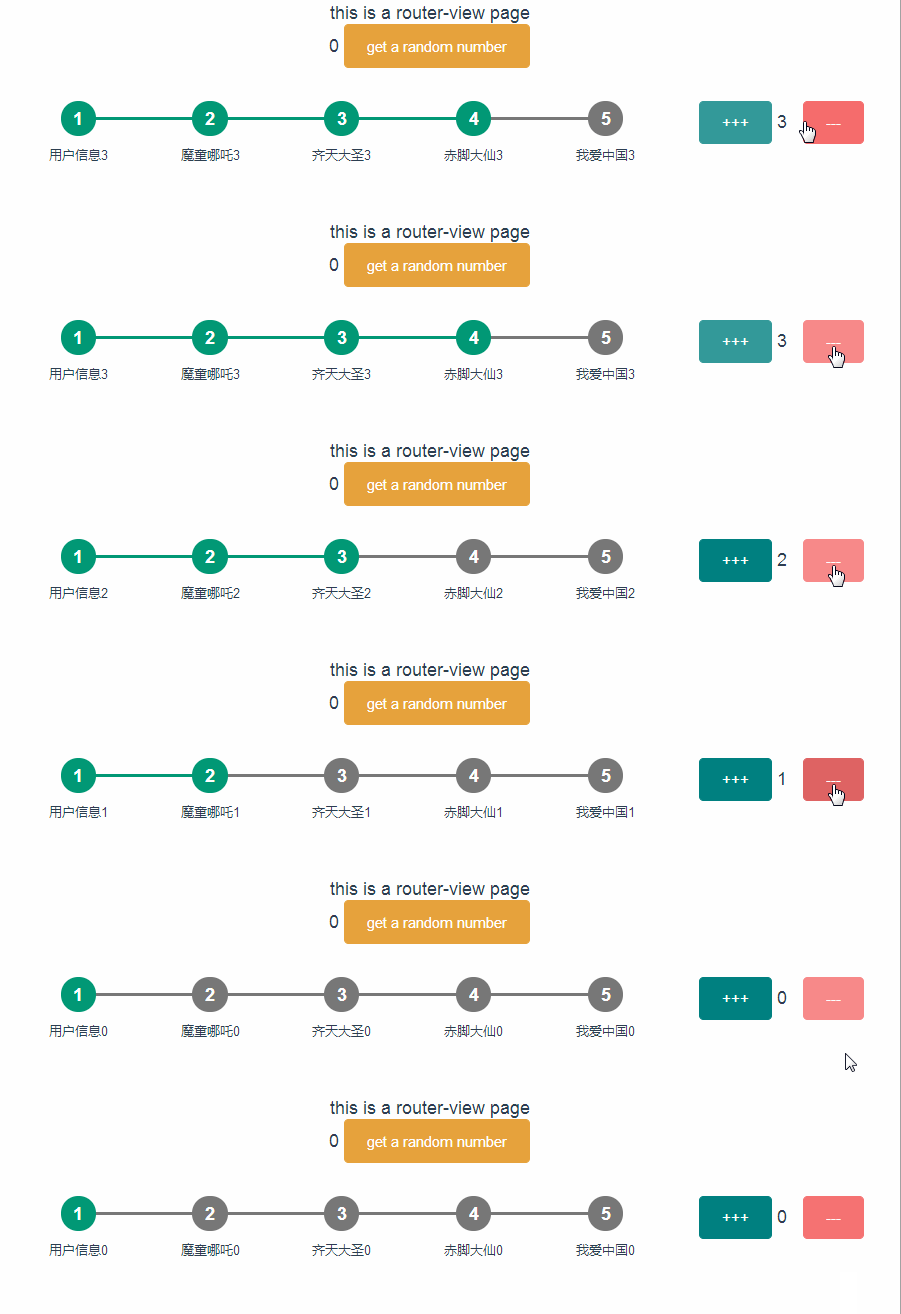
效果如下:
参考原文:https://blog.csdn.net/xqq580231/article/details/78086173