并发是指一次处理多件事,而并行是指一次做多件事。二者不同,但互相有联系。打个比方:像Python的多线程,就是并发,因为Python的解释器GIL是线程不安全的,一次只允许执行一个线程的Python字节码,我们在使用多线程时,看上去像很多个任务同时进行,但实际上但一个线程在执行的时候,其他线程是处于休眠状态的。而在多CPU的服务器上,Java或Go的多线程,则是并行,因为他们的多线程会利用到服务器上的每个CPU,如果一个服务器上只有一个CPU,那么Java或者Go的多线程依旧是并发,而不是并行。
在上个章节,我们讨论了Python的多线程,在这个章节,我们将通过asyncio包来实现并发,这个包使用事件循环驱动的协程来实现并发
下面,我们看一下asyncio包的简单使用
1import asyncio
2from time import strftime
3
4
5@asyncio.coroutine
6def hello():
7    print(strftime('[%H:%M:%S]'), "Hello world!")
8    r = yield from asyncio.sleep(1)
9    print(strftime('[%H:%M:%S]'), "Hello again!")
10
11
12loop = asyncio.get_event_loop()
13loop.run_until_complete(hello())
14loop.close()
运行结果:
1[17:01:59] Hello world!
2[17:02:00] Hello again!
@asyncio.coroutine把一个生成器标记为协程类型,然后,我们就把这个协程扔到EventLoop中执行
现在,我们封装两个协程扔进EventLoop中执行
1import threading
2import asyncio
3from time import strftime
4
5
6@asyncio.coroutine
7def hello(id):
8    print(strftime('[%H:%M:%S]'), 'coroutine_id:%s thread_id:%s' % (id, threading.currentThread()))
9    yield from asyncio.sleep(1)
10    print(strftime('[%H:%M:%S]'), 'coroutine_id:%s thread_id:%s' % (id, threading.currentThread()))
11
12
13loop = asyncio.get_event_loop()
14tasks = [hello(1), hello(2)]
15loop.run_until_complete(asyncio.wait(tasks))
16loop.close()
运行结果:
1[17:10:51] coroutine_id:1 thread_id:<_MainThread(MainThread, started 5100)>
2[17:10:51] coroutine_id:2 thread_id:<_MainThread(MainThread, started 5100)>
3[17:10:52] coroutine_id:1 thread_id:<_MainThread(MainThread, started 5100)>
4[17:10:52] coroutine_id:2 thread_id:<_MainThread(MainThread, started 5100)>
由打印的当前线程名称可以看出,两个协程是由同一个线程并发执行的。
如果把asyncio.sleep()换成真正的IO操作,则多个协程就可以由一个线程并发执行。
async/await
我们可以用asyncio提供的@asyncio.coroutine可以把一个生成器标记为协程类型,然后在协程内部用yield from调用另一个协程实现异步操作。为了简化并更好地标识异步IO,从Python3.5开始引入了新的语法async和await,可以让协程的代码更简洁易读。async和await是针对协程的新语法,要使用新的语法,只需要做两步简单的替换:
1import asyncio
2from time import strftime
3
4
5async def hello():
6    print(strftime('[%H:%M:%S]'), "Hello world!")
7    r = await asyncio.sleep(1)
8    print(strftime('[%H:%M:%S]'), "Hello again!")
9
10
11loop = asyncio.get_event_loop()
12loop.run_until_complete(hello())
13loop.close()
运行结果:
1[17:19:55] Hello world!
2[17:19:56] Hello again!
下面,让我们用协程并发下载多张图片,这里需要用到aiohttp包,asyncio包只支持TCP和UDP,如果想要使用HTTP协议,需要使用第三方的包,而aiohttp包,则是支持HTTP协议的
1import asyncio
2import time
3import aiohttp
4import sys
5import os
6from time import strftime, sleep
7
8POP20_CC = ["pms_1508850965.67096774", "pms_1509723338.05097112", "pms_1508125822.19716710",
9            "pms_1512614327.2483640", "pms_1525853341.8312102", "pms_1511228654.33099308"]
10
11BASE_URL = 'https://i1.mifile.cn/a1'
12
13DEST_DIR = 'downloads/'
14
15
16async def get_flag(cc):  # <1>
17    url = '{}/{cc}.jpg'.format(BASE_URL, cc=cc.lower())
18    async with aiohttp.ClientSession() as session:
19        async with session.get(url) as resp:
20            image = await resp.read()
21    return image
22
23
24def save_flag(img, filename):
25    path = os.path.join(DEST_DIR, filename)
26    with open(path, 'wb') as fp:
27        fp.write(img)
28
29
30async def download_one(cc):  # <2>
31    image = await get_flag(cc)
32    sys.stdout.flush()
33    save_flag(image, cc.lower() + '.jpg')
34    return cc
35
36
37def download_many(cc_list):  # <3>
38    loop = asyncio.get_event_loop()
39    to_do = [download_one(cc) for cc in sorted(cc_list)]
40    wait_coro = asyncio.wait(to_do)
41    res, _ = loop.run_until_complete(wait_coro)
42    loop.close()
43    return len(res)
44
45
46def main(download_many):
47    path = os.path.join(DEST_DIR)
48    if not os.path.exists(path):
49        os.mkdir(path)
50    t0 = time.time()
51    count = download_many(POP20_CC)
52    elapsed = time.time() - t0
53    msg = '\n{} flags downloaded in {:.2f}s'
54    print(msg.format(count, elapsed))
55
56
57if __name__ == '__main__':
58    main(download_many)
运行结果:
6 flags downloaded in 0.25s
<1>处,我们通过async/await将这个生成器声明为协程类型,我们用aiohttp获取远程的图片资源,当发生网络请求的时候,主线程会切换到其他的协程执行
<2>处,当<1>处的网络请求发回响应时,将返回的图片存入本地
<3>处,我们在这个方法里生成多个协程,并提交到EventLoop中运行
上面的程序,还有几处值的修改的地方:
第一处是IO问题,程序员往往忽略一个事实,就是访问本地文件系统会阻塞,想当然的认为这种操作不会受网络访问高延迟的影响,而在上述示例中,save_flag()函数会阻塞客户端代码和asyncio事件循环共用的唯一线程,因此保存图片时,整个应用程序都会被冻结,而一旦受到I/O阻塞,则会浪费掉几百万个CPU周期,所以,就算是本地文件系统的访问,我们也应该把他提到另一个线程去执行,避免造成CPU周期的浪费。
第二处是管理协程的并发数,假设我们这里抓取的不再是仅仅几张图片,而是成千上百,可能我们的链接会断掉,甚至对方的网络因为我们的频繁访问禁止了我们的IP。
所以,我们还要对我们的图片下载代码进行修改
1import asyncio
2import collections
3import contextlib
4import time
5import aiohttp
6from aiohttp import web
7import os
8from collections import namedtuple
9from enum import Enum
10
11POP20_CC = ["pms_1508850965.67096774", "pms_1509723338.05097112", "pms_1508125822.19716710",
12            "pms_1512614327.2483640", "pms_1525853341.8312102", "pms_1511228654.33099308", "error"]
13
14BASE_URL = 'https://i1.mifile.cn/a1'
15
16DEST_DIR = 'downloads/'
17
18DEFAULT_CONCUR_REQ = 3
19VERBOSE = True
20Result = namedtuple('Result', 'status data')
21HTTPStatus = Enum('Status', 'ok not_found error')
22
23
24class FetchError(Exception):
25    def __init__(self, country_code):
26        self.country_code = country_code
27
28
29def save_flag(img, filename):
30    path = os.path.join(DEST_DIR, filename)
31    with open(path, 'wb') as fp:
32        fp.write(img)
33
34
35async def get_flag(base_url, cc):
36    url = '{}/{cc}.jpg'.format(base_url, cc=cc.lower())
37    async with aiohttp.ClientSession() as session:
38        async with session.get(url) as resp:
39            with contextlib.closing(resp):  # <1>
40                if resp.status == 200:
41                    image = await resp.read()
42                    return image
43                elif resp.status == 404:
44                    raise web.HTTPNotFound()
45                else:
46                    raise aiohttp.HttpProcessingError(
47                        code=resp.status, message=resp.reason,
48                        headers=resp.headers)
49
50
51async def download_one(cc, base_url, semaphore, verbose):
52    try:
53        with (await semaphore):  # <2>
54            image = await get_flag(base_url, cc)
55    except web.HTTPNotFound:
56        status = HTTPStatus.not_found
57        msg = 'is not found'
58    except Exception as exc:
59        raise FetchError(cc) from exc
60    else:
61        loop = asyncio.get_event_loop()
62        loop.run_in_executor(None, save_flag, image, cc.lower() + '.jpg')  # <3>
63        status = HTTPStatus.ok
64        msg = 'is OK'
65
66    if verbose and msg:
67        print(cc, msg)
68
69    return Result(status, cc)
70
71
72async def downloader_coro(cc_list, base_url, verbose, concur_req):
73    counter = collections.Counter()
74    semaphore = asyncio.Semaphore(concur_req)
75    to_do = [download_one(cc, base_url, semaphore, verbose)
76             for cc in sorted(cc_list)]
77    to_do_iter = asyncio.as_completed(to_do)
78    for future in to_do_iter:
79        try:
80            res = await future
81        except FetchError as exc:
82            country_code = exc.country_code
83            try:
84                error_msg = exc.__cause__.args[0]
85            except IndexError:
86                error_msg = exc.__cause__.__class__.__name__
87            if verbose and error_msg:
88                msg = '*** Error for {}: {}'
89                print(msg.format(country_code, error_msg))
90            status = HTTPStatus.error
91        else:
92            status = res.status
93
94        counter[status] += 1
95
96    return counter
97
98
99def download_many(cc_list, base_url, verbose, concur_req):
100    loop = asyncio.get_event_loop()
101    coro = downloader_coro(cc_list, base_url, verbose, concur_req)
102    counts = loop.run_until_complete(coro)
103    return counts
104
105
106def main(download_many):
107    path = os.path.join(DEST_DIR)
108    if not os.path.exists(path):
109        os.mkdir(path)
110    t0 = time.time()
111    counter = download_many(POP20_CC, BASE_URL, VERBOSE, DEFAULT_CONCUR_REQ)
112    elapsed = time.time() - t0
113    msg = '\n{} flags downloaded in {:.2f}s'
114    print(msg.format(counter, elapsed))
115
116
117if __name__ == '__main__':
118    main(download_many)
运行结果:
1error is not found
2pms_1511228654.33099308 is OK
3pms_1512614327.2483640 is OK
4pms_1509723338.05097112 is OK
5pms_1525853341.8312102 is OK
6pms_1508125822.19716710 is OK
7pms_1508850965.67096774 is OK
8
9Counter({<Status.ok: 1>: 6, <Status.not_found: 2>: 1}) flags downloaded in 0.41s
<1>处,在网络请求完毕,我们要关闭网络,避免因为网络请求过多最后造成链接中断
<2>处,我们用asyncio.Semaphore(concur_req)设置协程最大并发数,这里我们设置是3,然后再用with (await semaphore)执行协程
<3>处,loop.run_in_executor()方法是用来传入需要执行的对象,以及执行参数,这个方法会维护一个ThreadPoolExecutor()线程池,如果我们第一个参数是None,run_in_executor()就会把我们的执行对象和参数提交给背后维护的ThreadPoolExecutor()执行,如果我们传入自己定义的一个线程池,则把执行对象和参数传给我们定义的线程池执行
使用aiohttp编写web服务器
asyncio可以实现单线程并发IO操作,但asyncio只实现了TCP、UDP、SSL等协议,而aiohttp则是基于asyncio上实现了HTTP协议,所以,我们可以基于这asyncio和aiohttp两个框架实现自己的一个web服务器,代码如下:
1import asyncio
2
3from aiohttp import web, web_runner
4
5CONTENT_TYPE = "text/html;"
6
7
8async def index(request):
9    await asyncio.sleep(0.5)
10    return web.Response(body=b"<h1>Index</h1>", content_type=CONTENT_TYPE)
11
12
13async def hello(request):
14    await asyncio.sleep(0.5)
15    text = "<h1>hello, %s!</h1>" % request.match_info["name"]
16    return web.Response(body=text, content_type=CONTENT_TYPE)
17
18
19async def init(loop):
20    app = web.Application(loop=loop)
21    app = web_runner.AppRunner(app=app).app()
22    app.router.add_route("GET", "/", index)
23    app.router.add_route("GET", "/hello/{name}", hello)
24    srv = await loop.create_server(app.make_handler(), "127.0.0.1", 8000)
25    print("Server started at http://127.0.0.1:8000...")
26    return srv
27
28
29loop = asyncio.get_event_loop()
30loop.run_until_complete(init(loop))
31loop.run_forever()
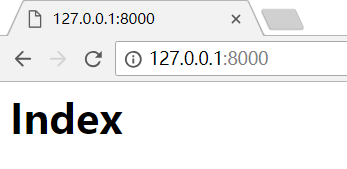
运行脚本后,在浏览器输入:
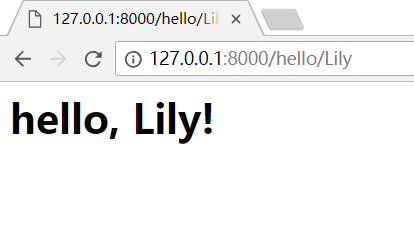
如果输入:http://127.0.0.1:8000/hello/Lily,就可以看见如下页面,/hello/后面的name可以替换