
1. 功能简介
栅格数据前置过滤是在渲染之前对内存中的数据根据特定的规则进行处理,然后再进行数据渲染。本示例以定标为例进行示例代码编写。
定标(校准)是将遥感器所得的测量值变换为绝对亮度或变换为与地表反射率、表面温度等物理量有关的相对值的处理过程。或者说,遥感器定标就是建立遥感器每个探测器输出值与该探测器对应的实际地物辐射亮度之间的定量关系。它是遥感定量化的前提。
栅格后置过滤是对渲染过程的控制。本示例以曲线调整为例进行示例代码编写
灰度拉伸又叫对比度拉伸,它是最基本的一种灰度变换,使用的是最简单的分段线性变换函数,它的主要思想是提高图像处理时灰度级的动态范围。
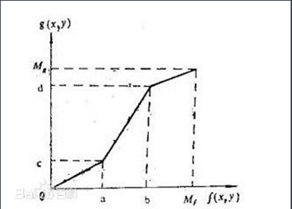
[灰度拉伸函数]
2. 功能实现说明
2.1 实现思路及原理说明
本示例代码以FY-4A数据的定标为例,已经运用静止卫星数据读取方法,读取NOMChannel13波段数据为tiff。
前置过滤(以定标为例)
第一步
初始化前置过滤回调函数。
第二步
实现定标算法。
第三步
实例化自定义前置过滤对象。
第四步
为前置过滤对象设置前置过滤算法
第五步
接口转换
第六步
添加前置过滤器
后置过滤(以曲线拉伸为例)
第一步
初始化拉伸结果表。
第二步
添加折点。
第三步
根据折点,计算结果拉伸表。
第四步
实例化后置过滤器
第五步
设置对照表
第六步
接口转换,添加后置过滤条件
2.2 核心接口与方法
接口/类
方法
说明
前置过滤
Carto.PreFilterFunCallback
Carto.ICustomerPreRasterFilter
SetPreFilterFun
设置前置过滤算法
Carto.IrasterFilterProps
AddPreRasterFilter
添加前置过滤
后置过滤
Carto. ILutAfterFilter
SetLut
为指定波段设置对照表
Carto. IRasterFilterProps
AddAfterRasterFilter
添加后置过滤器
2.3 示例代码
项目路径
百度云盘地址下/PIE示例程序/07图层渲染/12.栅格过滤制
数据路径
百度云盘地址下/PIE示例数据/栅格数据/ FY/FY4A/
视频路径
百度云盘地址下/PIE视频教程/07图层渲染/12.栅格过滤控制.avi
示例代码


1  1 方法(一)
2  2     //前置过滤本示例以定标为例
3  3     //风云4A数据为例
4  4     IRasterLayer rasterLayer = mapControlMain.ActiveView.CurrentLayer as IRasterLayer;
5  5     IRasterRender rasterRender = RenderFactory.ImportFromFile(@"C:\Users\zhangyiwei\Desktop\TestData\ICV-BD.xml");
6  6
7  7     //实例化定标函数
8  8     CaliCommon common = new CaliCommon();
9  9     string hdfpath = (rasterLayer as ILayer).DataSourcePath;
10 10     common.Initialize(hdfpath, "NOMChannel13");
11 11
12 12     //添加前置过滤
13 13     PIE.Carto.ICustomerPreRasterFilter preFilter = new PIE.Carto.CustomerPreRasterFilter();
14 14     preFilter.SetPreFilterFun(common.CaliFunCallBack);
15 15
16 16     IRasterClassifyColorRampRender classRender = rasterRender as IRasterClassifyColorRampRender;
17 17     (classRender as IRasterFilterProps).AddPreRasterFilter(preFilter as IPreRasterFilter);
18 18
19 19     //地图刷新
20 20     rasterLayer.Render = rasterRender;
21 21 mapControlMain.ActiveView.PartialRefresh(ViewDrawPhaseType.ViewAll);
22 22 方法(二)
23 23 /// <summary>
24 24 /// 定标方法接口
25 25 /// </summary>
26 26 public interface ICaliFunction
27 27 {
28 28 /// <summary>
29 29 /// 定标回调函数
30 30 /// </summary>
31 31 PreFilterFunCallback CaliFunCallBack
32 32 {
33 33     get;
34 34 }
35 35
36 36 /// <summary>
37 37 /// 数据定标
38 38 /// </summary>
39 39 /// <param name="dataNeedCali">原始数据</param>
40 40 /// <param name="width">宽度</param>
41 41 /// <param name="height">高度</param>
42 42 /// <param name="bandCount">波段</param>
43 43 /// <returns>定标后数据</returns>
44 44 float[] Cali<T>(T[] dataNeedCali, int width, int height, int bandCount);
45 45
46 46 /// <summary>
47 47 /// 定标算法函数
48 48 /// </summary>
49 49 unsafe bool CaliFilter(IntPtr valuesA, IntPtr valuesB);
50 50 }
51 51
52 52 /// <summary>
53 53 /// 风云4A数据的定标方法
54 54 /// </summary>
55 55 public class CaliCommon : ICaliFunction
56 56 {
57 57 /// <summary>
58 58 /// 定标数据
59 59 /// </summary>
60 60 private float[] m_DBDatas = null;
61 61
62 62 /// <summary>
63 63 /// 定标数据长度
64 64 /// </summary>
65 65 private int m_Count = 0;
66 66
67 67 /// <summary>
68 68 /// 定标回调函数
69 69 /// </summary>
70 70 private PreFilterFunCallback m_CaliFunCallBack = null;
71 71
72 72 /// <summary>
73 73 /// 构造函数
74 74 /// </summary>
75 75 public CaliCommon()
76 76 {
77 77 }
78 78
79 79 /// <summary>
80 80 /// 定标回调函数
81 81 /// </summary>
82 82 public PreFilterFunCallback CaliFunCallBack
83 83 {
84 84     get
85 85     {
86 86         return m_CaliFunCallBack;
87 87     }
88 88 }
89 89
90 90 /// <summary>
91 91 /// 初始化定标方法
92 92 /// </summary>
93 93 /// <param name="strFilePath_HDF">hdf文件路径</param>
94 94 /// <param name="chanelName">通道名称</param>
95 95 /// <returns></returns>
96 96 public bool Initialize(string strFilePath_HDF, string chanelName)
97 97 {
98 98     string calName = chanelName.Replace("NOM", "CAL");
99 99     string calFilePath = System.IO.Path.GetDirectoryName(strFilePath_HDF) + "\\" + calName+".tiff";
100100     IRasterDataset rasterDataset = PIE.DataSource.DatasetFactory.OpenRasterDataset(calFilePath, OpenMode.ReadOnly);
101101
102102     int height = rasterDataset.GetRasterYSize();
103103
104104     m_DBDatas = new float[height];
105105     int[] bandMap = { 1 };
106106     rasterDataset.Read(0, 0, 1, height, m_DBDatas, 1, height, PixelDataType.Float32, 1, bandMap);
107107
108108     (rasterDataset as IDisposable).Dispose();
109109
110110     m_Count = m_DBDatas.Length;
111111     m_CaliFunCallBack = new PreFilterFunCallback(CaliFilter);
112112     GC.KeepAlive(m_CaliFunCallBack);
113113     return true;
114114 }
115115
116116 /// <summary>
117117 /// 数据定标
118118 /// </summary>
119119 /// <param name="dataNeedCali">原始数据</param>
120120 /// <param name="width">宽度</param>
121121 /// <param name="height">高度</param>
122122 /// <param name="bandCount">波段</param>
123123 /// <returns>定标后数据</returns>
124124 public float[] Cali<T>(T[] dataNeedCali, int width, int height, int bandCount)
125125 {
126126     if (dataNeedCali == null || dataNeedCali.Length < 1)
127127     {
128128         return null;
129129     }
130130
131131     float[] dataCali = new float[width * height * bandCount];
132132     for (int j = 0; j < height; j++)
133133     {
134134         for (int i = 0; i < width; i++)
135135         {
136136             for (int m = 0; m < bandCount; m++)
137137             {
138138                 int nIndex = (j * width + i) * bandCount + m;
139139                 int value = Convert.ToInt32(dataNeedCali[nIndex]);
140140                 if (value < 0 || value >= m_Count)
141141                 {
142142                     dataCali[nIndex] = 0;
143143                 }
144144                 else
145145                 {
146146                     dataCali[nIndex] = m_DBDatas[value];
147147                 }
148148             }
149149         }
150150     }
151151     return dataCali;
152152 }
153153
154154 /// <summary>
155155 /// 定标算法
156156 /// </summary>
157157 /// <param name="valuesA">定标前</param>
158158 /// <param name="valuesB">定标后</param>
159159 /// <returns></returns>
160160 public unsafe bool CaliFilter(IntPtr valuesA, IntPtr valuesB)
161161 {
162162     if (m_DBDatas == null)
163163     {
164164         return false;
165165     }
166166     IPixelBuffer pixelBuffer = PIE.DataSource.DatasetFactory.ConstructCLRPixelBuffer(valuesA.ToPointer());
167167     int width = pixelBuffer.Width;
168168     int height = pixelBuffer.Height;
169169     int bandCount = pixelBuffer.BandMap.Length;
170170
171171     float[] valuesData = new float[width * height * bandCount];
172172
173173     short* byteValues = (short*)(pixelBuffer.GetData_Ref().ToPointer());
174174     for (int j = 0; j < height; j++)
175175     {
176176         for (int i = 0; i < width; i++)
177177         {
178178             for (int m = 0; m < bandCount; m++)
179179             {
180180                 int nIndex = (j * width + i) * bandCount + m;
181181                 int value = *(byteValues + nIndex);
182182                 if (value < 0 || value >= m_Count)
183183                 {
184184                     valuesData[nIndex] = 0;
185185                 }
186186                 else
187187                 {
188188                     valuesData[nIndex] = m_DBDatas[value];
189189                 }
190190             }
191191         }
192192     }
193193     pixelBuffer.SetData(PixelDataType.Float32, valuesData);
194194     return true;
195195 }
196196 }
View Code
2.4 示例截图
(一) 前置过滤
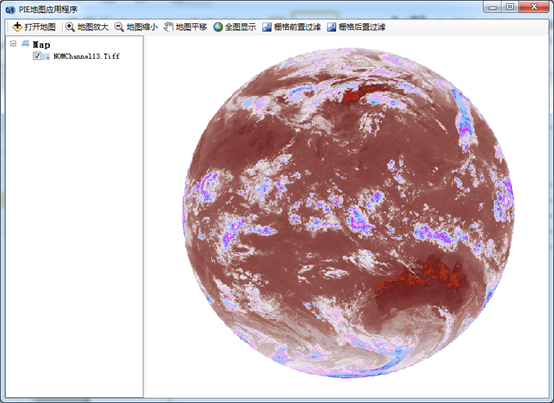
(二) 后置过滤