
@TOC

一、检查本地系统版本
检查本地环境的操作系统版本,本次实践为centos7.6版本。
1[root@docker ~]# cat /etc/os-release
2NAME="CentOS Linux"
3VERSION="7 (Core)"
4ID="centos"
5ID_LIKE="rhel fedora"
6VERSION_ID="7"
7PRETTY_NAME="CentOS Linux 7 (Core)"
8ANSI_COLOR="0;31"
9CPE_NAME="cpe:/o:centos:centos:7"
10HOME_URL="https://www.centos.org/"
11BUG_REPORT_URL="https://bugs.centos.org/"
12
13CENTOS_MANTISBT_PROJECT="CentOS-7"
14CENTOS_MANTISBT_PROJECT_VERSION="7"
15REDHAT_SUPPORT_PRODUCT="centos"
16REDHAT_SUPPORT_PRODUCT_VERSION="7"
二、创建redhat普通用户
1.创建redhat用户
1[root@docker ~]# useradd redhat
2.为redhat用户设置密码
1[root@docker ~]# passwd redhat
2Changing password for user redhat.
3New password:
4BAD PASSWORD: The password is shorter than 8 characters
5Retype new password:
6passwd: all authentication tokens updated successfully.
3.查询创建用户相关命令的绝对路径
1[root@docker ~]# which useradd
2/usr/sbin/useradd
3[root@docker ~]# which passwd
4/usr/bin/passwd
5[root@docker ~]# which userdel
6/usr/sbin/userdel
三、编辑/etc/sudoers文件
1[root@docker ~]# vim /etc/sudoers
2[root@docker ~]# grep redhat /etc/sudoers
3redhat  ALL=(ALL)      /usr/sbin/useradd,/usr/bin/passwd,/usr/sbin/userdel
4
四、检查redhat用户权限
1.切换到redhat用户
1[root@docker ~]# su -  redhat
2[redhat@docker ~]$
2.新建huawei账号
1[redhat@docker ~]$ sudo useradd huawei
2
3We trust you have received the usual lecture from the local System
4Administrator. It usually boils down to these three things:
5
6    #1) Respect the privacy of others.
7    #2) Think before you type.
8    #3) With great power comes great responsibility.
9
10[sudo] password for redhat:
11
12
3.查看新创建用户
1[redhat@docker ~]$ id huawei
2uid=1002(huawei) gid=1002(huawei) groups=1002(huawei)
4.为huawei账号设置密码
1[redhat@docker ~]$ sudo passwd huawei
2Changing password for user huawei.
3New password:
4BAD PASSWORD: The password is shorter than 8 characters
5Retype new password:
6passwd: all authentication tokens updated successfully.
5.删除huawei账号
1[redhat@docker ~]$ sudo userdel huawei
2[redhat@docker ~]$ id huawei
3id: huawei: no such user
五、批量用户授权
1.设置别名
1[root@docker ~]# grep -Evn '^#|^$|^##'  /etc/sudoers
222:User_Alias ADMINS = zhangsan, lisi
330:Cmnd_Alias USERTEST =  /usr/sbin/useradd, /usr/bin/passwd, /usr/sbin/userdel
459:Defaults   !visiblepw
568:Defaults    always_set_home
669:Defaults    match_group_by_gid
777:Defaults    always_query_group_plugin
879:Defaults    env_reset
980:Defaults    env_keep =  "COLORS DISPLAY HOSTNAME HISTSIZE KDEDIR LS_COLORS"
1081:Defaults    env_keep += "MAIL PS1 PS2 QTDIR USERNAME LANG LC_ADDRESS LC_CTYPE"
1182:Defaults    env_keep += "LC_COLLATE LC_IDENTIFICATION LC_MEASUREMENT LC_MESSAGES"
1283:Defaults    env_keep += "LC_MONETARY LC_NAME LC_NUMERIC LC_PAPER LC_TELEPHONE"
1384:Defaults    env_keep += "LC_TIME LC_ALL LANGUAGE LINGUAS _XKB_CHARSET XAUTHORITY"
1492:Defaults    secure_path = /sbin:/bin:/usr/sbin:/usr/bin
15104:root	ALL=(ALL) 	ALL
16105:redhat  ALL=(ALL)      /usr/sbin/useradd,/usr/bin/passwd,/usr/sbin/userdel
17112:%wheel	ALL=(ALL)	ALL
18
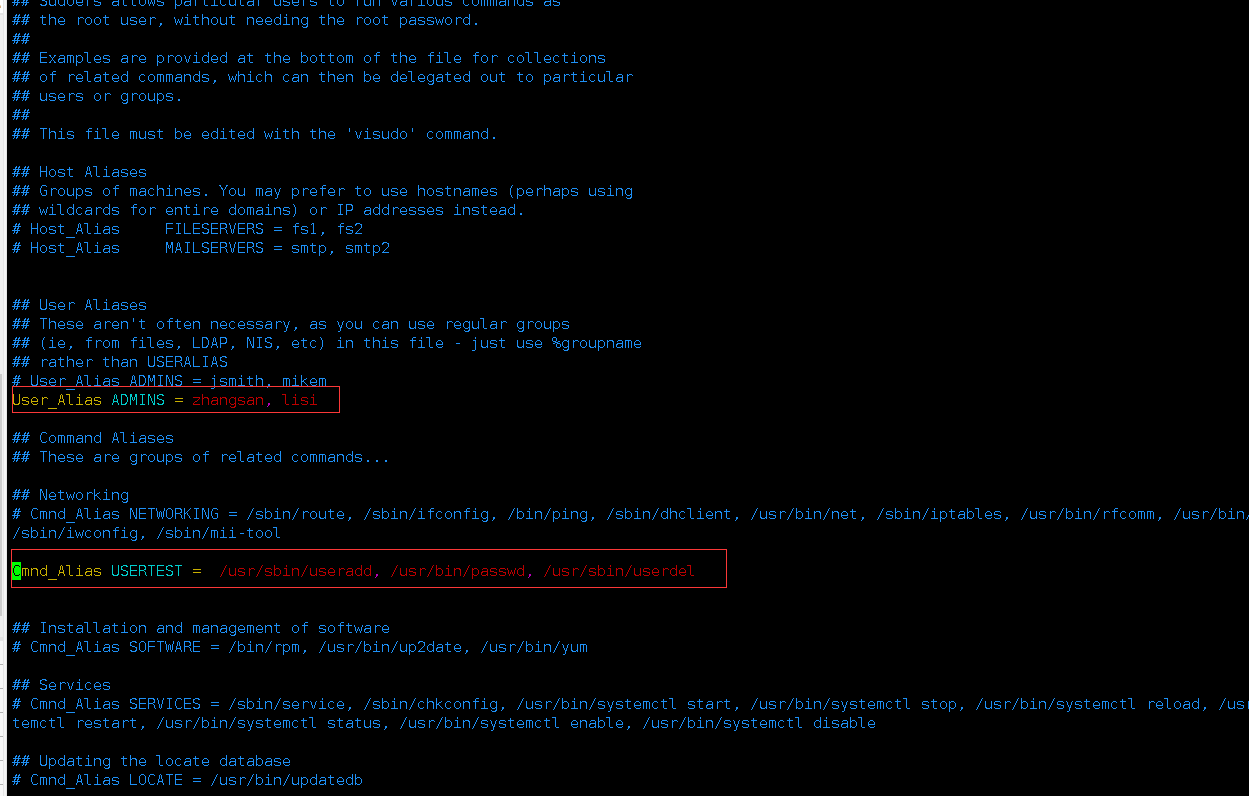
2.配置sudo授权
1[root@docker ~]# grep ADMINS /etc/sudoers
2# User_Alias ADMINS = jsmith, mikem
3User_Alias ADMINS = zhangsan, lisi
4ADMINS  ALL=(ALL)    USERTEST
六、测试批量授权效果
1.新建用户zhangsan
1[root@docker ~]# useradd zhangsan
2[root@docker ~]# passwd zhangsan
3Changing password for user zhangsan.
4New password:
5BAD PASSWORD: The password contains the user name in some form
6Retype new password:
7passwd: all authentication tokens updated successfully.
8
2.切换zhangsan用户
1[root@docker ~]# su - zhangsan
3.新建lisi用户并设置密码
1[zhangsan@docker ~]$ sudo useradd lisi
2
3We trust you have received the usual lecture from the local System
4Administrator. It usually boils down to these three things:
5
6    #1) Respect the privacy of others.
7    #2) Think before you type.
8    #3) With great power comes great responsibility.
9
10[sudo] password for zhangsan:
11[zhangsan@docker ~]$ sudo passwd lisi
12Changing password for user lisi.
13New password:
14BAD PASSWORD: The password is shorter than 8 characters
15Retype new password:
16passwd: all authentication tokens updated successfully.
17
4.切换lisi用户
1[zhangsan@docker ~]$ su - lisi
2Password:
3[lisi@docker ~]$ id lisi
4uid=1003(lisi) gid=1003(lisi) groups=1003(lisi)
5.切换lisi用户
1[zhangsan@docker ~]$ su - lisi
2Password:
3[lisi@docker ~]$ id lisi
4uid=1003(lisi) gid=1003(lisi) groups=1003(lisi)
6.测试lisi用户权限
1[lisi@docker ~]$ sudo useradd user
2
3We trust you have received the usual lecture from the local System
4Administrator. It usually boils down to these three things:
5
6    #1) Respect the privacy of others.
7    #2) Think before you type.
8    #3) With great power comes great responsibility.
9
10[sudo] password for lisi:
11[lisi@docker ~]$ sudo passwd user
12Changing password for user user.
13New password:
14BAD PASSWORD: The password is shorter than 8 characters
15Retype new password:
16passwd: all authentication tokens updated successfully.
17[lisi@docker ~]$ id user
18uid=1004(user) gid=1004(user) groups=1004(user)
19[lisi@docker ~]$ sudo userdel user
20[lisi@docker ~]$ id user
21id: user: no such user
22